8 Sources
[1]
Claude Code installed my IDE, and now I can't go back to manual setup
Maker, meme-r, and unabashed geek, Joe has been writing about technology since starting his career in 2018 at KnowTechie. He's covered everything from Apple to apps and crowdfunding and loves getting to the bottom of complicated topics. In that time, he's also written for SlashGear and numerous corporate clients before finding his home at XDA in the spring of 2023. He was the kid who took apart every toy to see how it worked, even if it didn't exactly go back together afterward. That's given him a solid background for explaining how complex systems work together, and he promises he's gotten better at the putting things back together stage since then. Lately, I've been testing out various AI coding apps, because whatever my feelings about AI are, they're not going away any time soon. But most of them are a confusing mess of package managers, whether that's things from npm, or bun, or brew, or wherever else that isn't a Windows-packaged program. I know I should go use Linux or macOS because it's slightly easier there, and I sometimes do, but I do most of my work on Windows. And that's before connecting to local LLMs, or adding additional skills, or MCP servers. It's honestly a lot for someone who's not a developer, and that got me looking for a better way. And I found one that can be installed by Claude Code (or your favorite LLM interface), as long as it has the ability to interact with your computer and to download from GitHub. It took minutes to set up a coding stack that would have taken hours previously, and the longest part was finding my API keys in various accounts. Claude Code's creator keeps sharing tips, and they all made my experience better Who better to learn from than the person who built it? Posts By Mahnoor Faisal What is Oh My OpenCode, and why would you use it? Your LLM is only as good as the harness around it OpenCode is already one of the best tools for vibe-coding, but it's deliberately sparse to let you create the agentic IDE that fits your needs. Oh My OpenCode supercharges this, with 11 specialized AI agents with optimized models, tool permissions, and expertise for their roles. The default is Sisyphus, the main orchestrator powered by Claude Opus 4.6. It can plan, delegate, and execute tasks with a 32K budget for thinking, but it's there to keep the other 10 agents in line. Those include Hephaestus, the craftsman; Oracle, which makes architectural decisions; and the librarian, who does multi-repo analysis, looks up documentation, and so on. It's like installing VS Code, but suddenly having a full department under your supervision, and it's pretty amazing to watch in action. Oh My OpenCode See at Github Expand Collapse The twist is that it was designed for LLMs throughout I made Claude do all the heavy lifting, and it was magical OpenCode is a great alternative to other agentic harnesses, sitting in your terminal interface and interfacing with over 75 different AI providers, including Claude, GPT, Gemini, OpenRouter, and Vercel AI Gateway, among others. While it's good on its own, it's also infinitely extensible, and Oh My OpenCode supercharges it. Install and configure oh-my-openagent by following the instructions here: https://raw.githubusercontent.com/code-yeongyu/oh-my-openagent/refs/heads/dev/docs/guide/installation.md The best part? You can get another LLM harness to install it for you, by telling it to in chat. I used Claude Code because that's what I had open at the time, but I could have used any of the other agentic tools with desktop access. Claude read the instructions in the markdown file on that GitHub link, and followed it to the letter. That included spawning a subagent to install OpenCode. A few things needed my attention along the way, like asking for permission to download, and to work in the directory I specified, but a few minutes later, I was being asked to enter my LLM API keys so that Oh My OpenCode could get on with doing things. The installation even handles all the minor details of setting up LLM plugins in OpenCode, leaving me only with the task of logging in to each provider and creating a new API key for Oh My OpenCode to use. It handles everything from fallback model options, to Human Intent β Agent Execution β Verified Result β β β---------------- Minimum --------------------------β (intervention only on true failure) The Oh My OpenCode system is set up to make things predictable and reliable. We all know the same prompt can yield different answers, but the system here aims to push LLMs through predictable loops with visibility and testing, so the end result is user-readable code ready for use. But it gets better with Ultrawork mode While the default interview style mode is handy for keeping an eye on things and making decisions, Ultrawork mode turns that up to 11 and takes the human element out of the equation. Say you want to add OAuth to the app you're working on. You can say ulw add OAuth, and the agent will plan the approach and best practices, implement what it finds, then test until it works. It's pure vibe-coding, where you supply the intent and the goal, and the agent figures out the rest. LLMs have gotten to the stage where that's perfectly workable, as long as they have the right framework of predictable harness around them, and that's what Oh My OpenCode aims to provide. Claude Code, Codex, and Pi can create their own AI agents now, and that changes everything Your LLM agents are smarter than you think Posts By Joe Rice-Jones Now that AI agents can do things on your computer, the sky is the limit I've spent enough time setting up AI tools to know that a single fat-fingered command can make the whole process fail, only to have to start again from the beginning. Even worse, you often have to remove things first, adding to the pain. Letting AI agents control the process instead is one of the tasks they're suited for, and this was the easiest coding environment I've ever had to install. The only annoying part (as with any AI tool) is finding the API keys for my various LLMs, but that's a given at this stage. I used my local LLM to sort hundreds of gaming clips, and it was the laziest solution that worked I tried training a classifier, then found a better solution. Posts By Adam Conway
[2]
I paired NotebookLM with Claude's browser extension, and it changed how I use both tools
Anthropic's Claude seems to be the first product that's truly convincing people that AI actually has a meaningful place in how you work, rather than just being a gimmick (which it truthfully has been for most people up until now). However, Claude wasn't the first tool that earned that kind of trust for me. Instead, it was Google's research tool, NotebookLM. It was the first tool that convinced me that AI can be a game-changer for your productivity, and I've been a power user of the tool since it was just an experiment in Google Labs. That said, Claude has since closed the gap in ways I didn't expect. I've been using Claude and Claude Code alongside NotebookLM for a while now. However, something that never quite fit was the handoff between them. The NotebookLM MCP server worked well enough, but there was always something missing. The Claude in Chrome extension is what finally made my NotebookLM + Claude workflow click, and my only regret is not putting this together weeks ago. Claude in Chrome lets Claude see what you see Ctrl+eyes, Ctrl+hands Anthropic announced the Claude in Chrome extension in December 2025, and it essentially lets you connect Claude to your actual browser. In the middle of 2025, the AI product that was generating the most buzz was agentic browsers. Perplexity had launched Comet, Opera had Neon, OpenAI released Atlas -- every major tech company (even Norton, yes the antivirus company) was betting that AI needed its own browser. Anthropic went the other way and decided to meet people where they already are by launching an extension that brings Claude into your existing browser instead of convincing you to download yet another one. Interestingly, this extension can do everything those agentic browsers can -- navigating pages, clicking buttons, filling forms, extracting data, managing tabs, and more. The entire premise of agentic browsers is that they're designed to do tasks for you, rather than telling you how to do them. Claude in Chrome does all of this by living in a side panel in the browser you already use. While the extension has been around for a few months now, it's currently available only in beta for all paid Claude plans. It works directly with Claude Code, Cowork, and Claude Desktop (which means by extension, the Dispatch feature as well). After trying the extension out and using it for a couple of weeks (and having tested every agentic browser), it might just be the best agentic browsing experience out there without even being a browser. Claude in Chrome made my NotebookLM workflow click The missing piece in my NotebookLM workflow Given that I spent the last few months testing out agentic browsers, I switched to using them exclusively, primarily Perplexity Comet and Opera Neon. Since I use NotebookLM heavily, I was already doing a lot of my research inside these browsers. Here's the thing though: I'm not a fan of Perplexity's AI, and Opera's Aria model doesn't do it for me either. Neither can match Claude for the kind of deep research and ideation I rely on. This meant my workflow was largely three tools deep: NotebookLM for synthesis, Claude for thinking through sources and finding new ones, and an agentic browser just for the automation. I was stuck in this awkward setup where I'd use an agentic browser to navigate the web, switch to Claude in a separate tab to actually think through what I found, then use the browser's agentic capabilities to feed everything into NotebookLM. The Claude in Chrome extension made that redundant. Now, the AI doing the browsing is the same one I actually want to research with. With this extension, I can pull up Claude in a side panel and ask it anything I would ask it in a separate Claude window. For instance, say I'm using NotebookLM to prepare for an exam. Given NotebookLM works exclusively with your sources, there are times when I might need external sources, which is when I would have to open a new tab and ask Claude to find relevant papers or explanations. Once I've vetted the sources, I'd then use the agentic browser's AI, copy and paste the sources Claude gave me into my NotebookLM notebook, and it'd go ahead and add them for me. It worked, but it was tedious. That's three tools, multiple tabs, and a lot of copy-pasting for something that should be simple. With Claude in Chrome, I just ask Claude to find what I need and add it to my notebook all without leaving NotebookLM once. The extension creates a tab group for whatever task it's performing and handles everything across multiple tabs simultaneously. The extension does more than just fetch sources It puts you in the passenger seat (in a good way) Beyond just finding sources and adding them to my NotebookLM notebooks, I've also been using it to do things I never bothered doing when it required tab-hopping. Things like asking Claude to read a page I'm on and tell me if it's worth adding to my notebook before I commit, or having it compare what my NotebookLM sources say against what's currently out there on the web. I've also been using it to hand off tasks to Cowork and the desktop app. Subscribe for deep newsletter coverage of Claude + NotebookLM Get deeper analysis of Claude in Chrome, NotebookLM, agentic browsers, and how they connect to real workflows. Subscribe to the newsletter for detailed breakdowns, side-by-side comparisons, and practical walkthroughs - plus broader AI tools coverage. Get Updates By subscribing, you agree to receive newsletter and marketing emails, and accept our Terms of Use and Privacy Policy. You can unsubscribe anytime. For instance, I pair NotebookLM with Claude Code to understand my codebase and build grounded workspaces for technical documentation to understand it more deeply in context rather than in isolation. Instead of asking Claude Code to read through an entire codebase cold, I use NotebookLM to build a structured understanding first, then pass that context along. However, the Chrome extension is what keeps me from being the middleman between all of these tools. Anything I'd normally have to do manually in the browser, I just tell Claude to handle. Instead of copying links, switching tabs, and manually connecting the dots, I just tell Claude what to do next and it goes and does it right there in the browser. It all comes down to your workflow The way you plug the Claude in Chrome extension into your NotebookLM workflow all comes down to how you really use both tools. In my case, NotebookLM is where I think, and Claude is how I act on that thinking. The Chrome extension just removed the wall between the two, and I don't think I can go back to using them separately. If you haven't used the Claude in Chrome extension (or have and haven't paired it with NotebookLM), I'd seriously recommend giving it a try. It might just change how you use both tools.
[3]
Claude Cowork is now available for enterprise use, adds analytics, access controls and more
Anthropic makes Claude Cowork available for all paying customers * Claude Cowork is now generally available for all paying customers * Enterprise plans get new access controls, governance and more * Zoom has also released an MCP connector to integrate its AI Companion Anthropic has announced its Claude Cowork platform is now generally available after recently being made available in research preview, with paid Pro, Team and Enterprise plans all getting access to the agentic assistant. A stark advancement over previous AI tools, Cowork can not only execute tasks but it can also control a user's entire computer, opening apps, editing files and more, all via the standard desktop app. And yet despite its advanced capabilities, it's being positioned as a tool for all, not just a niche developer tool. Claude Cowork is generally available for paying customers "Claude Code helped developers transition from handing Claude questions to whole tasks, and we're seeing the same pattern across the entire organization with Claude Cowork," Anthropic wrote. Some of the new features being introduced specifically for Anthropic's enterprise customers include role-based access controls for teams, spend limits and use controls for governance, analytics and visibility, and integrations and plugins. The news coincides with the launch of Zoom's MCP connector, which makes AI Companion meeting summaries, action items, transcripts and smart recordings available to Cowork. Claude Cowork and Claude Code on Desktop are generally available for all paying customers across Mac and Windows, and the company has committed to an upcoming April 16 webinar to help customers deploy the latest agentic tools with confidence. New of general availability comes just weeks after the company added two new features to Claude Cowork and Claude Code - direct computer use and remote task assignation from phones via Dispatch. In late March, these were research previews only, and for Pro and Max customers. Already, we're talking about general availability and future plans. As for what's next, we can only wait for Anthropic's next blog post, but this agentic era is clearly about removing the friction and allowing AI to act persistently with less and less human interaction. And we're already en route there, with Claude Code's auto mode set to trouble users less by determining when it does or doesn't need to ask for user permission. Follow TechRadar on Google News and add us as a preferred source to get our expert news, reviews, and opinion in your feeds. Make sure to click the Follow button! And of course you can also follow TechRadar on TikTok for news, reviews, unboxings in video form, and get regular updates from us on WhatsApp too.
[4]
Claude does more for my workflow than all other AI tools combined -- these 3 features are why
Using a lot of AI tools comes with the territory when you write about them constantly. This also means assuming I already know what they do, which is not always a fair assumption going in, but it's also not too far off; most of them do roughly the same thing in slightly different ways. When I first tested Claude, I approached it with the same mindset - that I give it a query and get an output, and call it a day. But I was barely scratching the surface of what it actually does, and only started noticing because I kept bumping into features that had no equivalent anywhere else. So this is not necessarily about how Claude is better than ChatGPT, Gemini, or the others, because it depends entirely on what you're using them for. It's more that Claude has a handful of things baked in that many are overlooking, or that competitors' AI tools don't really have anything to match. Keep in mind, I'm talking about the core chatbot interface for desktop and web (simply called Claude and Claude.ai, respectively) not Claude Code. I set up Claude Code the way its creator does, and the difference is night and day Who better to learn from than the person who made it? Posts 18 By Mahnoor Faisal Claude can show you, not just tell you Build anything right in the conversation Claude already had Artifacts - the side panel where it builds and renders things like apps, screens, and small tools. It's been around for a few years and is genuinely useful, but in March 2026, Anthropic rolled out something a bit different - interactive visuals that render inline, right between paragraphs of a response, instead of opening in a separate panel. Though you can request it, Claude can also decide when a visual would explain something better than text, build it on the spot, and it appears right in the chat. It's built with HTML, CSS, JavaScript, and leverages SVG for vector graphics - the same way websites are built, which is why you can interact with these visuals. The distinction from Artifacts is worth understanding. Artifacts are persistent and shareable from the start - they're the finished output. Inline visuals are more like a whiteboard sketch. They live in the moment, change as the conversation evolves, and disappear when you move on. You can still save them as an SVG or HTML file, or convert them to Artifacts if you want to keep them. But the point is that you don't have to think about any of that upfront. And you can literally get anything from charts and dashboards to fully interactive tools. I even got it to create a basic but functioning calculator in one of my chats because I needed to run the same cost comparison with different numbers without breaking focus. You get the visual when it's useful, and that's the productivity angle that's easy to miss. Every time you'd normally open a separate tool, fire up a spreadsheet, or sketch something by hand, Claude can handle all of it in one place. So it's not just about getting nice sketches and diagrams to accompany the responses to your queries; they're part of the responses and can replace the need to break your flow or hop over to other tools. I used Claude's interactive visuals for studying, now I can't go back to my static notebooks Who needs diagrams when my visuals can come alive? Posts 3 By Abhinav Raj Projects lets Claude remember everything, so you don't have to Upload your context once, and every conversation knows it A lot of people (myself included at first) use Claude the same way they would a search engine - open a chat, explain the situation, get the output, and close the chat. Which works fine, until you're doing the same type of work repeatedly and spending the first few minutes of every session re-explaining the vision or what you're working on. Projects fixes that. You create a project, drop in whatever context is relevant - a style guide, a brief, reference docs, notes, whatever - and every conversation you start inside that project already has all of it loaded in. You completely skip the background preamble and just start. Every chat you create within that project will have all the relevant context you added. For anyone doing repetitive knowledge work, it can compound fast, but Projects makes it much easier to navigate. If you're a developer, you load in your codebase documentation and technical specs once. If you're a researcher, your sources and notes are always in context. If you're running a business, your brand guidelines and product details are just there. The work starts immediately instead of a setup ritual that adds up more than you think - just five minutes a day doing this prep manually is several hours a month. Paid users get unlimited Projects, and free users can create up to five, which is still a great value. You can throw entire documents at it, and it won't lose the thread 200k tokens as the baseline. Up to 1 million if you need it. When it comes to LLMs, the context window is everything. It's essentially how much it can hold in its working memory at once. Both free and paid Claude users get a 200k token baseline, which is roughly 500 pages of text in a session, which is already a lot (free users do get more rate limits with the 5-hour rolling window system). Paid plans running Opus 4.6 or Sonnet 4.6 push that up to 1 million tokens, which went live in March 2026 with no extra charge on top of your plan. The catch is that longer sessions actually burn through your usage quota faster - the more context Claude is holding, the heavier each message weighs against your limits, which is why I tend to keep the extended token usage disabled. The productivity angle here is pretty straightforward. Most AI tools start losing the thread as a conversation gets longer, or force you to summarize and re-paste context manually. With 200K as your floor, you can drop in a full research PDF, a long draft, a transcript, a whole brief - and just work with it directly without babysitting what the model does and doesn't remember. You're not managing context nearly as much with Claude as with other bots, which lets you focus on the work for longer and uninterrupted. To demonstrate, I uploaded my 160-page 17MB driving license test documentation, and it easily pulled accurate content from the start, middle, and end of the document within seconds. Claude goes deeper than prompt and output None of this is about Claude being the only AI worth using - it isn't, and which tool wins depends entirely on the task. But these are the things I kept running into that nothing else in my stack was doing quite the same way. Interactive visuals that live in the conversation, context that carries across sessions, and a window big enough to just throw the whole document at. Used right, it removes a lot of the friction that makes AI-assisted work feel like more work. Claude OS Windows, macOS Individual pricing Free plan available; $17/month Pro plan Group pricing $100/month per person for the Max plan See at Claude Expand Collapse
[5]
I automated my entire workflow with Claude and cut my work hours in half
Parth, a seasoned tech writer, wields the keyboard (or pen) with finesse to unravel the intricacies of both Windows and Mac operating systems. He has covered evergreen content on mobile devices and computers for multiple publications over the last six years. You can find his work on AndroidPolice, GuidingTech and TechWiser. Whether it's demystifying system updates, deciphering error codes, or exploring hidden features, Parth's prose guides readers through the binary maze. When not immersed in tech jargon, you'll find him sipping chai, pondering the next software review, and occasionally indulging in a friendly debate about mechanical keyboards. My workflow has been a mess between browser tabs: I would draft an outline in one window, look for a specific PDF in Google Drive in another, keep Gmail pinned just to track client feedback, and have Canva open for brand assets. But it all changed when I stopped treating my AI as a chatbot and started using it as an operating system. By leveraging Claude's new connectors, I have successfully closed the gap between my files and focus. Now, I can pull brand assets from Canva, summarize deep-threaded emails, and move files across Google Drive without ever leaving the Claude interface. Claude doesn't replace my PM tools but it fills the gaps between them Instead of swapping out my PM tools, Claude fills the messy gaps where context and follow-through usually break down. Posts 1 By Beatrice Manuel Exploring Claude Connectors There is a long list Claude Connectors close the gap between your AI and your favorite work tools. Instead of manually copying and pasting text and files, these integrations allow Claude to securely 'reach out' to your other apps to read files, search databases, and even take actions like drafting emails. Claude establishes connections using MCP (Model Context Protocol), which is an open standard that understands the structure of data immediately (once you plug an app into Claude). They allow Claude to pull only the specific data needed for your prompt, rather than having to upload massive files every time. Claude's Connector list includes all the major tools like Microsoft 365 (requires a work or school account), Google Drive, Notion, Canva, Asana, Airtable, Slack, GitHub, and more. Of course, you don't need to connect every app with Claude. After all, you won't want to complicate your Claude experience with too many tools connected in the background. My go-to Claude Connectors Google Drive and Canva top the list Connecting these apps wasn't just about giving Claude permission to look at my data -- it was about transforming a chatbot into a project manager. Because I'm often jumping between my MacBook Pro and HP Specter, having this command center live in the cloud means my entire workflow stays synced across all my devices. I didn't need to write a single line of code. I simply headed into Claude Settings and connected my preferred tools like Drive, Asana, Canva, Gmail, and more. While you are at it, make sure to enable relevant permissions so that Claude can read content from your accounts. I am now able to execute prompts such as 'Audit my calendar for next week and draft a Gmail update to my clients regarding my availability,' and have an email prepared for sending through my Gmail account. Claude looks for my upcoming events in Google Calendar and drafts an email accordingly in Gmail. I just need to change the client's name (and tone if necessary) and send it with a single click. The secret isn't that Claude thinks faster -- it's that it removes the hassle of switching between tabs. I don't need to open Google Calendar, check my availability, and move to Gmail to draft an email. I tested Claude Code against 3 open-source alternatives, and one came surprisingly close Claude might not be the only coding agent worth using. Posts 8 By Anurag Singh Automating my workflow with Claude A major productivity booster Integrating these apps into Claude has shifted how I spend my day. As a freelance tech writer, my work involves endless coordination between my research in Drive, my schedule in Calendar, and creative assets in Canva. When I was coordinating my recent trip, I didn't want to dig through my messy 'Travel' folder to update my friends. I just ran the prompt below. Get me the meal details from the 'Europe trip' doc in Google Drive and draft an email for the group thread in Gmail. Claude scanned the specific document, pulled out our dinner reservations and dietary notes, and drafted a clear, friendly email to the group. I just hit Send, and it turned a 15-minute logistical headache into a 30-second task. In another example, instead of guessing which hashtags or captions will work for my latest design, I let Claude look at the work. Review my 'Bana Hills adventure' design in Canva and suggest improvements to the copy and layout to get more traction on Instagram. Because Claude can now see the visual elements of my Canva files, it suggested a punchier headline that fit the specific text box I had already placed and even recommended a more vibrant color from my brand kit. I can even ask Claude to apply those changes. I can also ask Claude to 'Search my Google Calendar for my 2 PM with the Asha Jewels team, find the last meeting notes in Drive, and summarize the action items so I'm ready.' I can even ask Claude to get my upcoming weeks from Asana. It's just one of the examples of using Claude connectors. The possibilities are endless here. Beyond chatting From now on, I no longer waste 20 minutes of momentum every time I need to find a file or check a design spec; the information already exists whenever I'm already working with Claude projects and artifacts. I simply ask, and Claude executes. Of course, these are just some of my favorite apps and services I use with Claude. The company offers a long list of tools to connect with. I highly recommend exploring the Connectors menu to find your preferred apps. Claude OS Windows, macOS Individual pricing Free plan available; $17/month Pro plan Claude is an AI assistant that rivals ChatGPT and Gemini. Group pricing $100/month per person for the Max plan See at Claude Expand Collapse
[6]
I was scared of the terminal until I tried Claude Code
Bryan Wolfe has spent 15+ years writing about the tech people actually use -- and occasionally the tech they probably shouldn't. With bylines at Yahoo, MakeUseOf, TechRadar, and Digital Trends, he brings an MBA-sharpened perspective to consumer tech, AI tools, and digital productivity. He's based in State College, PA, where he also runs GoingSolo.Life, a solo travel brand for the independently minded. It's 2019, and I'm a tech writer with over a decade of experience. I can break down machine learning, SSD controllers, and RAM speed in plain English. Unfortunately, when someone mentions "the terminal," I pretend to understand and then quietly panic. The terminal, that stark black window with the flashing cursor, always seemed meant for a different species of person: developers, engineers, people proud to wear Linux on their laptops. Not me, a lonely tech journalist who liked to cover iPhones and other consumer electronics. Back then, I had a real fear of it. One wrong command, I thought, and I might nuke my system. No undo button, no safety net. An unforgiving space, or so it seemed. Flash forward to 2026, and then I met Claude Code, and everything has changed. Claude Developer Anthropic PBC Price model Free, subscription available See at App Store See at Google Play Store See at Claude Expand Collapse What is Claude Code? Anthropic's terminal tool explained How to get started (it's easier than you think) Claude Code is Anthropic's coding tool that works in your terminal. It lets you use plain language to ask an AI to read files, edit code, run commands, and manage projects. You can access it with a Claude Pro, Max, Team, or Enterprise plan, or a Claude Console account with active API billing. Installation is relatively simple: just run a single command on Mac or Linux, and you're set up. It removes the barrier to entry for tools that typically require extensive 'under-the-hood' tinkering. On Windows, it's similarly painless via PowerShell. After that, you type 'claude' in your terminal, authenticate with your Anthropic account in the automatically open browser window, and you're running. That's it. And if something seems wrong, there's even a 'Claude doctor' command that diagnoses your setup and tells you exactly what to fix, such as an outdated version of Node.js. Related I Connected Claude to My Work Apps -- Now I Get So Much More Done It's not just a chatbot. This AI can automate my workflow. Posts By Yasir Mahmood How Claude Code made the terminal less intimidating for a non-developer Describing the problem in plain English and watching it get solved My first real session with Claude Code was born out of desperation, not curiosity. I run a WordPress site for a new travel blog. I needed to make changes to a PHP template file, tweaking the navigation structure across multiple files that all shared the same design system, like finding where the 'wp_nav_menu' was hidden in the CSS classes. I knew what I wanted to do. I just didn't know how to work the file system, find all the relevant files, and make consistent changes without breaking something. I opened my terminal, found my project directory (barely), and typed 'claude'. Then I simply described my problem as if messaging a developer friend: *I need to update the navigation in my WordPress child theme. The nav appears in multiple template files, and they all need to match. Can you look at the structure and tell me what I'm working with?* Claude Code read the directory, found the relevant templates, highlighted inconsistencies, and proposed clear changes for my approval. Seeing it break down the steps in real-time made the whole project feel manageable rather than overwhelming. I said yes. It made the changes, and just like that, the site was live. I gazed at the screen, surprised that everything worked so smoothly. Claude Code successfully fixed my problem, as it can for other issues. Claude Code vs. Claude.ai: Why the terminal version changes everything Your files, your machine, no copy-pasting required Claude Code is an agent that interacts with your projects right on your machine, seeing your actual files and local environment. It feels less like a chat window, like the one you see using the ever-popular Claude AI interface, and more like a friendly programmer sitting next to you. When you're working in Claude.ai's web interface, which I truly do love, you're copying and pasting snippets, explaining context, and uploading files one at a time. It's useful, but it's also a translation layer between your problem and the solution. Claude Code eliminates that gap. It reads your codebase directly. It understands the relationships between files. It can run git commands, create branches, and even help you write a commit message that actually describes what changed. For people who aren't developers, Claude Code's biggest benefit is that it lets you manage your site's code by describing your intent rather than learning technical details. You focus on goals, and Claude Code handles the complexity. Real-world Claude Code uses for non-developers and writers Managing WordPress themes without knowing PHP Honestly, I'm not writing Python or building applications; I'll continue to leave that to the developers and coders. I'm a writer managing websites and WordPress themes, and I occasionally need to edit files that used to scare me. Claude Code has become my safety net in technical moments. It lets me create consistent changes across multiple files quickly and accurately, making sure my WordPress theme updates go smoothly. When I need clarity, I ask Claude Code about code functions or template behaviors and get direct, context-aware answers based on my files, making troubleshooting faster and more precise. For example, it can help me catch mistakes before they happen or handle git basics without memorizing commands. The real reason Claude Code matters: it closes the gap The terminal isn't just as powerful as I thought; it's more accessible than I ever imagined. The problem was never the terminal itself; it was the learning curve between "I know what I want" and "I know how to make it happen." Claude Code collapses that curve. Subscribe to the newsletter for Claude Code help in terminal Want clearer guidance on using Claude Code? Subscribe to the newsletter for practical, jargon-free coverage of Claude Code, terminal workflows, and step-by-step examples that help non-developers manage local projects and related tooling. Get Updates By subscribing, you agree to receive newsletter and marketing emails, and accept our Terms of Use and Privacy Policy. You can unsubscribe anytime. It doesn't make you a developer overnight. I want to be clear about that. It bridges the gap for those 'in-between' jobs, tasks that are too complex for a quick edit but don't require a computer science degree, keeping them accessible to people like me. High-level skills such as architecture, performant code, and complex debugging still require years to master. I still don't love the terminal, but I'm no longer afraid of it. That shift changed what I can do on my own. If you're intimidated, if you've nodded while quietly panicking, if you've ever closed a terminal window because you weren't sure what would happen if you pressed Enter, Claude Code is worth your time. It doesn't just answer your questions. It works beside you, in your actual environment, on your actual problem. That flashing cursor finally feels like an invitation. I like Claude Code so much now, I've used it to make better use of my Obsidian CLI.
[7]
I stopped jumping between monitoring dashboards with one Claude Code command
Shekhar Vaidya is a veteran technology journalist and computer science engineer. He is the founder of TechLatest, where he has spent years providing technical analysis on hardware and Windows ecosystems. Now a Computing Writer at XDA, Shekhar leverages his deep background in NAS, storage solutions, and PC internals to help readers master their tech. I had built a solid monitoring setup for my homelab. I had visibility for uptime, system metrics, and network performance, but everything was scattered around separate dashboards. Portainer gave me basic information about my containers; Beszel gave the system metrics; Uptime Kuma gave the services' health; and Speedtest Tracker gave the network performance. On paper, everything was alright and organized, but in practice, troubleshooting was a nightmare. For a simple issue, I had to navigate through all these dashboards. And even if I identified the issue, I still had the "Why did the issue occur?" question. There was no single place that actually explained why it happened. So, instead of adding a new tool or writing a new script, I decided to try a different approach. I added a new glue layer with Claude Code's one command that logically connected these separate dashboards. After that, Claude Code automatically handled the why part, which I was previously doing manually. I set up Claude Code the way its creator does, and the difference is night and day Who better to learn from than the person who made it? Posts 18 By Mahnoor Faisal My monitoring setup was powerful, but disconnected Tools everywhere, insight nowhere The tools I already had in my setup were reliable and specifically designed for their respective tasks. I used the Beszel agent that connects to my Beszel hub for the system metrics. Uptime Kuma for all internal and external services' health and uptime status. And Speedtest Tracker solely for tracking my dual-ISP performance. Even Portainer gave me basic information about the deployed containers. These weren't new tools; they'd been around for a long time, were widely used, and actively maintained. Each monitoring tool excelled at what it did. But they all did a different job and answered a different question. For questions like 'Is X service up?', 'What's the CPU usage?', or 'Is my network performance stable?', I had to jump between different dashboards. Though all of them gave me the answers, the question 'What actually happened?' like, 'Why did the CPU spike when the service went down?' was never answered either. The interpretation, correlation, and reasoning were left for me to figure out. I didn't want a new tool; I already had the best tools. I wanted something that could work as a glue layer for all these tools. A unified place where I could see everything at once and actually understand what was happening without navigating several dashboards. One /loop command replaced everything Detection, reasoning, and output in one flow Previously, I tried many different setups to monitor my homelab. One time, I even tried adding a cloud LLM to my local server to monitor the services. That was successful, but I had to ask the model what was happening, if everything was alright or not. That was an additional task, and I was okay with it. But as soon as I discovered the /loop command for Claude Code, my perspective changed. I could do more with the slash command. The /loop command in Claude Code lets me schedule a recurring task at a set interval for up to seven days just by running it once manually. So, if I ask Claude Code to do a simple task of running the docker ps command, it will run continuously for seven days with the interval I asked it to run it. For example, it will work like this: /loop run the docker ps command and check for anomalies and repeat it every 10 minutes. So, once set up, Claude Code runs the command every 10 minutes and gives me the report in the active terminal only. The good thing about it is that it has all the context from the previous run. In the first run, it gives the list of containers running and their health status. In the next run, it only checks for the health. And in the subsequent runs, the report shrinks if everything is okay. There was an issue: Claude didn't have enough context just by executing basic commands like docker ps. So, I introduced an MCP server (docker-mcp) that acted as an intermediary layer to connect Claude Code to the Docker containers. It could now read each container's runtime logs and understand what went wrong. It analyzed patterns, detected anomalies from the logs, and even suggested possible solutions. Since all three monitoring tools run as Docker containers, the MCP server gave Claude access to their logs in one place. So, what changed after this single command? Previously, I used several cron jobs, separate scripts, and manual correlation. Now? Just one loop, one instruction, and continuous context. All good things? No, it had a few drawbacks: no real-time monitoring, a minimum interval of 1 minute, and the loop expires in seven days. And the most important drawback: I had to open the active terminal each time to check the status. But I found a solution that addressed this. 4 Claude Code slash commands I use daily that make me more productive Small commands, massive workflow gains. Posts 1 By Shekhar Vaidya The result is a live, self-updating dashboard Structured output instead of scripts The loop command was working fine, but I still had to SSH to the server and check the status report there. That was an additional step that in the long run would be tiring. So, I took a different approach. I asked Claude Code to generate the report and call a small Python script (15-20 lines). I explicitly asked Claude Code to run the Python script only when there was a change in the status from the previous run. Subscribe to the newsletter for homelab monitoring insights Want more on integrating scattered monitoring tools into one understandable dashboard? Subscribe to the newsletter to get clear, practical guides and examples on glue-layer approaches, including using Claude Code's /loop, MCP-assisted log analysis, and JSON dashboards. Get Updates By subscribing, you agree to receive newsletter and marketing emails, and accept our Terms of Use and Privacy Policy. You can unsubscribe anytime. The Python script, when run, created a structured JSON file (status.json). Then I could do anything with the JSON data. I could have just opened the JSON file directly. But I made it more convenient by creating an HTML page that reads the status.json file and displays the status of my homelab in a proper dashboard. After that, I had several options for accessing the HTML page, like an Nginx server or a simple Python HTTP server. Both could be accessed via local IP address when on the same network or via Tailscale when remote. I could have exposed it to the web via Cloudflare Tunnel, but that seemed like overkill. In the end, I had a working dashboard that continuously updated with fresh data. Claude Code turned my terminal into something I actually use every day Who knew a blinking cursor could be this useful? Posts 1 By Mahnoor Faisal Context beats scripts every single time I wasn't looking to replace the existing solutions. They were doing their respective jobs properly. I wanted to replace the manual work of figuring out patterns and reasoning through problems across multiple dashboards. The /loop command made it possible. It didn't add a new dataset; it made the existing data usable by actually understanding what was happening. It wasn't a full replacement for any of the tools, and it wasn't meant to be. I didn't need more data -- I needed something that could make sense of what I already had. Claude OS Windows, macOS Individual pricing Free plan available; $17/month Pro plan Claude is an AI assistant and LLM developed by Anthropic. See at Claude Expand Collapse
[8]
Claude Code Can Now Control Your Desktop : Here's What It Can Do
Anthropic's latest upgrade to Claude Code introduces AI-powered desktop automation, a feature that enables native computer control for macOS users. This enhancement allows tasks like mouse and keyboard navigation, screen recording and remote task execution to be automated directly on the desktop. For example, users can organize files in Finder, automate repetitive workflows in legacy applications, or even execute commands remotely via mobile devices using the new Dispatch feature. Nate Herk | AI Automation highlights how these capabilities can streamline workflows and reduce manual effort, though the macOS exclusivity and certain functional constraints leave room for future development. Explore how this update can enhance your productivity through practical applications like automating recurring tasks, debugging software in a sandbox environment, or managing browser-based workflows. Gain insight into the accessibility permissions required to activate these features and how they ensure secure interaction between the AI and your system. You'll also learn about the planned expansion to Windows and potential improvements in browser automation, offering a glimpse into how this technology could evolve to meet broader user needs. The most notable enhancement in this upgrade is Claude Code's ability to natively control computers through AI. This feature allows users to automate tasks that require direct interaction with their desktop, offering a seamless and efficient experience. Key functionalities include: For instance, Claude Code can be used to organize files in Finder, perform calculations in the Calculator app, or automate repetitive tasks in legacy applications that lack API support. These capabilities are particularly valuable for professionals seeking to streamline workflows, reduce manual effort and improve overall productivity. Claude Code extends its automation capabilities across a diverse range of applications, making it a versatile tool for professionals in various fields. Whether you are scheduling tasks, scanning emails, or generating reports, the AI handles these processes with precision and efficiency. To activate these features, users must grant accessibility permissions, such as screen recording and input control. These permissions ensure smooth interaction between the AI and your system while maintaining user oversight and security. Another standout feature is the sandbox environment testing, which allows developers to debug or test applications in isolated conditions. This functionality is particularly useful for making sure system integrity while refining workflows or testing new software. By providing a controlled environment, Claude Code supports developers in minimizing errors and optimizing performance. Advance your skills in Claude Code by reading more of our detailed content. Despite its innovative features, Claude Code has some limitations that may affect its broader adoption. Currently, the tool is available exclusively on macOS through the desktop app for Claude Co-work and Claude Code. This exclusivity restricts access for Windows users, though Anthropic has announced plans to expand compatibility to Windows in the near future. Another limitation lies in browser automation, which remains relatively basic. While Claude Code can perform simple tasks such as opening a browser or navigating to a specific URL, more complex operations are restricted due to security concerns. These limitations may pose challenges for users who rely heavily on browser-based workflows, particularly in industries where web applications are integral to daily operations. The latest upgrade to Claude Code unlocks a wide range of practical applications across industries, making it a valuable tool for professionals and organizations. Key use cases include: For developers, the sandbox environment testing feature offers a controlled space to debug and refine applications. This capability accelerates development cycles while minimizing the risk of errors in production environments. Additionally, the ability to automate repetitive tasks frees up time for professionals to focus on more strategic and creative work, enhancing overall productivity. Anthropic has outlined an ambitious roadmap for Claude Code, with several promising developments on the horizon. The most anticipated update is the expansion to Windows, which will make the tool accessible to a significantly broader audience. This rollout is expected within the next few weeks, reflecting Anthropic's commitment to inclusivity and user accessibility. Future updates may also include enhanced browser automation and deeper integrations with third-party tools. These advancements could address current limitations and further solidify Claude Code's position as a leader in AI-driven desktop automation. By continuously refining its features, Anthropic aims to meet the evolving needs of its users and expand the tool's applicability across various industries. The latest upgrade to Claude Code represents a significant advancement in the realm of AI-powered productivity tools. By allowing native computer control and remote task execution, Anthropic has introduced a feature set that caters to both individual users and professionals. While challenges such as macOS exclusivity and limited browser automation persist, the planned Windows expansion and ongoing improvements signal a promising future for this technology. As AI continues to evolve, tools like Claude Code are set to transform how we interact with our devices, making workflows more efficient, accessible and adaptable to the demands of modern work environments. Disclosure: Some of our articles include affiliate links. If you buy something through one of these links, Geeky Gadgets may earn an affiliate commission. Learn about our Disclosure Policy.
Share
Copy Link
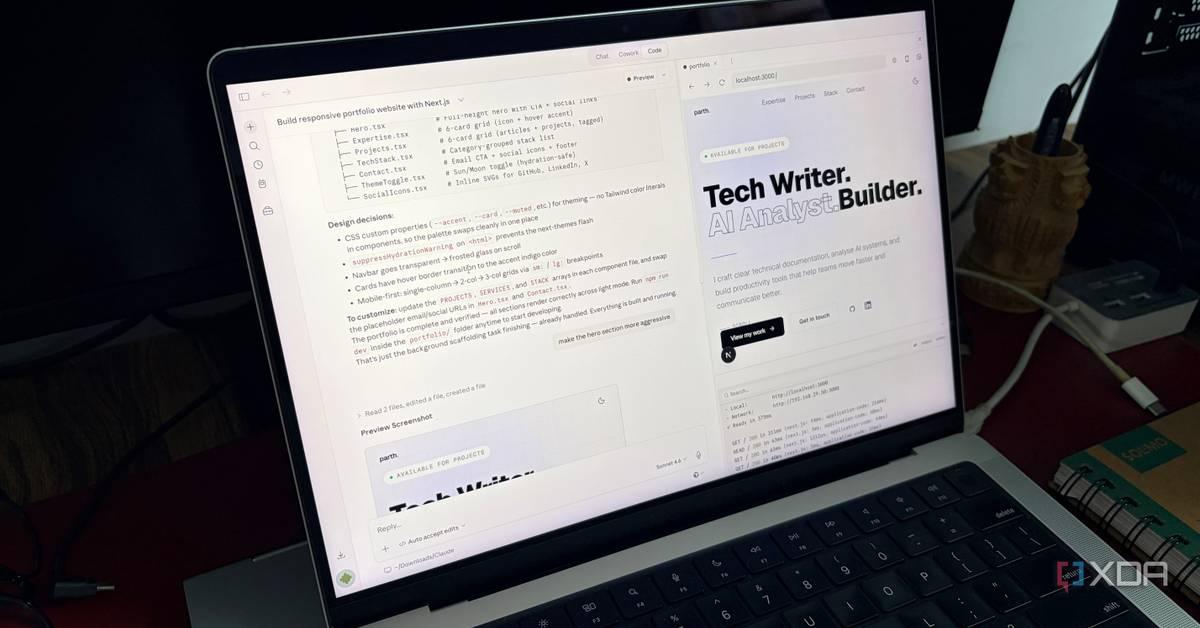
Anthropic's Claude AI is reshaping how professionals approach their daily tasks through advanced workflow automation and integration capabilities. Users report dramatic productivity gains, with some cutting their work hours in half by leveraging Claude Cowork, Claude Code, and connectors that link directly to tools like Google Drive, Gmail, and Canva. The platform's agentic AI assistant features now enable reduced human intervention across complex multi-step tasks.
Claude AI has evolved beyond a simple chatbot into a comprehensive productivity workflow platform that's fundamentally changing how professionals work. Anthropic's AI tools are gaining traction not as novelties but as genuine productivity multipliers, with users reporting they've cut their work hours in half through strategic automation and streamlined integration with existing tools
5
. Unlike traditional AI tools that require constant prompting and context-setting, Claude's ecosystemβincluding Claude Code, Claude Cowork, and its connector frameworkβenables persistent task execution with minimal oversight.

Source: Geeky Gadgets
The shift represents a fundamental change in how AI tools fit into professional environments. Rather than replacing existing productivity stacks, Claude fills the gaps between applications where context typically breaks down and manual work accumulates
5
. This approach has resonated particularly with knowledge workers who spend significant time switching between browser tabs, copying information, and re-explaining context across different platforms.Claude Connectors leverage the Model Context Protocol (MCP), an open standard that allows the agentic AI assistant to securely access and interact with external applications without manual data transfers
5
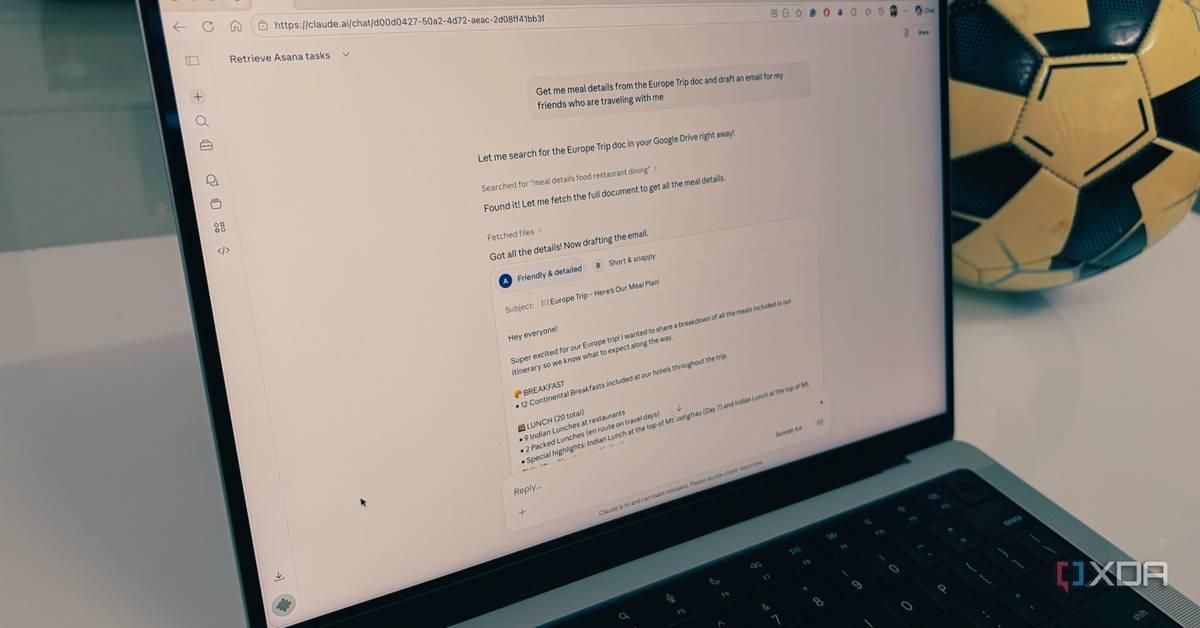
. The connector ecosystem includes integrations with Microsoft 365, Google Drive, Notion, Canva, Asana, Airtable, Slack, and GitHub, enabling Claude to read files, search databases, and execute actions like drafting emails directly within connected platforms.One freelance tech writer described how they automated trip coordination by prompting Claude to extract meal details from a Google Drive document and draft an email for their group thread in Gmailβturning a 15-minute task into a 30-second operation
5
. Another user leveraged the Canva integration to have Claude review design layouts and suggest improvements for social media traction, eliminating the guesswork in content optimization.
Source: XDA-Developers
The power of these connectors lies in their ability to pull only the specific data needed for each prompt rather than requiring massive file uploads. This targeted approach maintains privacy while delivering the context necessary for Claude to act as a true productivity workflow coordinator across multiple applications simultaneously.
Anthropic announced that Claude Cowork is now generally available for all paying customers, including Pro, Team, and Enterprise plans
3
. The platform represents a significant advancement over previous AI tools by not only executing tasks but controlling a user's entire computerβopening apps, editing files, and managing workflows through the standard desktop application.Enterprise customers gain access to role-based access controls for teams, spend limits and use controls for governance, analytics and visibility, and expanded integrations and plugins
3
. These additions address corporate concerns around AI deployment while maintaining the reduced human intervention that makes agentic systems valuable. Anthropic positioned Cowork as a tool for all employees, not just developers, signaling its intention to democratize AI-driven setup and automation across entire organizations.The rapid progression from research preview to general availabilityβoccurring within weeksβdemonstrates Anthropic's aggressive development pace. The company has committed to an April 16 webinar to help customers deploy these agentic tools with confidence, acknowledging that enterprise use requires careful governance alongside powerful capabilities.
Claude Code has become particularly valuable for developers and technical users who traditionally spent hours configuring development environments. One user described how Claude Code installed their entire IDE setup in minutesβa process that previously consumed hours navigating package managers like npm, bun, and brew
1
. The AI-driven setup handled everything from downloading dependencies to configuring API keys, requiring only occasional permission grants from the user.
Source: XDA-Developers
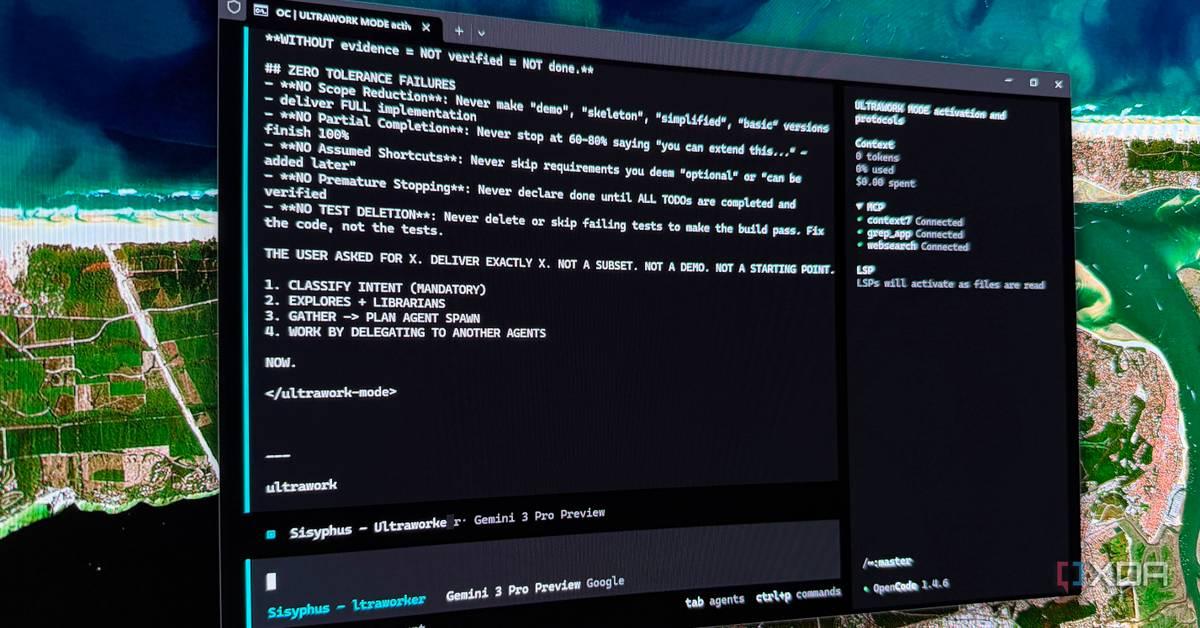
The Oh My OpenCode framework further supercharges this capability by providing 11 specialized AI agents with optimized models and expertise for specific roles
1
. The system includes Sisyphus, the main orchestrator powered by Claude Opus 4.6, which delegates tasks to specialized agents like Hephaestus for crafting code and Oracle for architectural decisions. This multi-agent approach creates what one user described as "having a full department under your supervision" within a terminal interface.Ultrawork mode takes automation further by removing human intervention entirely from routine tasks. Users can issue commands like "ulw add OAuth" and the agent will plan and execute the entire implementation without constant check-ins, pushing LLMs through predictable loops that yield production-ready code.
Claude's Projects feature addresses a common productivity drain: repeatedly re-explaining context at the start of each session
4
. Users create a project, upload relevant context like style guides, briefs, or documentation once, and every subsequent conversation within that project automatically has that information loaded. This eliminates the setup ritual that compounds to several hours monthly for knowledge workers who spend just five minutes daily on manual prep.The platform also introduced inline interactive visuals that render directly within conversations rather than in separate panels
4
. Built with HTML, CSS, JavaScript, and SVG, these visuals can include anything from charts and dashboards to functioning calculators. One user described creating a cost comparison calculator mid-conversation to run different scenarios without breaking focusβthe visual appeared exactly when needed and disappeared when no longer relevant.Claude's Artifacts feature complements this by creating persistent, shareable outputs that serve as finished deliverables. The distinction matters: inline visuals are ephemeral whiteboard sketches for thinking through problems, while Artifacts are polished outputs ready for distribution. Both reduce the need to switch to external tools like spreadsheets or design applications during active work sessions.
Related Stories
The Claude in Chrome extension, currently in beta for all paid plans, brings agentic AI assistant capabilities directly into users' existing browsers rather than requiring a separate application
2
. The extension can navigate pages, click buttons, fill forms, extract data, and manage tabsβmatching the functionality of standalone agentic browsers like Perplexity Comet and Opera Neon while integrating with the browser people already use.One power user of Google's NotebookLM described how the extension eliminated their three-tool workflow for research tasks
2
. Previously, they used an agentic browser for navigation, Claude in a separate tab for analysis, and then the browser's AI to feed content into NotebookLM. With Claude in Chrome, they can ask Claude to find relevant sources and add them directly to NotebookLM notebooks without leaving the research environmentβcollapsing multiple steps and tools into a single, continuous workflow.The extension creates tab groups for tasks and handles operations across multiple tabs simultaneously, putting users "in the passenger seat" while maintaining visibility and control. This approach aligns with Anthropic's broader strategy of boosting productivity through reduced human intervention while keeping users informed and empowered to override decisions when necessary.
Claude AI supports a 200,000-token context window as baseline, with capabilities extending to 1 million tokens for users who need it
4
. This massive context window means users can upload entire codebases, lengthy research papers, or comprehensive documentation without the AI losing thread of the conversation. For LLMs, the context window determines how much information the model can actively consider when generating responses.This capability proves particularly valuable when combined with Projects and Connectors. Users can maintain extensive context across multiple conversations while pulling in additional information from connected applications as needed. The combination creates a persistent knowledge environment where Claude maintains awareness of project goals, style preferences, and technical constraints across weeks or months of work.
The technical infrastructure supporting these features positions Claude AI as more than a conversational interfaceβit functions as a stateful workspace where context accumulates and compounds rather than resetting with each new chat. This persistence fundamentally changes the economics of AI assistance, as the value increases over time rather than requiring constant re-investment in setup and explanation.
Summarized by
Navi
[1]
[2]
[3]
[4]
[5]
20 Oct 2025β’Technology

06 Jun 2025β’Technology

29 Sept 2025β’Technology

1
Entertainment and Society

2
Policy and Regulation

3
Technology