NotebookLM connects hidden patterns in your documents that traditional tools miss entirely


3 Sources
3 Sources
[1]
NotebookLM connects dots across my documents that I never would have found myself
Jasmine is Software and PC Hardware Author at XDA with years of tech reporting experience ranging from AI chatbots right down to gaming hardware, she's covered just about everything. Whether it's breaking news about the latest AMD NPUs or creating video tutorials on social media platforms, Jasmine has contributed to the world of AI and tech in a variety of ways including interviewing the CEO of Razer, AMD's Director of Product Marketing and the VP of Lenovo. Passionate about gaming and PC technology, she has built countless computers, keyboards and other peripherals - knowing them inside and out. More often than not, everyone has a collection of 200 PDFs, random Google Docs, and meeting transcripts that never actually get used. It's easy to take notes, but then actually putting these notes into action can be a whole other ball game. Traditional note-taking apps like Evernote and Notion are like digital filing cabinets. They can store all of your information, but they don't actually help you think. NotebookLM has completely shifted my workflow from "where did I save that?" to "what is the relationship between these three things?" Rather than taking notes and storing them away to never be seen again, I can use NotebookLM to connect dots across my documents that I otherwise never would have noticed. Why NotebookLM is different There are tons of AI tools out there, so why this one? NotebookLM sets itself apart from other LLMs like ChatGPT or Google Gemini thanks to its retrieval-augmented generation (RAG). It anchors the AI specifically to your data, meaning you get no hallucinations, just logic. A downside of this can be that you don't get information from the internet, but in turn, you can be 100% certain that the information it's retrieving is based entirely on your documents. With a 50-300 source per notebook capacity based on your plan, you can upload entire projects or years' worth of research for NotebookLM to be grounded on. This allows for macro-level synthesis across hundreds of documents that you otherwise may not refer to. Once it has access to all of these documents, you can ask it to retrieve information, analyze your documents or even compare data. As it feeds you the answers to your questions, it provides you with a citation which links out to the exact sentence within your documents that it pulled the information from. You can provide it with things such as YouTube's transcript, a technical white paper, or even an export of Slack messages. It can then connect the dots between the three and provide you with answers to questions that you otherwise would have to trawl to find yourself. If you find a reliable source online then you can even feed this to NotebookLM and still be sure that it's not engaging with unreliable websites and hallucinating. I provided NotebookLM with access to all of Shakespeare's complete plays. I was then able to ask it to find common themes. It's worth noting that when providing it with this much information, it does take a while to process, with an approximate 30-second wait time for my queries, which can feel significantly longer than some LLMs' instant response time. When it did finally respond, not only did it highlight common themes like I asked for, but also broke down why this imagery is reoccurring, as well as providing quotes I could use directly from the plays themselves that I could use to potentially back up these points. I also created a new notebook to analyze some of my content creation scripts which it was able to pull directly from my Google Drive without me having to download and reupload each one. I was able to ensure I was covering all the details I was aiming to within my video scripts by asking NotebookLM one of the predetermined questions it produced. It ensured me that I was showcasing both aesthetic customization alongside the functional performance of the products I was covering in my videos and pulled out direct quotes of where I did this, reassuring me that I was providing a balanced argument. NotebookLM has been a fantastic tool to analyze my documents without the worry of background noise from the internet, which is often an issue with other LLMs. I don't have to worry about hallucinations and unreliable sources finding their way into my summaries. Look beyond the chatbot There are so many hidden features you might miss There are a range of other great tools on offer beyond just the chatbot itself. Another great feature that NotebookLM provides is the ability to turn your documents into a podcast. NotebookLM provides you with AI hosts that can turn your notes into a debate, which you can listen to even when on the go. It's not just a summary, but goes in depth about the information that you've uploaded, which can often surface contradictions in your own notes. There are a range of other useful tools you can generate in the NotebookLM studio too, including videos, mind maps and flashcards. Subscribe to the newsletter for NotebookLM workflows Tap into the newsletter for actionable NotebookLM prompts, tested workflow experiments, and practical examples that turn your documents into usable insights. Subscribe for focused NotebookLM guidance, prompt recipes, and real-case tactics to try. Subscribe By subscribing, you agree to receive newsletter and marketing emails, and accept Valnet's Terms of Use and Privacy Policy. You can unsubscribe anytime. Another way that I've been using it is the "everything notebook" strategy. I dump every random thought into a notebook, and it allows me to see what patterns emerge over time. This has allowed me to not just use NotebookLM in a professional manner, but also like a personal diary for myself. While it won't be replacing my therapist anytime soon, it allows me to look at my own thoughts in a more analytical way without having to directly read back over them myself. Deep Research Mode is a new feature that also allows for an in-depth report and can suggest and provide you with new sources if NotebookLM feels like you're missing something. While it won't automatically add these sources, it can provide them for you to check over, so you can decide if they are reliable enough for you to add to your notebook. This is great because you may not even realize you're missing something exceptionally useful, but NotebookLM will spot this gap for you. Work or play I've used NotebookLM for a variety of purposes NotebookLM has been a truly exceptional tool. It sets itself apart from other LLMs as there is a guarantee that it won't hallucinate. It works off of your sources and your sources alone, so you don't need to worry about random and incorrect information being found on the internet. Not only is it a fantastic research tool, but it can also be used in a variety of other ways, helping you connect dots or identify gaps within your work.
[2]
I fed my Obsidian vault into NotebookLM -- and it changed everything
You might also stumble upon his short how-to video explainers, simplifying complex topics. Beyond writing, Tashreef enjoys creating short explainer videos, gaming, and exploring animated shows. After switching to Obsidian, I've used it for almost everything, from drafting articles and research to trip planning and even weekly pitch ideas. The linking and backlinks help me connect related notes, but over time, my vault has grown faster than I can organize it. Understanding what I've actually accumulated, like patterns in my pitches, themes I keep returning to, connections across hundreds of notes, is harder to see when you're inside the vault every day. Obsidian doesn't have built-in AI, and I wanted more than just search. I wanted to quickly reference past articles without rereading them. So I uploaded a chunk of my vault into NotebookLM to see if Google's AI tool could make my notes useful again. What I fed NotebookLM from my vault Cleaning up notes before uploading I was planning to use NotebookLM to get more insights into my Obsidian notes, which primarily consist of drafts, research, and pitch ideas. First, I wanted to find patterns in which pitches were accepted and which were rejected, and what made them different from each other. I keep a weekly tab on the ideas that landed, the ones that underperformed despite being accepted, and the ones that were flat-out rejected. Before uploading anything to NotebookLM, I cleaned up my notes. I tagged which pitches were accepted, which performed well, which had their titles changed by editors, and which were rejected. I also prefer adding stats where possible to track performance, so I went back and filled in anything missing. Once everything was cleaned up, I uploaded the pitch files to a new NotebookLM notebook. The process is as easy as it can get. You create a new notebook, then drag and drop your files into it. Since Obsidian stores everything as Markdown files, I could upload them directly -- NotebookLM supports .md along with PDFs, Google Docs, and text files. If you have dozens of notes to upload, there's a catch. NotebookLM accepts up to 50 sources per notebook on the free tier. For larger vaults, you can use a PDF merger tool or an Obsidian plugin like Better Export PDF to combine multiple markdown files into a single PDF. This makes it easier to stay within the source limit while still getting all your notes into one place. What I asked and what it revealed Finding patterns across hundreds of pitches I started with a simple question: what's the common thread between my rejected pitches? I could have done this manually, but we're talking about hundreds of weeks of ideas. Scanning through them one by one would take forever. NotebookLM pulled out two patterns I hadn't consciously noticed. First, my rejected pitches often focused on broad, opinionated topics -- things like planned obsolescence or responsible tech disposal. Second, pitches about optimizing built-in features of mainstream platforms like Windows, Google, or YouTube tended to get rejected too. In contrast, my accepted pitches usually introduced lesser-known third-party tools or offered unique, actionable tips. I then asked what topics I might be avoiding but shouldn't. NotebookLM pointed out that while my open-source listicles performed well, I was avoiding in-depth comparisons against major commercial software. Two specific personal switch articles were rejected. The insight was that these might work better as broader comparisons rather than highly personal narratives. The most useful question was about combining ideas. NotebookLM suggested merging several accepted repurposing pitches into one comprehensive guide. It also recommended combining my rejected planned obsolescence pitch with accepted maintenance tips to create a guide on making devices last longer. These weren't insights I would have stumbled upon by just rereading my notes. I've used NotebookLM's deep research feature for external research before, but turning it on my own notes certainly feels a lot different. It was like having someone who had actually read everything I'd written and could spot trends I was too close to see. Who this is really for Beyond pitch analysis I've only shown one use case here -- finding patterns in what works and what doesn't for article pitches. But NotebookLM paired with Obsidian has broader applications. If you use Obsidian to keep research notes on complex topics, you can upload all your files and URLs, then ask questions to understand the material faster. I do this for technical subjects that don't make sense at first glance. Instead of scanning through official documentation or keeping a dozen tabs open, I upload everything to NotebookLM and ask it to explain concepts or find connections I might have missed. Another use case is learning. Upload course materials or tutorials, and you can ask questions without rewatching videos or hunting through transcripts. NotebookLM's audio and video overviews can turn dense material into something you can listen to while doing other things. Subscribe for practical Obsidian and NotebookLM tips Join the newsletter for deeper, hands-on Obsidian + NotebookLM workflows, sample prompts, and concrete examples that show how to surface patterns and synthesize notes. Ideal for readers seeking practical guidance on making their vaults AI-actionable. Subscribe By subscribing, you agree to receive newsletter and marketing emails, and accept Valnet's Terms of Use and Privacy Policy. You can unsubscribe anytime. Then there's journaling and self-reflection. Export your daily notes into one file, upload it, and ask NotebookLM to find patterns in your own thinking over time. What topics keep coming up? What problems are you repeatedly trying to solve? It's a form of metacognition -- using AI as a sounding board to understand your own thought patterns. The workflow does have limitations. NotebookLM is fully cloud-based, so your notes leave your device. It can't see Obsidian's knowledge graph or follow your internal links -- it only processes the raw text you upload. And you'll need to manually save any useful responses back into Obsidian if you want to keep them. A thinking partner, not a replacement NotebookLM doesn't replace Obsidian's linking, graph view, or local-first approach. I still use plugins to turn my vault into something more navigable, and I still rely on backlinks to connect ideas organically. What NotebookLM adds is a conversational layer on top of notes I've already written. It's useful for surfacing patterns, answering questions about my own work, and finding gaps I wouldn't notice otherwise. For anyone with an Obsidian vault that's grown beyond easy navigation, feeding it into NotebookLM is worth trying. The insights might not be groundbreaking every time, but occasionally they'll show you something you've been missing for months.
[3]
NotebookLM Upgrade Turns Research Hours into Minutes
What if you could condense 10 hours of painstaking research into just a few minutes? That's exactly the kind of fantastic efficiency NotebookLM promises. Universe of AI walks through how this innovative platform is reshaping the research process, turning traditionally time-consuming tasks into seamless, automated workflows. Imagine effortlessly generating polished overviews, visually stunning infographics, or concise slide decks, all tailored to your specific needs. With its ability to synthesize complex data into actionable insights, NotebookLM isn't just another productivity upgrade; it's a bold redefinition of how we approach information. In this update overview, we'll explore how NotebookLM's unique blend of automation and customization enables users to tackle even the most demanding projects with ease. Whether you're a student juggling deadlines, a professional preparing for a high-stakes presentation, or a content creator striving for efficiency, there's something here for everyone. You'll discover how this platform goes beyond basic functionality, offering structured outputs that save time without sacrificing quality. Could this be the future of research? Let's unpack the possibilities and see how it might transform the way you work. NotebookLM is purpose-built to tackle the most labor-intensive aspects of research. Instead of manually sifting through vast amounts of information, the platform identifies, evaluates, and synthesizes relevant data on your behalf. Whether your goal is to create a detailed overview, an engaging infographic, or a concise slide deck, NotebookLM transforms raw data into polished, structured outputs. Its advanced algorithms ensure accuracy, while its customizable source selection allows you to maintain relevance and precision in your work. This combination of automation and adaptability makes it an invaluable tool for anyone seeking to streamline their research process. NotebookLM offers a streamlined yet powerful workflow that simplifies the research process while saving you significant time and effort. The platform operates through a series of intuitive steps: This efficient process eliminates hours of manual work, allowing you to focus on higher-level tasks such as analysis and decision-making. Whether you're preparing for a critical presentation or drafting a strategic document, NotebookLM adapts seamlessly to your unique requirements. Take a look at other insightful guides from our broad collection that might capture your interest in NotebookLM. One of NotebookLM's most compelling features is its flexibility, which allows you to tailor outputs to suit your specific goals. The platform enables you to adjust the structure, tone, style, and level of detail in your deliverables, making it suitable for a wide range of applications. Some of the key use cases include: Additionally, NotebookLM offers various visual formatting options, allowing you to choose styles and orientations that best align with your audience's preferences. This ensures that your findings are not only accurate but also presented in a polished and professional manner. NotebookLM is engineered to enhance productivity by automating the transformation of unstructured data into actionable outputs. Tasks that traditionally required hours of manual effort can now be completed in a fraction of the time. This efficiency allows you to dedicate more energy to interpreting results, making strategic decisions, or refining your final outputs. Despite its speed, the platform maintains a strong focus on quality and accuracy, making sure that your work meets the highest standards. The versatility of NotebookLM makes it a valuable resource across a wide range of fields and professions. Regardless of your role, NotebookLM adapts to your specific needs, allowing you to work more efficiently and achieve better results in less time. Unlike traditional research tools or chatbots, NotebookLM functions as a comprehensive research agent. Its capabilities extend beyond simply answering questions, focusing instead on delivering structured, actionable results. By automating labor-intensive tasks such as data synthesis and formatting, the platform enables you to concentrate on deriving insights and creating impactful outputs. This unique approach sets NotebookLM apart, making it an indispensable tool for anyone who values precision, efficiency, and high-quality results. NotebookLM represents a significant advancement in the way research is conducted. By combining automation, customization, and a focus on actionable results, it caters to a wide array of needs while maintaining a commitment to accuracy and relevance. Whether you're a student aiming to streamline your studies, a professional seeking to optimize your workflow, or a content creator looking to enhance your output, NotebookLM offers a powerful solution to help you achieve your goals with ease and efficiency.
Share
Share
Copy Link
Google's NotebookLM is changing how people interact with their accumulated documents and notes. Unlike traditional AI tools, this AI-powered platform uses retrieval-augmented generation to ground responses entirely in user data, eliminating hallucinations while uncovering connections across hundreds of sources that would take hours to find manually.
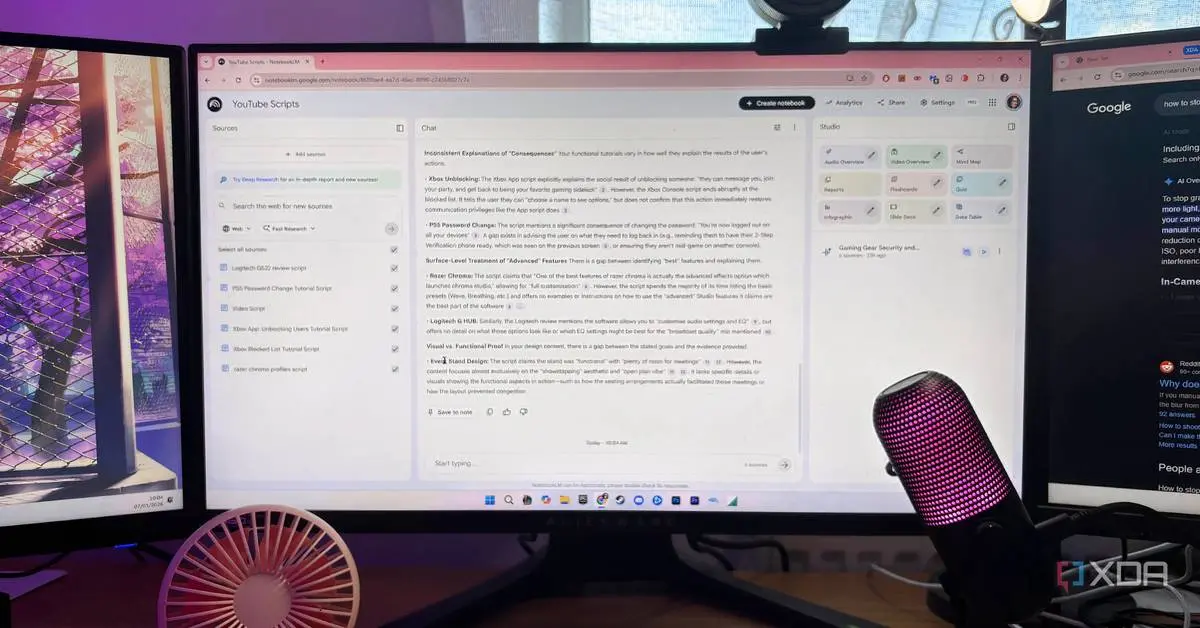
NotebookLM Redefines Personal Document Analysis
Google's NotebookLM is shifting the landscape for anyone drowning in PDFs, meeting transcripts, and scattered notes. This AI tool distinguishes itself from LLMs like ChatGPT and Gemini through its retrieval-augmented generation (RAG) approach, which anchors responses exclusively to user data rather than pulling information from the internet
1
. The result is citation-backed insights without hallucinations, though at the cost of external web access. For users seeking to streamline workflow and extract meaningful patterns from their own accumulated knowledge, this trade-off proves worthwhile.The AI-powered platform supports 50-300 sources per notebook depending on the plan, enabling macro-level data synthesis across entire projects or years of research
1
. Users can upload YouTube transcripts, technical white papers, Slack message exports, or Markdown files from knowledge management systems like Obsidian. Every answer includes citations linking to the exact sentence within uploaded documents, ensuring transparency in how the AI tool processes information.Pattern Identification Across Hundreds of Documents
One journalist uploaded weekly pitch tracking notes spanning hundreds of entries into NotebookLM to understand why certain article ideas succeeded while others failed
2
. The platform identified patterns invisible during manual review: rejected pitches typically focused on broad, opinionated topics or optimizing built-in features of mainstream platforms, while accepted pitches introduced lesser-known third-party tools with actionable tips. NotebookLM also suggested combining several accepted ideas into comprehensive guides, connections the user hadn't considered despite working with the material daily.Another user fed all of Shakespeare's complete plays into the system to identify common themes
1
. Processing this volume took approximately 30 seconds per query, noticeably longer than instant responses from other LLMs, but the output included not just theme identification but explanations for recurring imagery with direct quotes from the plays. For content creators analyzing video scripts pulled directly from Google Drive, NotebookLM confirmed balanced coverage of aesthetic customization alongside functional performance, providing specific quotes as evidence1
.Transforming the Research Process Into Minutes
NotebookLM automates the research process by identifying, evaluating, and synthesizing relevant data from uploaded sources
3
. Users select sources, specify desired output formats, and receive polished deliverables ranging from detailed overviews to infographics and slide decks. This content creation process eliminates hours of manual work, allowing focus on analysis and decision-making rather than data collection. The platform's customization options let users adjust structure, tone, style, and detail level to match specific audiences.Beyond the chatbot interface, NotebookLM Studio offers additional productivity tools. The platform can convert documents into AI-hosted podcasts featuring debate-style discussions that surface contradictions in uploaded notes
1
. Other generated formats include videos, mind maps, and flashcards. For Obsidian users managing vaults that have grown faster than they can organize, NotebookLM accepts Markdown files directly, though the 50-source limit on free tiers requires combining multiple files into PDFs using merger tools or plugins like Better Export PDF2
.Related Stories

Applications Across Professional Contexts
The versatility of this AI-powered platform extends across fields. Students can upload course materials and tutorials to ask questions without rewatching videos or hunting through transcripts
2
. Professionals preparing presentations can generate polished summaries and visual materials tailored to stakeholder needs3
. Researchers working with complex technical subjects can upload documentation and URLs to understand material faster through targeted questions rather than keeping dozens of tabs open2
.What separates NotebookLM from traditional tools is its function as a comprehensive research agent rather than a simple chatbot. By grounding all outputs in user data, the platform ensures accuracy while maintaining relevance to specific projects. This approach addresses a common pain point with other LLMs: unreliable sources and background noise from internet-wide training data finding their way into summaries
1
. For anyone who values precision alongside efficiency, NotebookLM offers a solution that maintains quality standards while dramatically reducing time spent on data analysis and knowledge management tasks.References
Summarized by

Navi
[3]
Related Stories
NotebookLM: Revolutionizing AI-Powered Productivity and Knowledge Management
28 Jul 2025•Technology
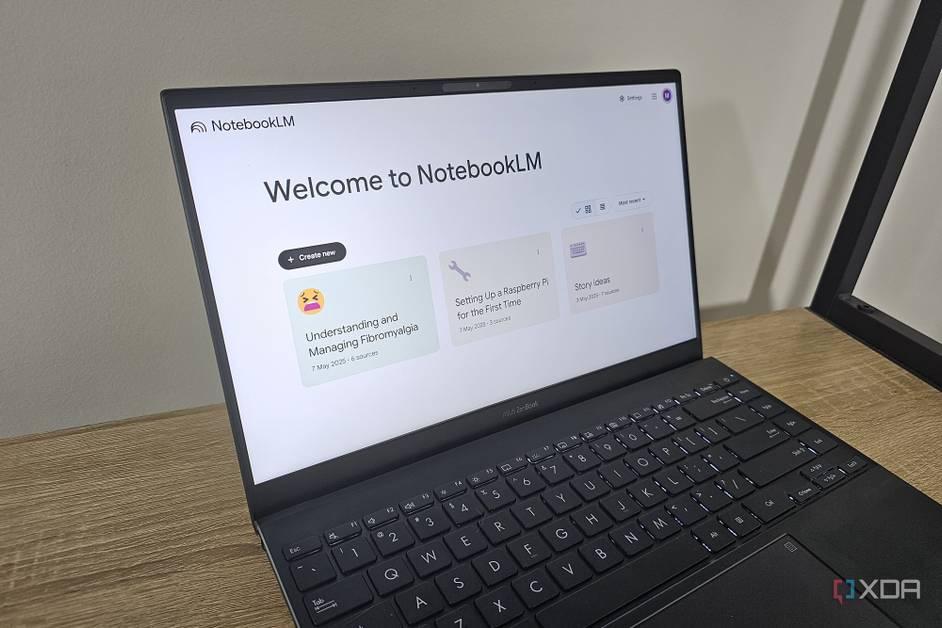
Google's NotebookLM Introduces AI-Powered Video Overviews and Studio Panel Upgrades
30 Jul 2025•Technology
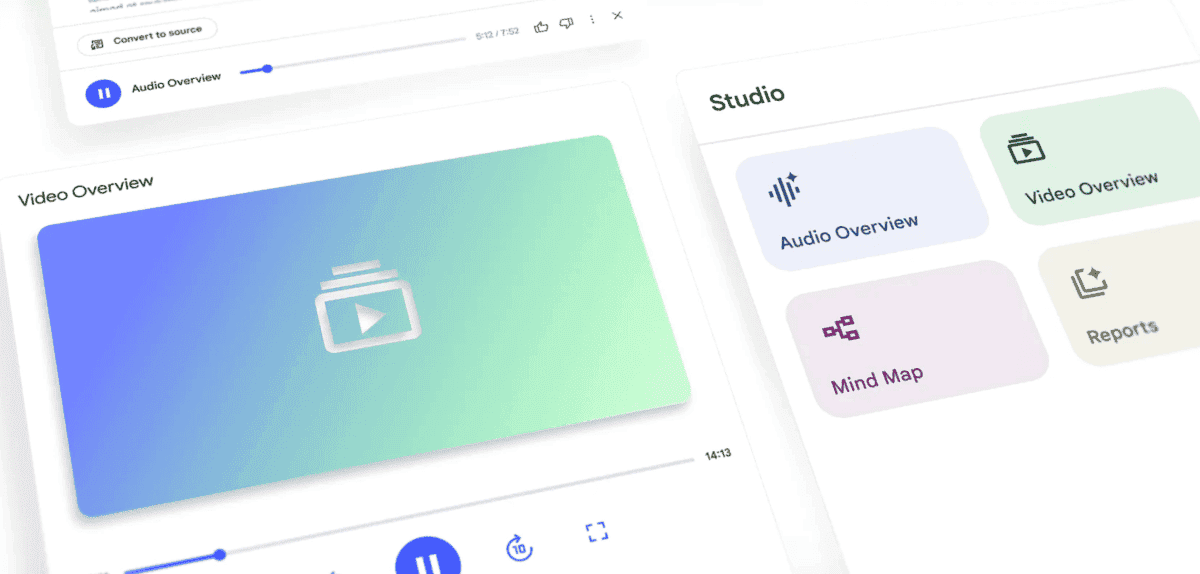
Google's NotebookLM: The AI-Powered Note-Taking Assistant Revolutionizing Research and Learning
18 Oct 2024•Technology

Recent Highlights


Recent Highlights
Today's Top Stories






Your Daily Dose of Curated AI News
Don’t drown in AI news. We cut through the noise - filtering, ranking and summarizing the most important AI news, breakthroughs and research daily. Spend less time searching for the latest in AI and get straight to action.

