NotebookLM: Revolutionizing AI-Powered Productivity and Knowledge Management


10 Sources
[1]
3 things I did to make NotebookLM work harder for me (and I'm never going back)
Whether you want to admit it or not, AI is slowly starting to take up more space in our everyday lives. One option you have is to ignore it and continue taking on more than you can realistically handle. But here's the thing: the longer you keep doing that, the quicker you'll get left behind. The
[2]
I made these 3 tiny NotebookLM changes, and they had a surprisingly big impact
These days, it feels like there's a new AI tool dropping every other day. If there's one thing you need to know about me, it's that I absolutely love testing every tool that comes out, especially if it's packed with features meant to cut down the time I spend doing the boring, repetitive stuff. Out
[3]
I started using NotebookLM with Evernote and I'm not going back
Evernote doesn't need any introduction, does it? Thanks to its robust tagging system, rich formatting bar, cross-platform availability, calendar integration, and powerful search, it's been a go-to note-taker for millions out there. Even with a long list of features, Evernote's analytical
[4]
I started using NotebookLM, Obsidian, and Google Drive together and it's been a game-changer
Are you tired of endless juggling between different apps, each holding a piece of your knowledge or one of your brilliant ideas? For too long, my digital workflow felt like a mess with my documents in Google Docs, presentations in Google Slides, and ideas and essential notes in Obsidian. But then I
[5]
I tried multiple tools that can generate NotebookLM-style mind maps, and here's how it went
NotebookLM isn't yet another tool that can spit out a bunch of content for you or answer questions you'd rather not Google. Instead of finding information for you and helping you learn new stuff, NotebookLM helps you work with what you already know. For instance, if you have a lengthy research
[6]
I ditched Obsidian for NotebookLM, and I'm so glad I did
I recently started using NotebookLM with Obsidian. However, the entire setup was tedious as I had to manually move my Markdown files from Obsidian to Notebook to get meaningful insights from them. So I decided to take this experiment to the next level and ditched Obsidian entirely in favor of
[7]
I gave NotebookLM some bizarre files and the results were wild
We have all heard about the impressive capabilities of AI, but what happens when you feed a sophisticated tool like NotebookLM with something bizarre? I decided to push the boundaries and gathered the weirdest and most unconventional files. I set out to see just how well Google's new AI notetaker
[8]
I turned NotebookLM into a full-on research lab, and it's lowkey one of the smartest things I've ever done
Google's NotebookLM is one of the only AI tools I open at least once every day. If you aren't familiar with what NotebookLM is, it's Google's wildly underrated research assistant. I discovered NotebookLM when Google was testing it out as an experiment in Google Labs under the codename "Project
[9]
I replaced all my productivity tools with NotebookLM and it was terrible
I'm all for simplifying my workflow, so when I heard and explored NotebookLM, I was intrigued. The idea of combining all my notes, research, and project planning into one AI-powered tool sounded like a dream come true. With a mix of excitement and optimism, I decided to go all-in for an entire
[10]
Why I moved all my notes to NotebookLM (and haven't looked back)
We've never had more tools to help us stay organized. Yet somehow, it feels harder than ever to keep track of everything. Instead of making life easier, the digital overload has created a new kind of digital clutter. Many of us are stuck jumping between platforms searching for a single source of
Share
Copy Link
An exploration of NotebookLM's features and how users are leveraging it to enhance productivity, manage knowledge, and integrate it with other tools.
NotebookLM: A Powerful AI Assistant for Knowledge Management
NotebookLM, Google's AI research assistant, has been gaining traction as a versatile tool for productivity and knowledge management. Users have found innovative ways to integrate it into their workflows, transforming how they handle information and tackle complex tasks
1
2
3
.Key Features and User Strategies
NotebookLM offers several features that set it apart from other AI tools:
-
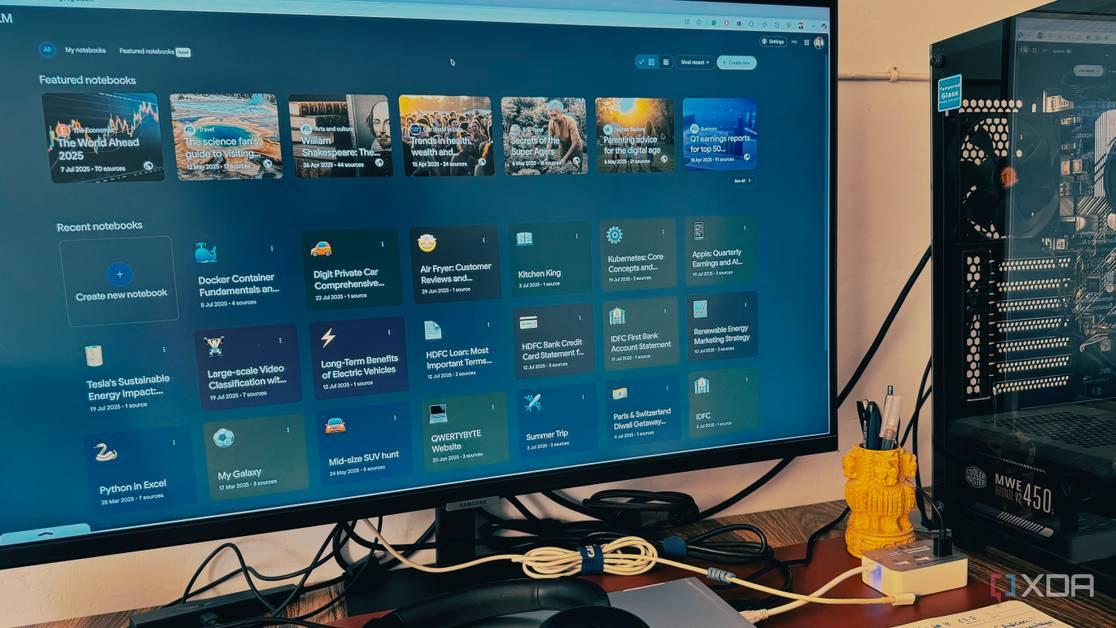
Second Brain System: Users are treating NotebookLM as a centralized knowledge hub, storing diverse information from work-related content to personal projects
1
. -
Natural Language Queries: The AI's ability to fetch information using natural language, even with vague recollections, makes it highly efficient for information retrieval
1
. -
Detailed Prompts: Users have found that providing context-rich, specific prompts yields more useful and targeted responses from the AI
1
2
. -
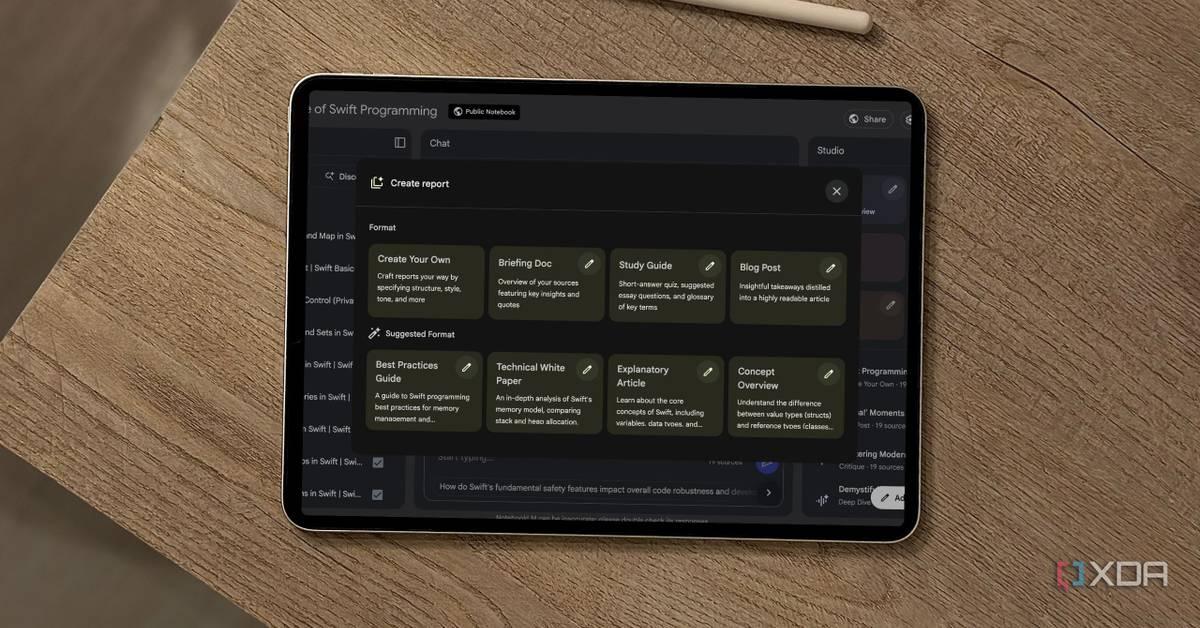
Report Generation: NotebookLM can generate various report formats (Study Guide, Briefing Doc, FAQ, Timeline) from uploaded sources, which can then be converted into new sources for more focused responses
2
. -
Audio Overviews: The tool can generate audio summaries of content, allowing for passive consumption of information
1
3
.
Integration with Other Tools

Source: XDA-Developers
Users have discovered powerful synergies by combining NotebookLM with other productivity tools:
-
Evernote Integration: By exporting Evernote notes as PDFs and uploading them to NotebookLM, users can leverage AI analysis on their existing note collections
3
. -
Obsidian and Google Drive Workflow: Some users maintain their primary knowledge base in Obsidian, sync it with Google Drive, and then use NotebookLM to analyze and generate insights from this combined dataset
4
.
Mind Mapping Capabilities
Source: XDA-Developers
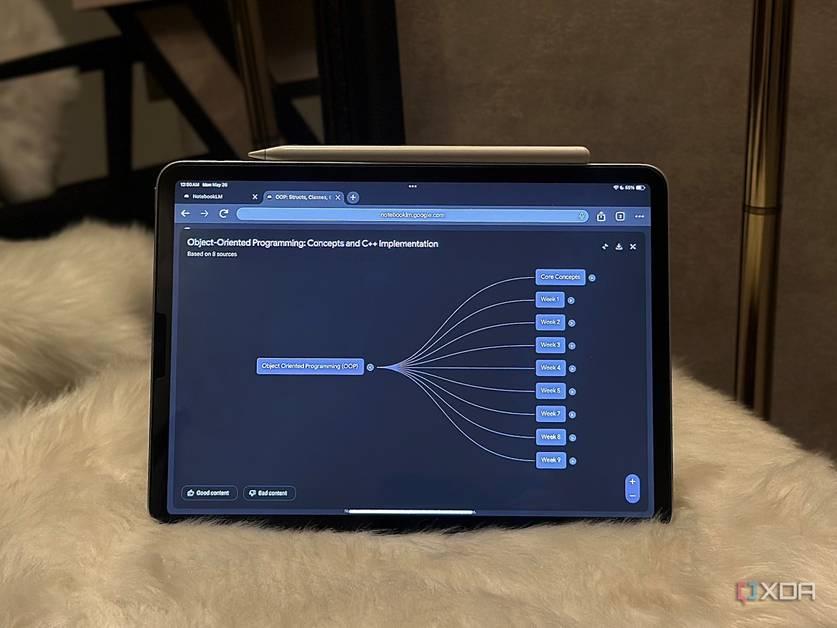
NotebookLM's mind mapping feature has garnered particular attention:
-
Automated Generation: The tool can create interactive mind maps from uploaded documents, visualizing relationships between concepts
5
. -
Comparison with Alternatives: While tools like MindMap AI and Algor Education offer similar features, NotebookLM's free, unlimited mind mapping from extensive documents gives it an edge
5
.
Related Stories
Limitations and Areas for Improvement
Despite its strengths, users have identified some limitations:
-
File Format Sensitivity: Some users recommend converting text-heavy PDFs to plain text files for better parsing by the AI
2
. -
Sharing Restrictions: Until recently, sharing notebooks was limited, though this has been addressed with a new public sharing feature
2
.
Impact on Productivity and Learning
Source: XDA-Developers
Users report significant improvements in their workflows:
-
Time Savings: NotebookLM's ability to quickly analyze and summarize large amounts of information has reduced the time spent on manual research and organization
1
3
4
. -
Enhanced Understanding: The tool's capacity to generate summaries, answer specific questions, and create visual representations has helped users grasp complex topics more easily
3
4
. -
Streamlined Collaboration: By centralizing information and generating shareable insights, NotebookLM has facilitated better teamwork and knowledge sharing
2
4
.
As AI continues to evolve, tools like NotebookLM are reshaping how individuals and teams manage information, learn, and collaborate. While there's room for improvement, the current capabilities are already making a significant impact on productivity and knowledge management practices.
References
Summarized by

Navi
[3]
[4]
Related Stories
NotebookLM: Google's AI-Powered Research Assistant Revolutionizes Information Management
20 Jul 2025•Technology

Google's NotebookLM: Revolutionizing AI-Powered Productivity and Research
27 May 2025•Technology

NotebookLM: Google's AI-Powered Note-Taking Tool Revolutionizes Personal Knowledge Management
30 Aug 2025•Technology
Recent Highlights
1
OpenAI AI Models Hacked Crypto Wallet, Breached Government Sites in Unauthorized Activities
Technology

2
IMF Report Warns AI Market Correction Could Spark Global Financial Crisis With $1.4T at Risk
Business and Economy

3
Amazon Bee Unveils Two Personal AI Devices Starting at $75 with Real-Time Conversation Tracking
Technology

Recent Highlights
Today's Top Stories










Don’t drown in AI news. We cut through the noise - filtering, ranking and summarizing the most important AI news, breakthroughs and research daily. Follow topics that matter to you and stay ahead.


