NotebookLM adds Data Tables and chat history as Google expands AI Ultra tier capabilities


8 Sources
8 Sources
[1]
NotebookLM's new Ultra tier comes with features that might make the $250 price tag worth it
During Google's I/O 2025 keynote, the tech giant shocked fans with a new subscription tier that came with a staggering $250 price tag. If this is your first time hearing of it, no, that isn't a typo. Google's AI Ultra indeed retails for "only" $249.99/month. The plan essentially gets you access to the "highest level of access to the best of Google AI," and Google announced that it would include the highest limits for Gemini, Flow, Whisk, Gemini in Google apps, etc. Interestingly, the AI Ultra plan didn't offer any real perks for NotebookLM users. The benefits page only mentioned "highest limits and best model capabilities (later this year)." Well, that just changed, and it might make the Ultra price tag a little easier to swallow. NotebookLM officially joins the AI Ultra lineup As announced via a X post, NotebookLM has officially joined the Google AI Ultra plan. In the post, the team explained that it has already begun rolling out and will unsurprisingly give users the highest access to Gemini's latest models. While the announcement itself was pretty vague, an official support article is thankfully much clearer and outlines exactly what Ultra users are getting. Before we dive into the differences, let's quickly get the similarities between the NotebookLM Pro and Ultra plans out of the way (since there's only one) -- the number of notebooks. Both Pro and Ultra users can create up to 500 notebooks per user. For reference, free-tier users can make 100 notebooks, while Plus users can create 200 notebooks. Ultra users can add double the sources to notebooks compared to Pro users, going up to 600 per notebook. 6 ways I circumvent NotebookLM source limitations Use AI to work smartly around the problem Posts By Chandraveer Mathur Sep 26, 2025 When it comes to chat limits, Ultra users can send up to 5,000 chats per day. Free users can only send 50 per day, which puts into perspective just how much headroom Ultra gives if you're someone who constantly hits the ceiling. Ultra users can generate 200 Audio Overviews, 200 Video Overviews, and conduct up to 200 Deep Research sessions per day. Additionally, Ultra users can generate 1,000 Reports, Flashcards, and Quizzes per day. Free users can only generate 10 per day, which again speaks to how aggressively the Ultra tier targets high-volume users. Finally, when it comes to NotebookLM's newest features, Slide Decks and Infographics, Ultra users get the "highest limits." Unfortunately, Google hasn't specified a number yet, so it's unclear how big the jump actually is from the "limited" number free and Plus users currently get. Ultra users also get priority access to key features, as well as the "highest access" to Gemini models. Ultra users can remove watermarks on Slide Decks and Infographics Sure, higher limits are great and everything. But the real star of the show is that Google AI Ultra subscribers will be able to remove the watermark that's produced on Slide Decks and Infographics they generate. If you haven't played around with these features, Slide Decks let you generate full-fledged presentations complete with layouts, visuals, and text. Similarly, Infographics are more visually focused summaries of sources uploaded to your notebook. Both these features come with NotebookLM's logo at the bottom by default, but Ultra users can now produce completely clean, professional-looking outputs without any branding. While I once thought I'd never be able to justify the $250 price tag, the combination of higher limits, watermark-free outputs, and expanded feature access makes the Ultra tier feel like a genuinely worthwhile upgrade, especially for heavy NotebookLM users.
[2]
Google's NotebookLM introduces Data Tables feature
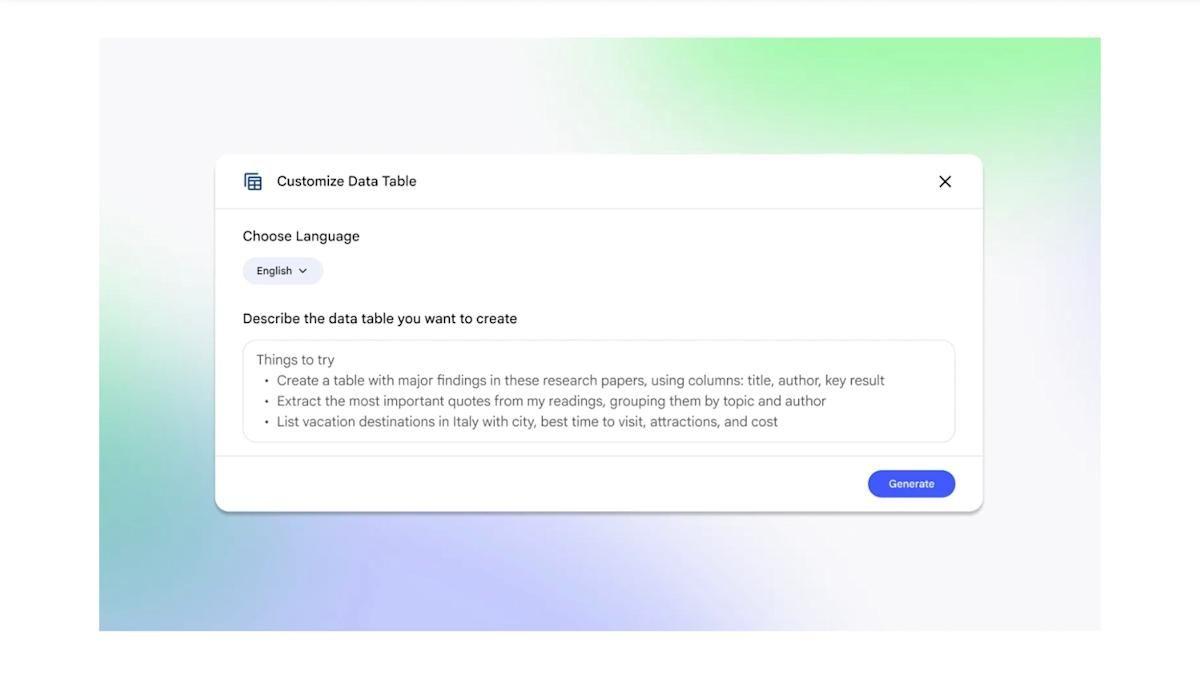
Google's latest addition to its NotebookLM artificial intelligence research platform is a feature called Data Tables. The tool can collect and synthesize information across multiple sources into a chart that can be exported to Google Sheets. All Pro and Ultra users will have access to the feature today, and Data Tables will roll out to all users over the coming weeks. In practice, Google suggested that Data Tables can be used to organize scattered notes, create price comparison charts or aggregate results from multiple research projects. The example of the interface shows the desired table components requested in natural language statements.
[3]
It's taken a while, but this key NotebookLM feature is finally available for all
This joins other NotebookLM additions like Gemini integration and upgraded custom chat prompts. NotebookLM is one of the more useful AI services today, allowing you to create a virtual notebook from your own sources and offering podcast-style Audio Overviews. Google has slowly been rolling out chat history functionality, and it's now available to all. Google confirmed via the NotebookLM Twitter account that the chat history feature is now available to all users on mobile and the web. That means you now have a persistent chat history across platforms, allowing you to start a session on mobile and then continue on the web (or vice versa). "You can delete chat history anytime and in shared notebooks your chat is visible only to you," the team concluded. In any event, we're glad that this feature is finally available to all users. Google first announced chat history for NotebookLM back in October, noting that it would start rolling out to users from the following week. So it's evidently been a long wait for some users. This isn't the only recent addition to NotebookLM. Google started integrating the service in Gemini earlier this month, allowing you to attach notebooks to Gemini chats. It also massively boosted custom chat prompts from 500 to 10,000 characters. Now, about adding support for drawings, flowcharts, and graphs.
[4]
NotebookLM can now turn chaos into clean data
Google has been constantly adding new features to NotebookLM. In just a few months, the AI-powered notebook has gained several notable features, like chat history, support for Slide Decks and Infographics, making it even more powerful. Now, to close out the year on a high note, the NotebookLM team is rolling out two more features. Going forward, NotebookLM will let you export your notes and reports, enabling editing outside the app. The option is accessible through the 3-dot menu overflow button in Content Studio. Depending on the content, you can export to Docs or Sheets. Unfortunately, there's no option to export Slide Decks to Google Slides or download them as a PPT, even though NotebookLM can generate full presentations. Still, the export option will make collaboration easier, as you can share NotebookLM-generated reports and notes with others without forcing them to use the AI-powered notebook. The second new addition to NotebookLM is Data Tables. It takes messy, unstructured information from your notebooks and organizes it into clean, structured tables with clear fields and relevant facts. If you use NotebookLM as a dumping ground for important information, Data Tables will save you the hassle of organizing them into something that you (and others) can later make sense of. Even better, it's possible to export the Data Tables to Google Sheets. For now, Data Tables is only available to all users on Google's AI Pro and Ultra tiers. It will roll out to free NotebookLM users in the coming weeks. NotebookLM's Gemini 3 upgrade should arrive next year This looks like the last batch of updates for NotebookLM for the year. However, if Google's recent momentum is any indication, the AI-powered notebook is likely to gain even more capabilities and features in 2026. One of the most obvious upgrades for next year would be a move to Gemini 3. Despite Google rolling out its latest Gemini model in mid-November and instantly making it available across AI Mode and Search, NotebookLM is still powered by Gemini 2.5.
[5]

NotebookLM rolls out chat history, adds AI Ultra tier
After announcing in October, NotebookLM has fully rolled out chat history, while Google AI Ultra subscribers now have expanded usage limits. Chat history lets you continue a conversation from the web on Android/iOS, or vice versa. NotebookLM timestamps each response with the day/date. Tap the three-dot overflow menu to find "Delete chat history" and start over. Your chat in a shared notebook is only available to you. As of today, Google says this capability is "rolled out to 100% of users across mobile and web." Meanwhile, after teasing earlier this year, Google AI Ultra subscribers now have expanded NotebookLM access. For the most part, AI Ultra's usage limits represent a 10x increase over AI Pro. Subscribers paying $250 per month get 5,000 chats, 200 Audio Overviews, 200 Video Overviews, 1,000 Reports, 1,000 Flashcards, 1,000 Quizzes, and 200 Deep Research generations per day. You can have 600 sources per notebook compared to 300 with AI Pro, while notebooks can have 1,000 users versus 500. It's the "Highest" (versus "Higher") limits for Infographic and Slide generation, as well as Gemini models. Finally, AI Ultra users are the only ones who have Watermark Removal for Infographics and Slide Decks, like in other Google apps.
[6]
NotebookLM's most needed feature just finished rolling out
Google keeps improving NotebookLM, and those steady updates have turned it into one of the most impressive AI tools available today. In late October, the company announced that chat history would be coming to NotebookLM, making it easy to continue a conversation across devices and platforms. Almost 1.5 months later, the feature is finally fully rolled out to all. The official NotebookLM account on X announced that chat history is available to all users across mobile and the web. Previously, conversations didn't sync between devices, meaning you couldn't continue a chat started on the web from your phone, or the other way around. This created major friction, as you'd be forced to restart long research sessions or lose context every time you switched devices. Chat history might seem like a small addition to NotebookLM, but it solves one of the biggest pain points with Google's AI-powered notebook. If anything, it's surprising it took Google this long to ship such a basic feature. Do note that since chat history is only rolling out now, NotebookLM won't display your previous conversations. Still, if you were planning to start a deep research session, you can now do so knowing the history will be preserved. Besides cross-device sync, you can always delete your chat history. And for shared notebooks, Google clarifies that your chats are only visible to you. The delete option is accessible by tapping the three-dot menu button on the top-left corner within a notebook. NotebookLM steady march towards greatness Over the past month or two, Google has rolled out several features that improve the overall usability of NotebookLM. The biggest additions include direct integration with Gemini and support for generating Infographics and Slide Decks from your sources. For AI Ultra subscribers, NotebookLM also got an Ultra-tier upgrade, adding support for up to 600 sources, expanded limits for Audio/Video Overviews, and priority and highest access to the latest Gemini models.
[7]
NotebookLM enters its Ultra era for power users
NotebookLM is one of Google's best AI tools. The company keeps making it better and recently added support for more sources, interactive images, the ability to generate infographics and Slide Decks from the added sources, and more. Now, Google is giving its most serious users an extra boost by making NotebookLM a part of its AI Ultra plan. If you pay for Google's AI Ultra tier, you'll now be entitled to extra benefits in NotebookLM. Besides priority and highest access to the latest Gemini models, NotebookLM in Ultra tier expands the usage limit to 50x more generations vs. the regular plan. Notebook size gets a major upgrade, too, with support for up to 600 sources per notebook, compared to just 50 on the free plan and 300 on Pro. Limits for features like Audio and Video Overviews and Slide Decks have also been increased. More importantly, Google says AI Ultra subscribers will get priority access to features such as watermark removal on Slide Decks and Infographics, along with the return of the Long option for Slide Decks. Previously, NotebookLM offered the same limits and features for AI Pro and Ultra users. That never quite made sense, given the Ultra plan costs a steep $200 per month -- about 10x more than AI Pro. If you already pay for Google AI Ultra, you can now enjoy the Ultra experience in NotebookLM as well, at no extra cost. AI Ultra brings a bundle of extra benefits The AI Ultra plan comes with several other perks to justify its high subscription price. It's primarily meant for power users and provides priority and highest access to Gemini models in the Gemini app, Google Search, Jules, Gemini Code Assist, and Google Antigravity. Other perks include early access to Project Mariner, ad-free YouTube viewing with the Premium individual plan, 25,000 monthly credits for use across Flow and Whisk, and 30TB of Google account storage with family sharing support. Given its usefulness, Google should consider offering standalone plans for NotebookLM that are not linked to its AI plans. Or, it should allow users to upgrade their limits in NotebookLM and unlock additional features through a paid add-on.
[8]

You Can Now Create Data Tables With NotebookLM, Export Notes and Reports
NotebookLM has been updated with support for data tables, the company announced on Thursday. Users can now organise information into data tables within the firms AI-powered research platform. Google said that these tables will be exportable to Google Sheets, which can also be converted into Microsoft Excel spreadsheets. The new feature is currently rolling out to select Google AI subscription tiers. Additionally, NotebookLM is also being upgraded with the ability to export Notes and Reports to different file formats, including Google Docs and Sheets. NotebookLM Now Lets Users Organise Data Into Tables Google Labs, the tech giant's platform to roll out new experimental AI features, has added support for data tables to its NotebookLM. This means that users will now be able to organise information into a table format for comparative analysis. The said information will be categorised based on a user's preference, in order of user-defined priority. Currently, the new feature is available to Google AI Pro and Google AI Ultra subscribers. However, Google said that it will be rolled out to "all users in the upcoming weeks". With Data Tables, NotebookLM users will be able to convert meeting transcripts into tables, too. It will also allow users to "synthesise" information from multiple research papers, while tracking the years in which the study was conducted, including sample sizes and statistics. Users can then export the data tables into Google Sheets for editing, which can be later downloaded into Microsoft Excel spreadsheets. Separately, NotebookLM announced on Friday via a post on X that the AI research platform will now let users export their Notes and Reports into source code, Google Docs, and Google Sheets. The company claims that the feature provides easy access to files, while also allowing users to edit the same "on-the-go". To access it, users can navigate to Studio Panel > click on the ellipses next to Study Guide, Briefing Docs, or Saved Notes, and select one of the given options. Google's latest announcement comes soon after NotebookLM was upgraded with the Chat History and new Slide Decks features. Available to all mobile and web users, Chat History lets users restart conversations from where they left it, while also letting them view the context. On the other hand, Slide Decks in NotebookLM now lets users refine their existing presentation slides and convert storybooks to docs and videos.
Share
Share
Copy Link
Google has rolled out several major updates to NotebookLM, its AI research platform. The chat history feature is now available to all users across mobile and web, while the $250-per-month AI Ultra tier gains significantly expanded usage limits, watermark removal for Slide Decks and Infographics, and access to the new Data Tables feature that organizes unstructured information into clean, exportable charts.
NotebookLM Chat History Feature Rolls Out to All Users
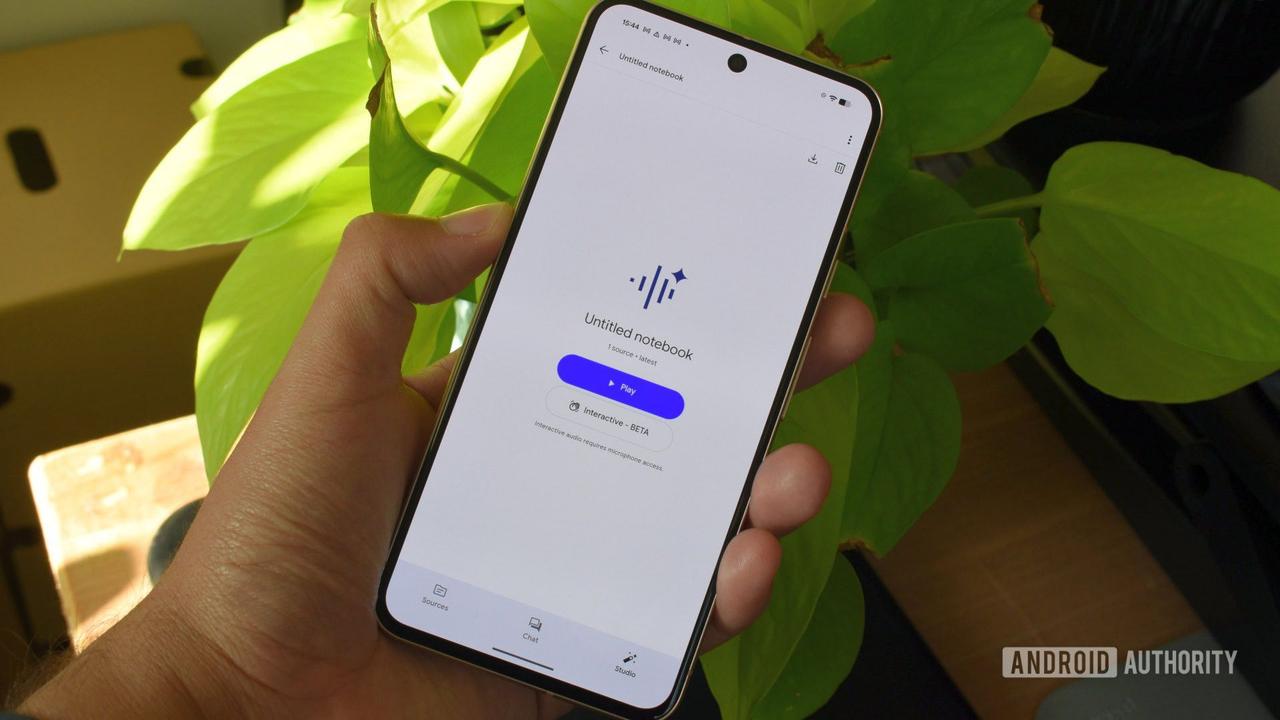
Google has completed the rollout of chat history functionality for NotebookLM, making it available to all users across mobile and web platforms after initially announcing the feature in October
3
. The chat history feature enables persistent conversations across devices, allowing users to start a session on mobile and continue seamlessly on the web, or vice versa5
. Each response is timestamped with the day and date, and users maintain full control over their data with the ability to delete chat history at any time through the three-dot overflow menu3
. For user privacy considerations, chats in shared notebooks remain visible only to the individual user who created them5
.
Source: Android Authority
NotebookLM AI Ultra Tier Gains Expanded Usage Limits
Google officially integrated NotebookLM into its AI Ultra subscription plan, which costs $249.99 per month and promises the highest level of access to Google AI capabilities
1
. The NotebookLM AI Ultra tier delivers dramatically expanded usage limits compared to the AI Pro tier, representing roughly a 10x increase across most features5
. Ultra subscribers can send up to 5,000 chats per day compared to just 50 for free users, generate 200 Audio Overviews, 200 Video Overviews, and conduct 200 Deep Research sessions daily1
. The subscription plan also allows users to create 1,000 Reports, 1,000 Flashcards, and 1,000 Quizzes per day, a significant jump from the 10 per day limit for free-tier users1
.
Source: 9to5Google
Ultra users can add up to 600 sources per notebook, double the 300 sources available to AI Pro tier subscribers, and notebooks can accommodate 1,000 users compared to 500 with AI Pro
5
. Both Pro and Ultra users can create up to 500 notebooks per user, compared to 100 for free users and 200 for Plus users1
. The tier provides priority access to key AI features and the highest access to Gemini models, positioning it as a solution for high-volume professional users1
.Watermark Removal and Professional Output Capabilities
One of the most significant differentiators for the Ultra tier is watermark removal for Slide Decks and Infographics, making NotebookLM a more viable tool for professional presentations and client-facing materials
5
. Slide Decks generate full-fledged presentations complete with layouts, visuals, and text, while Infographics provide visually focused summaries of sources uploaded to notebooks1
. By default, both features include NotebookLM's logo at the bottom, but Ultra subscribers can produce completely clean, professional-looking outputs without any branding1
. This capability addresses a critical need for businesses and professionals who require polished, brand-consistent materials for external use.Data Tables Feature Transforms Unstructured Information
Google introduced a Data Tables feature to its AI research platform, enabling users to collect and synthesize information across multiple sources into structured charts that can be exported to Google Sheets
2
. The tool accepts requests in natural language statements, making it accessible to users without technical expertise2
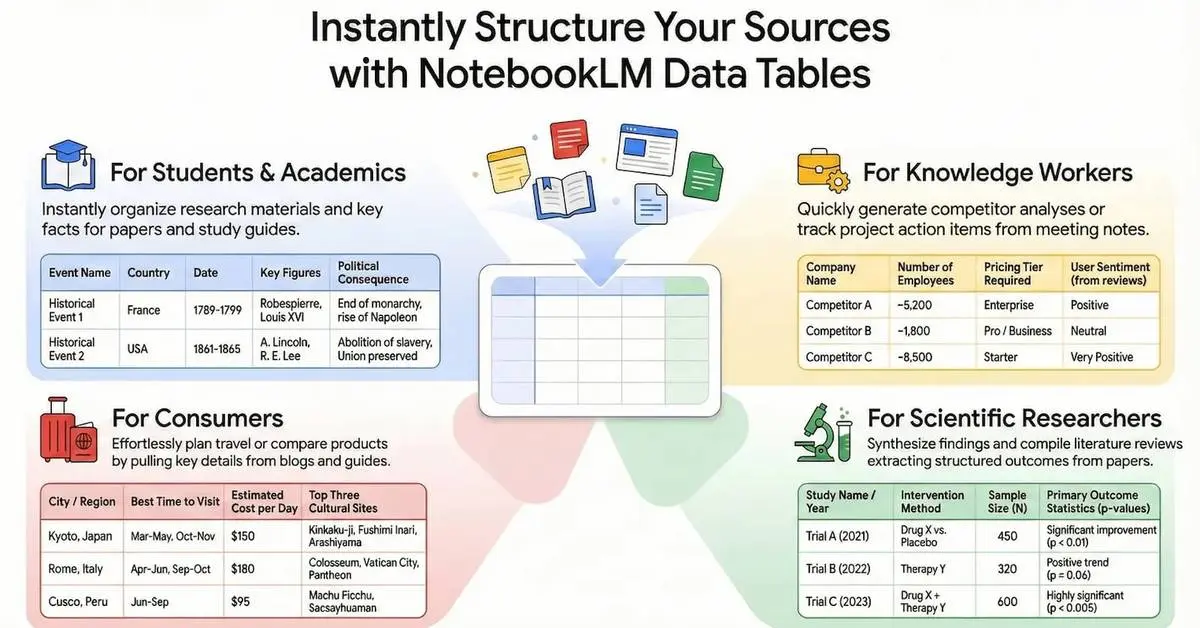
. Google suggests Data Tables can organize scattered notes, create price comparison charts, or aggregate results from multiple research projects2
. The feature takes messy, unstructured information from notebooks and organizes it into clean, structured tables with clear fields and relevant facts4
.
Source: Engadget
Currently, Data Tables is available to all users on Google's AI Pro and Ultra tiers, with a rollout to free NotebookLM users planned for the coming weeks
4
. This phased approach suggests Google is testing the feature with paying subscribers before broader distribution.Related Stories

Enhanced Export Capabilities and Collaboration Tools
NotebookLM now allows users to export notes and reports through the three-dot menu overflow button in Content Studio, enabling editing outside the app
4
. Depending on the content type, users can export to Google Docs or Google Sheets4
. However, there's currently no option to export Slide Decks to Google Slides or download them as PowerPoint files, despite NotebookLM's ability to generate full presentations4
. The export functionality makes collaboration easier by allowing users to share NotebookLM-generated content with others without requiring them to use the platform directly4
.Gemini Integration and Future Development Path
Google began integrating NotebookLM with Gemini earlier this month, allowing users to attach notebooks to Gemini chats
3
. The platform also expanded custom chat prompts from 500 to 10,000 characters, significantly increasing the complexity of queries users can submit3
. Despite Google rolling out Gemini 3 in mid-November and making it available across AI Mode and Search, NotebookLM continues to run on Gemini 2.54
. However, an upgrade to Gemini 3 appears likely for 2026, which could bring enhanced reasoning capabilities and improved output quality4
. The rapid pace of feature additions suggests Google views NotebookLM as a strategic priority within its AI portfolio, particularly as competition intensifies in the AI research tools market.References
Summarized by

Navi
[1]
[3]
[4]
[5]
Related Stories
NotebookLM's Data Tables feature converts scattered notes into structured spreadsheets
20 Dec 2025•Technology
Google's NotebookLM Unveils Deep Research Tool and Enhanced Mobile Features
07 Nov 2025•Technology

Google NotebookLM Unveils Deep Research Feature and Expanded File Support for Enhanced AI-Powered Research
14 Nov 2025•Technology

Recent Highlights



Recent Highlights
Today's Top Stories







Your Daily Dose of Curated AI News
Don’t drown in AI news. We cut through the noise - filtering, ranking and summarizing the most important AI news, breakthroughs and research daily. Spend less time searching for the latest in AI and get straight to action.

