Adobe launches Photoshop AI assistant in public beta for web and mobile editing


11 Sources
11 Sources
[1]
Adobe is debuting an AI assistant for Photoshop | TechCrunch
Adobe announced on Tuesday that its AI assistant for Photoshop is becoming available to users in beta on the web and in the mobile apps. The company is also adding new AI-powered image editing capabilities to Firefly, its tool for media generation and editing. The creative tooling company first announced an AI assistant for Photoshop during its MAX event in October. The feature, now rolling out to users, can help them remove objects or people from images, change colors, or adjust lighting through prompts. Users can also use natural language to instruct the AI assistant to add soft glow, crop in a specific format, enhance shadows, or transform the background to give a different look to your image. Adobe said that paid users of Photoshop will be able to create unlimited generations with the AI assistant through April 9, and free users will get 20 generations to start with. In addition, the company is adding a new feature called AI markup in public beta, which lets people draw markers on the screen and use the AI assistant to transform those objects. For instance, you can draw a flower or mark an object to remove to modify the background. What's more, Adobe is adding new image editing tools to its Firefly media creation tool. Firefly is getting Generative Fill, which has been present in Photoshop for a few years now, for replacing or adding objects and modifying the background accordingly. Firefly is also gaining a generative remove feature for object removal, generative expand for increasing an image size using AI, and generative upscale features. What's more, the company is adding a one-click tool to remove the background from images. The company said in February that it is allowing unlimited generations for Firefly subscribers to encourage increased usage. Over time, it has also added more than 25 third-party video and image generation models, including Google's Nano Banana 2, OpenAI's Image Generation, Runway's Gen-4.5, and Black Forest Labs' Flux.2 Pro.
[2]
Photoshop's AI Assistant Can Edit Photos for You, if You Want That
Anyone who uses Photoshop regularly knows the photo editing app has gotten a big AI makeover over the past few years. Adobe is taking its next step on that journey now. Photoshop's AI assistant is publicly available in the web and mobile apps. Photoshop's AI assistant is meant to be an editing partner. You can ask the AI to make nearly any kind of edit, from changing the color of an object or removing an obtrusive element. While pro users might be comfortable making those edits manually, the AI assistant might be more appealing to its less experienced users and folks working under a time crunch. Adobe Express, the company's Canva competitor, has had a similar AI assistant available as a public beta for the past few months. While these AI assistants won't be the "everything machines" that ChatGPT or Gemini claim to be, it's a stark sign that Adobe's AI revolution is marching onward. They have an emphasis on "conversational, agentic" experiences -- meaning you can ask the chatbot to make edits, and it can independently handle them. The company's focus on agentic AI, like much of the AI industry, aims to persuade people to delegate tasks to AI. These AI efforts represent a range of what conversational editing can look like, Mike Polner, Adobe Firefly's vice president of product marketing for creators, said in an interview. "One end of the spectrum is [to] type in a prompt and say, 'Make my hat blue.' That's very simplistic," Polner said. "With Project Moonlight, it can understand your context, explore and help you come up with new ideas and then help you analyze the content that you already have," Polner said. In a recent Adobe survey of 16,000 global creators, 86% said they use creative generative AI. Over three-fourths (80%) said Gen AI helped them create content they otherwise couldn't have made. The new stats align with a growing popularity of generative media tools, like AI image and video generators, with newer models like OpenAI's Sora and Google's nano banana going viral this year. Adobe's been all in on AI for a while. In 2025, Adobe introduced AI-first mobile apps for Photoshop, Firefly and a new video editor called Premiere. The professional photographers, designers and illustrators who are Adobe's primary customers haven't all been sold on Adobe's AI ambitions, raising concerns about AI's legality, energy use and ethics. Agentic AI assistants are just the tip of the iceberg of all the news Adobe dropped this week. For more, check out Firefly's new generative audio and music tools and Adobe's cutting-edge photography AI research projects. Correction, March 10: An earlier version of this story incorrectly listed the Photoshop AI assistant's features. The assistant isn't able to rename layers in the mobile or desktop apps, though that may be possible in the future. But it is available on web.
[3]
You can now ask Photoshop's AI assistant to edit images for you
Adobe announced more agentic AI features for its Creative Cloud apps this week, allowing users to edit images and documents by describing the changes to a chatbot. A native AI-assistant is now available in public beta for Photoshop on web and mobile, and some Adobe apps, including Acrobat and Express, will soon be available to access directly within Microsoft's Copilot service. The AI Assistant in Photoshop for web and mobile was introduced in a private beta in October, but now more people can use it to remove distractions, change backgrounds, refine lighting, adjust color, and more. This follows Adobe launching similar AI assistants for Express and Acrobat. The chatbot-like interface isn't available for the full Photoshop desktop app yet, but that's likely still coming, given that Adobe teased in April last year that AI agents are being developed for Photoshop and Premiere Pro. "With AI Assistant in Photoshop you can choose to have AI Assistant apply edits automatically or guide you step by step so you can learn along the way," Adobe said in its press release. "In the Photoshop app, you can use your voice to request edits you want to see, making editing on the go simple." If you don't want to edit your work with Creative Cloud apps via Adobe's chatbots, the company is hoping you'll access its tools through other AI assistants instead. Adobe says that Express and Acrobat will soon be available to Copilot 365 enterprise customers, allowing them to make conversational adjustments without leaving Microsoft's AI platform. Similar support for Photoshop, Acrobat, and Express was introduced to ChatGPT in December.
[4]
Photographers Can Now Tell Photoshop How to Edit Their Images
The initial release is limited in scope, available now as a public beta in Photoshop across web and mobile, but not desktop, and it shows Adobe's broader agentic AI plans for its Creative Cloud applications. "Using AI Assistant in Photoshop is as simple as describing the edits you want -- like removing distractions, changing backgrounds, refining lighting, or adjusting color," Adobe explains. Users can then decide if they want the AI Assistant to automatically make the requested edits, or instead show the user a step-by-step guide to achieve the desired results. This second option, if executed well, could have extensive educational benefits, as Photoshop has a fairly steep learning curve. Users can converse with the AI via text or, in the Photoshop mobile app, via voice. Specifically in the Photoshop web, a new AI Markup tool, powered by AI Assistant, lets users draw directly on their photos and add prompts for what they want to change and where. "For example, you can mark up an area of an image, then type in a prompt to add flowers or mountains. Within seconds Photoshop will generate amazing results," Adobe explains. The company offers other examples of how to use the AI Assistant in Photoshop, including removing unwanted people or objects, changing colors and lighting, refining portraits, tweaking lighting, cropping images for particular use cases, and much more. There are also photo-relevant changes to Adobe Firefly. Beyond Adobe's general Firefly application, there are also many Firefly-powered tools inside Photoshop. For example, Generative Fill, Generative Remove, Generative Expand, Generative Upscale, and Remove Background all use Firefly. These are now all available in the dedicated Firefly Image Editor. It is worth noting that Firefly works with an ever-expanding list of non-Adobe AI models. Firefly now supports over 25 other models, including Google's Nano Banana 2, OpenAI Image Generation, Black Forest Labs' Flux.2 [pro], and many more. Adobe's new AI Assistant is now available in public beta in Photoshop for web and mobile (iOS and Android). Firefly's new image editing tools are available now.
[5]

Photoshop's new AI assistant helps you edit images with simple prompts
The assistant can carry out edits, suggest tools, and guide you through complex workflows using natural language commands. Adobe is bringing a new AI-powered assistant to Photoshop that aims to simplify image editing tasks and make the app easier to use, especially for beginners. The assistant, currently rolling out in beta for Photoshop on the web and mobile apps, lets users interact with the image editing software using natural language prompts instead of navigating complex menus and tools. First announced in October last year, the AI assistant acts like a conversational helper directly embedded within Photoshop. Users can type or speak instructions describing the changes they want to make, and the assistant can carry out edits automatically. For example, it can modify backgrounds, adjust lighting, correct colors, or remove unwanted objects from an image based on simple text commands. Beyond edits, the assistant can also guide users through the editing process. It can recommend tools, explain how to perform certain actions, and provide step-by-step instructions for more advanced workflows. Adobe says the assistant is aimed at making Photoshop more accessible while also helping experienced users complete common tasks more quickly. Adobe is steadily adding more AI tools to its creative apps The feature is part of Adobe's broader push to integrate generative AI across its creative suite. Over the last few months, the company has introduced several new AI-powered features across its products, including conversational PDF editing and podcast and presentation creation in Acrobat, as well as AI Object Mask selection in Premiere. Recommended Videos By combining conversational AI with generative editing tools, Adobe is trying to turn Photoshop into a more interactive creative workspace where users can describe the results they want and let the software handle much of the technical work behind the scenes.
[6]

Photoshop's new AI assistant makes it easer than ever to edit images
Photoshop Mobile and Web have included AI features for a while. The web version already had Adobe Firefly generative AI features like generative fill and generative expand. The previous mobile version of Photoshop became truly usable because it smartly integrated AI to allow for making accurate object selections with your fat finger. Then it ups its power by giving you easy and precise ways to interact with the image -- whether its via voice, text, or using your finger to draw a new reality on the screen. This new AI assistant integration removes any lingering difficulty from image editing, putting it in competition with popular AI image generators like Google's Nano Banana, OpenAI GPT-Image, or ByteDance's Seedream. Unlike those models, however, combining the new Adobe AI assistant with Photoshop Mobile and Web gives users a lot more image editing precision through its new tools. Plus, it adds the possibility of "upstreaming" results beyond posting an edited image on social media. Users will be able to move the AI-edited files into the full Adobe creative app workflows, to go full Photoshop, integrate into a Premiere project, or publish a book in Acrobat.
[7]

Adobe launches public beta of AI Assistant for Photoshop
Adobe announced its AI assistant for Photoshop is now available in beta on the web and mobile applications. The company is also adding new AI-powered image-editing capabilities to its Firefly media-creation tool. The beta release expands on a feature first announced during the Adobe MAX event in October. The assistant allows users to remove objects, change colors, and adjust lighting using natural language prompts. This development signals a broader integration of generative AI into core creative workflows for a wide user base. Adobe stated that paid Photoshop users will have unlimited generations with the AI assistant through April 9. Free users will receive 20 generations to start. The company is also launching an AI markup feature in public beta, which lets users draw markers for the AI to transform objects. Video: Adobe The Firefly tool is receiving several new features, including Generative Fill, generative remove, generative expand, and generative upscale. Adobe is adding a one-click tool to remove backgrounds from images. The company said in February that it allows unlimited generations for Firefly subscribers to encourage usage. Adobe has added more than 25 third-party video and image-generation models. These include Google's Nano Banana 2, OpenAI's Image Generation, Runway's Gen-4.5, and Black Forest Labs' Flux.2 Pro.
[8]

You Can Now Edit Images in Adobe Photoshop With This New AI Feature
Adobe, the San Jose-based tech firm, held its annual creativity conference, the Adobe Max 2025, in October last year. During the event, the company unveiled various new AI-powered features for its productivity products and apps, including the AI assistant upgrade for its image editing software, Photoshop. Now, the company has announced that the public beta version of the AI Assistant in Photoshop is available for users. Additionally, the tech firm has announced that it is introducing new tools in its Firefly Image Editor, which will allow users to remove the background from images and add or refine elements within an image with a prompt. Photoshop's AI Assistant Upgrade Available via Public Beta On Tuesday, the tech firm announced that the public beta version of the AI assistant feature in Photoshop is now available for users. Users can access the new tool via the web and mobile app versions of Adobe's image editing software. It is also available within Adobe Firefly. Until April 9, the tech firm is providing unlimited image generations and edits with the AI assistant to paid Photoshop subscribers. However, free users can only generate up to 20 image edits with the new AI-based tool. With the new AI assistant in Photoshop, users can edit images by providing a text-based description to the AI-powered tool. For example, people can prompt the AI assistant in Photoshop to remove distractions from an image or ask the tool to change the background of the photograph. Moreover, Adobe says that it is also capable of refining the lighting and adjusting the colours, contrast, and saturation of any image. While the AI assistant in Photoshop can automatically apply edits and requested refinements, it is also capable of providing a step-by-step guide for users who wish to make the adjustments themselves. On the Photoshop web, the public beta version of Adobe's AI assistant-backed AI Markup is also available in the contextual task bar. It works similarly to the Markup tool in Photoshop, which allows users to select a particular object in a project. However, with AI Markup, users can also edit the selected part alone with a text-based prompt. For example, users can select a ball in an image with the AI Markup tool, and then ask the AI assistant in Photoshop to change the colour of the ball. Along with the release of the AI assistant in Photoshop, the tech firm has also introduced new tools for the Firefly Image Editor, including the Generative Fill tool, which allows users to add, replace, or refine elements. The company has also added the Generative Remove tool, along with the Generative Expand, Generative Upscale, and Remove Background capabilities. The new tools are available globally.
[9]

Adobe Debuts AI Assistant for Photoshop and Firefly Image Editing
The upgrade was announced last October and was undergoing beta testing for several features California-headquartered software giant Adobe has rolled out its first AI Assistant for Photoshop and would make it available to users in beta on the web version as well as in the mobile apps. In addition, the company has also added a new AI-powered image-editing capability to its Firefly tool that assists in generating media and editing. Readers may recall that Adobe had announced the AI assistant for Photoshop and Express at the MAX event in October. The former was put on closed beta testing of a wide array of tasks that included understanding different layers and automatically helping users select objects and create masks. Users can also ask the AI assistant to complete repetitive tasks like removing backgrounds. For its Express, Adobe created a new mode that allows users to type in text prompts to create new images and designs. Additionally, they can switch on the AI assistant mode to use AI prompts and switch back to editing tools and controls seamlessly. The current rollout of AI features on Photoshop includes helping remove objects or people from images, changing colours, adjusting the lighting through prompts. All of these can be achieved through natural language instructions. Additionally, users can add soft glow, crop in a customised format, enhance shadows and transform image backgrounds. The company said in a release that paid users of Photoshop would be able to create unlimited generations with the AI assistants through April 9, while free users would get to create 20 of them for now. Adobe would also be adding an AI markup feature in public beta that would allow users to draw markers on the screen and use the AI assistant to transform those objects. From the Firefly point of view, Adobe said it has added image-editing options to the media-creation tool. The Generative Fill, which has been around in Photoshop for several years now would be a part of Firefly now and help with replacing or adding objects and modifying the background accordingly. Users would also get a generative remove feature for knocking off objects while a generative expand feature would enhance and increase image size using AI. Adobe says there will also be a one-click tool that would make removal of background images that much more easier. Last month, Adobe had allowed Firefly subscribers to "create unlimited generations with industry-leading image models, including Google Nano Banana Pro, GPT Image Generation, Runway Gen-4 Image, as well as Adobe's commercially safe Firefly image and video models."
[10]

Photoshop's AI assistant is now live
Adobe's rolling out more new generative AI-powered tools today. Its Photoshop AI assistant is now available in public beta, and there are new editing tools in Firefly. You'll find the AI assistant in the web and mobile versions of Photoshop only, not on desktop, and you'll need to join beta testing if you haven't already. The assistant appears as a new icon that you can click to bring up a field where you can type in edits you want to make, such as removing distractions, changing backgrounds, refining lighting or adjusting colour. How Photoshop's AI assistant works You can choose to have Photoshop's AI Assistant apply edits automatically or guide you step by step so you can learn the process. And in the Photoshop mobile app, you can use your voice, simply telling the app what edits you want to see, making it even faster. You can also draw over images, and then use Firefly or a third-party AI model to interpret your scribbles and turn them into new objects in the image, like Microsoft Paint's scribble-to-image tool. Adobe's calling this AI Markup. Also from today, Firefly Image Editor now includes Generative Fill, Remove, Expand, Upscale, Remove Background. Plus, some Photoshop-branded tools are now in Microsoft 365 Copilot following the addition of Photoshop in ChatGPT in December. Is Photoshop's AI assistant useful? Suggested use cases proposed in Adobe's blog post include 'turning a vacation photo into an epic memory' by removing unwanted people or objects, and 'making your portrait pop' by getting 'step-by-step instructions on how to add a soft glow, boost colors, refine lighting or transform the background with simple prompts'. The Photoshop AI assistant was one of Adobe's AI projects that I was more excited about. It seemed to me to be more in line with what generative AI should be about: simplifying and speeding up workflows and helping creatives use their tools more efficiently rather than generating artificial imagery. Alas, the execution concerns me a little and has me wondering if it's not at least partly intended as a way to encourage people to burn through more generative credits - the pricing of which keeps changing. In Adobe's demos, many of the edits that the AI assistant proposes involve using generative AI in some way. Why not add confetti to this photo of people celebrating? Why not add some flowers with Nano Banana? How about changing the colour of the subject's dress and adding some extra details in the background? It seems Adobe is keen to have us believe the era of realism is over and to make it seem impossible to conceive of a workflow that doesn't involve using generative AI. It also follows the introduction of third-party AI image generators in Photoshop as well as third-party tools like Topaz AI Upscaling in Lightroom. That move already had some creatives thinking that Adobe's vision for its legacy apps is to turn them into UI wrappers for multiple AI models. The danger of that is that it could end up relying on third-party tools rather than trying to innovate on its own. As for the impact on our pockets, Adobe played a massive role in the shift from software as a one-time purchase to monthly subscriptions. Generative credits feel like a way to take that even further towards pay pay-per-use. Until April 9, paid subscribers to Photoshop on web and mobile get unlimited generations when using AI Assistant irrespective of the number of generative credits that come with their plan. Those using the free version of Photoshop on web and mobile get 20 free generations to start with.
[11]

Adobe Photoshop is getting an AI assistant: What to expect
Adobe Firefly is also getting new AI tools, including object removal, image expansion, and background editing. Adobe has recently announced that they are bringing a new AI assistant to Photoshop. Along with that, the company is also adding more editing features to its Firefly platform. The Photoshop AI assistant has started rolling out for the beta users on the web and mobile apps. The feature also enables users to edit images using text prompts instead of complex manual processes. On the other hand, Adobe is also improving Firefly by adding new AI-powered tools for editing images, making it easier to remove objects, increase the size of images, and edit the background. The AI assistant in Photoshop was first introduced during Adobe's MAX event in October last year. With the beta rollout, users can now try the feature across web and mobile versions of Photoshop. The assistant allows people to type instructions in natural language to make changes to an image. Also read: Oppo Find X9 Ultra and Find X9s spotted on NBTC certification ahead of rumoured launch For example, users can ask the tool to remove objects or people from a photo, adjust lighting, or change colours. It can also add effects such as a soft glow, enhance shadows, crop an image into a specific format, or transform the background to give the image a different look. Adobe said paid Photoshop users will be able to generate unlimited AI edits using the assistant until April 9. Free users will get 20 generations to begin with. Also read: The Boys: OTT release date, platform, plot, cast and more The company is also testing a feature called AI markup, which is now available in public beta. This tool allows users to draw simple marks on the screen and ask the AI assistant to modify those areas. A user can sketch a flower to add it to the image or mark an unwanted object so the AI can remove it from the scene. Alongside the Photoshop updates, Adobe is expanding the capabilities of its Firefly media creation platform. Firefly is now getting Generative Fill, a feature that has already been popular inside Photoshop. It allows users to replace or add objects while adjusting the background automatically. Also read: Meta under fire as fake AI war video gains over 700K views Firefly is also gaining generative remove for deleting objects, generative expand to increase image size using AI, and generative upscale to improve image resolution. In addition, Adobe is introducing a one-click background removal tool. Adobe said earlier in February that Firefly subscribers can now generate unlimited images. The company has also added more than 25 third-party image and video generation models, including options from Google, OpenAI, Runway, and Black Forest Labs.
Share
Share
Copy Link
Adobe has released its Photoshop AI assistant in public beta for web and mobile platforms, enabling users to edit images through natural language prompts. The conversational tool can remove objects, adjust lighting, change backgrounds, and provide step-by-step instructions. Meanwhile, Adobe Firefly gains new editing capabilities including Generative Fill and support for over 25 third-party AI models.
Adobe Brings Conversational Editing to Photoshop on Web and Mobile
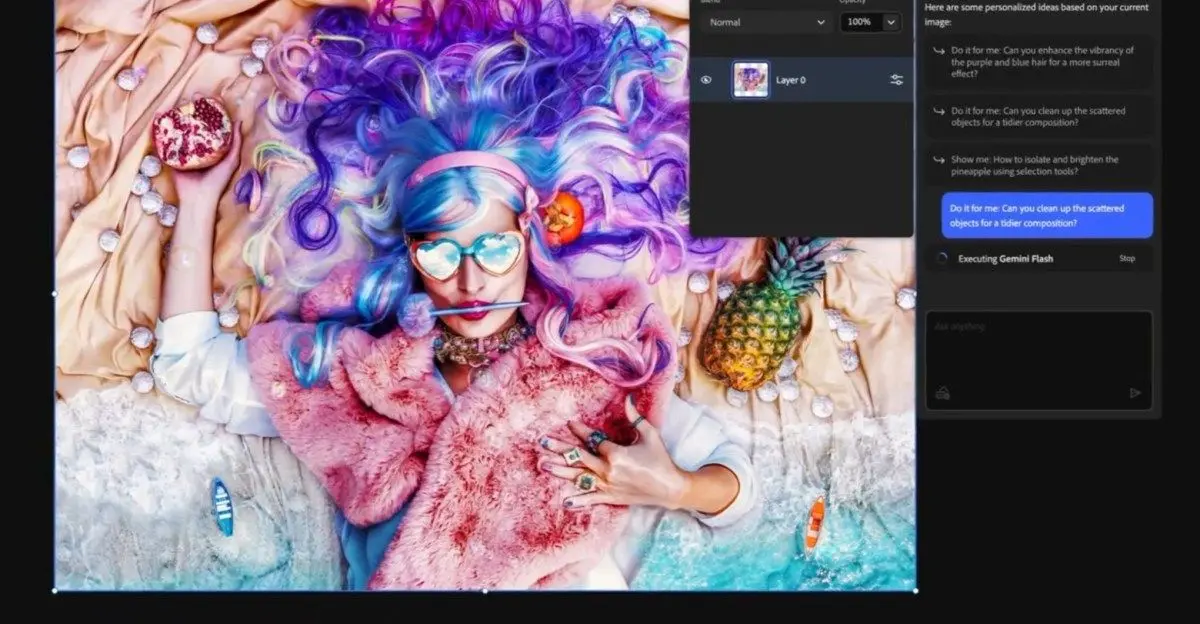
Adobe announced on Tuesday that its Photoshop AI assistant is now available in public beta for web and mobile apps, marking a significant expansion of the company's agentic AI capabilities across Creative Cloud
1
. First unveiled at Adobe's MAX event in October, the conversational tool enables users to edit images with text commands instead of navigating complex menus and toolbars5
. The assistant can remove distractions, change backgrounds, refine lighting, adjust colors, and perform various other edits through simple natural language prompts3
.
Source: Digit
Users working on mobile devices can even use voice prompts to request edits on the go
4
.The feature represents Adobe's broader push to integrate generative AI across its creative applications, following similar AI assistants launched for Adobe Express and Acrobat
2
. While the desktop version of Photoshop doesn't yet include this chatbot-like interface, Adobe teased in April last year that AI agents are being developed for both Photoshop and Premiere Pro3
.AI-Powered Image Editing With Educational Benefits
The Photoshop AI assistant offers users two distinct modes of operation. They can either have the assistant apply edits automatically or receive step-by-step instructions to learn the editing process themselves
3
. This educational approach could help address Photoshop's notoriously steep learning curve, making the software more accessible to beginners while helping experienced users complete routine tasks more quickly4
.Adobe is also introducing AI Markup in public beta for Photoshop web, allowing users to draw markers directly on their images and use conversational commands to transform those marked areas
1
. For instance, users can mark an area and type a prompt to add flowers or mountains, with Photoshop generating results within seconds4
.
Source: PetaPixel
Paid Photoshop users will receive unlimited generations with the AI assistant through April 9, while free users start with 20 generations
1
. Mike Polner, Adobe Firefly's vice president of product marketing for creators, explained that these AI efforts represent a spectrum of conversational editing capabilities, from simple commands like "Make my hat blue" to more complex contextual understanding2
.
Source: The Verge
Adobe Firefly Gains Professional Editing Tools
Alongside the Photoshop AI assistant launch, Adobe is expanding its Adobe Firefly media creation tool with new AI-powered image editing capabilities. Firefly is gaining Generative Fill, which has been available in Photoshop for several years, allowing users to replace or add objects while modifying backgrounds accordingly
1
. The platform is also adding generative remove for object removal, generative expand for increasing image size using AI, generative upscale features, and a one-click background removal tool1
.Adobe announced in February that it would allow unlimited generations for Firefly subscribers to encourage increased usage
1
. The company has also integrated over 25 third-party image generation models into Firefly, including Google's Nano Banana 2, OpenAI Image Generation, Runway's Gen-4.5, and Black Forest Labs' Flux.2 Pro1
4
.Related Stories

Growing Adoption Despite Professional Concerns
According to a recent Adobe survey of 16,000 global creators, 86% reported using creative generative AI, and 80% said it helped them create content they otherwise couldn't have made
2
. This aligns with the growing popularity of generative media tools, with newer models like OpenAI's Sora and Google's nano banana gaining viral attention this year2
.However, not all of Adobe's primary customers—professional photographers, designers, and illustrators—have embraced these AI ambitions. Some continue to raise concerns about AI ethics, legality, and energy use
2
. Despite these concerns, Adobe continues expanding its AI integrations, recently announcing that Adobe Express and Acrobat will soon be available to Microsoft Copilot 365 enterprise customers, and similar support was introduced to ChatGPT in December3
.References
Summarized by

Navi
[5]
Related Stories
Adobe Unveils AI Assistants for Photoshop and Express, Introducing Conversational Editing and Third-Party Model Integration
28 Oct 2025•Technology

Adobe Revolutionizes Photoshop with AI: New Tools and Features Unveiled
24 Apr 2025•Technology

Adobe Unveils Powerful AI-Driven Features in Photoshop, Revolutionizing Image Editing
29 Jul 2025•Technology

Recent Highlights
1
Apple Plans Major Siri AI Overhaul in iOS 27 With Third-Party Chatbot Integration
Technology

2
OpenAI shuts down Sora after six months, ending Disney's $1 billion licensing partnership
Technology

3
AI chatbots validate you too much, making you less kind to others, Stanford study reveals
Science and Research

Recent Highlights
Today's Top Stories



Your Daily Dose of Curated AI News
Don’t drown in AI news. We cut through the noise - filtering, ranking and summarizing the most important AI news, breakthroughs and research daily. Spend less time searching for the latest in AI and get straight to action.

