Nvidia DLSS 4.5 launches with 6x frame generation and dynamic mode for RTX 50 series GPUs


12 Sources
[1]
Nvidia rolls out DLSS 4.5 update with new frame generation features
The main standout of DLSS 4.5 is its 6x Multi Frame Generation feature for users with RTX 50-series GPUs. Nvidia says this mode uses its second-generation transformer AI model to generate "five additional frames for every single natively rendered one," with "minimal impact" to responsiveness -- up
[2]
We go hands-on with Nvidia's DLSS 4.5 Dynamic Multi Frame Generation and its 5X and 6X multipliers -- more generated frames, now tailor-made for your monitor's refresh rate
For GeForce gaming, 2026 has so far been the year of software updates to existing GPUs as the world's cutting-edge silicon gets swallowed up by AI demand. DLSS 4.5 upscaling was the first of those updates to arrive all the way back at CES 2026. That new upscaling model runs best on RTX 50- and
[3]
NVIDIA's DLSS 4.5 Multi Frame Generation tech is now available to boost your Hz
After releasing DLSS 4.5's Super Resolution feature earlier this year, NVIDIA has released an update with DLSS 4.5 features designed to boost frame rates on RTX 50 series cards. Those include DLSS 4.5 Dynamic Multi Frame Generation and DLSS 4.5 Multi Frame Generation 6X. With those, NVIDIA is
[4]
I tested DLSS 4.5 Dynamic Multi Frame Generation: It's not just AI trickery, it's Nvidia's cheat code for 4K 240Hz and a true console killer
Nvidia has just dropped DLSS 4.5 Dynamic Multi Frame Generation and I've been testing it for the past week. This takes the idea of multi-frame generation and adds automation to it, so AI only generates the frames you need rather than going over the top, and in my time using it, Team Green has
[5]

Nvidia DLSS 4.5 update with 6x frame generation lands on RTX graphics today
Following the controversial reveal of DLSS 5, Nvidia has officially rolled out DLSS 4.5 today, with the update arriving through a new Nvidia app beta release. The company says users can now access the full DLSS 4.5 feature set, including the new Dynamic Multi Frame Generation system and 6x Multi
[6]

The latest Nvidia App beta update adds DLSS 4.5 Dynamic Multi Frame Generation support and an intriguing Auto Shader Compilation feature to the green team suite
The Nvidia App beta has been updated to include DLSS 4.5 Dynamic Multi Frame Generation support for RTX 50-series owners. The much-anticipated tech allows for dynamic adjustment of AI generated frames based on a target frame rate, with the goal being consistently smooth, high fps gameplay. The
[7]

NVIDIA DLSS 4.5 Debuts Dynamic Multi Frame Generation and Higher Scaling
NVIDIA has begun deploying DLSS 4.5 through a beta update of its application, introducing a new phase in AI-driven rendering focused on expanded frame generation and adaptive performance control. The update increases the maximum multi-frame generation capability, allowing up to five AI-generated
[8]

DLSS 4.5 Dynamic Multi Frame Generation hands-on, tailor-made for high refresh-rate displays
DLSS 4.5 Dynamic Multi Frame Generation is now available. After going hands-on with NVIDIA's updated Frame Generation technology in recent days, it's safe to say that it not only improves the Multi Frame Generation technology that debuted with DLSS 4, but it's a version of the technology that makes
[9]
Hands-on with Nvidia's new Dynamic Multi Frame Generation: 5x and 6x modes push frame rates even higher than before, though you can have too much of a good thing
Earlier this month, Nvidia announced that RTX 50-series owners would soon be able to use an improved version of Multi Frame Generation (MFG) in games, one that could dynamically switch between modes, including a new 6x option. After our first glimpse of it at the CES show in January, we've now had
[10]

Nvidia Brings New AI Features With a New DLSS 4.5 Update
Nvidia's 6x multi-frame generation is built on 2nd gen transformer model Nvidia is now rolling out a major update to its Deep Learning Super Sampling (DLSS) 4.5. The new update brings a 6X multi-frame generation feature, which creates multiple AI-powered frames for every natively rendered frame.
[11]

We Tested Nvidia DLSS 4.5 Dynamic Multi-Frame Generation: Is It Worth It?
Nvidia technically launched DLSS 4.5 back at CES 2026, improving the already-great DLSS 4 algorithm with an updated transformer model for upscaling. But its headline feature, Dynamic Multi-Frame Generation, was absent until now. Essentially, this technology takes the 4x multi-frame generation that
[12]

How well does NVIDIA DLSS 4.5 actually perform?
NVIDIA's launching the biggest update to DLSS today in the form of DLSS 4.5. After what can be described as a rather harsh unveiling of DLSS 5, NVIDIA is focusing its energies on what they've done well for a long time. At least, until they can figure out a way to position DLSS 5 in a better light.
Share
Copy Link
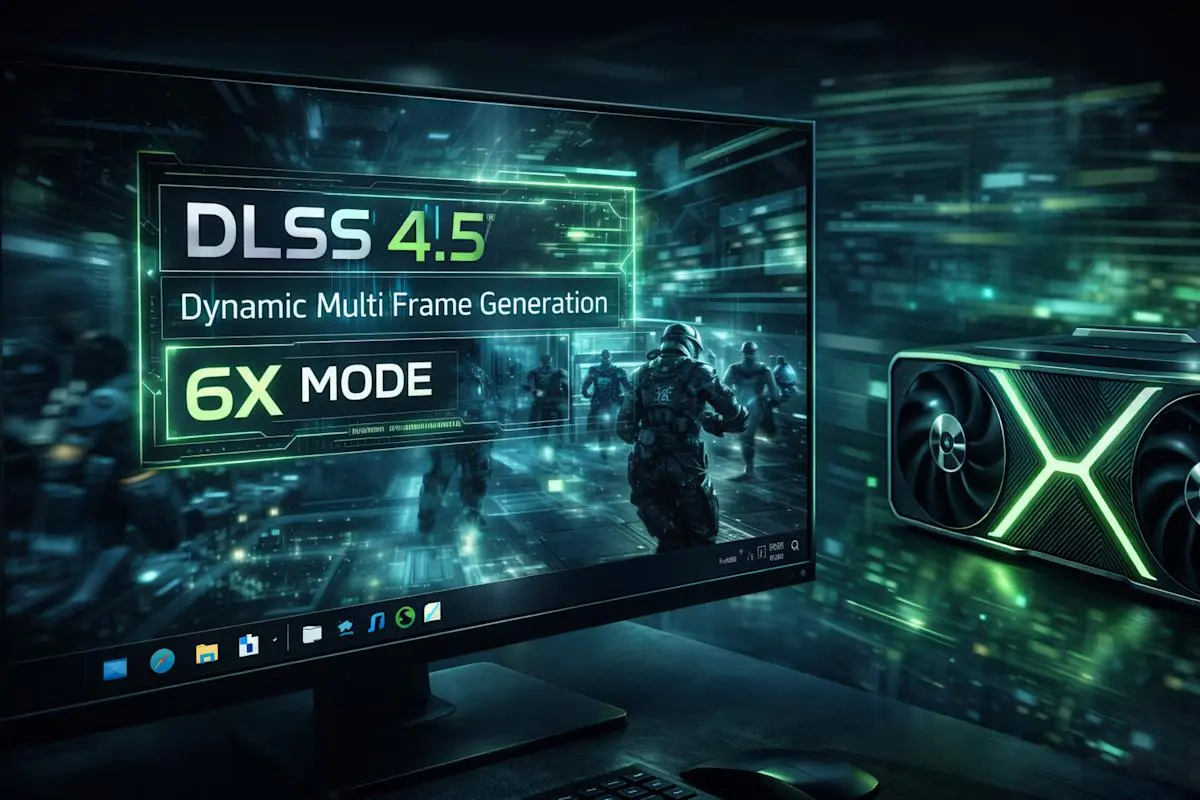
Nvidia has officially rolled out DLSS 4.5 through a beta update for the Nvidia App, bringing 6x Multi Frame Generation and Dynamic Multi Frame Generation exclusively to RTX 50 series GPUs. The update generates up to five additional frames for every natively rendered frame while automatically adjusting multipliers to match your monitor's refresh rate, promising smoother 4K 240Hz gaming with minimal latency impact.
Nvidia DLSS 4.5 Arrives with Advanced Frame Generation Capabilities
Nvidia has officially launched DLSS 4.5 through a beta update for the Nvidia App, introducing two major features designed to boost frame rates on RTX 50 series GPUs. The update delivers 6x Multi Frame Generation and Dynamic Multi Frame Generation, marking a significant evolution in the company's AI-powered graphics technology
1
. Users need GeForce Game Ready Driver 595.79 WHQL or newer to access the full feature set, which promises to unlock the potential of high-refresh displays including 4K 240Hz OLED monitors and 1080p or 1440p screens at 360Hz and beyond3
.
Source: Engadget
The release represents a software-focused approach for Nvidia as cutting-edge silicon continues to be consumed by AI demand. While DLSS 4.5 upscaling arrived earlier at CES 2026 and works across RTX graphics cards stretching back to the RTX 20 series, the new frame generation features remain exclusive to RTX 50 series GPUs
2
.6x Multi Frame Generation Pushes Performance Boundaries
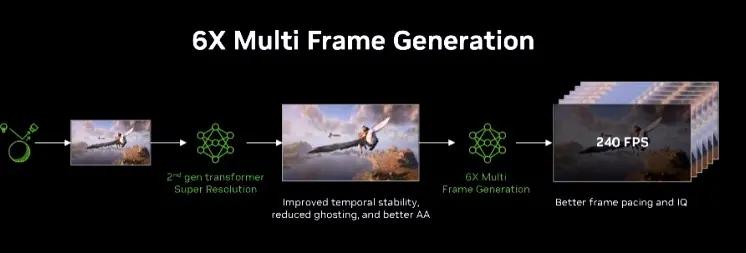
The standout feature of DLSS 4.5 is its 6x Multi Frame Generation capability, which uses Nvidia's second-generation transformer AI model to generate five additional frames for every single natively rendered frame
1
. This represents a substantial leap from DLSS 4's maximum of three additional frames. Nvidia claims the technology delivers up to 35 percent higher 4K frame rates with minimal impact to responsiveness3
.
Source: Guru3D
However, the technology doesn't accelerate the native frame rate of games. Instead, it uses AI to create interpolated intermediate frames, which can occasionally produce visual artifacts in scenes with fine details like rain, hair, and phone wires
3
. Testing revealed some ghosting issues in titles like Hogwarts Legacy and Cyberpunk 2077, particularly around character hair and at screen edges, though these artifacts remain relatively minor and easy to overlook during typical gameplay2
.Dynamic Multi Frame Generation Functions Like Automatic Transmission
Dynamic Multi Frame Generation represents a fundamental shift in how frame generation operates. Nvidia describes the system as functioning like an automatic transmission for your GPU, automatically switching between different multiplier levels to strike the perfect balance between frame rate, image quality, and responsiveness
1
. Rather than locking users into fixed multipliers that don't account for changing gaming workloads, the technology adjusts on the fly to maintain a target frame rate—typically your monitor's refresh rate2
.
Source: Digit
This optimization ensures that games don't generate frame rates exceeding the display's native refresh rate, preventing wasted computing power. Users can enable the feature manually on specific games or configure it to run globally on all available titles through the Nvidia App's Graphics tab
1
. Testing confirmed that multiplier shifts occur seamlessly without visible hitches or stutters, with any variance smoothed over by variable-refresh-rate displays2
.Related Stories

Latency Performance Exceeds Expectations
One of the most pressing concerns about generating multiple frames from limited input data has been latency, but testing suggests Nvidia has largely overcome this hurdle. With an RTX 5080 configuration, games maintained an average latency of 33-45ms while saturating high-refresh displays, with Cyberpunk 2077 achieving 45ms of input lag while maintaining 240Hz gaming—described as a landmark achievement
4
. The technology also delivered an average of 115 FPS across various tests for 1% lows, well above the variable refresh rate threshold and eliminating visible judder4
.The beta update includes two presets in the Nvidia App: Preset A takes a brute force approach with wider compatibility but potential UI smearing, while Preset B separates in-game visuals from UI elements to keep on-screen text sharp, though with limited compatibility requiring developer support
4
.Image Quality Improvements Through Super Resolution
Beyond frame generation, DLSS 4.5 leverages its second-generation transformer AI model for Super Resolution improvements, reducing ghosting and offering better temporal stability
5
. These upscaling enhancements ensure that the increased smoothness doesn't come at the cost of blurry or unclear visuals, addressing a common criticism of AI-powered graphics technologies.Testers noted that despite warranted skepticism about stretching one frame's worth of input data into four or five extra frames, the 5x and 6x modes work well enough to be mostly unnoticeable in practice—remarkable precisely because they're unremarkable during typical gameplay
2
. While RTX 40 series cards get access to standard frame generation tech, older RTX graphics cards lack support for these new features entirely5
.References
Summarized by

Navi
Related Stories
Nvidia DLSS 4.5 brings Dynamic Multi-Frame Generation to RTX 50-series GPUs on March 31
10 Mar 2026•Technology
Nvidia releases DLSS 4.5 with enhanced AI upscaling as 6x frame generation waits until spring
14 Jan 2026•Technology
Nvidia DLSS 4.5 brings AI upscaling improvements to all RTX GPUs, but older cards may struggle
14 Jan 2026•Technology

Recent Highlights



Recent Highlights
Today's Top Stories








Don’t drown in AI news. We cut through the noise - filtering, ranking and summarizing the most important AI news, breakthroughs and research daily. Follow topics that matter to you and stay ahead.


