Adobe Photoshop upgrades Generative AI tools with 2K resolution and geometry-aware features


3 Sources
[1]
Adobe Photoshop upgrades its Firefly-powered generative-AI editing tools
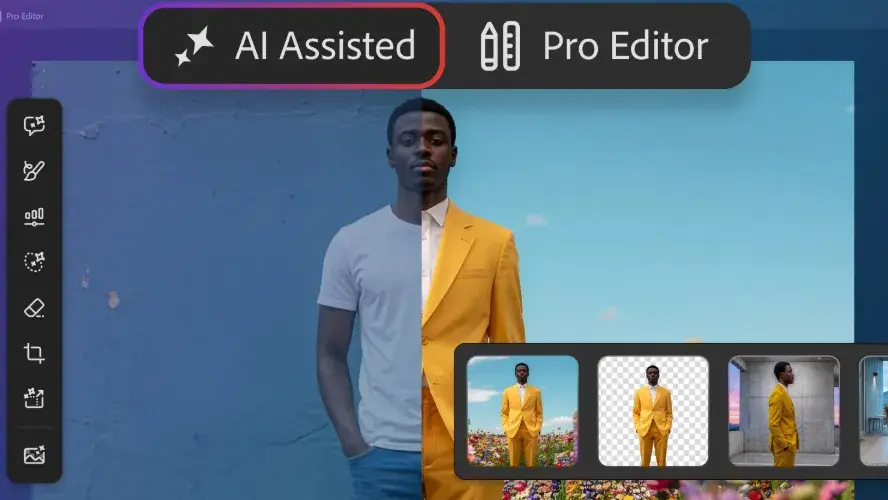
Adobe Photoshop introduced some new features that are rolling out for creators today. As you'd expect from any service operator in this day and age, there's some AI involved. Adobe has improved the tools for Generative Fill, Generative Expand and Remove that are powered by its Firefly generative AI
[2]
Photoshop's AI tools now offer more control with reference objects
Adobe is rolling out updates to a few AI-powered Photoshop features today, including referencing objects in Generative Fill. Here's everything new. New adjustment layers Photoshop is adding three non-destructive, maskable adjustment layers today: Clarity, Dehaze, and Grain. Adobe says the new
[3]
Adobe rolls out 2K resolution and "geometry-aware" AI to Photoshop
Adobe Photoshop rolled out upgraded Firefly-powered generative-AI editing tools today for creators. The enhancements improve Generative Fill, Generative Expand, and Remove functions through higher-quality outputs. These tools generate results at 2K resolution, exhibiting fewer artifacts and
Share
Copy Link
Adobe Photoshop has unveiled significant updates to its Firefly-powered generative AI editing tools, introducing 2K resolution output and geometry-aware capabilities. The enhancements to Generative Fill, Generative Expand, and Remove tools promise sharper detail with fewer artifacts. Creators also gain access to new non-destructive adjustment layers and a beta version of Dynamic Text for curved typography.

Adobe Photoshop Enhances Firefly-Powered Tools with Higher Resolution Output
Adobe Photoshop updates are bringing substantial improvements to creators through enhanced generative AI capabilities that deliver sharper, more accurate results. The company rolled out upgrades to its Firefly-powered tools today, focusing on Generative Fill, Generative Expand, and Remove functions that now produce outputs at 2K resolution
1
. These Photoshop updates rely on the latest Firefly Fill & Expand and Remove Tool 3 models, which significantly reduce artifacts while increasing detail and delivering better adherence to user-provided prompts2
. The improvements create more globally coherent light and depth effects, resulting in more realistic and polished edits that matter for both professional designers and casual creators seeking precision in their image editing workflows.Reference Image Option Gains Geometry-Aware Intelligence
The Reference Image option for Generative Fill has received a major upgrade that transforms how creators work with reference materials. Adobe describes this as one of its top-five features, and the enhancement now preserves the identity of actual objects from reference images rather than merely approximating their appearance
2
. The geometry-aware results better match the scene by reorienting objects to the correct scale, rotation, lighting, color, and perspective3
. This capability allows Photoshop to insert or adapt objects more accurately within a scene, significantly speeding up tedious editing tasks that even experienced users would take much longer to complete manually. The technology addresses a critical pain point in generative AI where maintaining contextual accuracy has been challenging.New Non-Destructive Adjustment Layers Expand Creative Control
Adobe Photoshop introduced three non-destructive adjustment layers that give creators more precise control over texture, depth, and detail: Clarity, Dehaze, and Grain
1
. These maskable layers permit image edits without modifying underlying content, preserving original files during adjustments3
. Creators can add dimension with Grain, cut through atmospheric haze and balance lighting with Dehaze, and enhance subject structure and crispness with Clarity while masking and blending each adjustment seamlessly2
. The addition of these tools reflects Adobe's strategy to balance AI-powered automation with traditional editing techniques that professionals rely on for nuanced control.Related Stories



Dynamic Text Beta Simplifies Typography Workflows
A beta version of Dynamic Text launched today, making it easier to transform text layers into circular, arched, or bowed shapes without complex workarounds
2
. Users simply select Dynamic Text and choose a shape, and Adobe Photoshop will automatically fit and resize the text, allowing creators to create, move, and refine text along paths quickly3
. This feature streamlines design workflows for varied typographic effects that previously required manual adjustments or third-party plugins. As Adobe continues integrating generative AI across its creative suite, these updates signal a broader shift toward tools that reduce technical barriers while maintaining professional-grade output quality that matters for competitive creative work.References
Summarized by

Navi
Related Stories
Recent Highlights
1
Meta Unveils Muse Wonder Frontier AI Models, Claims Performance Matching OpenAI and Anthropic
Technology

2
IMF Report Warns AI Market Correction Could Spark Global Financial Crisis With $1.4T at Risk
Business and Economy

3
OpenAI Releases 722 AI-Generated Math Solutions, Triggering Existential Crisis in Mathematics
Technology
Recent Highlights
Today's Top Stories












Don’t drown in AI news. We cut through the noise - filtering, ranking and summarizing the most important AI news, breakthroughs and research daily. Follow topics that matter to you and stay ahead.


