ChatGPT Atlas adds Tab Groups and Auto Search Switching between Google and AI


2 Sources
2 Sources
[1]
ChatGPT Atlas Gains Tab Groups, Auto Google/AI Search Switching
OpenAI is rolling out another noteworthy update to ChatGPT Atlas, its AI-powered browser for Mac. As per the release notes, the latest build introduces tab groups, allowing users to organize their browsing sessions more efficiently. The update also brings fixes for vertical tab "mini mode" and a simplified right-click context menu for tabs. On the search front, Atlas now features an "Auto" mode that automatically switches between ChatGPT and Google depending on the query. The search results UI has also been refreshed with a new vertical layout that more prominently displays links in answers. Elsewhere in this update, Safari users migrating to Atlas will now be prompted to install the iCloud passwords extension during onboarding. Other changes include a simplified address bar context menu, crash fixes, updated translations, and support for macOS keyboard text replacements on webpages. Today's update follows the browser's first major update that came in November. That introduced vertical tabs, iCloud Passkey support, and Google as a default search engine option. Atlas currently remains available only on macOS, but OpenAI has said Windows, iOS, and Android versions are coming.
[2]
ChatGPT Atlas now lets you organize tabs into groups
Its latest update also brings a handy "Auto" mode that switches between ChatGPT and Google based on your queries. OpenAI just pushed a fresh update for ChatGPT Atlas, its AI-powered browser for macOS, and it brings some genuinely useful upgrades that make the browsing experience smoother and more organized. According to the release notes, the highlight feature in the latest update is Tab Groups, which allow you to organize webpages much like in Chrome or Safari. The update also brings some additional changes for tabs, including fixes for vertical tab "Mini mode" and a simplified tab context menu. Recommended Videos Atlas' search experience has also been updated with a new "Auto" mode that automatically switches between ChatGPT and Google depending on the user's query. This means you no longer have to manually switch search engines whether you want direct links or conversational answers. On top of that, search results now show links in a vertical format that's easier to scan. Quality-of-life tweaks across the board For users switching over from Safari, the onboarding flow will now suggest installing the iCloud password extension, making it easier to bring over saved passwords and other credentials. Other small but useful tweaks include a simplified context bar menu, crash fixes, updated translations, and support for macOS keyboard text replacements on webpages. This update follows the browser's first major post-launch update, which rolled out in November last year and introduced vertical tabs, the ability to set Google as the default search engine options, and iCloud Passkey support. These improvements highlight OpenAI's focus on making Atlas feel more like a full-featured browser while keeping its AI functionality front and center. The update is already rolling out to users on macOS, the only platform where Atlas is currently available. However, OpenAI has confirmed that Windows, iOS, and Android versions are in the works and could roll out soon.
Share
Share
Copy Link
OpenAI rolls out a major update to ChatGPT Atlas, its AI-powered browser for Mac, introducing Tab Groups for better organization and an Auto mode that intelligently switches between ChatGPT and Google search. The update also brings a refreshed vertical layout for search results and improved onboarding for Safari users migrating to the platform.
OpenAI Enhances ChatGPT Atlas with Tab Groups and Smart Search
OpenAI has released a significant update to ChatGPT Atlas, its AI-powered browser for Mac, introducing features that bridge traditional browsing with AI capabilities
1
. The latest build centers on Tab Groups, allowing users to organize tabs into groups much like Chrome or Safari, addressing a core need for anyone managing multiple browsing sessions2
. This addition positions ChatGPT Atlas for macOS as a more competitive alternative in the browser landscape, where organizational tools have become essential for productivity.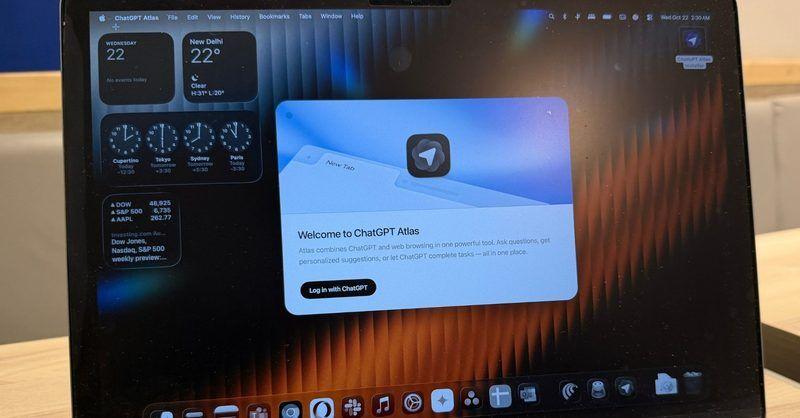
Source: Digital Trends
Auto Mode Transforms Search Experience
The update introduces an Auto mode that automatically switches between ChatGPT and Google depending on the search query, eliminating manual toggling between conversational AI responses and traditional web links
1
. This intelligent switching mechanism represents a practical approach to hybrid search, recognizing that users need different types of results for different queries. The search results UI has been refreshed with a vertical layout that more prominently displays links in answers, making it easier to scan through results2
. For users accustomed to traditional search engine layouts, this vertical format offers familiarity while maintaining AI-powered browser functionality.Quality-of-Life Improvements Across the Board
Beyond headline features, the update delivers several refinements that improve user experience. Safari users migrating to the AI-powered browser for Mac will now be prompted to install the iCloud passwords extension during onboarding, streamlining the transition process
1
. The release notes detail fixes for vertical tab "mini mode" and a simplified right-click context menu for tabs, alongside a simplified address bar context menu2
. Crash fixes, updated translations, and support for macOS keyboard text replacements on webpages round out the technical improvements, addressing stability concerns that have plagued earlier versions.Related Stories
Building Momentum Since November Launch
This update follows ChatGPT Atlas's first major update that rolled out in November, which introduced vertical tabs, iCloud Passkey support, and Google as a default search engine option
1
. The rapid iteration cycle suggests OpenAI is committed to making Atlas feel more like a full-featured browser while keeping its AI functionality front and center. Currently available only on macOS, the platform remains in its early stages, but OpenAI has confirmed that Windows, iOS, and Android versions are in development and could roll out soon2
. The ability to organize tabs into groups and the Auto Google/AI Search Switching feature indicate OpenAI's strategy to compete not just on AI capabilities, but on the fundamental browsing features users expect from established players like Chrome and Safari.References
Summarized by

Navi
[2]
Related Stories
ChatGPT Atlas Browser Receives Major Update with Vertical Tabs and Enhanced Security Features
20 Nov 2025•Technology

OpenAI Challenges Chrome with AI-Powered Browser ChatGPT Atlas
21 Oct 2025•Technology
OpenAI Expands ChatGPT's Capabilities on macOS with Apple Notes and Third-Party App Integration
20 Dec 2024•Technology

Recent Highlights


Recent Highlights
Today's Top Stories












Your Daily Dose of Curated AI News
Don’t drown in AI news. We cut through the noise - filtering, ranking and summarizing the most important AI news, breakthroughs and research daily. Spend less time searching for the latest in AI and get straight to action.

