Gmail AI Inbox launches for premium subscribers with smart prioritisation and email summaries


4 Sources
4 Sources
[1]
Gmail's new AI Inbox cuts through your clutter
Rajesh started following the latest happenings in the world of Android around the release of the Nexus One and Samsung Galaxy S. After flashing custom ROMs and kernels on his beloved Galaxy S, he started writing about Android for a living. He uses the latest Samsung or Pixel flagship as his daily driver. And yes, he carries an iPhone as a secondary device. Rajesh has been writing for Android Police since 2021, covering news, how-tos, and features. Based in India, he has previously written for Neowin, AndroidBeat, Times of India, iPhoneHacks, MySmartPrice, and MakeUseOf. When not working, you will find him mindlessly scrolling through X, playing with new AI models, or going on long road trips. You can reach out to him on Twitter or drop a mail at [email protected]. In January this year, Google announced several new AI-powered features for Gmail, including AI Overviews and the wider availability of Help Me Write, Suggested Replies, and Proofread. It also announced AI Inbox, designed to cut through clutter and highlight only the most important emails. Initially limited to select testers, Google is now rolling out AI Inbox to its most premium AI users. The AI-powered Gmail Inbox will be available to Google AI Ultra subscribers, which costs $250 per month, in the US. As its name suggests, this is Google's Ultra tier, offering higher usage limits for Gemini, 30TB Google Cloud storage, and access to the company's other advanced AI tools. AI Inbox is the latest perk to join the list. It will appear as a separate option in Gmail's sidebar on the web. It does away with the traditional inbox approach. Instead, it displays a list of briefings based on the email's content and sorted based on priority. Essentially, Google does not want you to open and read an email. You switch to AI Inbox and get a personalized briefing of all the important information. AI Inbox highlights what matters most Briefings of the less-important emails are shown under the "Topics to catch up on" section below the "Suggested to-dos." Below is how Google's support page explains the two sections of the AI Inbox: Suggested to-dos: This section shows things that need your attention or action from incoming emails. It identifies high-priority items and explains what you need to do in bold text, like a due date for a utility or credit card bill. Topics to catch up on: This section gives you a quick summary of important updates. It helps you stay updated on things like upcoming travel, restaurant reservations, purchase confirmations, and more. Based on Google's previous rollout timelines, it should expand AI Inbox access in Gmail to AI Pro subscribers in the coming months. Subscribe to our newsletter for Gmail AI briefings Get clear, practical coverage of Gmail's AI innovations by subscribing to our newsletter. We break down features like AI Inbox, explain what matters, and deliver concise analysis and use-case guidance so you can make informed choices about Google's AI tools. Get Updates By subscribing, you agree to receive newsletter and marketing emails, and accept our Terms of Use and Privacy Policy. You can unsubscribe anytime. AI Inbox expands to Gmail subscribers as Google finally allows username changes. Unlike the former, the option is available to all Gmail users in the US, whether they pay for Google's AI plan or not.
[2]
Gmail rolling out AI Inbox beta for AI Ultra subscribers
Following the announcement in January, Google is beginning to roll out AI Inbox in Gmail to AI Ultra members. AI Inbox is a new interface that exists in addition to the reverse chronological list of messages. On the web, "AI Inbox" appears above "Inbox" in the side panel. Google wants to provide a personalized briefing that surfaces the actual information you need instead of a message that you have to open and read. There's a greeting that offers a count, with the last refresh (time) noted in the corner. You'll then see "Suggested to-dos" that you need to act on, like reminders, bills, and other short-term tasks. Gmail links to the email at the end, while you'll find a checkmark at the right. Less pressing matters that are not immediately actionable are part of the "Topics to catch up on" section. You might see groupings like Events, Travel Planning, and Health & Wellness with bullets underneath. This is powered by Gemini 3 and leverages a new "engineered privacy" environment where your information is processed in and doesn't leave a dedicated space. You can turn off AI features by disabling smart features at any time, while Google reiterates that personal Workspace content is not used to train its AI models. AI Inbox first came to Trusted Testers in January, and is now rolling out in beta to Google AI Ultra ($249.99 per month) subscribers. In January, Google also announced AI Overviews in Gmail search and Proofread for advanced grammar, tone, and style checks.
[3]
Gmail Rolls Out AI Inbox With Smart Prioritisation for These Users
* Gmail AI Inbox groups emails into tasks and updates * Gmail redesign focuses on summaries instead of email lists * Premium Gmail users get early access to AI inbox experience Gmail is rolling out its AI-powered Inbox feature to select Google AI Ultra subscribers in the US, expanding on the Gemini-driven updates it introduced earlier this year. The new feature adds a dedicated AI view within Gmail that highlights priority emails, surfaces actionable tasks, and groups less urgent updates into summaries. It is said to be designed to reduce inbox clutter and help users quickly focus on what matters most, building on Google's broader push to integrate AI more deeply across its email experience. Gmail's AI Inbox Feature Splits Email Into Two Sections Gmail said in an X post that it has introduced an AI-powered Inbox with smart prioritisation and personalised briefings, now rolling out in beta to Google AI Ultra subscribers in the US. The new AI Inbox appears as a separate view alongside the traditional inbox and is designed to surface priority information, rather than requiring users to scan individual emails. The AI Inbox feature splits emails into two sections. While suggested to-dos highlight messages that need action, such as bills, reminders, or deadlines, and show what needs to be done, topics to catch up on cover less urgent updates, grouping things like travel plans, events, and purchases into quick summaries. These appear as interactive cards that link back to the original emails. AI Inbox was first introduced to a small group of testers in January and is now rolling out in beta. It runs on Gemini 3 and processes data within what Google describes as a dedicated privacy environment. Users can turn off AI features through Gmail settings, and the company says personal Workspace data is not used to train its AI models. The Gmail AI Inbox rollout builds on earlier Gemini features in Gmail, like natural language search, email summaries, Help Me Write, and Suggested Replies. While some of these tools are available to all users, AI Inbox is currently limited to Google AI Ultra subscribers, priced at $249.99 (roughly Rs. 23,400) per month in the US. Google is expected to expand availability over time as testing continues.
[4]
How to set up an AI Inbox in your Gmail for clutter free emails
Checking your email inbox shouldn't be a task. However, we are bombarded with a huge number of emails on a daily basis, and this can become a problem. In this give-and-take process, important emails often get lost, and less important ones are wasting your precious time. To solve this problem, Google has brought a new feature. It offers quick summaries, highlights urgent tasks, and neatly groups less important updates. With all this organisation, you can see what's truly important in seconds instead of looking at all your emails. It's a smarter approach to your inbox and can save you a lot of time. In this guide I will walk you through everything you need to know about the all-new AI Inbox feature in Gmail. The tech giant announced AI Inbox for the first time in January as part of its efforts to bring smarter tools to Gmail users. The feature is rolling out to a limited number of AI Ultra subscribers, as announced by Google's official X (formerly Twitter) account. Before you learn how to set up the AI inbox on your Gmail, here are some of the things you need to know: Note: The feature is being rolled out in phases, so you may not see it yet even if you meet the criteria above. Also read: Oracle layoffs hit India hard: 12,000 jobs cut, more layoffs may follow soon If you're looking to set up the AI inbox in your Gmail, then you should keep in mind that the function can't work without the permission to analyse your emails for summaries and to-dos. Here's how you can give the required permissions: 1. Launch Gmail website or app on your device. 2. Head to the Settings tab by pressing the gear icon and select See all settings. Note: If you're using the Gmail app, then you can find the Settings in the hamburger menu (three lines icon). 3. Under the General tab, scroll down to the Smart features and personalisation section. 4. Make sure that the box next to Smart features or Smart features and personalisation' is checked. Note: If this is off, Gemini will not be able to read your emails and create the daily briefings or suggested to-dos. 5. Now, scroll to the bottom and click Save Changes if you made any updates. Also read: Apple breaks its own rule, sends critical security update to older iPhones amid DarkSword threat If you've received it, then here's how you can access the AI Inbox feature: In the left column, look for the tab labelled 'AI Inbox'. It would be placed above the Inbox tab. Many users in the Beta may also get to see a promotional banner at the top of their regular inbox. The banner may say 'Try the new AI Inbox'. Once you click that banner, you'll be redirected to the AI Inbox view.
Share
Share
Copy Link
Google is rolling out AI Inbox to AI Ultra subscribers in the US, bringing smart prioritisation and prioritized briefings to Gmail. The AI-powered tool transforms email management by surfacing actionable to-dos and organizing less urgent updates into summaries, eliminating the need to manually sort through email clutter.
Google Launches AI Inbox for Premium Gmail Users
Google has begun rolling out AI Inbox to AI Ultra subscribers in the US, marking a significant shift in how users interact with their Gmail accounts
1
. First announced in January alongside other AI-powered features like AI Overviews, Help Me Write, and Proofread, the AI view in Gmail moves away from traditional chronological email lists2
. Instead of opening individual messages, users receive prioritized briefings that surface the most critical information automatically.
Source: Android Police
The feature is currently available to premium subscribers paying $249.99 per month for Google AI Ultra, which also includes higher usage limits for Gemini, 30TB of cloud storage, and access to advanced AI tools
3
. After initial testing with Trusted Testers in January, this beta rollout represents Google's broader push to integrate AI more deeply across its email platform.How Smart Prioritisation Transforms Email Management
AI Inbox appears as a separate option in Gmail's sidebar on the web, above the standard inbox view
1
. The interface greets users with a message count and displays when the view was last refreshed. Rather than forcing users to sift through email clutter, the AI-powered tool automatically organizes messages into two distinct sections designed to reduce cognitive load.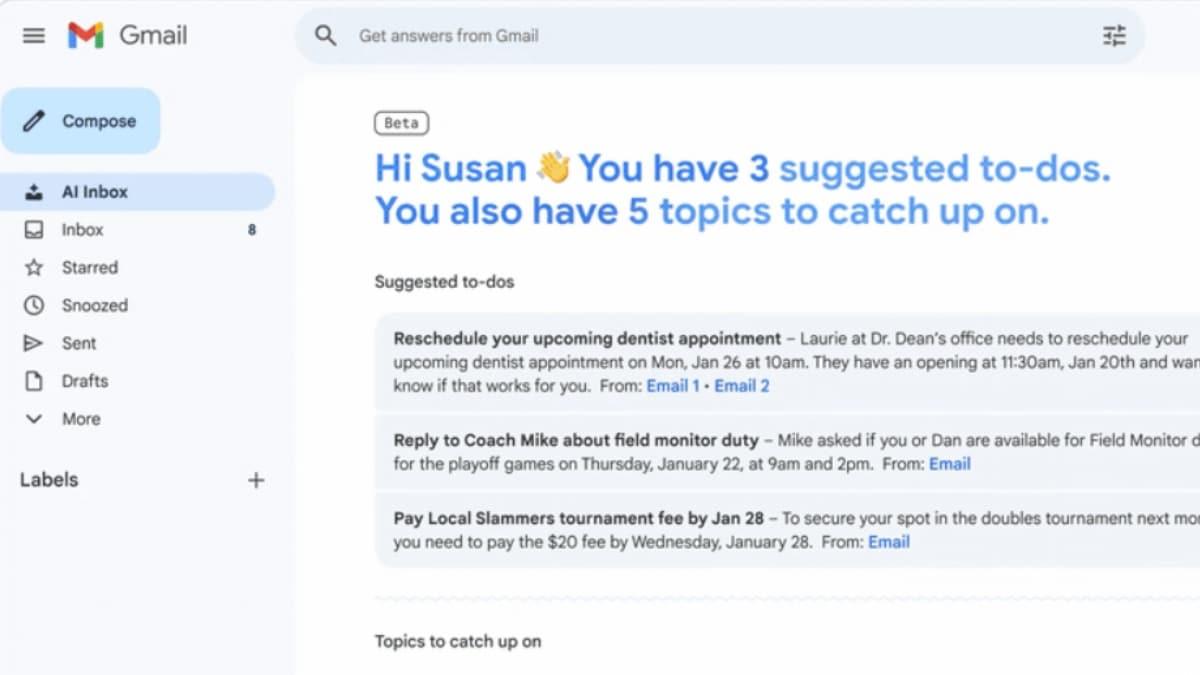
Source: Gadgets 360
The "Suggested to-dos" section highlights actionable to-dos that require immediate attention or action from incoming emails. This includes high-priority items like utility bill due dates, credit card payment reminders, and other time-sensitive tasks
4
. Each briefing explains what needs to be done in bold text, with a link to the original email and a checkmark for task completion.Email Summaries Group Less Urgent Updates
Below the priority tasks, the "Topics to catch up on" section provides email summaries of less pressing matters that don't require immediate action
2
. Google automatically groups related messages into categories like Events, Travel Planning, Health & Wellness, restaurant reservations, and purchase confirmations. These appear as interactive cards with bullet points underneath, allowing users to quickly scan updates without opening individual emails.This approach fundamentally changes how users process their inbox. Google wants to provide a personalized briefing that surfaces actual information rather than requiring users to open and read each message individually. For professionals managing hundreds of daily emails, this could translate to significant time savings and reduced inbox anxiety.
Related Stories

Privacy Protections and User Control
The AI Inbox feature runs on Gemini 3 and processes data within what Google describes as an "engineered privacy" environment
2
. This dedicated space ensures that user information is processed within a contained system and doesn't leave that environment. Google emphasizes that personal Workspace content is not used to train its AI models, addressing privacy concerns that often accompany AI-powered tools.Users must grant user permissions for the feature to function properly. To enable AI Inbox, subscribers need to activate "Smart features and personalisation" in Gmail settings, which allows Gemini to analyze emails for creating daily briefings and suggested to-dos
4
. Users can disable AI features at any time through their Gmail settings, maintaining control over how their data is processed.Phased Rollout and Future Availability
The current beta rollout is limited to Google AI Ultra subscribers in the US, with a phased rollout approach that means not all eligible users will see the feature immediately
4
. Based on Google's previous rollout timelines, the company is expected to expand AI Inbox access to AI Pro subscribers in the coming months1
.The $250 monthly price point positions AI Inbox as a premium offering for power users and organizations willing to invest in productivity tools. This pricing strategy mirrors Google's approach with other enterprise AI features, where advanced capabilities remain exclusive to top-tier subscribers before potentially trickling down to broader user bases. Industry observers are watching to see whether the value proposition justifies the premium cost, particularly as competing email platforms develop their own AI capabilities.
References
Summarized by

Navi
[1]
[2]
Related Stories
Google unveils AI Inbox for Gmail with smart summaries and natural language search capabilities
08 Jan 2026•Technology

Google removes paywall on Gmail's Help Me Write and AI summaries, making them free for everyone
08 Jan 2026•Technology

Google Unveils AI-Powered Upgrades to Gmail and Workspace Suite
21 May 2025•Technology

Recent Highlights


Recent Highlights
Today's Top Stories




Your Daily Dose of Curated AI News
Don’t drown in AI news. We cut through the noise - filtering, ranking and summarizing the most important AI news, breakthroughs and research daily. Spend less time searching for the latest in AI and get straight to action.

