Google Canvas in AI Mode expands to all US users with document drafting and tool creation


8 Sources
8 Sources
[1]
Google's Gemini rolls out Canvas in AI mode to all US users | TechCrunch
Google has expanded access to Canvas in AI Mode to all users in the U.S. in English, after first launching the feature as part of its Google Labs experiments last year. Canvas in AI Mode is designed to help users organize and plan projects or delve into deeper research. The feature now supports the ability to draft documents or create custom tools within Google Search, the company said in a blog post. Google previously suggested using Canvas for tasks like building a study guide by uploading class notes and other sources; the feature can also complete other tasks such as turning a research report into a web page, quiz, or audio overview, which has some overlap with Google's research tool Notebook LM. Users can describe an idea to Canvas and watch as it generates the code to transform that idea into a shareable app or game. The feature can also be used to help refine creative writing drafts and get feedback on projects. Canvas is already available in Gemini, where Google AI Pro and Google AI Ultra subscribers have access to the latest model, Gemini 3, and a larger 1 million-token context window for more complex projects. More people will be exposed to Canvas now that it's available to all users in the U.S. through Google's AI search feature known as AI Mode, including those who haven't yet dabbled with Gemini's capabilities. That's one of Google's advantages in the AI race -- the reach of Google Search gives it the power to place its products in front of billions of users. To use Canvas, users select the new Canvas option from the tool menu (+) while in AI Mode, then describe what they want to create. This opens up a Canvas side panel where users can pull together information from the web and Google's Knowledge Graph. If building a prototype or app, users can test the functionality, toggle to see the underlying code, and refine how the app works by chatting with Gemini. Canvas competes with similar tools from rivals like OpenAI and Anthropic. However, ChatGPT's Canvas feature is triggered automatically based on the query, while Google and Anthropic's Claude require more direct interaction. Both also allow users to get help with writing or turn ideas into projects.
[2]
Google's Canvas AI Project-Planning Tool Is Now Available to Everyone in the US
Julian is a contributor and former staff writer at CNET. He's covered a range of topics, such as tech, crypto travel, sports and commerce. His past work has appeared at print and online publications, including New Mexico Magazine, TV Guide, Mental Floss and NextAdvisor with TIME. On his days off, you can find him at Isotopes Park in Albuquerque watching the ballgame. Canvas, the AI planning tool from Google Search, has rolled out across the US, the company said Wednesday. Canvas is essentially a project planning tool with a range of uses, including trip planning. You can select the tool directly from the AI Mode screen at the top of the Google Search results page. The tool is integrated into AI Mode and can be used on both desktop and mobile devices, including smartphones and tablets. However, because Canvas opens a second screen beside the main chat window, it's a little trickier to see on a smartphone. You'll have to toggle between the screens. Planning trips is one of Canvas's main functions, with the ability to view and account for flights, hotels and other relevant information in real time. "Canvas makes it easy to build travel plans customized for your specific needs -- bringing together real-time Search data for flights and hotels, details from Google Maps like photos and reviews, and relevant information from sites across the web," a Google spokesperson told CNET. Google also notes you can use Canvas as an academic scholarship tracker, which includes dollar amounts and deadlines. Once you're in the AI Mode screen on Google, you can select the Canvas option from the plus sign that appears on the left side of the box where you type. Clicking the Canvas button opens the project in a side panel. From there, you can refine the project with the standard chat prompts. You can even look at the underlying code and adjust the Canvas window's user interface, such as switching to dark mode. Rose Yao, vice president of product for Google Search, posted a thread on X on Wednesday, sharing a video of a summer camp project for her kids. Canvas created an interactive dashboard that sorts camp options by cost, distance and focus. "We're adding support for coding & creative writing tasks, so you can bring even more ideas to life with custom dashboards or interactive tools," Yao wrote in the post. Google first announced Canvas for AI Mode in July 2025, and later that year, expanded Canvas's travel features. There's no word yet from Google on when Canvas will expand into other languages and other countries.
[3]
Google's AI-powered workspace is now available to more users in Search
Google is bringing Canvas to everyone in the US using AI Mode in Search. The feature opens up a dedicated workspace within its AI-powered search tool, allowing it to use the latest information from Search to organize plans, develop tools, and draft documents in a panel alongside your chat. Though Google initially launched Canvas inside its Gemini app as a way to create documents and code in real-time, it later tested the feature in AI Mode -- but only for visualizing travel plans. Now, you can use Canvas in AI Mode for tasks related to creative writing and coding, too, giving you the ability to view an AI-generated dashboard laying out information related to your prompt, or an interactive prototype of a tool you're developing. You can try out the feature by navigating to AI Mode in Search, selecting the "plus" button inside the chat window, and then choosing Canvas. From there, you can describe what you want to create, and Google will display the results in a panel on the right side of your screen. This feature is currently only available in English.
[4]
Now's your chance to try Google's Canvas in AI Mode, with document drafting and tool creation
Canvas can generate working prototypes from prompts, which you can refine or edit through a code view. Ever since ChatGPT and the other chatbots arrived on the scene, Google has been keeping up by steadily evolving its AI-powered search experience beyond simple answers. The latest update gives it another new trick -- Canvas in AI Mode can now generate documents and even simple interactive tools directly from a prompt inside Search. According to a post on the Google Blog, the company says Canvas in AI Mode is now available to all US users in English. The feature was previously limited to a Search Labs experiment, but it's now rolling out more broadly along with its enhanced capabilities. Google first introduced the workspace in Gemini before bringing it to AI Mode in Search last year, where it was mainly used to refine results for things like studying or planning trips. With the latest update, Canvas can now handle creative writing tasks and coding projects, letting you draft documents or generate custom tools right within the AI-powered search interface. To use it, you select the Canvas option from the tool menu (the + icon) in AI Mode and describe what you want to create. Google then generates a working prototype in a side panel that pulls information from the web and Google's Knowledge Graph. From there, you can test the functionality, refine the results with follow-up prompts, or switch to a code view to see and edit the underlying code. One example Google highlighted from early testers involved building a dashboard to track academic scholarships. The blog entry has a GIF showing that example being built, and it all underlines how little you need to stray from a quick search to vibe-coding a basic app in 2026.
[5]

Google Search's AI Mode just built me an app
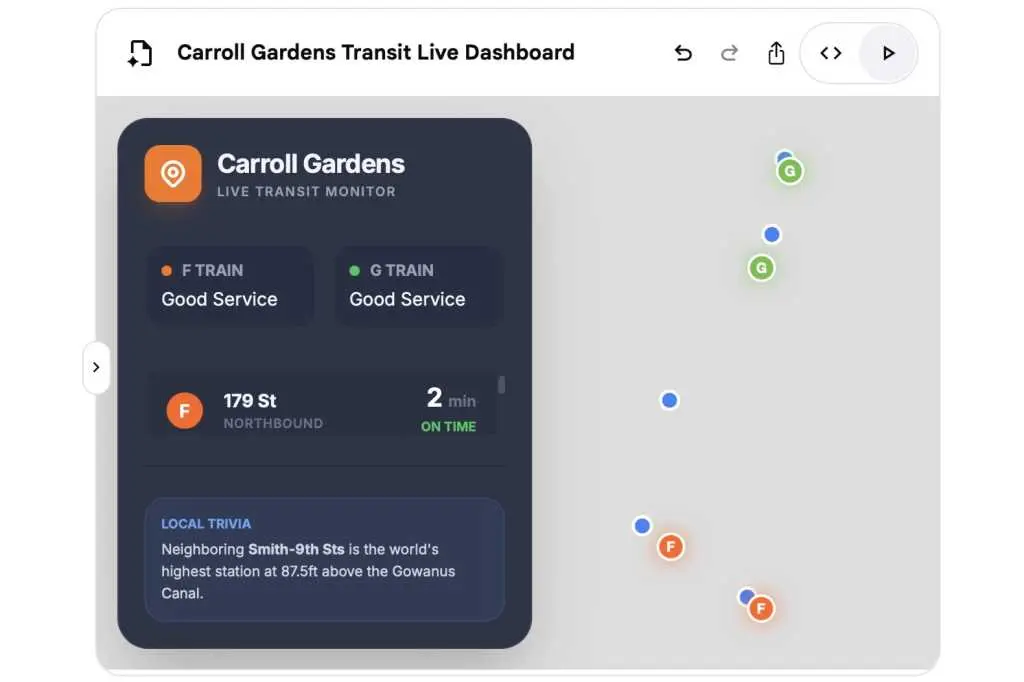
Canvas is now available to all U.S. users, enabling easy modification of generated prototypes through prompts or direct code editing. You've probably heard of vibe coding, seen ads for it on the Super Bowl, or read about AI coding environments like Claude Code or Codex. But if you want to try vibe coding for yourself, right here and right now, just head to Google Search. Are you there? OK, now click the AI Mode button, click the "+" in the search box, and select Canvas. Now, ask Google to make something for you-an app, a website, anything. I started with this: "can you give me a working prototype of a commerce web site for t-shirts?" The next thing I knew, Gemini's gears were turning, its thought process visible in the left column of the page, while another element-the Canvas-spring into view on the right, with lines of code rapidly scrolling down the page. Suddenly, the code inside the canvas disappeared, replaced by something new: a T-shirt commerce website, just like I asked for. Of course, the T-shirt site that Google Search and its Gemini-powered AI Mode produced isn't an actual live website-or at least, not yet. But it could be the beginning of one, and you could easily copy the code into an AI coding tool like Claude Code, OpenAI's Codex, or Google Antigravity. Next, I tried something a little more ambitious: "make me a dashboard that shows the location of subway trains in the area." Again, Gemini's AI Mode spun to life, with Google finding ways to integrate live New York MTA subway data to the app I'd requested. The Canvas panel opened anew, and a few seconds later, boom: There was my app, with a glowing green "live" indicator and readouts of subway lines. A few things weren't quite right-I wanted the app to focus on the Carroll Gardens station, not just the generic area-but all I had to do was ask for the fix ("make the app focus on the Carroll Gardens shop"), and Gemini made it so. First launched last year as a Google Labs experiment, Canvas in AI Mode is now available to all U.S. users (English only for now), and it performs other cool tricks besides building instant prototypes for websites and apps. It can also draft creative writing samples, create dashboards that incorporate live Google Search results, and more. Just use your imagination. You can interact with your Canvas project using the preview mode or click a toggle to see-and if you like, copy-the underlying code. If you want changes or revisions, just type in a prompt. Canvas in AI Mode may look familiar to Gemini app users, who can also quickly create projects and prototypes with its own Canvas tool. It also reminds me of Lovable, a third-party "no-code" tool that specializes in instant website prototypes. But Canvas in AI Mode works best as a way to anyone to try vibe coding themselves, instantly. Go give it a try.
[6]

Google's AI Mode in Search now lets you plan, write, and code on its own Canvas
Canvas turns Google Search into a workspace for planning and coding Google Search has updated Canvas inside AI Mode, a workspace powered by Gemini that already lets users draft and refine documents, to now support coding projects and interactive tools. With the latest update, you can plan, code, and build small apps directly inside Google Search without switching to separate editors or coding environments. AI Mode is Google's conversational search experience that replaces traditional results with AI-driven responses. Canvas in AI Mode is now available to everyone in the United States in English. Canvas now supports writing and coding projects Canvas appears as a side panel within AI Mode, and you can continue improving the project you are working on through follow-up prompts. Recommended Videos To make your own tool or dashboard, select the new Canvas option from the tool menu in AI Mode and describe what you want to create. Gemini then generates a working prototype that appears inside the Canvas panel. For example, you can request a basic web app, a calculator, or a simple game, and the AI will produce working code that appears inside Canvas. Once the code is generated, you can review it, edit it, and ask Gemini to improve or expand it. The system can help add new features, debug issues, or explain how parts of the code work. Canvas continues to support writing tasks such as drafting essays, planning reports, or organizing study guides. You can highlight sections and ask Gemini to expand ideas, simplify explanations, or restructure the content. The AI can also pull relevant information from the web and Google's knowledge graph to help refine the work. With Canvas mode, you can also plan and book your trip using AI. With this update, Google is turning Search into more than a place to find information. It is now a space where users can build, write, and refine projects with the help AI.
[7]

All Users Get Access to New Canvas in AI Mode
We may earn a commission when you click links to retailers and purchase goods. More info. Right inside of Google Search, all users within the US can now access Canvas in AI Mode, with no Labs opt-in required. Canvas is a dedicated space to organize plans and projects, such as trips or research. While availability has been widened, Google also introduced new features, such as support for creative writing and coding tasks. Google provides a pretty wonderful example of how to utilize Canvas, tasking it with creating, "a dashboard to visualize and track information on academic scholarships, including all the different requirements, deadlines and dollar amounts." To start using Canvas in AI Mode, select the new Canvas option from the tool menu in AI Mode and simply describe what you want to create. Users will get a first draft on the Canvas side panel, which you can then refine through follow-ups until you like what you have.
[8]

Google rolls out Canvas in AI Mode to all US users in English
Google has made Canvas in AI Mode available to all U.S. users in English. The expansion moves the feature beyond Google Labs, allowing more users to organize projects, conduct research, and draft documents or custom tools directly within Google Search. Canvas can generate study guides from uploaded notes and convert research reports into web pages, quizzes, or audio overviews, Google stated in a blog post. The feature also enables users to describe an idea, prompting Canvas to generate code for a shareable application or game. Video: Google It can refine creative writing drafts and provide project feedback. Canvas is already available to Google AI Pro and Google AI Ultra subscribers within Gemini, utilizing the Gemini 3 model and a 1 million-token context window. The integration into Google Search's AI Mode exposes Canvas to a broader user base in the U.S. To use Canvas, users select the "Canvas" option from the tool menu within AI Mode and describe their desired creation. A Canvas side panel opens, allowing information integration from the web and Google's Knowledge Graph. Users can test prototypes, view underlying code, and refine app functionality by interacting with Gemini. Canvas competes with similar tools from OpenAI and Anthropic.
Share
Share
Copy Link
Google has expanded Canvas in AI Mode to all US users, transforming Google Search into an AI-powered workspace. The feature enables document drafting, tool creation, and coding projects through natural language prompts. Originally launched as a Google Labs experiment, Canvas now competes directly with similar offerings from OpenAI and Anthropic while leveraging Google's massive search reach.
Google Canvas Expands Nationwide Through AI Mode
Google has rolled out Canvas in AI Mode to all US users in English, marking a significant expansion beyond its initial Google Labs experimental phase
1
. The AI-powered workspace integrates directly into Google Search, allowing users to organize projects, draft documents, and build custom tools without leaving the search interface2
. This nationwide launch positions Google to leverage its search dominance, placing AI capabilities in front of billions of users who may not have explored Gemini's features yet1
.
Source: Android Authority
Canvas in AI Mode functions as a project-planning tool that opens a dedicated side panel alongside the chat window, pulling information from the web and Google's Knowledge Graph
3
. Users access the feature by selecting the Canvas option from the tool menu, identified by a plus sign within AI Mode, then describe what they want to create using natural language prompts4
.Document Drafting and Creative Writing Tasks Made Simple
The expanded Canvas now supports document drafting and creative writing tasks, extending beyond its original focus on travel planning and study guides
1
. Users can refine creative writing drafts and receive feedback on projects through conversational interactions with Gemini1
. The feature can transform research reports into web pages, quizzes, or audio overviews, showing overlap with Google's Notebook LM research tool1
.
Source: The Verge
Rose Yao, vice president of product for Google Search, demonstrated the tool's versatility by sharing a summer camp project that created an interactive dashboard sorting options by cost, distance, and focus
2
. Another example highlighted by Google involved building a dashboard to track academic scholarships, complete with dollar amounts and deadlines2
4
.Tool Creation and Coding Projects Through Prompts
Canvas enables tool creation and coding projects by allowing users to describe ideas and watch as it generates working prototypes
5
. One user requested a commerce website for t-shirts and received a functional prototype within seconds, with code rapidly scrolling down the page before transforming into a working interface5
. Another test involved creating a dashboard showing live subway train locations, with Gemini integrating real-time New York MTA data into the app prototype5
.
Source: PCWorld
Users can test functionality, toggle to view the underlying code, and refine how apps work by chatting with Gemini
1
. The code can be copied into AI coding environments like Claude Code, OpenAI's Codex, or Google Antigravity for further development5
. This approach to coding through conversational prompts represents an accessible entry point for anyone wanting to try vibe coding instantly5
.Related Stories




Competing in the AI Workspace Arena
Canvas competes directly with similar offerings from OpenAI and Anthropic
1
. However, ChatGPT's Canvas feature triggers automatically based on queries, while Google and Anthropic's Claude require more direct interaction from users1
. Google's advantage lies in the reach of Google Search, which gives it power to place products in front of billions of users1
.The feature is already available in Gemini, where Google AI Pro and Google AI Ultra subscribers access the latest model, Gemini 3, and a larger 1 million-token context window for more complex projects
1
. Canvas works on both desktop and mobile devices, including smartphones and tablets, though the side panel layout proves trickier to navigate on smaller screens where users must toggle between windows2
. Google has not announced when Canvas will expand to other languages or countries2
.References
Summarized by

Navi
[4]
[5]
Related Stories
Recent Highlights
1
OpenAI shuts down Sora video app after six months, ending Disney's $1 billion investment deal
Technology

2
AI-Generated Val Kilmer to Posthumously Appear in As Deep as the Grave After His Death
Entertainment and Society

3
Supermicro Co-Founder Indicted in $2.5 Billion Nvidia AI Chip Smuggling Scheme to China
Policy and Regulation

Recent Highlights
Today's Top Stories




Your Daily Dose of Curated AI News
Don’t drown in AI news. We cut through the noise - filtering, ranking and summarizing the most important AI news, breakthroughs and research daily. Spend less time searching for the latest in AI and get straight to action.

