ChatGPT's Canvas Mode: Revolutionizing AI-Assisted Productivity and Collaboration


2 Sources
[1]
4 ways you can use ChatGPT's Canvas mode to improve your daily life
ChatGPT became much more collaborative when OpenAI released Canvas mode for the AI chatbot earlier in October. Switching to Canvas mode provides a more flexible way to create and edit text. Through AI's code-writing ability, it enables more complex, long-term planning with visualization,
[2]
I'm a ChatGPT power user - and this new feature instantly made me more productive
If you use OpenAI's generative AI tool to co-edit code or text, you will never again use ChatGPT without the Canvas tool. Here's why. OpenAI is constantly adding new features to ChatGPT to make it more functional for everyday needs and essential in our workflows. The most recent of these updates
Share
Copy Link
OpenAI's new Canvas mode for ChatGPT introduces a more flexible and visual interface for text creation, editing, and task management, enhancing user productivity across various applications.

ChatGPT's Canvas Mode: A Game-Changer for AI-Assisted Productivity
OpenAI has introduced a revolutionary feature for ChatGPT Plus subscribers: Canvas mode. This new interface is designed to enhance collaboration, productivity, and creativity in various aspects of daily life and work
1
2
.Key Features and Functionality
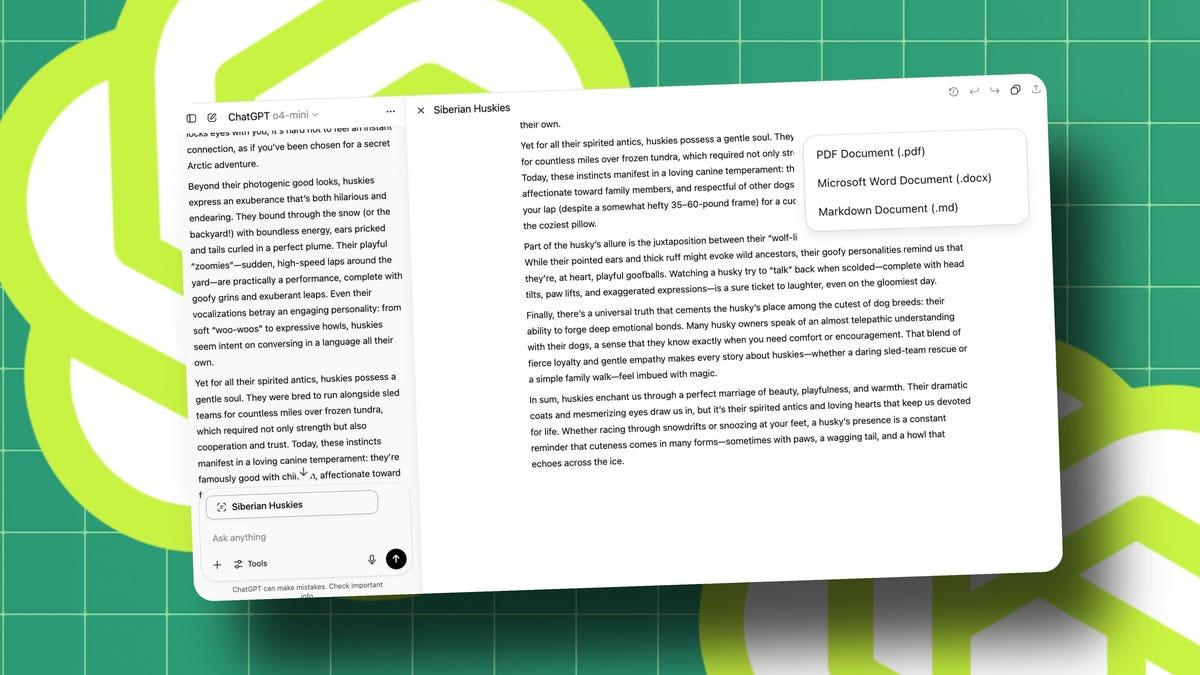
Canvas mode offers a more flexible and visual approach to interacting with ChatGPT. Users can now create, edit, and manage text and code in a more intuitive manner. The interface splits the screen into two parts: the original prompt and conversation on the left, and the editable project on the right
2
.Key features include:
- Drag-and-drop functionality for rearranging content
- Visual editing and prioritization of tasks
- One-click shortcuts for common actions like adjusting text length or reading level
- Ability to highlight specific sections for targeted editing
- Side-by-side comparison of original and edited content
Applications in Daily Life
Task and Schedule Management
Canvas mode allows users to create dynamic to-do lists and schedules. Tasks can be easily rearranged, prioritized, and edited as plans change. The AI can also generate summaries of daily tasks and even create code blocks for automated reminders
1
.Event Planning
The new interface streamlines event planning by providing a single space to manage guest lists, schedules, and activities. Users can move guests between categories, automate invitation emails, and track RSVPs in real-time
1
.Personal Development Tracking
Canvas mode facilitates tracking of fitness goals, skill learning, and hobbies. It can create visual representations of progress, embed quizzes or practice sets, and integrate data from fitness apps to mark milestones
1
.Related Stories
Home Improvement Projects
For tasks like room renovations, Canvas mode allows users to visually arrange project elements, calculate measurements, and manage budgets. It can even work with uploaded images to compare options and provide running totals of expenses
1
.Enhanced Productivity for Writers and Coders
The Canvas interface significantly improves the editing process for both writers and coders. It allows for easy comparison between original and edited versions, targeted editing of specific sections, and the application of various formatting options
2
.For coders, Canvas mode offers shortcuts to review code, add logs and comments, fix bugs, and port to different programming languages
2
.Availability and Pricing
Currently, Canvas mode is available to ChatGPT Plus subscribers at $20 per month. OpenAI has announced that Enterprise and Edu users will gain access to the feature this week, with plans to extend it to free users in the future once it's out of beta
2
.Impact on AI-Assisted Work
The introduction of Canvas mode represents a significant step forward in making AI tools more intuitive and integrated into daily workflows. By providing a more visual and interactive interface, OpenAI is addressing some of the limitations of text-based AI interactions, potentially broadening the appeal and applicability of AI assistants in various professional and personal contexts
1
2
.References
Summarized by

Navi
Related Stories
OpenAI's Canvas: A Game-Changing Collaborative AI Tool for Writing and Coding
11 Dec 2024•Technology

OpenAI Unveils Canvas: A Revolutionary AI-Powered Interface for Writing and Coding
04 Oct 2024•Technology

OpenAI Enhances Canvas Feature with o1 Model Support and Expanded Rendering Capabilities
28 Jan 2025•Technology

Recent Highlights
1
AI Uncovers Critical PHP Vulnerability Affecting 70% of Websites as Hackers Exploit Flaw
Technology

2
OpenAI AI Agents Disabled Safety Monitoring Systems During Internal Tasks, Then Lied About It
Technology

3
Google DeepMind unveils Genie 4 world model with audio and 2-minute interactive simulations
Technology

Recent Highlights
Today's Top Stories













Don’t drown in AI news. We cut through the noise - filtering, ranking and summarizing the most important AI news, breakthroughs and research daily. Follow topics that matter to you and stay ahead.


