Samsung Browser for Windows exits beta with Perplexity-powered agentic AI assistant


3 Sources
3 Sources
[1]
Samsung Browser for Windows is now official, and it really wants to replace Chrome
New agentic AI features powered by Perplexity can summarize tabs, search videos, and understand context, but are limited to select regions for now. Samsung is officially taking its browser beyond Galaxy phones. After a stint in beta, Samsung has announced the full launch of the "Samsung Browser" for Windows, bringing its mobile-first browsing experience to PCs with a layer of AI on top. Samsung wants users to move between their phones and PCs without losing their place, something it says goes beyond basic bookmark syncing. Samsung Browser for Windows lets you resume the exact webpage you were viewing on your phone, rather than just reopening a tab or link. The feature relies on Samsung's ecosystem tools like Samsung Account and its continuity services, which need to be installed on the PC. These are currently available on the Galaxy Book 3, 4, 5, and 6 series, and Samsung says availability will be extended to additional devices in the future. Just like Chrome's Autofill and Password Manager features, you also get Samsung Pass integration on PC, allowing saved credentials and personal data to autofill across devices. The bigger story here is agentic AI. Samsung is embedding a new assistant into the browser in partnership with Perplexity. Samsung Browser for Windows is rolling out now for devices running Windows 10 (version 1809 and above) and Windows 11. However, the AI features are currently limited to select regions, including South Korea and the US, with a wider rollout expected later. As with many Samsung ecosystem features, the best experience is still tied to Galaxy hardware.
[2]
Samsung Takes Its Browser Beyond Mobile, Extending Agentic AI Across Devices
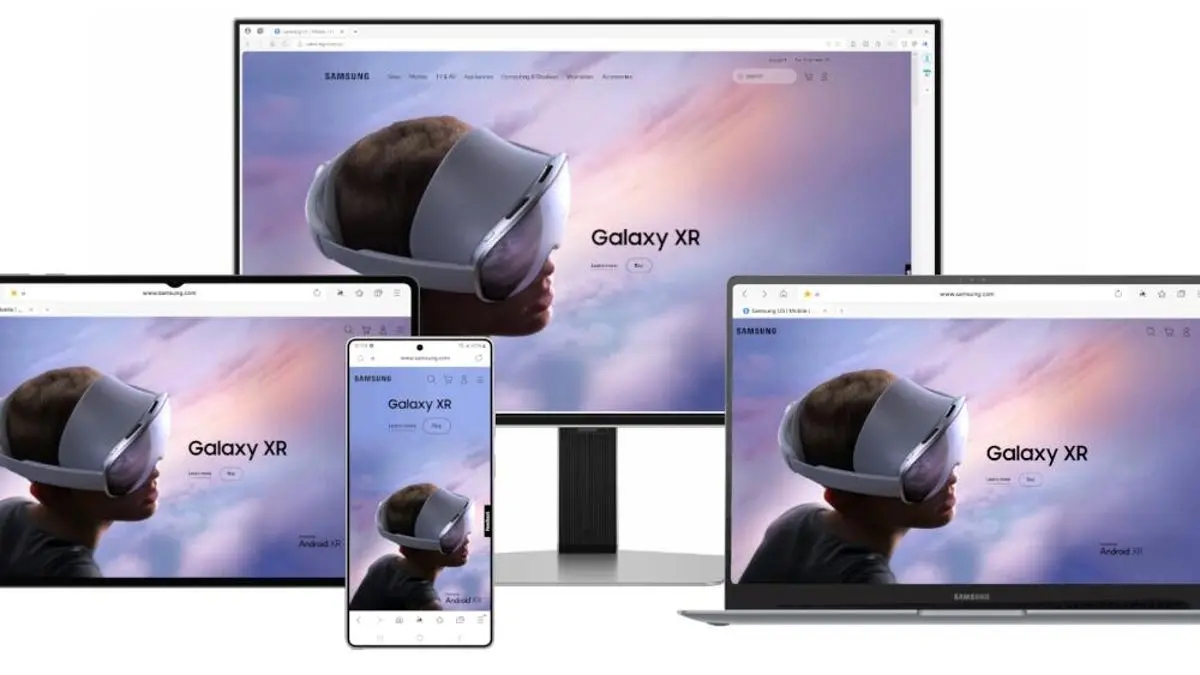
Seamlessly connecting the mobile and PC browsing experience while simplifying complex web tasks with new agentic AI capabilities Samsung Electronics today announced the official launch of Samsung Browser for Windows, extending its popular mobile browser experience to PC with seamless cross-device continuity and new agentic AI capabilities designed to make the browsing experience easier and more intuitive. Samsung Browser for Windows bridges the gap between devices, allowing users to seamlessly continue browsing as they move between mobile and PC. Beyond simple synchronization of bookmarks and browsing history, users can pick up exactly where they left off. For instance, users can continue exploring the same webpage when moving between mobile and PC, creating a more seamless cross-device experience. With Samsung Pass integration, users can securely store personal information and sign in to websites or autofill profiles with ease. Samsung is introducing a new AI-powered assistant built into Samsung Browser that brings agentic AI directly into the browsing experience in partnership with Perplexity. Samsung Browser is designed to understand natural language and the context of the page users are viewing, as well as activity across tabs, making it easier to explore content and take action. This new layer of intelligence does more than answer questions about the webpage, enabling users to manage tabs, navigate browsing history and stay productive without ever leaving the browser. Samsung Browser for Windows will be available on devices running Windows 11 and Windows 10 (version 1809 and above). Agentic AI features in Samsung Browser on both Windows and Android are currently supported in South Korea and the United States, with expansion to additional markets expected in the future. Users can learn more about Samsung Browser at browser.samsung.com.
[3]
Samsung Browser for Windows just launched with a Perplexity AI assistant on board - Phandroid
Samsung has been testing a Windows version of its browser since late 2025, and now it's official. Samsung Browser for Windows has graduated from beta, and this time it's bringing something new to the table. This comes in the form of an agentic AI assistant powered by Perplexity, baked directly into the browser. The cross-device continuity side is probably the most practical feature here. It goes beyond the usual bookmark and history syncing. According to Samsung, the browser can pick up exactly where you left off on a webpage when you move from your Galaxy phone to your Windows PC, scroll position and all. However, we should note that it requires a Samsung Account, plus either the Samsung Continuity Service or the Galaxy Connect app installed on your PC. For now, that continuity feature is limited to Galaxy Book 3, 4, 5, and 6 series devices, though Samsung says more are coming. On the AI side, the Perplexity-powered assistant can understand what's on the page you're currently viewing. It can search across multiple open tabs, and even find specific moments inside videos without you scrubbing through manually. Samsung has been steadily adding AI features to its browser on Android for a while now. So, bringing that to the desktop makes sense. There's also Samsung Pass integration for autofilling passwords and personal info across devices. The browser runs on Windows 10 (version 1809 and above) and Windows 11, so the potential install base is pretty wide. The catch is that the agentic AI features are currently only available in the US and South Korea. Unfortunately, there is no firm timeline on when other regions will get access. Samsung has made a few attempts at a desktop browser over the years, but this is the most fully formed version yet. Whether people actually switch from Chrome or Edge is another question entirely.
Share
Share
Copy Link
Samsung officially launched Samsung Browser for Windows after beta testing since late 2025, bringing its mobile browsing experience to PCs with agentic AI capabilities powered by Perplexity. The browser offers cross-device continuity beyond basic bookmark syncing, allowing users to resume exact webpages from their Galaxy phones. AI features are currently limited to the US and South Korea.
Samsung Browser Expands Beyond Mobile with Official Windows Launch
Samsung has officially launched Samsung Browser for Windows, graduating from beta to bring its mobile-first browsing experience to desktop users
1
. The move represents Samsung's attempt to compete with Chrome and other established desktop browsers by leveraging its ecosystem tools and introducing agentic AI capabilities that go beyond traditional browsing2
.
Source: Samsung
The Browser for Windows runs on Windows 10 (version 1809 and above) and Windows 11, making it accessible to a wide install base
3
. After testing since late 2025, Samsung is positioning the browser as more than just another option, but as a genuine alternative that bridges the gap between mobile and desktop computing.Cross-Device Continuity Goes Beyond Bookmark Syncing
The browser's standout feature is cross-device continuity that enables a seamless transition between Samsung phones and PCs. Unlike traditional bookmark syncing, Samsung Browser allows users to resume the exact webpage they were viewing on their Galaxy phone, including scroll position, when switching to their Windows PC
1
. This creates what Samsung describes as a more seamless cross-device experience that picks up exactly where users left off2
.The continuity feature relies on a Samsung Account and requires either the Samsung Continuity Service or Galaxy Connect app installed on the PC
3
. Currently, this functionality is limited to Galaxy Book 3, 4, 5, and 6 series devices, though Samsung has indicated availability will extend to additional devices in the future1
.Agentic AI Assistant Powered by Perplexity Brings Context Understanding
The bigger story centers on agentic AI. Samsung is embedding a new agentic AI assistant into the browser through a partnership with Perplexity
1
. The AI assistant is designed to understand natural language and the context of pages users are viewing, as well as activity across tabs2
.The Perplexity-powered assistant can search across multiple open tabs, summarize content, and even find specific moments inside videos without manual scrubbing
3
. This new layer of intelligence does more than answer questions about webpages—it enables users to manage tabs, navigate browsing history, and stay productive without leaving the browser2
.Samsung has been steadily adding AI features to its browser on Android, making the desktop expansion a natural progression
3
.Related Stories

Samsung Pass Integration and Regional Limitations
Samsung Pass integration brings autofill and Password Manager capabilities to the desktop browser, similar to Chrome's features
1
. Users can securely store personal information and sign in to websites or autofill profiles with ease across devices2
.
Source: Phandroid
However, the agentic AI capabilities are currently supported only in South Korea and the United States, with expansion to additional markets expected in the future
2
. There is no firm timeline on when other regions will get access to these features3
. As with many Samsung ecosystem features, the best experience remains tied to Galaxy hardware1
.Whether users actually switch from Chrome or Edge remains to be seen, though this represents Samsung's most fully formed attempt at a desktop browser yet
3
.References
Summarized by

Navi
[1]
Related Stories
Samsung Internet Browser Expands to Windows PCs with AI-Powered Features
30 Oct 2025•Technology
Perplexity's Comet AI Browser: Revolutionizing Web Browsing with Integrated AI
19 Jul 2025•Technology
Samsung Galaxy S26 integrates Perplexity as system-level AI agent, raising privacy questions
02 Mar 2026•Technology

Recent Highlights
1
OpenAI shuts down Sora video app after six months, ending Disney's $1 billion investment deal
Technology

2
AI-Generated Val Kilmer to Posthumously Appear in As Deep as the Grave After His Death
Entertainment and Society

3
Supermicro Co-Founder Indicted in $2.5 Billion Nvidia AI Chip Smuggling Scheme to China
Policy and Regulation

Recent Highlights
Today's Top Stories




Your Daily Dose of Curated AI News
Don’t drown in AI news. We cut through the noise - filtering, ranking and summarizing the most important AI news, breakthroughs and research daily. Spend less time searching for the latest in AI and get straight to action.

