Samsung Internet Browser Expands to Windows PCs with AI-Powered Features


10 Sources
[1]
Samsung's Mobile Web Browser Is Getting the PC Treatment
Blake has over a decade of experience writing for the web, with a focus on mobile phones, where he covered the smartphone boom of the 2010s and the broader tech scene. When he's not in front of a keyboard, you'll most likely find him playing video games, watching horror flicks, or hunting down a
[2]
Samsung's web browser arrives on Windows, with an AI future on its radar
On Thursday, Samsung launched a desktop version of its web browser. Why bother putting its mobile browser on Windows? Well, the company offers a hint in describing Samsung Internet as "evolving from a PC browser that waits for input to an integrated AI platform." So, surprise, surprise: It's about
[3]
Samsung is bringing its Internet browser to desktop with AI and cross-device syncing
Serving tech enthusiasts for over 25 years. TechSpot means tech analysis and advice you can trust. The big picture: Samsung is positioning its internet browser as a platform that bridges desktop and mobile experiences, while responding to growing demand for responsive, secure, and intelligent
[4]
The Samsung Internet Browser Is Now Coming To Your PC
Summary Samsung Internet beta comes to Windows PCs -- US & Korea rollout starts Oct 30. Sync bookmarks, history, passwords and Samsung Pass across devices for seamless browsing. Built-in Galaxy AI offers page summaries and translations; includes anti-tracking and Privacy Dashboard. Samsung
[5]

Samsung is bringing its cult favorite mobile browser to Windows PCs
Samsung's mobile browser has won fans for being a cleaner version of Chrome -- and now it's coming to Windows. Samsung is bringing its mobile browser to the Windows PC, most likely as a way of making its ecosystem stickier for customers who are considering another brand. Beginning today, United
[6]

Samsung Internet is coming to PC with Galaxy AI, cross-device sync support
Regardless of whether agentic AI is the future of the web, the AI-based browser wars are really starting to heat up. Following the launches of AI-focused tools from Perplexity and OpenAI, Samsung is throwing its hat in the ring with the arrival of its Android-based browser on PC. On Windows,
[7]

Samsung Internet Expands to PC With New Beta Program
Samsung brings its popular mobile browser to PC for the first time, unlocking a more fluid and connected experience across the Samsung Galaxy ecosystem Samsung Electronics today announced the beta release of Samsung Internet for PC, expanding its popular mobile browser to desktop. Samsung Internet
[8]

Samsung challenges Chrome dominance with new PC browser launch
Samsung Electronics has officially launched its new PC web browser, Samsung Internet PC, marking a major step in its effort to extend its mobile ecosystem to desktop platforms. The company said the browser aims to deliver a more personalized and connected user experience, with plans to evolve into
[9]

Samsung Internet Beta Now Available on Your PC
We may earn a commission when you click links to retailers and purchase goods. More info. Samsung is bringing Samsung Internet to PC users in a new beta program for Windows machines. The concept makes enough sense: to create a more connected and seamless browser experience by expanding Samsung
[10]

Samsung Internet beta brings Galaxy AI to Windows PCs
Users can now sync bookmarks, passwords, and browsing history between Galaxy phones and PCs via Samsung Pass. Samsung is launching a beta version of its Internet browser for Windows PCs on October 30, 2025, initially in the United States and South Korea. The browser targets Windows 10 version 1809
Share
Copy Link
Samsung launches a beta version of its mobile browser for Windows PCs, featuring cross-device syncing, AI-powered browsing assistance, and enhanced privacy tools as part of its ecosystem expansion strategy.
Samsung Revives Desktop Browser Strategy
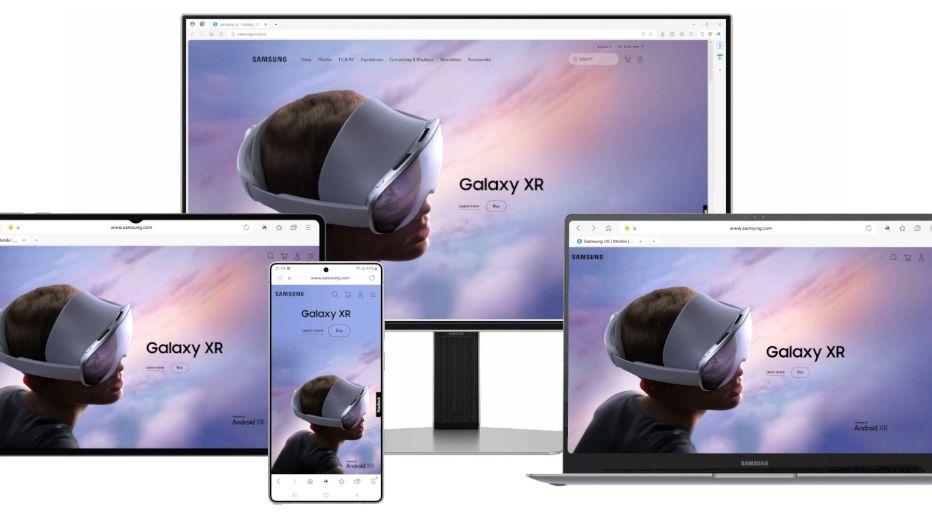
Samsung has officially launched a beta version of Samsung Internet for Windows PCs, marking the company's second attempt to bring its mobile browser to desktop platforms
1
. The beta program is initially available to users in the United States and South Korea, with plans for broader international expansion following the testing phase4
.
Source: How-To Geek
This launch represents a strategic pivot for Samsung, which previously attempted a desktop browser release in 2024 before quietly withdrawing it from the Microsoft Store
2
. The renewed effort signals Samsung's commitment to creating a more cohesive ecosystem that bridges mobile and desktop experiences, similar to strategies employed by Google and Apple4
.
Source: Samsung
AI Integration Takes Center Stage
The desktop version incorporates Samsung's Galaxy AI technology from launch, featuring "Browsing Assist" capabilities that provide on-demand webpage summarization and translation services
1
. This positions Samsung Internet within the rapidly evolving landscape of AI-powered browsers, competing alongside OpenAI's ChatGPT Atlas, Microsoft's Edge Copilot Mode, and Perplexity's Comet browser2
.Samsung describes its vision as evolving "from a PC browser that waits for input to an integrated AI platform," emphasizing the company's commitment to ambient AI that anticipates user needs and provides personalized assistance
2
. The company hints at future developments that will "unlock even more intuitive browsing experiences," suggesting ongoing AI enhancements are planned5
.Cross-Device Ecosystem Integration
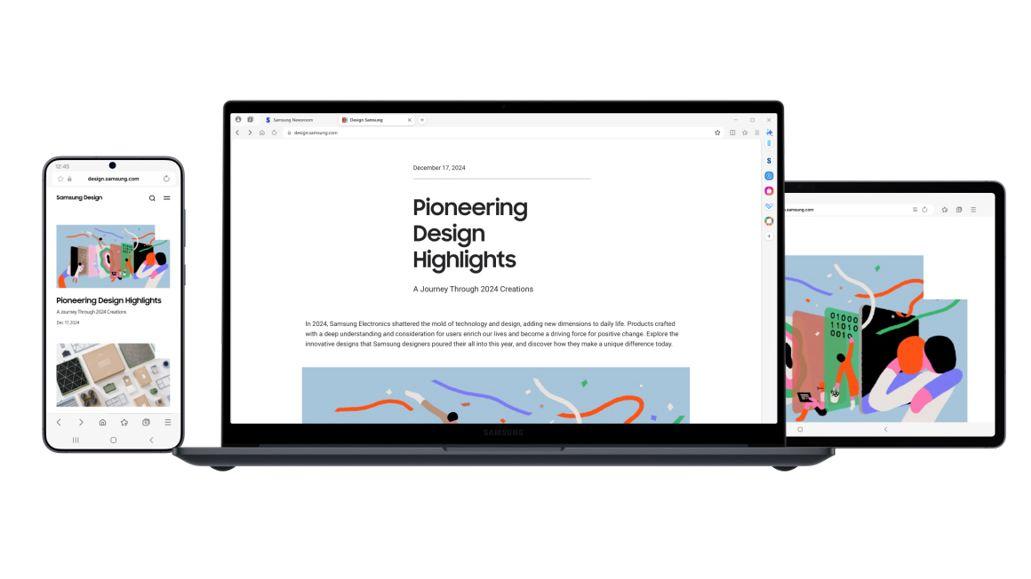
The browser's core strength lies in its seamless cross-device synchronization capabilities. Users can sync bookmarks, browsing history, passwords, and Samsung Pass data across their PC, phone, and tablet when signed into their Samsung accounts
3
. The platform also supports session handoff functionality, allowing users to resume browsing exactly where they left off when switching between mobile and desktop devices3
.
Source: Engadget
This integration strategy targets users who have remained loyal to Samsung's mobile browser but lacked desktop alternatives, providing continuity for those managing digital activities across multiple screens
3
.Related Stories

Privacy and Security Features
Samsung Internet for PC incorporates the company's smart anti-tracking system, originally developed for mobile versions, which blocks third-party tracking cookies and pop-ups
3
. The browser includes a built-in Privacy Dashboard that provides real-time visibility into blocked trackers and allows users to adjust security settings on the fly1
.These privacy-focused features address growing user and regulatory concerns about online tracking and data collection, positioning Samsung's browser as a security-conscious alternative in the competitive browser market
4
.Market Position and Future Outlook
Despite Samsung Internet's relatively small mobile market share of less than 4% according to StatCounter, the desktop expansion makes strategic sense for Samsung's broader ecosystem ambitions
1
. The browser has cultivated a dedicated following among Android users who appreciate its cleaner interface compared to Chrome, with some considering it a "cult favorite" mobile browser5
.The beta requires Windows 10 (version 1809 or later) or Windows 11, and Samsung has not disclosed financial details or monetization plans for the desktop version
3
. The company positions this launch as "just the beginning" of building a browser foundation that "evolves with its users and devices"1
.References
Summarized by

Navi
[4]
Related Stories
Samsung Browser for Windows launches with Perplexity-powered agentic AI to challenge Chrome
26 Mar 2026•Technology
Perplexity's Comet AI Browser: Revolutionizing Web Browsing with Integrated AI
19 Jul 2025•Technology
Samsung's One UI 7 Introduces AI-Powered 'Now Bar' and Personal Data Engine
18 Dec 2024•Technology

Recent Highlights



Recent Highlights
Today's Top Stories









Don’t drown in AI news. We cut through the noise - filtering, ranking and summarizing the most important AI news, breakthroughs and research daily. Follow topics that matter to you and stay ahead.


