5 Sources
[1]
Google Gemma 4 in your pocket: How to run the latest AI fully offline
You can also set us as a preferred source in Google Search by clicking the button below. In its current state, the app acts as a local sandbox for Google's Gemini models. Unlike Gemini, which sends your data to Google for processing, AI Edge Gallery downloads the brain of AI directly to your device. In other words, you can now use AI anywhere without an internet connection, such as being in the middle of the ocean on a cruise ship or up at 35,000 feet on a plane. Better still, because the AI stays with you, you gain a certain level of privacy you didn't have before.
[2]
Forget Gemini and Claude, this is the free game-changing AI tool you need to try on Google Pixel
When he is not busy with technical analysis and software evaluation, Parth dedicates his time to watching K-dramas, studying mobile technology trends and the role of artificial intelligence. There is no shortage of cloud AI tools on the Google Play Store. While giants like Gemini and Claude dominate the AI world, a capable AI mode from Google's open source labs flies under the radar. Meet Gemma 4 E2B -- a lightweight but powerful AI model that fits right in your pocket. By using the Google AI Edge Gallery app on a Google Pixel, you can finally unlock full offline reasoning, image understanding, and even native audio processing without a single byte of data leaving your device. Gemma 4 proves that the most exciting AI right now isn't living in a data center. It's running locally on your hardware. Related I tried Android's Desktop Mode, and I might never use my laptop again Android's Desktop Mode surprised me Posts 29 By Sanuj Bhatia What is Gemma 4, anyway? Close So, what exactly is Gemma 4? It is basically the lightweight open-weight alternative to the massive Gemini models. Google changed the architecture to make these models work on different types of hardware. For example, if you are a desktop user, you can use Gemma 4 31B, which specializes in deep reasoning and complex coding. It is ideal for high-end GPUs. Gemma 4 26B is another capable model if you have a low-end GPU. It activates only 4 billion parameters at a time, and it strikes the perfect balance between speed and intelligence. Edge models are where things get interesting for mobile users. E2B is a small yet effective tool I'm using on my Pixel 8. However, if you have an Android phone with more RAM, you can try the E4B model. The E2B model takes up around 1.5 GB of RAM. This leaves plenty of free RAM for other apps and services running in the background. Unlike many small models that handle only text, E2B is an all-rounder that tackles text, images, and even audio. In my limited testing, E2B has been quite snappy on Tensor G3. In short, I chose E2B because it's the first time an on-device model has felt invisible. It's fast enough to be useful, small enough to handle my actual workflow without calling Google's servers. How to try Gemma 4 on any Android phone Close Setting up Gemma 4 E2B on my Pixel 8 was surprisingly straightforward. You don't need to deal with sideloading or complex terminal commands. Since the Google AI Edge Gallery is an official developer tool, it handles the heavy lifting of model quantization and optimization. First, I grabbed the app from the Google Play Store. After it is installed, it acts as a container for various local models. I tapped the Models section, searched for Gemma 4 E2B, and downloaded it on my device. Now for the fun part. I enabled the model, and I started testing its limits in the chat interface. The model weighs around 2GB, so make sure to connect your Android phone to a Wi-Fi network first. My new workflow with Gemma 4 E2B Close Integrating Gemma 4 E2B into my daily routine has redefined what I expect from my Pixel 8. Usually, on-device AI feels like a watered-down version of the cloud giants, but this workflow is different. It's fast, private, and robust for my day-to-day queries. Since it's a local LLM, I can run the entire model while keeping my Pixel on Airplane mode. I don't have to wait for a handshake with a server. I can fire up the AI Edge Gallery and start dumping my thoughts and queries for the day. Whether I'm asking it to categorize five random errands or draft a quick email to a client, the response is near instant. Subscribe to our newsletter for on-device AI guides Get hands-on coverage when you subscribe to the newsletter: step-by-step setup help, model comparisons, configuration tips, and real-world workflows for running on-device AI like Gemma 4 E2B -- practical coverage to help you pick and use edge models. Get Updates By subscribing, you agree to receive newsletter and marketing emails, and accept our Terms of Use and Privacy Policy. You can unsubscribe anytime. The native multimodality is where this really shines for my on-the-go queries. If I see a complex diagram or a handwritten note, I snap a photo. Using the 'Ask Image' mode, E2B analyses the visual and extracts structured data. Unlike some heavy models that turn my phone into a hand-warmer, the E2B variant is light enough that it doesn't kill my battery by lunchtime. Using the 'Agent Skills' within the app, I can even have it perform local tasks like looking up a specific fact in a local Wikipedia. It's rare for a free tool to feel like an upgrade over a paid one, but for my daily Pixel workflow, Gemma 4 E2B has officially taken the crown. Related I found a Gemini feature so good, I deleted a bunch of apps Your phone's home screen is about to get a lot cleaner Posts 16 By Ben Khalesi Move over Gemini We have always believed that high-end AI requires a massive server and a constant data connection. But the ability to run 128K context windows and native multimodel reasoning entirely on-device changes the conversation. Whether you are a developer building next-gen agentic workflows or a power user looking for total data control, this setup proves that such a free alternative is a superior way to work. This is just one of the local LLM models I tried on Pixel. There are dozens of such small but powerful models in the Google AI Edge Gallery. If Gemma 4 E2B doesn't work for you, don't hesitate to try other models.
[3]
Gemma 4 : Google's New Open-Source Local AI That Requires No Internet
Google has introduced Gemma 4, an open source AI model designed to operate entirely offline, as highlighted by Zinho Automates. Based on Google's Gemini LLM research, Gemma 4 allows users to process text, images, audio and video without requiring internet connectivity. Released under the Apache 2.0 license, it is free for both personal and commercial use. This offline functionality enhances data privacy and eliminates the need for subscriptions or external APIs, making it a practical option for industries requiring secure and cost-effective AI solutions. Discover how Gemma 4 supports tasks like document summarization, HTML generation, and visual data analysis while running locally on your device. Gain insight into its compatibility with platforms such as Google AI Studio and its four size configurations, E2B, E4B, 26B and 31B, that cater to different hardware capabilities. This breakdown will also examine its applications in sectors like healthcare, government and small business, focusing on how it integrates into workflows with an emphasis on security and efficiency. Gemma 4 distinguishes itself with a range of features that cater to diverse user needs. Its unique attributes include: This combination of offline functionality and open source licensing positions Gemma 4 as a cost-effective and practical solution for users across industries, offering both flexibility and peace of mind. Gemma 4 is designed to integrate effortlessly into existing workflows, particularly within Google's ecosystem. It is fully compatible with tools such as Google AI Studio, Collab and Vertex AI, allowing users to enhance their productivity with minimal setup. To accommodate a wide range of hardware configurations, Gemma 4 is available in four sizes: E2B, E4B, 26B and 31B. Whether you are working on a high-performance workstation or a standard laptop, there is a version tailored to your specific needs. This hardware flexibility ensures that users can use the model's capabilities without requiring expensive upgrades. Uncover more insights about Google Gemma 4 in previous articles we have written. Gemma 4 offers a robust suite of features that cater to both professionals and hobbyists. Its capabilities include: These features make Gemma 4 a powerful tool for tasks ranging from data analysis to content creation, offering practical solutions for a variety of challenges. Gemma 4's offline operation and advanced features make it particularly valuable in industries where data privacy and security are critical. Key applications include: The model's versatility and affordability make it an attractive option for a wide range of users, from large organizations to individual creators. Gemma 4 is built with simplicity and accessibility in mind. It supports Mac, Windows and Linux operating systems, making sure compatibility across platforms. The installation process is straightforward, allowing users to set up the model quickly and begin using its capabilities without technical hurdles. By offering a free, open source alternative to subscription-based AI models, Gemma 4 democratizes access to innovative technology. Its offline functionality ensures that users can work securely and efficiently, regardless of their internet connectivity or budget constraints. Gemma 4 represents a significant step forward in the evolution of AI technology. By combining advanced multimodal capabilities with offline operation and open source accessibility, it provides a versatile and practical tool for a wide range of applications. Its seamless integration with Google's ecosystem and compatibility with diverse hardware configurations further enhance its appeal. This model not only addresses the growing demand for data privacy and cost-effective solutions but also enables individuals and organizations to harness the power of AI without compromising on security or affordability. As a free and open source tool, Gemma 4 sets a new standard for AI accessibility, paving the way for broader adoption and innovation in the field. Disclosure: Some of our articles include affiliate links. If you buy something through one of these links, Geeky Gadgets may earn an affiliate commission. Learn about our Disclosure Policy.
[4]
How to Turn Your Smartphone Into a Local AI Powerhouse
Running large language models (LLMs) locally on your phone is no longer just a concept, it's a practical reality with the Google AI Edge Gallery. This application allows users to execute advanced AI models directly on their devices, bypassing the need for cloud servers. AI Grid's walkthrough demonstrates how to set up and optimize the app to perform tasks like text generation and summarization while maintaining privacy and offline functionality. For instance, the guide highlights how devices with at least 8GB of RAM, such as flagship Android phones or the iPhone 15 Pro, can handle larger models efficiently for smoother performance. Dive into this guide to explore key features like customizable AI settings, GPU acceleration for faster processing and multimodal capabilities that extend beyond text-based interactions. You'll also gain insight into using experimental voice commands to control device settings and learn how to use predefined "agent skills" to automate tasks like drafting emails or generating QR codes. Whether you're a developer or a casual user, this walkthrough provides actionable steps to make the most of AI on your smartphone. The app is designed to meet diverse user needs, offering a robust set of features that include: Whether you're a developer exploring AI tools or a casual user seeking advanced functionality, the Google AI Edge Gallery provides a comprehensive platform to harness the power of AI on your smartphone. The Google AI Edge Gallery is accessible to all users without the need for waitlists or developer accounts. You can download the app directly from the Google Play Store or Apple App Store. While the app is compatible with a wide range of devices, its performance is heavily influenced by your hardware specifications. Devices equipped with advanced processors and higher RAM, such as the iPhone 15 Pro or flagship Android models with 8GB or more RAM, deliver optimal performance, especially when running larger AI models. Here are more detailed guides and articles that you may find helpful on Google AI. One of the app's standout features is its ability to run large language models locally, offering a user-friendly interface for seamless interaction. Through the app, you can: The app allows users to download and switch between various model variants based on their specific needs. Larger models deliver superior reasoning and output quality but require more advanced hardware to function efficiently. For the best experience, devices with at least 8GB of RAM are recommended. The app offers extensive customization options to fine-tune the AI's behavior, allowing users to adjust parameters such as: Additionally, the app supports GPU acceleration, which significantly enhances processing speed and reduces battery consumption compared to CPU-based operations. This feature is particularly beneficial for running resource-intensive models, making sure smoother performance and extended usability. The app includes predefined prompts, known as "agent skills," to simplify specific tasks. These skills enable users to: For advanced users, the app also supports the creation and import of custom skills, allowing for highly personalized workflows tailored to unique requirements. The Google AI Edge Gallery goes beyond text-based interactions by incorporating multimodal capabilities. These features include: These multimodal functionalities make the app a versatile tool for managing and interpreting diverse data types, catering to both personal and professional use cases. The app includes experimental features that allow users to control their devices through voice commands. For example, you can: Although still in development, these features demonstrate the app's potential to integrate AI with everyday mobile operations, offering a glimpse into the future of hands-free device management. The Prompts Lab provides a collection of preset templates designed to streamline common tasks. These templates allow users to: By using these predefined options, users can save time and achieve consistent, high-quality results. The app's performance is closely tied to the hardware capabilities of your device. Devices with advanced processors and higher RAM, such as iPads with M-series chips or flagship Android smartphones, excel at handling larger models and complex tasks. Conversely, older devices may experience slower processing times or struggle with resource-intensive operations. A defining feature of the Google AI Edge Gallery is its commitment to privacy. All data processing occurs locally on your device, eliminating the need for external servers. This ensures that sensitive information remains secure and allows users to access the app's full functionality even without an internet connection. The app includes supplementary tools to enhance the user experience, such as: These additional features add value to the app, making it a comprehensive solution for both casual and advanced users. The Google AI Edge Gallery is a versatile and privacy-focused application that brings the power of AI directly to your mobile device. With support for local LLMs, multimodal capabilities and experimental device controls, the app enables users to explore and use AI in a secure, efficient and highly customizable manner. Whether you're a developer seeking advanced tools or a casual user looking for offline functionality, this app offers a robust platform to meet your needs. Disclosure: Some of our articles include affiliate links. If you buy something through one of these links, Geeky Gadgets may earn an affiliate commission. Learn about our Disclosure Policy.
[5]
How to Use Google AI Edge Gallery App for Gemma 4 on iOS and Android
The Google AI Edge Gallery app provides a functional platform for mobile AI. Gemma 4 delivers efficient performance for daily tasks. The system emphasizes speed, privacy, and offline capability. This combination supports practical usage and reflects the future direction of mobile AI technology. This approach makes AI more accessible for everyday use. The Google AI Edge Gallery app allows AI models to run directly on mobile devices. The app removes the need for constant internet access and processes data locally for faster and more private usage. Gemma 4 runs on the device instead of remote servers. The model focuses on efficiency and speed rather than large-scale processing. This design supports offline usage and better data privacy. The app requires internet only during installation and model download. The system works offline after setup. The model processes queries locally without network dependency. The model handles everyday tasks such as writing, rewriting, summarizing, and answering general queries. The model performs best with short and structured inputs. The system handles simple and moderate queries efficiently. The model may take more time or produce limited depth for complex or long-context queries. The performance depends on device capability.
Share
Copy Link
Google launched Gemma 4, an open-source AI model that runs entirely offline on smartphones via the AI Edge Gallery app. Unlike cloud-based tools like Gemini, this on-device AI solution processes text, images, and audio locally without sending data to servers. Available free under Apache 2.0 license, it delivers private AI capabilities even at 35,000 feet or in the middle of the ocean.
Google has released Gemma 4, an open-source AI model designed to run Gemma 4 fully offline on smartphones, marking a shift from cloud-dependent AI tools to true on-device AI solutions
3
. Available through the AI Edge Gallery app on both iOS and Android, this development brings the power of large language models (LLMs) directly to users' pockets without requiring constant internet connectivity1
. Based on Google's Gemini research, Gemma 4 represents a lightweight yet capable alternative that processes data entirely on your device, offering private usage without an internet connection whether you're on a cruise ship in the middle of the ocean or flying at 35,000 feet1
.
Source: Analytics Insight
Released under the Apache 2.0 license, Gemma 4 is free for both personal and commercial use, eliminating subscription costs and external API dependencies that typically burden cloud-based AI services
3
. The AI Edge Gallery acts as a local sandbox for Google's AI models, downloading the AI's processing capabilities directly to your device rather than sending your data to Google's servers for processing1
. This approach delivers enhanced data privacy while maintaining functionality even when completely disconnected from cloud servers5
.Google designed Gemma 4 with hardware flexibility in mind, offering four distinct configurations: E2B, E4B, 26B, and 31B
3
. The E2B variant serves as the most accessible option for mobile users, consuming approximately 1.5 GB of RAM and weighing around 2GB for download, leaving sufficient resources for other applications running in the background2
. For Android phones with more RAM, the E4B model offers enhanced capabilities, while desktop users can leverage the Gemma 4 31B variant, which specializes in deep reasoning and complex coding tasks on high-end GPUs2
.The 26B model strikes a balance between speed and intelligence by activating only 4 billion parameters at a time, making it ideal for users with lower-end GPU configurations
2
. Devices with at least 8GB of RAM, such as flagship Android phones, Google Pixel devices, or the iPhone 15 Pro, can execute large language models on device most efficiently, delivering smoother performance for complex tasks4
. This tiered approach ensures that users can harness AI capabilities without requiring expensive hardware upgrades, democratizing access to advanced AI technology across different device categories.Unlike many compact models limited to text processing, Gemma 4 delivers true multimodality, handling text generation, image understanding, and native audio processing
2
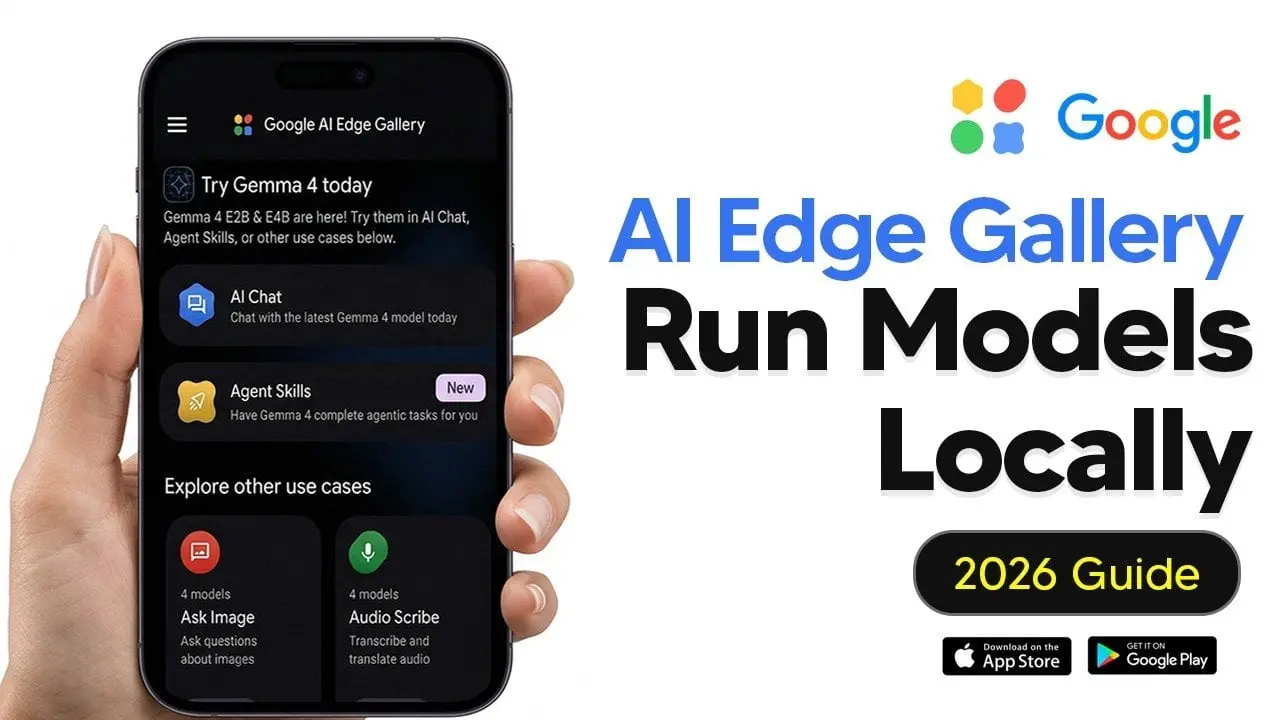
. The 'Ask Image' mode enables users to snap photos of complex diagrams or handwritten notes, with the E2B variant analyzing visuals and extracting structured data on the fly2
. This local AI powerhouse also supports document summarization, HTML generation, and visual data analysis while maintaining complete offline functionality3
.
Source: Geeky Gadgets
The AI Edge Gallery incorporates predefined Agent Skills that automate specific tasks like drafting emails, generating QR codes, or looking up information in locally stored resources such as Wikipedia
4
. Advanced users can create and import custom skills for highly personalized workflows tailored to unique requirements4
. GPU acceleration significantly enhances processing speed while reducing battery consumption compared to CPU-based operations, addressing a common concern with AI without internet capabilities4
. Users report near-instant responses when running the model on Airplane mode, with performance on devices like the Pixel 8 with Tensor G3 proving surprisingly snappy2
.Related Stories
Gemma 4 integrates effortlessly into existing workflows, particularly within Google's ecosystem through compatibility with Google AI Studio, Collab, and Vertex AI
3
. Setting up the system requires no complex terminal commands or sideloading procedures2
. Users simply download the AI Edge Gallery from the Google Play Store or Apple App Store, navigate to the Models section, search for their preferred Gemma 4 variant, and download it to their device2
. The app handles the heavy lifting of model quantization and optimization automatically2
.Source: Android Police
The application supports Mac, Windows, and Linux operating systems, ensuring compatibility across platforms
3
. Internet connectivity is required only during installation and model download; afterward, the system operates completely offline5
. Users can customize AI behavior by adjusting parameters and leveraging the Prompts Lab, which provides preset templates for common tasks like text generation and summarization4
. Experimental voice command features are also in development, potentially allowing hands-free device management through AI-powered controls4
.Gemma 4's offline operation makes it particularly valuable in industries where data privacy and security are critical, including healthcare, government operations, and small business applications
3
. All data processing occurs locally on the device, eliminating the need for external servers and ensuring that sensitive information never leaves the user's control4
. This privacy-first architecture addresses growing concerns about data security while maintaining full AI functionality even without network connectivity5
.The model performs best with short and structured inputs, handling everyday tasks such as writing, rewriting, summarizing, and answering general queries efficiently
5
. While the system may require more time for complex or long-context queries compared to cloud-based alternatives, its combination of speed, privacy, and accessibility positions it as a practical solution for daily mobile AI usage5
. By offering a free, open source alternative to subscription-based models, Gemma 4 sets a new standard for AI accessibility, enabling individuals and organizations to harness advanced AI capabilities without compromising on security or budget constraints3
.Summarized by
Navi
[1]
[2]
[4]
[5]
02 Apr 2026•Technology

27 Jun 2025•Technology

22 May 2025•Technology

1
Entertainment and Society

2
Health

3
Technology