Google AI Overviews now surface expert advice from Reddit and social media in search results


19 Sources
[1]
Google updates AI search to include 'expert advice' from Reddit and other web forums | TechCrunch
Google is updating search to refine its AI experience by adding additional context to links, like conversations from web forums, as well as a feature that highlights links from a user's news subscriptions. While citing web forums and discussion boards can help users find answers to more niche
[2]
Google Will Show You Things You Didn't Ask for in AI Overview Searches
Google is tweaking the tech behind its AI overviews in Search to expand the information it gives you and where it pulls it from. These updates are designed to help you "explore relevant websites, deep insights and original content," the company said in a blog post on Wednesday. But you may not want
[3]
Google's AI search summaries will now quote Reddit
Google is updating its AI Search features to make it easier for users to find information from sources they know and trust. One of the more notable changes introduces "a preview of perspectives" from firsthand sources like social media, Reddit, and other web forums, effectively linking your search
[4]
Google's AI Overviews will show you advice from other people now
Links to the sources will also appear next to the relevant text. I often use Google's AI Overviews to get a summary of the information I need when I run a search. But the overview itself rarely provides enough details to fully answer my question. That's why I always consult the sources used to
[5]

Google's AI Overviews Now Include 'Expert Advice' Pulled From Social Media Posts
Google's AI-generated search results will show direct quotes from people sharing their opinions and first-hand experiences on Reddit and other online communities. Google on Wednesday announced five new updates to AI Overviews and AI Mode in Search. While all of them aim to improve context and
[6]

Google's AI search results will now turn to Reddit for 'Expert Advice' - Engadget
Google is updating AI Overviews and AI Mode, the AI-generated portions of its search engine, to highlight sources in new ways, and interestingly, more prominently feature first-hand accounts from forums, social media and Reddit. Via a new "Expert Advice" section that can appear in AI responses,
[7]

Google adds more deep-dive potential to Search topics in AI Overviews
AI is growing smarter, more powerful, and even more helpful by the day -- so much so that Google has updated AI Mode and AI Overviews in Gemini-powered Search to provide more context into topics you're searching about. Google is sharing the details on five updates it has given AI Mode and AI
[8]

Google invites Reddit back to the AI Overview party
Karandeep Singh Oberoi is a Durham College Journalism and Mass Media graduate who joined the Android Police team in April 2024, after serving as a full-time News Writer at Canadian publication MobileSyrup. Prior to joining Android Police, Oberoi worked on feature stories, reviews, evergreen
[9]

Google making links in AI Mode and AI Overviews a bit more direct
Since the launch of AI Overviews and AI Mode, Google has been working to make links in generative responses more prominent, with Search adding five updates today. Google is now placing links "right next to the relevant [generated] text" in an AI Mode or AI Overview response. ...you may now see a
[10]

Google Search AI Mode Gets 'Expert Advice' From Reddit and Social Media
Google is updating its AI search results to incorporate a "preview of perspectives" sourced from public online discussions and social media. The results sourced from places like Reddit and online forums are sometimes labeled as "Expert Advice," per Google's screenshots. Google says that the
[11]

A new search AI tool from Google will summarize tips from Reddit and social media -- the 'Expert Advice' panel will 'include a preview of perspectives from public online discussions' and other sources as part of its updates to AI Mode and AI Overviews
* Google is adding a new AI feature to search results * 'Expert Advice' summarizes tips from forums and social media * But it risks undermining the very sources it's cribbing from Over the last couple of years, Google has increasingly been working AI into its search results -- type anything into
[12]

Google is now labeling some Reddit posts as 'Expert Advice'
Google announced a few new AI-related updates to Google Search this week, including a new feature that appears as "Expert Advice" in AI Mode and the AI Overview section at the top of the search results page. When a user performs a search, Google will now bring in social media posts and forum
[13]

Google Search's latest updates aim to turn AI responses into a starting point, not a dead end
Five new features, including a Further Exploration section and inline link previews, are designed to get users clicking through to websites from AI Mode and AI Overviews. Google's AI-powered Search features have fundamentally changed how we look stuff up. Instead of scrolling through the search
[14]

Google expands AI Overviews with forum and community insights
Google announced five updates to AI Overviews and AI Mode in Search, aimed at enhancing context and highlighting relevant links. A key aspect of this announcement is Google's plan to leverage social media posts and online discussions as sources of expert advice. The search engine will include
[15]

Google AI Overviews now show what actual people think, not just what AI says - Phandroid
You've probably added "Reddit" to a Google search at some point. Google has noticed. The company just updated Google AI Overviews to surface real perspectives from forums, social media, and public online discussions. They now appear directly inside AI-generated results. Google VP Hema Budaraju
[16]

Google's AI search just got a lot more useful -- but make sure to vet those "experts"
When not writing, Dave enjoys spending time with his family, running, playing the guitar, camping, and serving in his community. His favorite place is the Blue Ridge Mountains, and one day he hopes to retire there (hopefully his fear of heights will have retired by then, too!). Summary Google has
[17]

Google Is Adding These New Features to AI Overviews and AI Mode in Search
Expert advice will be curated from online discussions and social media Google has been frequently updating its artificial intelligence (AI) tools in Search, namely AI Overviews and AI Mode. After releasing agentic capabilities and new features in the Google app for Windows and Chrome browser, the
[18]

Google updates AI Mode and AI Overviews with new links, subscriptions, and community insights
Google is rolling out updates to AI Mode and AI Overviews in Search to help users find relevant websites, deeper insights, and original content from across the web. With ongoing advances in AI, Google is improving its generative AI experiences in Search, including AI Mode and AI Overviews. These
[19]

Google adds direct links, forums, subscription news to AI Search
Google is expanding its AI-powered Search features by adding more direct links, user discussion snippets, and subscription-based news content into AI-generated answers, even as concerns over the accuracy of those responses continue to grow. In a blog post published on May 6, Google said its AI
Share
Copy Link
Google is overhauling its AI Search experience to include direct quotes from Reddit, discussion boards, and social media posts in a new Expert Advice section. The update aims to connect users with first-hand experiences but raises questions about information reliability, especially given AI Overviews' history of citing dubious sources like sarcastic Reddit comments advising people to put glue on pizza.
Google AI Overviews Integrate Expert Advice from Reddit and Web Forums
Google is rolling out significant updates to its AI Search functionality, introducing a new Expert Advice section that pulls quotes from social media posts, Reddit, and other discussion boards directly into AI-generated insights
1
. The move addresses a growing trend where users increasingly append "Reddit" to their Google searches to find advice from other people rather than relying on SEO-optimized content3
.
Source: The Verge
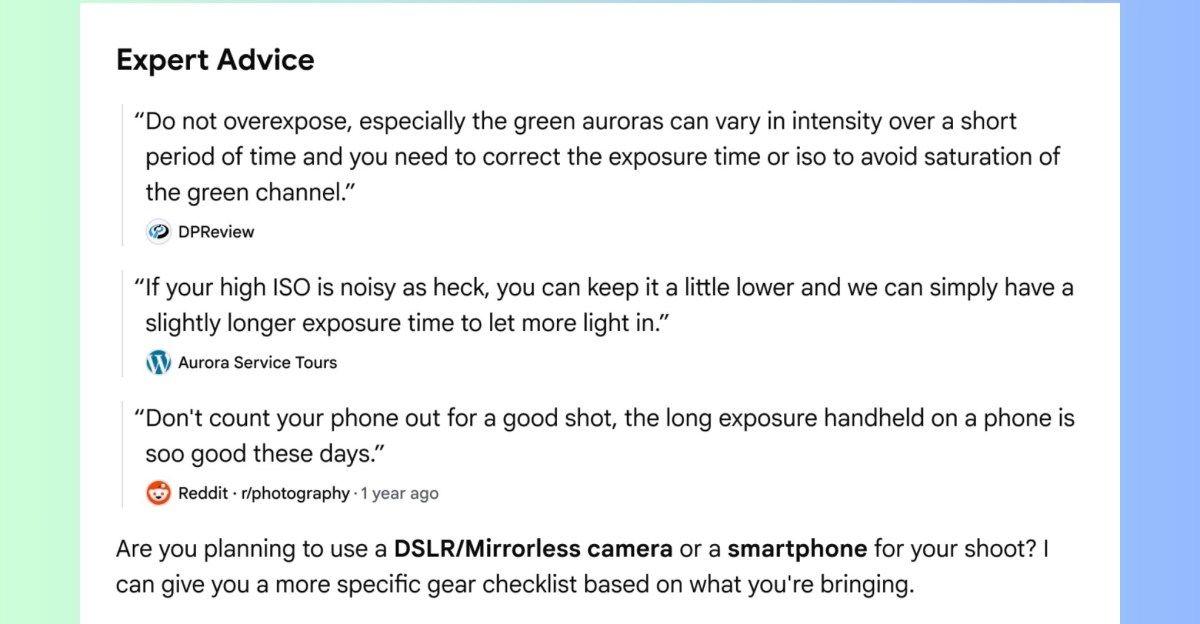
The update represents a strategic shift in how Google AI Overviews deliver information. When searching for niche queries like photographing the northern lights, users will now see direct quotes from photography forums with specific guidance on exposure time, complete with clickable source links featuring community names
5
. This approach leverages content from web forums to surface first-hand experiences that traditional search results might bury beneath commercial content.Source Transparency and Information Reliability Concerns
Google is attempting to improve source transparency in search by adding creator names, handles, and community identifiers to citations within AI search summaries
2
. The company will also display source links directly next to relevant text in AI responses, making it easier to verify where specific information originates4
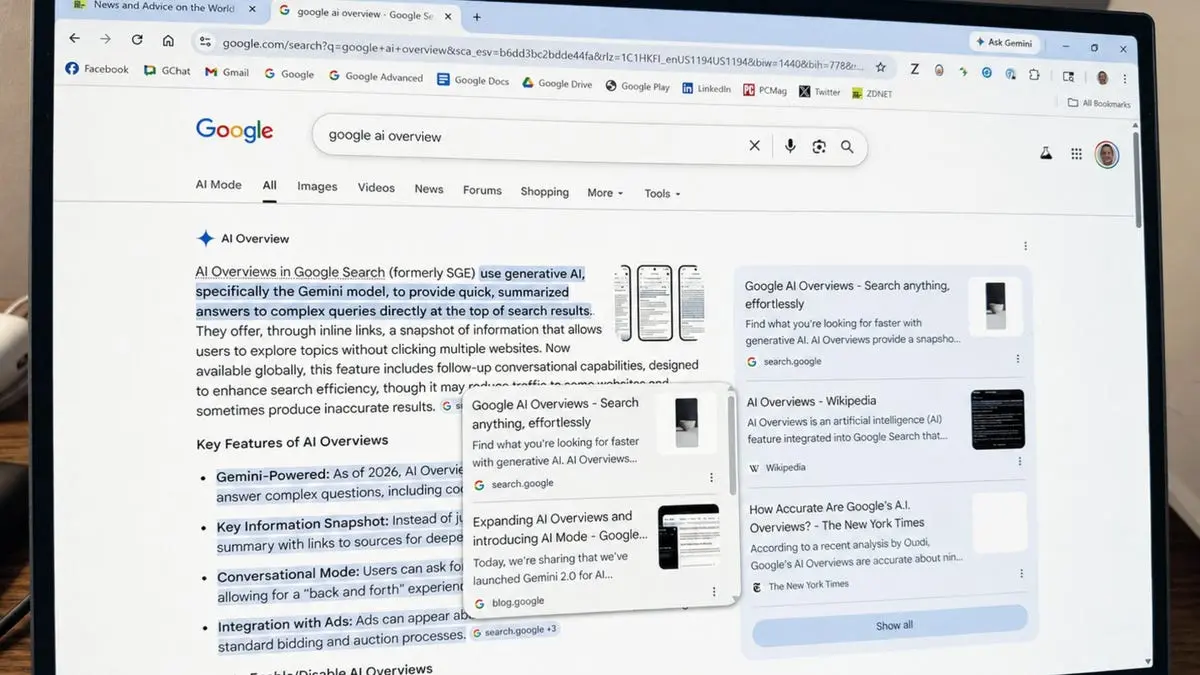
.However, this integration of social media integration raises significant concerns about information reliability. Two years after Google overhauled its search experience to put AI front and center, the platform still struggles with hallucinated content. Early versions of Google AI Overviews infamously cited The Onion when advising users to "eat one small rock per day" and pulled from sarcastic Reddit comments suggesting people put glue on pizza to make cheese stick better
1
.
Source: ZDNet
A recent New York Times analysis found that Google AI Overviews were correct approximately nine times out of 10. While this might seem acceptable, for a company processing trillions of queries annually, that error rate would generate hundreds of thousands of inaccurate results every minute
1
. Like any LLM-powered system, the technology remains prone to mistakes, making the trustworthiness of these AI-generated insights a persistent concern.Enhanced User Experience Through Personalized Features
Beyond surfacing expert advice from Reddit, Google is introducing several features designed to improve user experience. The platform will now highlight links from news subscriptions directly in AI Mode and Google AI Overviews, making it easier for users to access content from publishers they trust
3
. Early testing showed that people were significantly more likely to click links labeled as their subscriptions4
.
Source: FoneArena
When hovering over links on desktop searches, users will see expanded previews showing website names or page titles, helping them make informed decisions before clicking
2
. Google is also adding "further exploration" sections below AI search summaries with related topics that users didn't explicitly request. For instance, searching for cycling routes might trigger suggestions about bike touring guides and training blogs4
.Related Stories

Implications for Search Functionality and Publishers
These updates complicate the fundamental purpose of Google AI Overviews. The feature now serves dual functions: providing direct answers while simultaneously directing users to various sources—essentially mimicking traditional Google search functionality
1
. This hybrid approach may confuse users about whether they're receiving definitive answers or curated source collections.The AI Search makeover has already dramatically harmed publishers and websites that rely on organic traffic
2
. By keeping users within AI-generated summaries longer and now integrating social media content, Google further reduces clicks to traditional publishers. The company claims it's using techniques like query fan-out to dive deeper into the web and find relevant sites, but the long-term impact on content creators remains uncertain4
.Reddit CEO Steve Huffman claimed last year that "just about anybody using Google at this point will end up on Reddit," and these updates validate that assertion by building Reddit content directly into search results
3
. Users should remain vigilant about double-checking citations and verifying that AI systems aren't hallucinating the validity of sources, particularly when dealing with health, financial, or safety-related niche queries where misinformation carries serious consequences.References
Summarized by

Navi
[1]
[3]
Related Stories
Google tests AI-powered article overviews on News pages, expands source linking in AI Mode
10 Dec 2025•Technology

Google AI Search officially replaces traditional web search with Gemini-powered conversations
22 May 2026•Technology

Google Search AI Overviews Auto-Expand, Pushing Traditional Links Further Down Page
29 Aug 2026•Technology

Recent Highlights
1
Microsoft and Nvidia Launch Surface Laptop Ultra: A $2,599 AI-Ready PC With RTX Spark Chip
Technology

2
Trump Consulted Grok AI Before Ordering Venezuela Invasion and Capture of Nicolás Maduro
Policy and Regulation

3
Scientists Build AI Model That Reconstructs Images From Brain Scans in Record Time
Science and Research

Recent Highlights
Today's Top Stories




Don’t drown in AI news. We cut through the noise - filtering, ranking and summarizing the most important AI news, breakthroughs and research daily. Follow topics that matter to you and stay ahead.


