Google Drive upgrades with Gemini AI insights, but only for paid subscribers


2 Sources
2 Sources
[1]
Google Drive is making it easier to know what's inside a folder
Google has gone to great lengths to integrate Gemini into every Workspace product, including Drive. As part of this push, Google introduced "nudges" at the top of the Drive home page and individual folders back in March. These nudges offered one-click access to key Gemini actions, such as the ability to summarize entire folders or files. Related Google Drive now lets you chat with your images Goodbye, text-only analysis Posts By Karandeep Singh Oberoi Aug 26, 2025 Now, Google is announcing an "evolution" of these AI nudges in the form of "insights." Instead of the horizontally placed chips at the top, users will now see "Insights from Gemini," offering a summary of all the files in the folder. Google says this will make it easier to quickly gauge what's in the folder without having to dive into each file. For more info on the folder's contents, users can tap the "Explore with Gemini" chip within the insights panel at the top. This opens the Gemini side panel with a "full summary" of the folder. As you would expect, the side panel also lets you ask follow-up questions about the contents. A logical evolution of nudges This new insights section effectively replaces the existing "Ask Gemini" panel, which includes the soon-to-be-replaced nudges. In Google's own words, the updated panel replaces "simple suggestions" with "proactive, intelligent summaries." The insights panel also comes with thumbs-up and thumbs-down icons to rate the quality of the summary. Google says the feature will be enabled by default, but users can collapse the panel if they don't want insights generated each time a folder is opened. If you find these insights to be too intrusive, you can hide them entirely by disabling smart features in Drive from the privacy settings page. However, this may come at the expense of losing out on some of the other Gemini-related features. Related NotebookLM just made working with Google Drive a lot easier Search smarter, not harder Posts By Rahul Naskar Oct 8, 2025 This updated insights panel is only available in English right now and will roll out over the next few weeks to the Google One AI Premium and Google AI Pro for Education tiers, as well as Workspace Business Standard/Plus, and Enterprise Standard/Plus customers. The introduction of the Insights with Gemini panel follows the launch of "Catch me up" in June. This feature provides an overview of file edits in Docs since your last visit, as well as details on comments across Docs, Sheets, and Slides files.
[2]
Google Drive is getting improved search, but there's a catch
If you've ever found searching through your folders on Google Drive to be a chore, the company has good news. There's a catch, however -- and naturally it involves your wallet. Google revealed its list of upcoming changes to Drive this week. Most revolve around further integrating Gemini, the company's AI tool. Gemini will now preview what's inside a folder in Drive, making it easier to find what you're looking for without opening individual files. "Gemini will now proactively provide insights about the files within a folder, right at the top of the folder view," the announcement says. "This makes it easier to quickly understand what's inside without having to open individual files. For a more in-depth look, you can click 'Explore with Gemini' to get a full summary or ask follow up questions in the Gemini side panel." Here's what that looks like: "This feature is designed to help you save time and stay organized by providing at-a-glance insights into your folders," Google wrote. As tech site Android Authority pointed out, this helpful upgrade is available only to paid Google Workspace users, or folks with a Gemini Plus or Pro subscription. So if it looks nifty and you don't have one of those accounts already, you'll have to pay up.
Share
Share
Copy Link
Google Drive is rolling out a new AI-powered feature called Insights from Gemini that automatically summarizes folder contents for quick navigation. The upgrade replaces the previous nudges system with proactive intelligent summaries, but access is limited to Google Workspace subscribers and Gemini Plus or Pro users.
Google Drive Introduces Insights from Gemini for Enhanced Navigation
Google Drive is rolling out a significant update to its AI integration, replacing the previous "nudges" system with a more comprehensive feature called Insights from Gemini
1
. The new capability delivers proactive intelligent summaries of folder contents directly at the top of the folder view, enabling users to understand files without opening them individually. This evolution marks a shift from simple one-click suggestions to automated, context-aware summaries that appear whenever users access a folder1
.
Source: Android Police
The Insights from Gemini panel replaces the existing Ask Gemini feature, which previously displayed horizontally placed chips offering basic actions like folder or file summarization. According to Google, the updated approach provides summaries of folder contents that make it easier to quickly gauge what's inside without diving into each file
1
. Users seeking more detailed information can tap the "Explore with Gemini" chip within the insights panel, which opens the Gemini side panel with a full summary and allows follow-up questions about the contents1
.
Source: Mashable
Enhanced Search Capabilities Come with Subscription Requirements
While the AI integration promises to improve organizational capabilities and save time, access to these enhanced search capabilities is restricted to paid users
2
. The feature is available exclusively to Google Workspace subscribers on Business Standard/Plus and Enterprise Standard/Plus tiers, as well as users with Google One AI Premium, Gemini Plus, or Pro subscription plans1
2
. Google AI Pro for Education tier users also gain access to the functionality1
.The insights panel includes thumbs-up and thumbs-down icons, allowing users to rate the quality of file summaries and help refine the AI's performance
1
. While enabled by default, users can collapse the panel if they prefer not to have insights generated each time a folder is opened. Those who find the feature intrusive can disable it entirely through Drive's privacy settings by turning off smart features, though this may result in losing access to other Gemini-related capabilities1
.Related Stories

Rollout Timeline and Language Availability
The updated insights panel is currently available only in English and will roll out over the next few weeks to eligible Google Workspace business tiers and premium subscription holders
1
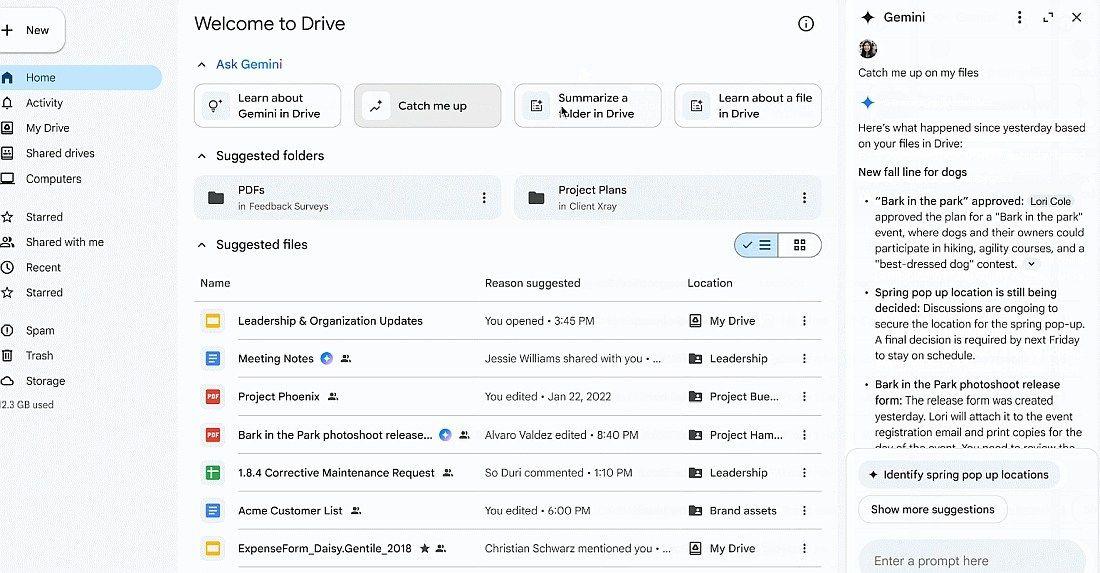
. This launch follows Google's June introduction of "Catch me up," another AI-powered feature that provides overviews of file edits in Docs since a user's last visit, along with details on comments across Docs, Sheets, and Slides files1
. The continued integration of Gemini across Workspace products signals Google's commitment to embedding AI throughout its productivity suite, though the paywall requirement may limit adoption among free-tier users who could benefit from improved folder navigation and summaries of folder contents2
.References
Summarized by

Navi
[1]
Related Stories
Recent Highlights
1
Apple Plans Major Siri AI Overhaul in iOS 27 With Third-Party Chatbot Integration
Technology

2
OpenAI shuts down Sora after six months, ending Disney's $1 billion licensing partnership
Technology

3
AI chatbots validate you too much, making you less kind to others, Stanford study reveals
Science and Research

Recent Highlights
Today's Top Stories



Your Daily Dose of Curated AI News
Don’t drown in AI news. We cut through the noise - filtering, ranking and summarizing the most important AI news, breakthroughs and research daily. Spend less time searching for the latest in AI and get straight to action.

