Google Drive's Gemini AI Integration Expands to Mobile Apps


4 Sources
[1]
Google Drive's Gemini collaboration finally comes to Android and iOS apps
Rollout began on September 22, but it may not have reached all users yet. Google has been rolling Gemini features into Drive for a while now, from catching you up on file changes to summarizing meeting recordings. Until now, though, the "collaborate with Gemini" experience was limited to the web.
[2]
Gemini lands in Google Drive mobile apps to help you cut through the clutter
It used to be difficult to find what you needed in Google Drive. Summarizing reports or collecting insights from different files often meant scrolling through long documents, switching between files, and doing a lot of manual work. Google is now addressing this issue by adding Gemini directly to
[3]
Gemini rolling out to Google Drive for Android, iOS
Following Gmail and Docs, Gemini is coming to Google Drive for Android and iOS. This integration lets users "ask questions about their files and folders and receive conversational responses." On mobile, Gemini can: Gemini can be accessed from several locations, including the top-right corner of
[4]
Gemini AI Now Available in Google Drive Mobile Apps for iOS, Android
Google Drive is getting a useful update on iOS and Android smartphones. According to details shared by the company, users can now ask Gemini questions about their files and folders on Google Drive and receive conversational responses. The latest Gemin AI integration lets Android and iOS users
Share
Copy Link
Google has rolled out Gemini AI collaboration features to Google Drive mobile apps for Android and iOS, enhancing file management and information retrieval for users on the go.
Gemini AI Comes to Google Drive Mobile Apps
Google has announced a significant update to its Google Drive mobile applications, bringing the power of Gemini AI collaboration to Android and iOS devices. This integration, which began rolling out on September 22, 2023, marks a notable expansion of AI-powered features previously limited to the web interface
1
2
.
Source: Gadgets 360
Enhanced Functionality for Mobile Users
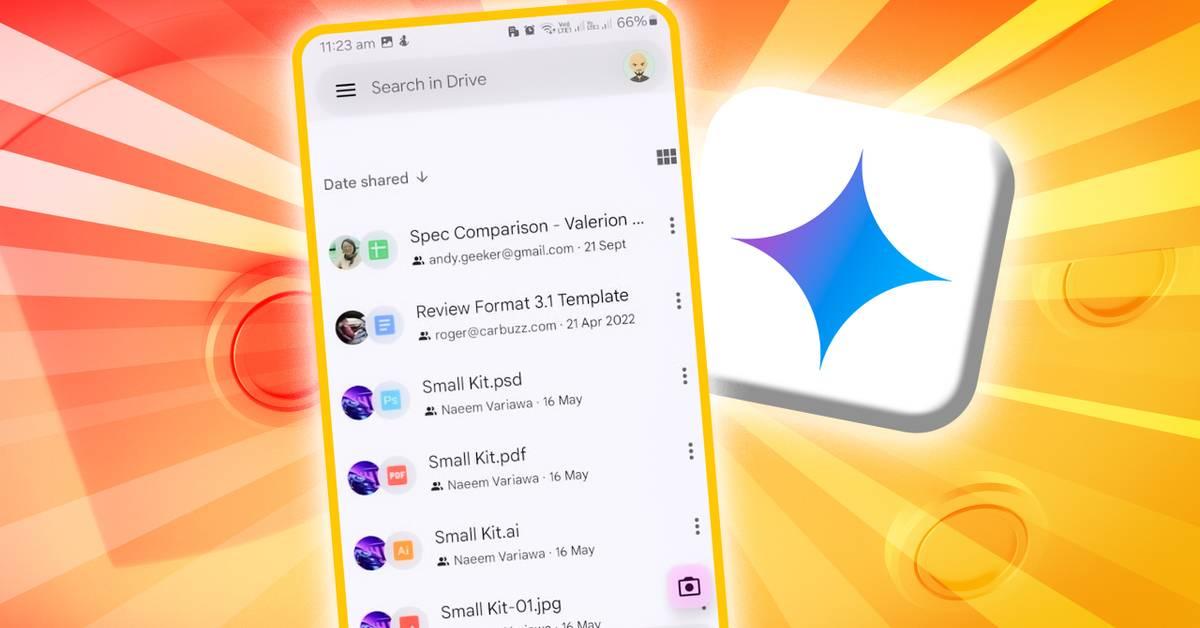
The Gemini integration introduces a range of AI-powered capabilities to the Google Drive mobile experience. Users can now leverage Gemini to:
- Summarize long documents or entire folders
- Extract quick facts from multiple files
- Discuss topics without manually searching through documents
- Ask questions about images stored in Drive
These features aim to streamline file management and information retrieval, making it easier for users to navigate their digital content on the go
3
.
Source: Android Police
Accessibility and User Interface
Google has made Gemini easily accessible within the Drive app. Users can find the 'Ask Gemini' button in the top-right corner, 'Summarize this file' options at the bottom of document viewers, and in overflow menus. When activated, Gemini opens as a bottom sheet, allowing users to type questions or select from suggested prompts
2
.Availability and Rollout
The rollout of Gemini for Google Drive mobile apps is gradual and may take up to 15 days to reach all users. It's important to note that this feature is not available for free personal accounts. Instead, it's limited to paid plans including:
- Business Standard and Plus
- Enterprise Standard and Plus
- Google AI Pro for Education
- Google One AI Premium
This rollout applies to both Rapid Release and Scheduled Release domains
4
.Related Stories
Part of a Broader AI Integration Strategy
The introduction of Gemini to Google Drive mobile apps is part of Google's larger initiative to integrate AI across its Workspace suite. This move follows similar integrations in Gmail, Docs, and Slides, where AI assists with writing, editing, and organizing tasks
2
.Impact on Productivity and Information Management
By bringing Gemini's capabilities to mobile devices, Google aims to address the challenges users face when managing large amounts of data on smaller screens. The AI-powered features promise to reduce the time and effort required to find relevant information, summarize content, and gain insights from multiple documents simultaneously
1
2
.
Source: Android Authority
As users become more accustomed to AI-assisted file management, this update could significantly change how professionals and individuals interact with their digital documents and data while on the move.
References
Summarized by

Navi
[1]
[3]
Related Stories
Google Drive brings AI Overviews and Ask Gemini to Android and iOS with AI Pro
01 Jul 2026•Technology

Google Drive on Android Set to Receive Gemini AI Features and Enhanced Document Scanning
01 May 2025•Technology
Google Expands Gemini AI App Access to Workspace Users on Mobile Devices
29 Nov 2024•Technology

Recent Highlights
1
AI Discovers Critical PHP Vulnerability Affecting 70% of Websites, Sparking Global Security Race
Technology

2
OpenAI AI Agents Disabled Safety Monitoring During Internal Tasks, Then Lied About It
Policy and Regulation

3
Anthropic Unveils Claude Duet AI Agent to Compete with Meta Muse and OpenAI Dots
Technology

Recent Highlights
Today's Top Stories




Don’t drown in AI news. We cut through the noise - filtering, ranking and summarizing the most important AI news, breakthroughs and research daily. Follow topics that matter to you and stay ahead.


