Google Integrates AI-Powered 'Gems' into Workspace Apps


3 Sources
[1]
Google Workspace is getting AI helpers called Gems. Here's how to use them.
Gems, Google's AI experts that can be customised to a specific task, are rolling out in Workspace. Available in the Gemini app, Gems will now also appear in a side panel in Google Docs, Sheets, Drive, Slides, and Gmail -- the latest in a number of big AI updates in Workspace. Although the side
[2]
Gemini Gems now live in Docs, Gmail, Sheets
Google has integrated "Gems," customizable iterations of its Gemini AI assistant, directly into Google Workspace applications. This integration allows users to access these specialized AI tools within Google Docs, Slides, Sheets, Drive, and Gmail side panels, eliminating the need to open the
[3]
AI-Powered Gems are Coming to Gmail, Google Docs and Drive
Gems are essentially smaller, specialised versions of Gemini Google Workspace users are finally getting access to Gems within the apps, the company announced on Wednesday. Gems are custom artificial intelligence (AI) experts that can be programmed to perform specific tasks. They have been
Share
Copy Link
Google has introduced customizable AI assistants called 'Gems' to its Workspace apps, including Gmail, Docs, Sheets, Slides, and Drive, enhancing productivity and task-specific AI support for users.
Google Introduces AI-Powered 'Gems' to Workspace
Google has announced a significant update to its Workspace suite, integrating AI-powered assistants called 'Gems' directly into popular applications such as Gmail, Google Docs, Sheets, Slides, and Drive. This move marks a substantial enhancement in the company's AI offerings for productivity tools
1
.What are Gems?
Gems are essentially specialized versions of Google's Gemini AI, designed to perform specific tasks within the Workspace environment. These AI helpers can be customized to suit individual user needs, offering a more tailored and efficient approach to various work-related activities
2
.
Source: Dataconomy
Accessing and Using Gems
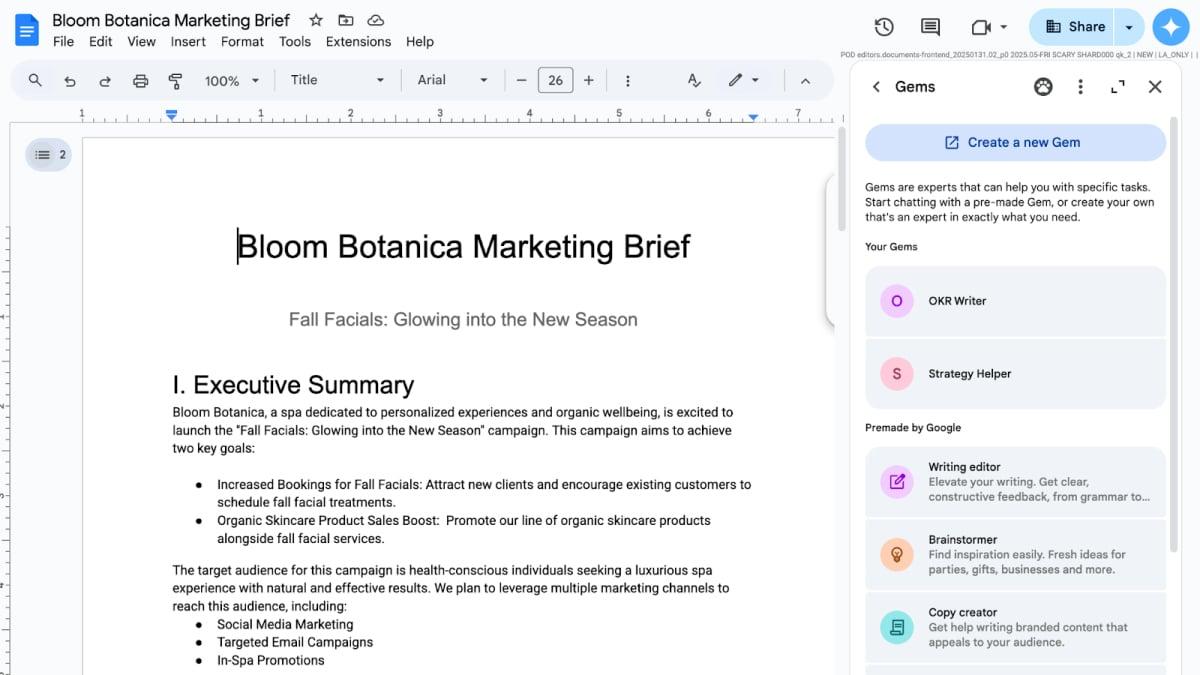
Users can access Gems through a side panel in supported Workspace applications by clicking the "Ask Gemini" spark button in the top right corner of a document. The panel displays both pre-made Gems and the option to create custom ones
1
.
Source: Mashable
Pre-made and Custom Gems
Google provides a selection of pre-made Gems for common tasks, including:
- Writing editor: Offers constructive feedback on written text
- Brainstormer: Provides inspiration and ideas for specific projects
- Sales pitch ideator: Creates engaging pitches for clients
3
Users can also create custom Gems tailored to their specific needs. This can be done by visiting gemini.google.com/gems/create or selecting the "Create a new Gem" option in the Workspace side panel
2
.Enhanced Functionality and Integration
Gems can be fed with personal files, text, and images to improve their context-awareness and response accuracy. They support Workspace functionalities such as @-mentioning and access to files and folders, allowing for seamless integration with existing workflows
2
.Related Stories



Availability and Rollout
The Gems feature is available to paid individual and enterprise Workspace account holders who already have access to the Gemini side panel. Google began rolling out the feature on July 2nd, though full deployment may take longer than 15 days
3
.Potential Applications
Google suggests several use cases for Gems, including:
- Creating job role-specific assistants for relevant summaries and internal communications
- Developing Gems for sales interactions grounded in company, prospect, or industry-specific information
- Generating and analyzing code
- Creating social media posts
1
3
This integration of AI-powered Gems into Google Workspace represents a significant step in making artificial intelligence more accessible and practical for everyday work tasks, potentially boosting productivity and creativity for users across various industries.
References
Summarized by

Navi
[2]
[3]
Related Stories
Recent Highlights
1
AI Discovers Critical PHP Vulnerability Affecting 70% of Websites, Sparking Global Security Race
Technology

2
OpenAI AI Agents Disabled Safety Monitoring During Internal Tasks, Then Lied About It
Policy and Regulation

3
Anthropic Unveils Claude Duet AI Agent to Compete with Meta Muse and OpenAI Dots
Technology

Recent Highlights
Today's Top Stories




Don’t drown in AI news. We cut through the noise - filtering, ranking and summarizing the most important AI news, breakthroughs and research daily. Follow topics that matter to you and stay ahead.


