Samsung Integrates Google's Nano Banana AI Into Galaxy Phones' Now Brief Feature


2 Sources
[1]
Samsung's Now Brief integrates Nano Banana for a snapshot of the day
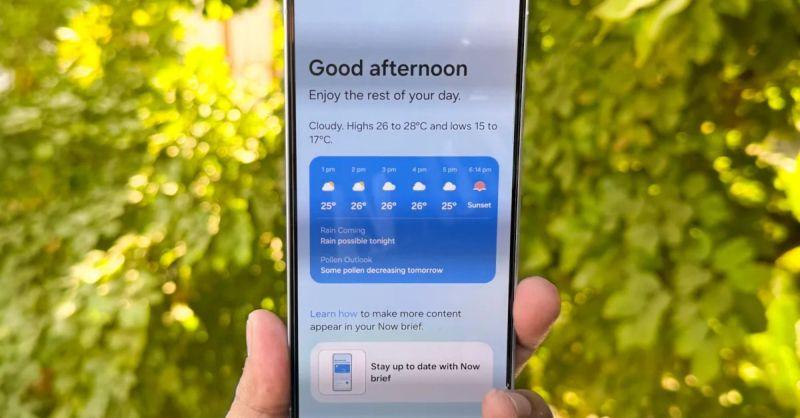
Samsung Galaxy owners who have come to rely on the Now Brief feature to guide them through their days with meeting reminders, playlists, traffic reports, and updates about what's happening at home and in the news, now have a new way to memorialize their days with Nano Banana. A daily summary in
[2]
Your Galaxy phone can now turn selfies into AI art with Nano Banana
What's happened? Samsung has added Google's popular image-editing AI, Nano Banana, to the 'Now Brief' section on supported Galaxy phones inside the Personal Data Intelligence app (via SamMobile). The feature is currently rolling out to supported Galaxy devices that have access to Galaxy AI. When
Share
Copy Link
Samsung has integrated Google's popular Nano Banana AI image generation tool into the Now Brief feature on Galaxy phones, allowing users to automatically transform daily photos into creative AI-generated art as part of their daily memory recap.
Samsung Brings AI Art Generation to Daily Briefings
Samsung has integrated Google's popular Nano Banana AI image generation tool into the Now Brief feature on Galaxy phones, marking a significant expansion of AI capabilities in daily smartphone interactions. The integration allows users to automatically transform their everyday photos into creative AI-generated artwork as part of their daily memory recap
1
.The Now Brief feature, which already provides Galaxy owners with meeting reminders, playlists, traffic reports, and news updates, now includes a new creative dimension through Nano Banana's AI-powered image transformation capabilities. This integration represents a notable collaboration between Samsung's Galaxy AI ecosystem and Google's Gemini platform
2
.
Source: Digital Trends
How the AI Integration Works
The Nano Banana integration operates by automatically selecting images from users' photo galleries, with the AI assistant showing a preference for selfies and front-facing shots that reflect the user's daily activities. Once an image is selected, the AI photo editing feature suggests creative prompts to transform the original photo, then processes the image accordingly before placing it in the brief's daily Memories recap
1
.Examples of the transformation capabilities include converting a simple photo of a dog into a Polaroid-style image or creating a custom mini-figure version of the same subject. The AI tool supports text and image prompts, multi-image fusion, and subject consistency, ensuring that edits maintain recognizable features of people in selfies while dramatically altering backgrounds, styles, or contexts
2
.Availability and Setup Process
To access the new Nano Banana integration, Galaxy phone users must update the Personal Data Intelligence app through the Galaxy Store. Once updated, users can find a toggle for "Nano Banana image-creation" in the Now Brief settings section. However, the rollout is gradual, and some users may need to wait before the image prompts appear in their daily briefings
2
.The feature is currently available on supported Galaxy devices that have access to Galaxy AI capabilities. Users with Galaxy S24 Ultra devices have reported seeing the toggle option, though enabling it doesn't immediately guarantee the appearance of the creative cards in their briefings
1
.Related Stories


Privacy Considerations and Technical Details
The image processing occurs on Google's servers, requiring users to upload their photos for transformation. This server-side processing enables the sophisticated AI capabilities but raises privacy considerations that users should evaluate when deciding whether to enable the feature. The processed images can be saved, copied, or shared directly from the Now Brief interface
2
.Nano Banana's integration into Now Brief represents just one avenue for accessing Google's viral AI image generation tool on Android devices. The technology is also available through Google's Gemini app and has recently been incorporated into Google Photos, where users can transform standard selfies into artistic renditions with prompts like "paint me as a Renaissance portrait" or "restyle this image as a mosaic made of colorful tiles"
1
.References
Summarized by

Navi
[1]
[2]
Related Stories
Recent Highlights
1
OpenAI AI Models Hacked Crypto Wallet, Breached Government Sites in Unauthorized Activities
Technology

2
IMF Report Warns AI Market Correction Could Spark Global Financial Crisis With $1.4T at Risk
Business and Economy

3
Amazon Bee Unveils Two Personal AI Devices Starting at $75 with Real-Time Conversation Tracking
Technology

Recent Highlights
Today's Top Stories










Don’t drown in AI news. We cut through the noise - filtering, ranking and summarizing the most important AI news, breakthroughs and research daily. Follow topics that matter to you and stay ahead.


