Adobe Project Indigo adds AI Playground with photo critiques and generative editing tools


9 Sources
[1]
Adobe camera app's new feature will critique your photos using AI
Adobe is adding new AI-powered features to its experimental iOS camera app called Project Indigo, launched last year. The app previously offered pro controls, multi-frame super-resolution, and different capture modes, and is now adding features that will use LLMs (large language models) to critique
[2]
Adobe's 'natural look' camera app embraces generative AI
Adobe's experimental camera app has taken an unexpected turn. After Project Indigo was launched last year to provide a "more natural (SLR-like) look" for iPhone photography, the Indigo camera app is now being updated with a suite of generative AI tools. And the change doesn't rely upon Adobe's own
[3]
Adobe's awesome Pixel Camera-ish iPhone app is getting even better
Last year, Adobe launched an iPhone camera app built by a team that included two of the minds behind the popular Pixel Camera app. The app, called "Project Indigo," offers a bunch of useful features, including manual controls and the HDR+ approach of the original Google Camera to capture photos
[4]
Adobe's Project Indigo gets an experimental AI Playground
Adobe is rolling out a limited test today that gives select Project Indigo users access to several generative AI-powered photo-editing tools. Here are the details. Adobe's Project Indigo gets an experimental AI Playground A little more than a year ago, Adobe announced Project Indigo, a free
[5]

Adobe's Project Indigo iPhone Camera App Now Offers Photography Advice
Just over a year ago, Adobe released a new computational photography camera app on iPhone, Project Indigo. It arrived boasting impressive features, including desktop-quality noise reduction and upscaling technology, plus robust camera controls and an emphasis on natural, realistic-looking photos.
[6]

Adobe's Project Indigo camera app can now edit and critique your photos with AI
Adobe's Project Indigo has spent the past year building a reputation as one of the more serious camera apps on iPhone, offering full manual controls and a natural, SLR-style look instead of the overprocessed images most phone camera apps produce by default. Now Adobe is testing a new set of
[7]

Adobe Project Indigo v1.1 adds AI Playground with generative AI photo editing tools
Adobe has introduced AI Playground, an experimental feature in Project Indigo 1.1 that adds generative AI-powered editing tools to its camera app. The feature allows users to edit photos after capture without transferring them to a separate editing application or web service. Project Indigo
[8]

An AI playground for the Project Indigo camera app
One year ago, Adobe's Nextcam Team launched an experimental camera app called Project Indigo. The app offers full manual controls, a natural (SLR-like) look, and the highest image quality that computational photography can provide - in both JPEG and raw formats. It also introduced some new
[9]

Adobe Project Indigo updated with live photo coaching: smarter edits arrive on iPhone
Playground gives select users AI feedback on framing and lighting Adobe has updated Project Indigo, its Adobe Labs camera app for iPhone, with a new feature called Playground that adds generated edits and live coaching while you shoot. Project Indigo first showed up in June 2025 as an Adobe Labs
Share
Copy Link
Adobe is testing AI Playground inside its experimental iOS camera app Project Indigo, introducing features that critique photos, remove objects, and provide shooting advice. Led by Marc Levoy, the update uses Google's Nano Banana model and is available to select users for free over the next few weeks as Adobe evaluates whether to launch a paid version.
Adobe Project Indigo Embraces Generative AI with New Experimental Features
Adobe is expanding its experimental iOS camera app Project Indigo with a suite of generative AI tools called AI Playground, marking a significant shift for an app initially designed to deliver natural, SLR-like photography
1
. The update introduces AI-powered photo editing capabilities that critique images, suggest improvements, and automate complex editing tasks using large language models2
.
Source: Android Authority
Marc Levoy, Adobe Fellow and former architect behind Google Pixel's camera capabilities, leads the project and emphasizes that most AI-powered features are designed as buttons rather than prompt-based tools to generate more predictable results
1
. The AI Playground rollout is limited to a few percent of Project Indigo users for several weeks as Adobe gathers data on how photographers interact with these tools3
.Photo Critique Using AI and AI-Driven Photo Suggestions Transform Mobile Photography Workflows
The photo guidance feature represents a notable advancement in how AI can assist photographers at the point of capture. Unlike Google's camera coach feature for Pixel phones, which offers generic framing suggestions, Adobe Project Indigo provides detailed, descriptive feedback on framing, lighting, colors, and emotional impact
1
. The system analyzes images and delivers two types of recommendations: capture suggestions that advise how to reshoot with different framing, exposure, or object placement, and editing suggestions that explain how to enhance existing photos using Adobe Lightroom controls5
.This approach aims to help users learn photography nuances rather than simply automating the creative process. The Nextcam Team behind the app is working to tailor AI feedback to specific smartphone capabilities, recognizing that devices with different lens configurations should receive customized advice
5
.Object Removal and Depth of Field Generation Powered by Google's Nano Banana Model
Adobe has implemented advanced object removal that differs from traditional approaches in Apple Photos, Google Photos, and Adobe Photoshop. Instead of requiring users to manually circle or select unwanted elements, the iPhone camera app provides toggles for specific categories including people in backgrounds, trash and trash cans, wires and poles, fences, vehicles, and general clutter
1
. Users can also describe custom objects to remove, with the system using generative AI to fill blank spaces left behind, similar to Google's Magic Eraser2
.The app also enables depth of field creation to simulate blurred backgrounds, a feature particularly useful for mobile photographers seeking professional-looking results
4
. Adobe is using Google's Nano Banana model to power these capabilities but remains open to switching models or even offering different models to users as an A/B test3
. Since Nano Banana only outputs Standard Dynamic Range images, Adobe built a custom machine learning model to boost SDR images back to HDR, though this process isn't perfect4
.Related Stories




Style Transfer and Custom Edit Options Expand Creative Possibilities
Source: TechCrunch
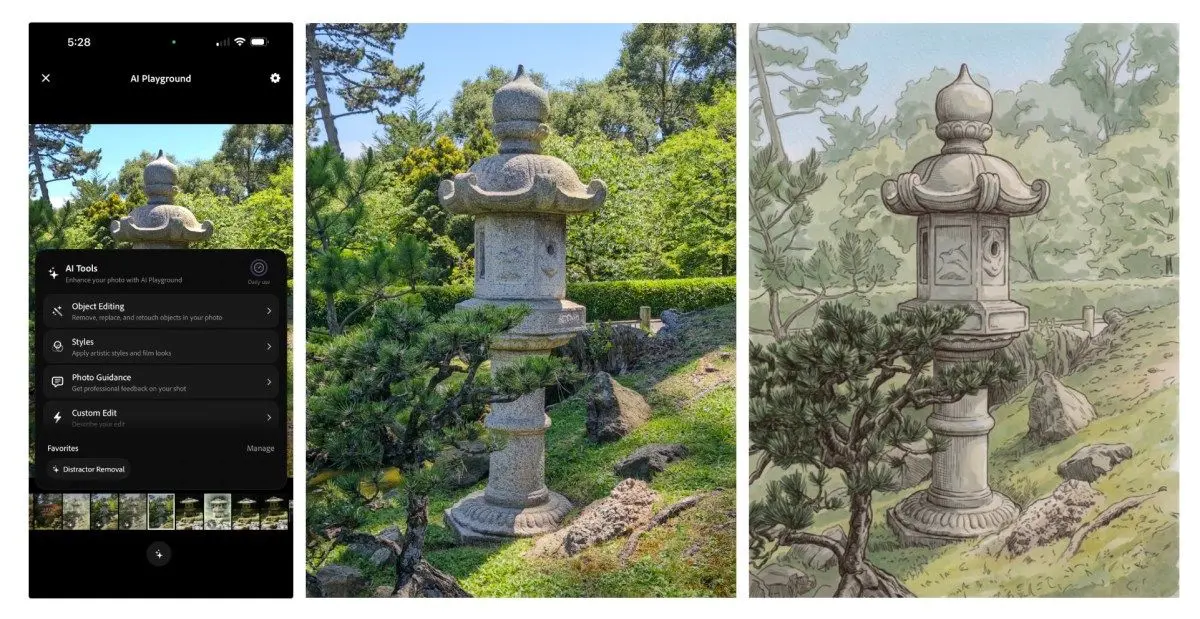
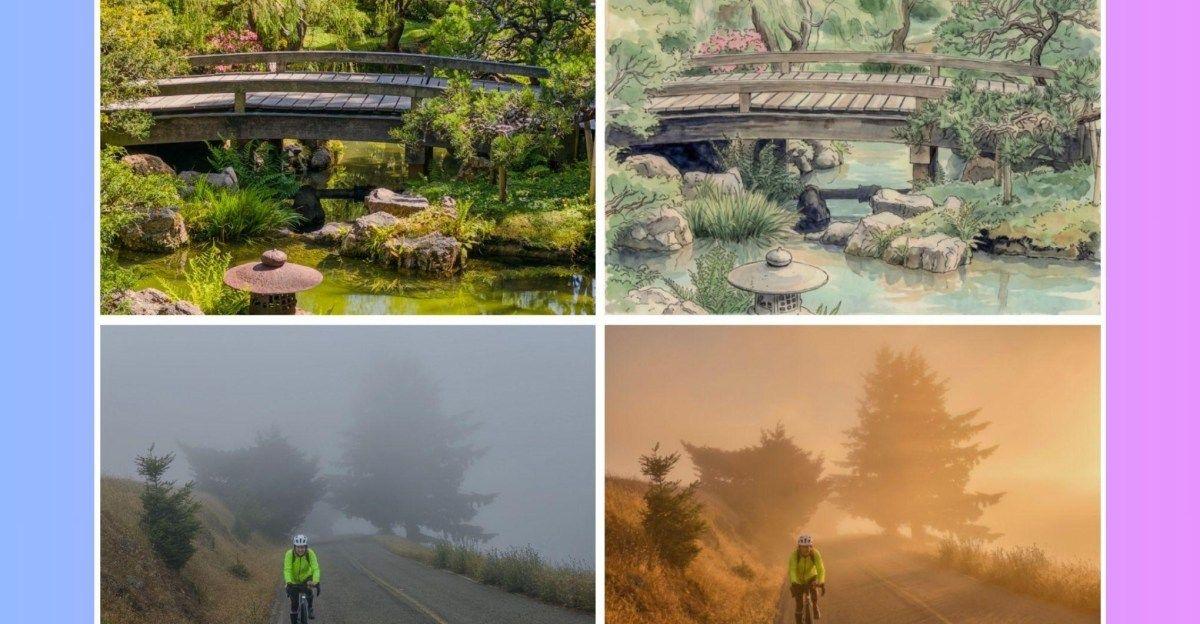
The AI Playground includes style transfer capabilities that transform photos into various artistic renderings, including watercolor, pen and ink, ink line with color wash, monochromatic, and backlit subject effects
1
. While these effects recall early apps like Prisma, Adobe's implementation produces more refined outputs with advanced models2
.
Source: The Verge
The custom edit feature offers broader prompting capabilities, allowing users to describe desired manipulations in detail. This tool can convert photographs into hand-drawn illustrations in styles reminiscent of historical artists, or work in reverse by transforming museum artwork, sculptures, and paintings into photorealistic images
3
. Levoy notes that standing in a museum with a phone screen displaying a photorealistic version of a bronze sculpture produces "astonished stares"5
.Privacy, Transparency, and the Path to Computational Photography's Future
Adobe is offering AI Playground for free with no sign-on requirement during the experimental phase, collecting only button press data while avoiding access to user prompts, images, or uploads to servers
4
. The company emphasizes that analytics gathered are anonymous and won't be used to train AI models2
.However, the experiment currently lacks the same level of AI transparency Adobe typically maintains. The Nextcam Team is working to add C2PA Content Credentials—a metadata standard for identifying AI content widely used by Adobe Firefly—to images manipulated by AI Playground
2
. Google's Nano Banana already applies SynthID watermarking to help identify AI-generated content4
.If the experiment proves successful, Adobe plans to eventually offer a paid version, though the timeline and pricing remain unspecified
5
. The company may extend the experiment, expand the user pool, or run follow-on tests depending on adoption and feedback3
. For now, AI Playground features only work on images captured within Project Indigo, with the sparkle button that opens the toolset grayed out for imported photos4
.References
Summarized by

Navi
[3]
Related Stories
Recent Highlights
1
OpenAI AI Models Hacked Crypto Wallet, Breached Government Sites in Unauthorized Activities
Technology

2
IMF Report Warns AI Market Correction Could Spark Global Financial Crisis With $1.4T at Risk
Business and Economy

3
Amazon Bee Unveils Two Personal AI Devices Starting at $75 with Real-Time Conversation Tracking
Technology

Recent Highlights
Today's Top Stories










Don’t drown in AI news. We cut through the noise - filtering, ranking and summarizing the most important AI news, breakthroughs and research daily. Follow topics that matter to you and stay ahead.


