17 Sources
[1]
Apple's Photos app is getting new AI editing features
Apple announced at WWDC 2026 on Monday that its Photos app is getting a few new AI features that leverage Apple Intelligence. A new spatial "Reframe" feature will let users use AI to reframe images. For instance, if a user accidentally capture a sign above someone's head, if the photo would have been more symmetrical by stepping slightly to the right, or if eye contact with a subject was missed by a fraction of a second, the new reframing tool can help fix all of these issues. Users can touch and drag photos to adjust the perspective as if they had repositioned the camera in the original scene. Users can also preview the effect in real-time. As the photo is being adjusted, a blur will appear around the edges of the original image, which will be filled later by Apple's generative models. The feature only generates new content to fill in the gaps where the perspective has been affected to ensure that the reframe photo stays consistent with the original scene. The "Extend" tool expands images to give subjects more breathing room, or to straighten a crooked horizon without cropping out anything important. Users can pinch to zoom out, or adjust the crop to add more to the scene. The app's popular "Cleanup" tool is also getting an upgrade so users can remove distractions with better quality and more realistic infill with generative AI. The feature lets users tap, brush, or circle what they want to remove.
[2]
Apple's Camera Chief Thinks AI Can Give You Superpowers
What even is a photograph these days? As tech giants pack generative AI capabilities into our phones and their camera software, the line between what is a real image and what isn't continues to blur. Phones from Google and Samsung, for example, now come with features that let you drastically alter a photo by erasing people, moving people around in the shot, and even adding new objects to the scene. Apple is getting in on the action by adding new generative features to its Photos app, though the company's iPhone camera chief, Jon McCormack, stresses that Apple is taking a more measured approach than its competitors and isn't "doing AI for the sake of AI." At its annual Worldwide Developer Conference on Monday, Apple showed off a handful of AI features invading the Photos app in iOS 27, which will arrive on iPhones later this year. While the iPhone's Photos app already has the Clean Up tool, which lets you erase unwanted objects in pictures, it'll perform even better in iOS 27 thanks to its access to Apple's improved AI models. However, there are two new features -- called Extend and Spatial Reframe -- that let you expand the space around your photo or change the perspective of an image, all while generating fake pixels. The camera "thinks" about what should be there, then draws it in. McCormack says there's a giant backlog of unsolvable issues that AI is now helping to address and that these new features are very deliberate. "You don't have to know all the details of how to do something in Photoshop or something else -- it gives normal people these absolute superpowers," McCormack says. Apple doesn't want to let you run wild with your images and generate all kinds of fakery, though. (At least not in the Photos app; the App Store offers plenty of tools for making photorealistic slop.) The fake pixels the Photos app generates are restricted to what's in the background. It won't alter the pixels of the main subject's face. With Clean Up, for example, you cannot remove the primary subject in the image. The Extend function only works once and expands the image by 25 percent -- you can't save, edit the image again, and infinitely extend it with AI. McCormack also says Apple will integrate Google DeepMind's SynthID technology later this year to add an invisible watermark indicating these images have been altered with generative AI. Any platforms where you share the photo may be able to flag it as AI-edited. (Just know that researchers have shown that digital watermarks aren't foolproof.) "A photograph is of something that actually happened," McCormack says. "We really do believe in this idea of authentic journalism to your own life -- when you're capturing photographs, you're making these memories, you're putting moments of your life in a bottle that you can go back to. It's really important to us that we create tools that keep the sanctity of that moment." The head of Google's Pixel camera division shared a similar sentiment when I spoke to him a few years ago; however, he highlighted the importance of how you remembered the photograph. Google is far more lax in letting you alter the image to match what you had in your mind. Was the sky bluer in your memory? Go ahead and change it. Apple's new tools are more restrictive and are specifically meant to solve compositional problems you may not have realized you made during the capture process, McCormack says. Maybe you didn't see that unsightly plastic bag rolling through the background. Maybe you took a picture of your kid but shot a little too high up. Or maybe you framed your spouse too close to the edge and want a little more space. Della Huff, product manager for Apple's Camera and Photos software, says the team spent time training the AI models to minimize any hallucinations that might occur during these digital adjustments. "It's not going to create anything that shouldn't be there," Huff says. For example, if you're trying to extend a street scene, it's plausible that there could be a car parked outside the boundary of your original photo, but Extend won't make that assumption and generate it. "How the model has been trained is if you don't need to create something there, then just don't -- do the minimum amount of hallucination to achieve the goal the user is asking the model to do." But in one of my examples of using Extend in the iOS 27 developer beta, I took a photo of a friend sitting at a table, then tried to expand the scene a little more to the right. In the background, some people were sitting at tables, but as the scene was extended, the Photos app added a couple more tables, complete with fake people -- people who were never there in real life -- sitting at them. Huff says the feature is trying to match the existing aesthetic. If there are people in the background but Extend doesn't add anyone else as you expand the photo, that may look strange. "If we said the rule is we could never generate a background human ever, then the feature would become less useful," she says. It's worth remembering a point Apple made at the keynote: There are usage limits for these new camera features. Apple isn't sharing exactly what those daily limits are, but users will need to subscribe to iCloud if they want to Extend, Spatial Reframe, or Clean Up their photos multiple times a day. One of the big themes of Apple's WWDC presentation this year was using natural language to get things done. You can converse with Siri naturally -- no need to use rigid commands -- and it will understand your intent. In the Calendar app, you can describe the event, and it will create it in a jiffy, no need to fill out various fields. You can describe the shortcut you want to create in the Shortcuts app without fiddling with triggers and actions. In Safari, you can speak an extension into existence. So how come you can't edit a photo with natural language? That's a feature Google introduced last year on Google Photos. Huff says the new Siri AI can handle a few touch-ups on your behalf and that Apple is not ruling out anything on the future road map. Siri cannot edit with the new AI features -- those are strictly human-controlled -- but this is partially because Apple doesn't think it's a good user experience. Those features require a little more muscle; it's hard to talk Siri through the process of changing a photo's perspective. "There's so much more that's open-ended about that, especially something like Spatial Reframing where that's really a user-intent thing that you need to express," Huff says. Speaking of Siri, the other big change coming in iOS 27 is that Siri is getting injected into the Camera app. McCormack says Sirifying the iPhone's camera is purely about reducing friction. Siri's Visual Intelligence feature -- which operates like Google Lens by using computer vision to study an image -- currently is activated through the Camera Control button. But this is a camera-specific function, so McCormack says it makes sense that it would live in the Camera app. "It's embracing the idea that the camera is really a number of things," he says. "It's a memorialization device ... it's a note-taking device ... or I'm just curious what that plant is." Apple's more measured approach might feel at odds next to its image-generation app -- Image Playground -- which lets you create AI-generated images with text prompts (or by injecting a photo from your own library). In iOS 27, Image Playground defaults to generating more photorealistic pictures unless you specify a particular art style. But McCormack says these different uses of AI will feel different based on the context of where they live on your phone. If you're in the Photos app, users want to know they're in a safe place where memories are kept intact. But in Playground, the naming is intentional -- "it's a place to play." "Both use cases are totally valid," Huff says. "I want to improve this photo. A photo is something that happened, I captured it with my camera, and the Photos app is where I can improve it. But I also want to be creative and let my imagination be able to run wild, and so they're two separate experiences intentionally."
[3]
Apple's Spatial Reframing Is Generative AI I Can Get Behind as a Photographer
We knew Apple's Worldwide Developers Conference would be full of AI, but I didn't expect to see a photo feature that would make me think: "This is wild." During the WWDC keynote on Monday, Apple showed off a few new editing features in its Photos app that I think will be genuinely useful. In addition to the existing Clean Up tool, which can remove unwanted distractions from a photo, we'll also be able to extend a photo's edges. But it was Spatial Reframing, a feature that lets you adjust a photo's composition to reflect where you wish you had been standing to take it, that really caught my eye. All these features use generative AI, and will be included in a new Tools category in the Edit environment in the Photos app. The first developer beta of iOS 27 is available now to registered developers. More AI, less slop Generative AI is a technology that photographers are distancing themselves from (or should be), thanks to all the AI slop being produced everywhere. And yes, that includes creations from Apple's Image Playground app, the image generator that the company also showed off during the WWDC keynote. But generative AI doesn't need to mean full images created from text prompts. When applied to selective areas, like erasing a piece of trash next to a subject's feet, generative AI can do some of the menial work of replacing pixels that photographers would otherwise spend time retouching in an app like Photoshop. Google's Pixel phones include a similar Magic Eraser tool. Spatial Reframing is a great example of how the technology can be used to enhance real photos you capture. How Spatial Reframing will work Apple's Spatial Photos technology uses AI to determine depth in a flat photo, giving it a 3D effect that responds when you tilt your phone or view it in a Vision Pro headset, even if it wasn't shot as a spatial photo. It can give depth to iPhone lock screen photos, too. Honestly, the effect's quality is pretty good. The separation between the subject of a photo and the background is usually not jarring, nor does it have a "cut-out" look. But it's mostly a neat gimmick on the iPhone (I don't have a Vision Pro to experience it in that environment). Spatial Reframing takes that technology and makes it useful. As shown in the keynote demo, you'll be able to drag the image to adjust the shot's perspective. The background will adjust as if you had taken a physical step to the side or repositioned your camera for a better angle. Photo editing software like Adobe Lightroom lets you adjust the plane of the entire photo, rotating it around a central axis to do limited reframing, but at the cost of distorting the image. After you've reframed the shot, the Photos app uses generative AI to fill in any areas around the edges. Apple says it uses on-device spatial modeling to determine the depth, and its private cloud compute architecture to process the image generation. "It only generates new content to fill in the gaps where the perspective has shifted," said Alok Deshpande, Apple's director of Camera and Photos Software. "This ensures that the reframed photo stays consistent with the original scene." The result is a photo from the location you wished you'd moved to when you took the picture. Whether the edited photos are really as clean as they were demoed remains to be discovered. I sometimes use the existing Clean Up feature in Photos, but it can be very hit-or-miss in terms of the quality of the generated pixels. With promised new imaging models in iOS 27, I'm hoping the edited images are ones that any photographer would be proud to share -- maybe not in a gallery or competition, but informally with friends or on social media.
[4]
Apple's new AI photo editing tools mostly work, for better and worse
The most popular camera in the world just got its first set of serious AI photo editing features, and I don't think any of us are ready. As far as AI photo editing goes, the new features in iOS 27 are pretty tame compared to what you can do on, say, Google's Pixel phones. But for the iPhone, they represent a tipping point in what the native photos app allows you to do to your photos. I mean memories. I mean, I don't know anymore. These new features are part of the iOS 27 developer beta right now, so bear in mind that Apple may continue making tweaks to them before they're released to the general public. There are three, or maybe two and a half, new AI editing features in this update. The new Clean Up tool counts as half, because it existed before but was so bad it didn't really count. That's the tool that lets you take photobombers out of the background of your photos, and it got a major upgrade this year. There's also Extend, which lets you expand the edges of your photo using AI to paint in some plausible-looking filler. And there's Spatial Reframing, which mimics the effect of moving the camera around the scene to let you recompose an existing photo. It's the most ambitious and maybe the most problematic of the three. But first things first: Clean Up. It's actually good now. Instead of only using on-device models to remove objects and fill in details, it can now use more powerful models in the cloud. This is what Google has been doing for years now, and it's why the company's Magic Editor tools were miles better than the version Apple introduced last year. That totally on-device Clean Up wasn't very good at painting in convincing details to replace what it removed. It left weird artifacts and was generally more trouble than it was worth. Clean Up 2.0? It does the job. Using AI to remove stuff from photos is the generative editing tool that I'm the least queasy about using. I'll use it to remove a booger from my kid's nose or take a stranger out of the background. This new version in iOS does all of that without a problem, and I think it's going to be popular with iPhone owners. Stepping up to the next level of complexity and what-is-a-photo-ness, there's Extend. Think of it as cropping, but in reverse. It lets you expand the edges of your frame, which you might want to do if your composition was too tight on your subject and you want to give it a little more breathing room, for example. Extend lets you do this, but only to a point. It seems to avoid making edits to people, and will sometimes tell you a photo can only be extended in a particular direction. It will only add a little bit of padding, too, which minimizes the kind of shenanigans it can be used for. I appreciate that. Like Clean Up, it does its job convincingly. It seems predisposed to looking for symmetry, which usually works. It added part of a rally car that was out of frame in my original image, adding a side mirror to match the one already in the photo. It doesn't seem as eager to make stuff up to put into your photos as, say, Samsung's early efforts. But I did catch it adding a potted plant on a side table; it looks reasonably convincing, but I know that it's not a real plant. I'd feel weird about that if I were to put that photo on Instagram. Extend works with your photo in a two-dimensional space; Spatial Reframing adds a third dimension. It builds on an existing feature that makes your photos look 3D-ish, allowing you to reframe a photo as if you had physically moved the camera and changed your perspective of the scene. You can't go too far with it -- only about as far as you could have moved your arm when originally taking the photo. But the idea is that you can fix your framing if you didn't quite nail it when you took your shot. Look, this appeals to my Type A nature. Sometimes I'll love everything about a photo I took, except wouldn't it be better if I had just stepped to the left to avoid framing something distracting in front of my subject? You can't always catch that stuff in real time. These are the minor adjustments that Spatial Reframing is designed for. Seems reasonable, except that there's room to introduce existential chaos, even with minor adjustments. I tried changing the framing of a photo I took at a tech talk with Apple executives following the WWDC keynote. Since I was sitting off to the side, one of the execs onstage was mostly obscured in the original shot. I changed the framing and the AI kind of made up a guy sitting next to Craig Federighi. Predicting what should come next in a two-dimensional space seems like an easier problem than in three dimensions. The results from Spatial Reframing compared to Extend reflect that. They're weirder. The farther you are from a subject, the less latitude you have to "re-compose," and the more realistic the AI-generated stuff is. But you end up with an image that's only subtly different from the actual photo you took, and at that point, what are we doing? In photos with a subject that's closer to the camera, things get strange. The effect of "re-composing" is more dramatic, and the AI has to work harder to fill in the gaps. You can change the perspective in a selfie, but that means the AI has more detail it needs to fill in on your face, which gets a little uncanny valley pretty quick. Even within its limited adjustment range, it can make faces look a bit skewed and "off." It's more prone to inventing things that weren't there. Sure, it sounds nice being able to rescue a photo from a composition that wasn't quite right. In practice, I don't think I like it. It's a small comfort that images edited with these AI tools get Synth ID labels signaling that they have been modified with AI. Instagram picked up on this info when I uploaded a couple of images, but only surfaces that information if you tap on the "AI Info" menu for that image. Labels aren't exactly an airtight solution right now, and I think the bigger danger is the quickly eroding notion that we can usually trust a photo that someone takes and posts from their phone. Apple is certainly not the most audacious player here. But even introducing a little bit of doubt about the provenance of a houseplant on a side table, or whether someone was indeed standing exactly where they appear to have taken a photo from, can add up to a lot of trouble over time. Photography by Allison Johnson / The Verge
[5]
I tested iOS 27's new AI photo editing tools as a skeptic - and the results surprised me
Follow ZDNET: Add us as a preferred source on Google. ZDNET's key takeaways * The iOS 27 developer beta offers three AI photo editing tools. * The improved Clean Up tool cleanly erases an item from a photo. * The Reframe and Extend tools can change the framing or view of a photo. AI has increasingly seeped into popular photo editors, including Apple's Photos app. At WWDC on Monday, Apple unveiled several AI-powered updates for the app that aim to help you edit, refine, and alter your photos. The skills are accessible in the first iOS 27 developer app, now available for anyone with a supported iPhone and a developer account. Also: The biggest announcements at Apple WWDC 2026 First up are improvements to the Clean Up tool. Introduced with iOS 18.1, Clean Up tries to cleanly remove unwanted people and objects from your photos, replacing the empty space with the surrounding area. In the past, Clean Up was a bit hit-or-miss. But with iOS 27, the tool is supposed to work more effectively and accurately. Next up is a new tool called Extend. With this one, you can expand a photo to surround the subject with more space. AI automatically fills in the extended area based on the background. Finally, another new tool, Reframe (aka Spatial Reframing), lets you shift the angle or perspective of a photo, almost as if you're repositioning the camera's view. How to try AI-powered photo editing tools I tried all three tools on several photos to see how they worked, and here are my impressions. Before we proceed, though, let's get a couple of things out of the way. As the first developer beta, iOS 27 is likely to be unstable and unsuitable for everyday use. That's why I strongly suggest you install this only on a spare iPhone and not on your primary device. I use an iPhone 15 Pro to test new features, especially AI-powered ones. That's because Apple Intelligence supports only the iPhone 15 Pro and Pro Max, as well as the entire iPhone 16 and 17 lineup. Also: iOS 27's Shortcuts upgrade makes automations easy to build - and will save me so much time If you still want to give the beta a try, go to Settings on your supported iPhone, select General, and then tap Software Update. Select the Beta Updates option, then choose iOS 27 Developer Beta. Wait for the update to download and install. Restart your phone, and you can then dive in. Also, I love photography and snap a lot of photos, especially when my wife and I take our various treks both in the US and abroad. I try to capture the best image and scene possible when I take a photo. But that doesn't mean my photos can't use some tweaking in the editing room. However, I'm not a big fan of using AI to manipulate my photos. Improving the color, brightness, contrast, and other attributes? Yes, definitely. But turning to AI to alter the original photo seems a bit like cheating, as if I'm attempting to rewrite history. Still, I have used Clean Up to erase unwanted items in certain photos. It does come in handy for removing glare, reflections, and other intrusive elements, so I'm always game to give these tools a shot. The improved Clean Up tool First, I tried the improved Clean Up tool. Here, I chose a photo of a street performer in London; I wanted to remove the passersby. For this one, open the Photos app and pick a photo with a distracting person or object you wish to remove. Tap the three-lined editor icon at the bottom, select Tools, and then tap Clean Up. Also: Apple's new Siri AI comes with hidden costs that power users should know of On my end, Clean Up automatically highlighted all of the passersby. Taping each one allowed me to remove them all. The process did seem more seamless and accurate than in the past. The AI cleanly erased all the people except the performer and filled in the background quite effectively. Extend for extra breathing room Next, I opened a different photo and segued to the Extend tool. I picked a photo of myself that was tightly framed and one to which I wanted to add some breathing room. Selecting the Extend icon from the editing bar told me to pinch to zoom out or adjust the crop to add more to the scene. I zoomed out and moved myself to the lower-left corner of the frame. The photo was extended to show more of the surrounding area. The effect looked good, so I didn't find any significant fault with it. Reframe for a new perspective Finally, I tried the Reframe tool. Here, I chose a photo of a statue for which I wanted to adjust the angle. After I moved the image and tapped Reframe, the AI repositioned it. By tapping the photo, I could see the before and after images. I liked the reframed version because it gave the statue's face a more sideways glance. So this one also worked effectively. My conclusions What did I think of the three AI tools? Despite my resistance to using AI to manipulate a photo, I did find the tools useful and fun to try. I like the Clean Up and Reframe Tools the most, while Extend didn't thrill me as much. Still, I'd likely play with these tools the next time I want to enhance a photo. And since this is just the first developer beta, I look forward to seeing how Apple might fine-tune them even further.
[6]
The iPhone's New AI Photo Tool Wants to Rewrite Your Memories
Apple's Alok Deshpande demonstrates the Spatial Reframing feature at WWDC (Credit: Apple/PCMag) This week's WWDC keynote was heavy into AI, with one feature for the camera app -- Spatial Reframing. It lets you edit the positions of objects and people in photos, and even change the angle of a person's head so it appears as if they were looking at the camera when the snap was taken. Spatial Reframing works by taking the depth map that the iPhone uses for bokeh and other artistic effects and mapping it into a 3D model, or by using its algorithms to create a depth map if an image doesn't have one. It sounds mostly harmless on the surface, but I have some real concerns about how it changes the way we take family snaps and affects the authenticity of photography in general. Photography or Simulation? Apple sells Spatial Reframing as a way to improve your family photos. Alok Deshpande, who demoed the feature during the WWDC keynote, showed a picture he took of his children posing in the front yard before school. The kids weren't perfectly parallel to the camera lens, and were a little too centered in the composition for his taste, so he used the Spatial Reframe tool to shift the angle and to adjust the crop. The end result looks like the image was taken from a lower perspective -- that is, if Deshpande had gotten down on a knee so the lens was at the same level as his children's eyes, and his daughter is looking more directly into the lens. Shifting perspective wipes out some of the border around the background, so generative AI redraws it, and voila, you've got the perfect family snapshot. That sounds innocuous enough on the surface, but there's a darker undercurrent to Spatial Reframing. What it's really doing is creating memories of moments that didn't actually happen, and at the same time putting unreasonable expectations on parents and other family historians who may not be as tech savvy, or simply won't use AI tools because of personal principles. Deshpande introduced the feature by claiming that "At Apple, we have deep respect for the craft of photography," and promised that Spatial Reframing will "help photographers enhance their images in ways that respect the original moment." I couldn't disagree more. The moment you change the angle of someone's eye or head, remove a distraction from the background, or shift someone's position in the environment, you've disconnected from reality and thrown all respect for authenticity out the window. Family photos aren't supposed to be masterpieces. A little sloppy framing, a thumb over the lens, bad focus or exposure -- that's part of the experience. Spatial Reframing takes us one step further from reality, and I'd argue that Deshpande's spatially reframed photo isn't a picture of his children; it's a simulacrum of a picture of them. Some of Apple's photo editing tools go even further. Its distraction removal can erase people from the background in travel photos or objects from behind a portrait subject, so it looks like you're the only one standing in front of a famous landmark, or it can remove a person who accidentally photobombed your group portrait. Is there a demand for these tools? I don't doubt it. Influencer culture has led to feeds of curated, polished moments in exotic locations with perfect compositions and art direction. We don't see the bad poses, we don't see images with sudden background distractions, we don't see blinks, or the times when the photog's thumb strays into the frame. I find it a little ironic that years after high-end fashion photography backed away from over-Photoshopped images that thrust unrealistic beauty standards onto our culture, we're just doing the same thing again, but now with AI. Embrace the Mess: The Case for Authentic Photography My advice? Forget about Spatial Reframing and other generative photo editing tools. Embrace your bad and awkward family photos; they're the ones that'll brighten your day and give you a good laugh or smile twenty years down the road. Your pictures of your kids, your fur babies, and your vacation snaps aren't supposed to look like Annie Leibovitz was behind the lens. And don't worry, your friends and relatives are going to hit that like button even if the image isn't technically perfect. Most of all, if you want to be a better photographer, embrace your mistakes and learn from them.
[7]
Apple is embracing the fantasy of AI photo editing
Apple used to question whether generative AI-powered editing features were worth the risk of distorting our perceptions of the world. Now it seems Apple no longer believes that photos should accurately capture reality. At WWDC 2026, the company announced a host of new AI-powered photo editing tools. They give users effortless powers of manipulating images that Apple still refers to as "photos." Two years ago, Apple launched Clean Up -- an AI-powered object removal tool in Apple's Photo app that's similar to the Magic Eraser feature in Google Photos. At the time, Apple software chief Craig Federighi said that it was important for the company to "purvey accurate information, not fantasy." The company seemed hesitant to provide more extensive AI editing tools, while Google and Samsung charged ahead with editing suites that allow you to add almost anything to photographs by just describing it -- including explosions, drug paraphernalia, and other potentially harmful inclusions. Now, Apple is launching its own tools for manipulating photographs using prompt descriptions. An updated version of Image Playground, Apple's AI app for generating and editing images, notably introduces the ability to generate images in a photorealistic style. Apple says this "offers new powerful ways for users to bring their imagination to life." Image Playground allows you to modify images by describing complex changes in natural language, or by tapping, circling, or brushing over specific objects to simply move or resize them. In Apple's keynote demonstration, we saw Image Playground being used to generate an image of a woman holding a birthday cake, using a real photograph of the person as a reference. The manipulated image doesn't just add the cake, it also entirely replaces the original background. Until now, Apple avoided photorealistic AI generation. Image Playground previously focused on cartoon-like styles that don't believably deepfake real people. So why did Apple change its mind? The answer, seemingly, is SynthID: Google's near-invisible watermarking system that tags content generated by its own AI tools. Apple says any photos adjusted with Apple Intelligence will be embedded with SynthID to make them easier to identify as AI manipulated. Apple was already labeling the metadata of images that were edited using Clean Up or generated through Image Playground, but using its own "forensics" feature that, to my knowledge, isn't used by any other major tech platform. SynthID watermarks will be applied to photos that are edited using Clean Up, Extend, and Spatial Reframing -- the trio of Apple Intelligence-powered tools for Apple's Photos app. The updated Clean Up tool has been given a "major upgrade" according to Apple, allowing you to remove "distractions" with "better quality and more realistic infill, even when the scene is complex." The new Extend tool lets you expand an image beyond its current dimensions, using generative AI to fill in the blank spaces -- just like Adobe's Generative Expand feature in Photoshop. You can use it to turn a portrait image into a landscape one, so long as you don't mind the fact that the manipulated background isn't actually real. Spatial Reframing lets you adjust the perspective of images like a 3D scene. You can select part of a photograph and drag it around with your finger to make it look like it was taken at a different angle. Apple says that Spatial Reframing builds on the understanding of spatial models that it developed for the Vision Pro headset and that it only generates new content where the perspective has been adjusted, "ensuring the reframed photo stays consistent with the original scene." But consistency doesn't mean authenticity. Any image edited using Apple's tools will be flagged with AI watermarks, and if portions of the images are synthetically generated, is it really a true reflection of reality anymore? We've debated this subject at length at The Verge, and Apple itself has weighed in. When Apple Intelligence was announced in 2024, Federighi said Apple was "concerned" that AI could impact how "people view photographic content as something they can rely on as indicative of reality." AI labels are supposed to aid with this, by providing a way for online users to distinguish between real photographs and misleading AI manipulations. Support for SynthID is expanding across the industry, having recently been adopted by OpenAI. You can check images for SynthID data by uploading them into Gemini or Google's AI-powered Search chatbot and asking if they carry the watermark. This is not exactly intuitive, but it gives users some control over checking the authenticity of images. Online platforms are also making efforts to automatically label content that carries SynthID data so that AI manipulated images can be quickly identified wherever they're posted. Those efforts are in the early stages, however, and much of the deepfake and synthetically generated imagery online is still unlabeled. Still, it's notable that Apple is placing its trust in SynthID given the concerns it previously expressed about AI's ability to easily distort real moments in time. If SynthID adoption pans out for Apple, the company may feel that's enough to prevent people from being misled, which would allow it to develop more expansive generative AI editing features. Apple has frequently communicated that photography's ability to reliably capture real memories is worth preserving. But it seems like that's no longer the emphasis here. The company encourages users to manipulate personal photos in unprecedented ways with the convenience of their phones -- all for the sake of... what? A photo more "perfect" than reality? And while Apple doesn't exactly want to contribute to the avalanche of manipulated content online, it's betting it all on SynthID to stop that from happening. That's a big pivot from saying that photography should represent "a personal celebration of something that really, actually happened."
[8]
Apple's New AI Photo Tool Wants to Rewrite Your Memories
Apple's Alok Deshpande demonstrates the Spatial Reframing feature at WWDC (Credit: Apple/PCMag) This week's WWDC keynote was heavy into AI, with one feature for the camera app -- Spatial Reframing. It lets you edit the positions of objects and people in photos, and even change the angle of a person's head so it appears as if they were looking at the camera when the snap was taken. Spatial Reframing works by taking the depth map that the iPhone uses for bokeh and other artistic effects and mapping it into a 3D model, or by using its algorithms to create a depth map if an image doesn't have one. It sounds mostly harmless on the surface, but I have some real concerns about how it changes the way we take family snaps and affects the authenticity of photography in general. Photography or Simulation? Apple sells Spatial Reframing as a way to improve your family photos. Alok Deshpande, who demoed the feature during the WWDC keynote, showed a picture he took of his children posing in the front yard before school. The kids weren't perfectly parallel to the camera lens, and were a little too centered in the composition for his taste, so he used the Spatial Reframe tool to shift the angle and to adjust the crop. The end result looks like the image was taken from a lower perspective -- that is, if Deshpande had gotten down on a knee so the lens was at the same level as his children's eyes, and his daughter is looking more directly into the lens. Shifting perspective wipes out some of the border around the background, so generative AI redraws it, and voila, you've got the perfect family snapshot. That sounds innocuous enough on the surface, but there's a darker undercurrent to Spatial Reframing. What it's really doing is creating memories of moments that didn't actually happen, and at the same time putting unreasonable expectations on parents and other family historians who may not be as tech savvy, or simply won't use AI tools because of personal principles. Deshpande introduced the feature by claiming that "At Apple, we have deep respect for the craft of photography," and promised that Spatial Reframing will "help photographers enhance their images in ways that respect the original moment." I couldn't disagree more. The moment you change the angle of someone's eye or head, remove a distraction from the background, or shift someone's position in the environment, you've disconnected from reality and thrown all respect for authenticity out the window. Family photos aren't supposed to be masterpieces. A little sloppy framing, a thumb over the lens, bad focus or exposure -- that's part of the experience. Spatial Reframing takes us one step further from reality, and I'd argue that Deshpande's spatially reframed photo isn't a picture of his children; it's a simulacrum of a picture of them. Some of Apple's photo editing tools go even further. Its distraction removal can erase people from the background in travel photos or objects from behind a portrait subject, so it looks like you're the only one standing in front of a famous landmark, or it can remove a person who accidentally photobombed your group portrait. Is there a demand for these tools? I don't doubt it. Influencer culture has led to feeds of curated, polished moments in exotic locations with perfect compositions and art direction. We don't see the bad poses, we don't see images with sudden background distractions, we don't see blinks, or the times when the photog's thumb strays into the frame. I find it a little ironic that years after high-end fashion photography backed away from over-Photoshopped images that thrust unrealistic beauty standards onto our culture, we're just doing the same thing again, but now with AI. Embrace the Mess: The Case for Authentic Photography My advice? Forget about Spatial Reframing and other generative photo editing tools. Embrace your bad and awkward family photos; they're the ones that'll brighten your day and give you a good laugh or smile twenty years down the road. Your pictures of your kids, your fur babies, and your vacation snaps aren't supposed to look like Annie Leibowitz was behind the lens. And don't worry, your friends and relatives are going to hit that like button even if the image isn't technically perfect. Most of all, if you want to be a better photographer, embrace your mistakes and learn from them.
[9]
AI photo editing in iOS 27: revamped Clean Up and two new AI tools for iPhone Photos app
Apple today announced a significant upgrade to the editing features available in Apple Photos on iPhone, Mac and Vision Pro. Powered by new artificial intelligence models, Apple announced a significant improvement to Clean Up as well as new Extend and Reframe tools. These features will be available with iOS 27 and other software updates later this year. It seems that all of these image editing features are now powered by a combination of on-device and cloud models, rather than just on device. This means Clean Up has been upgraded to be powered by smarter AI models, so it can do object removal on much more complex scenes. Extend is a brand new tool that lets users generate content around the borders of an existing image. And Reframe lets users change a photo's angle or zoom out. Choose a new angle using multi-touch gestures, and then when you press Save, the phone sends the image to a cloud server for processing.
[10]
I just installed the iOS 27 beta -- and Reframe is unlike any other AI feature I've come across
After watching the events that unfolded during WWDC 2026, Apple's clearly not holding back this time around when it comes to AI. From its supercharged Siri AI to the wealth of new Apple Intelligence features in iOS 27, there's no denying that Apple redeemed itself. If there's one thing that caught my attention the most, it has to be none other than Reframe. This tool is one of many new additions to the Photos app. But unlike Clean Up and Extend, Reframe is something truly original that Apple can genuinely call its own. Shortly after I installed the iOS 27 beta on my iPhone 17 Pro, I tried out Reframe on a few photos I captured -- and believe me when I say that it's ridiculously amazing. Here's why. Shoot now, worry later When I capture photos, there are times after the fact when I wish I'd shot just one more frame. Whether I just need an extra angle or the original wasn't quite what I wanted, Reframe eases that anxiety because I can fix it in post -- and with outstanding results. In the Photos app, the new Tools icon tucks away all the latest Apple Intelligence features. Reframe instantly analyzes an image, allowing you to shift the perspective entirely. I love this flexibility because I can snap a photo now and adjust it to exactly the angle I need later on. This is an incredible time-saver -- and quite frankly -- it's like nothing I've come across on any other phone. I've been impressed by plenty of AI photo editing tools that can remove objects and fill the voids, but what Reframe is doing here is on a completely different level. Better-than-expected results I tried Reframe on a few photos I had in my gallery. The first set above is a perfect example of what a slight shift in angle can do to change the look of a shot. In the original, the camera's position is level with my face. Honestly, it's not bad, but with Reframe, I'm able to make it look like the camera was shooting upward from a slightly lower angle. What makes the generative elements so convincing to me is that it even manages to change the perspective of the background, properly shifting the tree and the horizon downward. For the second photo, I actually went for the opposite effect -- taking a slightly off-angle shot and leveling it out. The result is quite surprising because not only does Reframe deliver a clean, straight-on composition, but it shifts the background perfectly to match. I'm also really impressed by how accurately Apple Intelligence preserves the fine details and textures around the eyes despite the perspective shift. Finally, I took a photo I shot of the 2027 BMW 7 Series and adjusted it so that more of the car's side profile is visible. I was actually most skeptical about this image because car lines are notoriously hard for AI to replicate, but the result was yet again incredibly convincing. Bottom line Apple definitely needed a unique AI feature to call its own, and Reframe hits the mark perfectly. It highlights the impressive capability of Apple Intelligence to analyze a shot and deliver a realistic, re-angled photograph. Most people might not appreciate everything that's going on behind the scenes to execute this. The technology likely categorizes different layers within the frame, manipulating them independently to ensure the final image looks natural. None of Apple's rivals has anything remotely close to this, making it a truly original feature that elevates the entire Apple Intelligence platform. At the end of the day, it's exactly the kind of tool I can reliably lean on. Follow Tom's Guide on Google News and add us as a preferred source to get our up-to-date news, analysis, and reviews in your feeds. Alternatively, you can read our content on the Tom's Guide app available now for iOS and Android. Subscribe to Tom's Guide on YouTube and follow us on TikTok. Finally, you can visit our dedicated Tom's Guide Savings Squad hub for expert help on getting the best products for less.
[11]
Apple to Bring AI Reframing and Editing Tools to Photos App
Apple today announced new AI-powered photo editing tools coming to the Photos app as part of Apple Intelligence, including an upgraded Cleanup tool, a new Extend tool, and a new Spatial Reframing feature. Spatial Reframing allows users to reposition the virtual camera angle of a photo after it has already been taken. By touching and dragging, users can adjust the framing and perspective of a shot, with Apple Intelligence generating new content only to fill in the gaps created by the shift in angle. It only generates new content to fill in the gaps where the perspective has shifted, ensuring the reframed photo stays consistent with the original scene. The Cleanup tool is also receiving what Apple calls a "big upgrade," with improved ability to remove distractions from images and more realistic infill "even when the scene is complex." A new Extend tool rounds out the trio, letting users add more background space to a photo or adjust its aspect ratio. Apple said the new tools help photographers "enhance their images in ways that respect the original moment." All three features are processed using Apple's Private Cloud Compute infrastructure, meaning the edits are handled in the cloud while Apple says user data remains protected. The new tools will work on older photos as well as images taken with non-Apple cameras.
[12]
Spatial Reframing in iOS 27 might finally turn me into a photo pro -- here's how it works, and why it could be your iPhone's secret storage weapon
As artificial intelligence (AI) worms its way further and further into our daily lives, one increasingly popular way to edit photos is to use AI to help adjust your images in ways that would normally be impossible after the fact. Yet this is also a deeply contentious subject among photographers, as it blurs the lines between reality and fiction. If you can go back in time to shoot an image from a different angle, for example, why not just go the whole hog and drum up something entirely artificial? Apple has decided to enter this swirling storm with the iOS 27 updates it showed off at WWDC 2026, and one feature in particular has piqued my interest. Apple calls it Spatial Reframing. The idea is that you can load up a photo whose composition is not quite to your liking, then use AI to adjust its angle and framing to get the result you wish you'd captured the first time around. Instead of messing up a once-in-a-lifetime moment or taking multiple photos in the hope that one is right, you just need to shoot once and edit later if necessary. Not only might that help improve my images, but it could also free up storage space on my devices and in the cloud. It could be just what I've been needing to take my iPhone photography up a notch. Ending a bad old habit Here's how Spatial Reframing works. When you tap the Edit button on an image in the Photos app, there's a new Tools button on the right-hand side. Tap it, then select Reframe. Once Apple Intelligence has analyzed your picture, you can touch and drag it to adjust its framing and perspective. The feature also lets you zoom in and out and will generatively infill content where needed. There are other AI image-editing tools in iOS 27 too, including improved Clean Up capabilities and an Extend option that can generate additional content around your subject to expand the photo's dimensions. Those new tools look interesting, but it's Spatial Reframing that could be the most useful of the bunch for me. You see, I'm one of those people who are never entirely satisfied with the images they capture. Whenever I line up my iPhone to take a photo, I end up snapping several from different angles, just in case I look back later and decide my original framing was off. As you can imagine, this fills up my storage space fast and makes sorting through my pictures a chore. I don't want to miss a moment thanks to poor composition, but I also don't like the burden it puts on me and my storage. Not to mention the extra cost of needing a more capacious iCloud library to accommodate everything. But with Spatial Reframing, I might finally be able to let go of that bad old habit and just settle for a single shot at a time, content in the knowledge that I can go back later and reframe my photos if anything appears to be off. That's the kind of AI boost I can get behind. A controversial move That said, Spatial Reframing certainly isn't without its critics. AppleInsider, for example, said it has the potential to create "nightmare fuel" and isn't quite ready for prime time. YouTuber Mrwhosetheboss, meanwhile, had his own reservations, saying: "You've already got a perfectly fine photo there of your two real children. Why would you turn that into a fake AI image that never happened just to make the angle more aesthetic?" And I can understand why some people are reluctant to embrace any kind of AI intrusion into photography. Apple seemed to be aware of that at WWDC 2026, promising that it has a "deep respect for the craft of photography" and that its tools would "help photographers enhance their images in ways that respect the original moment." But how true is that when you're changing an image into something it never was in the first place? Removing small distracting aspects from a photo is one thing -- after all, photographers already do this by taking multiple snaps and combining them into one, obliterating pesky crowds and photobombers in one fell swoop -- but reshooting a picture from an angle that you were never standing at might feel like it's leaning too far into artificiality for a lot of people. Me? I don't mind it so much because my goal isn't to pass off my images as something they're not. I'm not about to use AI to edit an image and then enter it into a competition or present myself as a more competent photographer than I actually am. Instead, I want to use this tool to help cut down on unnecessary images and ensure my pictures come out the way I intended, even if I didn't notice a small error in the original composition. Sure, Spatial Reframing is not going to revolutionize my skills overnight. But if it can prevent me from feeling the need to waste time taking image after image throughout the day -- and save me money on iCloud+ storage upgrades in the process -- then that's good enough for me. Follow TechRadar on Google News and add us as a preferred source to get our expert news, reviews, and opinion in your feeds. Make sure to click the Follow button! And of course you can also follow TechRadar on TikTok for news, reviews, unboxings in video form, and get regular updates from us on WhatsApp too.
[13]
Apple's Photos App is Getting Three New AI-Powered Editing Tools
Apple is enhancing the photo editing tools available in the Photos App with the next version of iOS. Three new features are coming: enhanced Cleanup, Extend, and Reframe. In its WWDC (Worldwide Developer Conference) keynote, Apple showcased enhanced editing tools that are coming to the Photos app. Firstly, Cleanup -- the only one of the three highlighted tools that has a form available in the Photos app today -- is getting more powerful, with the ability to remove more objects from a scene more naturally. Apple showcased one example where multiple people are removed from an image without the background looking fake. While that is only new in the sense that it is more powerful, the next two features are truly new to the app. Firstly, Extend is a feature coming to Photos that is best described as Apple's take on Adobe's Generative Expand feature, which allows users to add digitally "pull back" from a photo and fill in that missing information using generative AI. Apple showcased an example where a portrait might be too tightly framed, so an editor can create a wider field of view using the new feature. While preparing the tool, the app will show a blurred area that shows how much is being made by AI before using it. The second feature combines both generative AI and Apple's spatial maps cleverly into one feature. Spatial Reframing, or Reframe as it is called in the app, takes a photo's spatial data and allows a user to isolate and move subjects around in that spatially generated digital space. Once a new frame is chosen, that same blurred area shown in the Extend feature will show what parts of the new frame need to be generated with AI. Once done, the final image is a new perspective of an existing scene that is only made possible by using those two technologies. "The next generation of Apple Intelligence powers tremendous new features in apps across the system. In Photos, Spatial Reframing enables users to improve the composition of a photo after it's been taken," Apple says. These features will all arrive later this year with iOS 27.
[14]
Apple Spatial Reframing is the most unique AI tool from WWDC
It was a big day for Apple Intelligence, Apple's distinctly branded suite of AI tools, at the company's annual WWDC event for developers. And of all the AI tools seen at WWDC 2026, the most interesting might have been a new photography tool called Spatial Reframing. A revamped Siri, powered by AI and now known as Siri AI, was definitely the spotlight of the show. However, most of what Apple's new AI assistant can do has been seen before on other devices. Because Apple Intelligence and Siri AI will be powered by Google Gemini, many of the new tools are already available on Android devices or in the Gemini app. To be fair, Apple has a habit of rolling out features that have already been done by competitors, even if Apple sometimes does them better. Even so, Apple did show off a unique AI feature that has people buzzing. The real showstopper of WWDC was Spatial Reframing. What is Spatial Reframing in Apple Intelligence? While discussing updates to the Camera app, Apple showcased a new spatial computing experience that allows users to change the angle, perspective, or zoom on photos. Spatial Reframing grew out of Apple's spatial computing and visual intelligence technology on visionOS, the operating system for its Apple Vision Pro headset. The reframing feature is powered by on-device spatial models and Apple's Private Cloud Compute. With Spatial Reframing, Apple Intelligence scans a photo, and then the user can drag their finger to change the angle or perspective and pinch to zoom in and out. Spatial Reframing keeps as much of the original photo intact as possible, showing the user, via a blurring effect, exactly where it will utilize AI to fill in the gaps that will be needed for the new photo. When a user finds that perfect angle, they just need to tap on the "Reframe" button and Spatial Reframing will make the AI-powered updates to the photo. There are similar AI features out there, but Spatial Reframing is unique in how it shows the user in real-time as they're using the touchscreen how their changes affect the original photo. In addition, Spatial Reframing can be used on any picture, not just ones taken by the iPhone camera. Spatial Reframing is just one of the new AI photo editing tools coming to Apple's Camera and Photos apps. Users will also have new tools for editing, extending, and cleaning up photos. Spatial Reframing will be available in the fall when iOS 27 is released to the public. For more WWDC 2026 news, follow our live blog to see all of the latest announcements and surprises from the annual Apple event.
[15]
Apple's new AI photo tool can literally change where the camera was standing
Spatial Reframing uses Apple Intelligence to reposition shots after they've already been taken This story is part of our complete Apple WWDC coverage Updated less than 1 minute ago We've all taken a photo that would've been perfect if only the camera had been positioned a little differently, right? Well, Apple now wants to fix that with Spatial Reframing, a new Apple Intelligence feature that can virtually reposition the camera after the shot is taken while using AI to naturally fill in the missing parts of the scene. Spatial Reframing uses AI to virtually move the camera after the shot According to Apple, Spatial Reframing combines on-device spatial models, built using technology developed for Apple Vision Pro, with its image generation models running on Private Cloud Compute. Users can simply drag around a photo during editing, and the perspective shifts as though the camera itself had been moved while capturing the original scene. Apple says only the newly exposed portions of the image are generated by AI, while the original content remains untouched. The company demonstrated the feature by repositioning a family photo, moving the framing lower to create a more balanced composition while naturally filling in the missing background around the edges. Alongside Spatial Reframing, Apple also announced an upgraded Extend tool that can expand images to create more breathing room or straighten horizons without aggressively cropping the original shot. This might be the closest thing to a photographic time machine yet Unlike traditional AI photo editing that simply adds or removes objects, Spatial Reframing tries to recreate a shot you never actually took. That's a far more ambitious idea, because it asks AI to understand the three-dimensional layout of a scene before generating only the missing pieces needed to support a new perspective. If it works as well in the real world as it did on stage, this could easily become one of the most useful Apple Intelligence features announced so far. After all, everyone has taken a badly framed photo at some point, and Apple is essentially promising a second chance without asking anyone to go back in time.
[16]
Apple's AI-powered Spatial Reframing tool just stole the show at WWDC
There will be no more stressing about getting the perfect composition with this AI and photo editing go together like peanut butter and jelly, and Apple's just announced some impressive-sounding editing features at WWDC 2026. But of the three, it's clear that the new Reframe tool absolutely steals the show. Reframe is a feature that does exactly what it sounds like. The idea is that you can take an existing photo and shift the perspective to create something (almost) totally new. It sounds like the kind of thing Apple would restrict to spatial photos, which are only visible on the Vision Pro headset, but that's not the case. Referred to as Spatial Reframing, Apple says that this feature can be applied to all pictures Apple Photos has access to -- even ones taken by a totally different camera. The AI scans the photo in question, and once done, you can pull your finger across the screen to change the perspective. Apple Photos lets you see a preview of the final image in real time, and once you've decided on the new perspective, generative AI will shift things around and fill in the blanks. This effectively means that you don't necessarily need to stress about getting the right photo composition before you actually hit the shutter button. You can always come back to it later and shift things around to make them more visually appealing. Which is pretty incredible, especially when you remember that Apple Photos doesn't have any additional spatial data to work with. In addition to Reframe, Apple is adding a new "Extend" feature, which is kinda like a reverse crop. It can expand the image beyond its original framing and generate new details that you may not have been able to get into shot the first time around. Similarly, Clean Up, which arrived as part of iOS 18, is getting a much-needed upgrade that improves performance and offers better results whenever you remove an object. We hope to test these features in the near future to see just how well they work.
[17]
Apple's New AI Photos Tool Lets You 'Go Back in Time' to Retake a Picture
At the tech giant's annual Worldwide Developers Conference, which kicked off Monday, Apple announced a series of AI-powered updates to apps. In Apple's Photos app, that means three new editing capabilities. First, Alok Deshpande, Apple director of camera and photos software engineering, announced that the "Clean Up" tool will be able to remove bigger distractions from photos, and fill the empty space with more realistic infill. Another new tool, called "Extend," allows Apple users to extend photos to fit a larger aspect ratio, give their subjects "more breathing room" or straighten a crooked horizon without tight or limiting crops, Deshpande said. But perhaps the most exciting tool is called "spatial reframing." The tool allows users to digitally go back in time and correct an imperfect photo.
Share
Copy Link
Apple introduced AI photo editing capabilities to its Photos app at WWDC 2026, featuring Spatial Reframe for perspective adjustment, Extend for image expansion, and an upgraded Clean Up tool. The company emphasizes a measured approach that restricts alterations to backgrounds while preserving subject authenticity, setting it apart from competitors like Google and Samsung.
Apple announced a suite of AI photo editing tools at its WWDC announcement on Monday, bringing generative AI photo editing tools to the Photos app in iOS 27
1
. The update introduces three capabilities powered by Apple Intelligence: a spatial "Reframe" feature for perspective adjustment, an "Extend" tool for image expansion, and significant improvements to the existing Clean Up tool for object removal2
. The iOS 27 developer beta is now available to registered developers, with a public release expected later this year3
.
Source: MacRumors
The Spatial Reframe tool represents the most ambitious addition, allowing users to adjust photos as if they had physically repositioned the camera during capture
1
. Users can touch and drag photos to adjust perspective in real-time, with a blur appearing around the edges of the original image that Apple's generative models later fill1
. Jon McCormack, Apple's iPhone camera chief, explained that the feature addresses compositional issues photographers may not have realized during capture, such as accidentally framing a sign above someone's head or missing eye contact by a fraction of a second2
. The technology uses on-device processing for spatial modeling to determine depth, while private cloud compute handles the image generation3
.
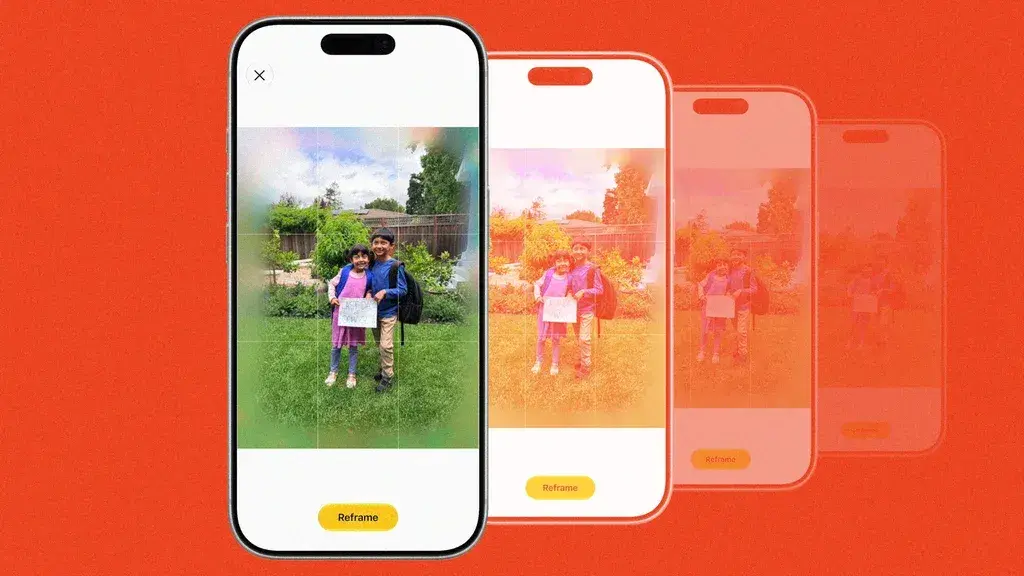
Source: Inc.
The Extend tool enables users to expand images by pinching to zoom out or adjusting the crop, giving subjects more breathing room or straightening a crooked horizon without losing important elements
1
. Apple deliberately restricts the feature to work only once and expands images by 25 percent, preventing users from infinitely extending photos with AI2
. Della Huff, product manager for Apple's Camera and Photos software, stated that the team trained AI models to minimize hallucinations by doing "the minimum amount of hallucination to achieve the goal the user is asking"2
. However, early testing revealed instances where the tool added fake people sitting at tables in the background when extending street scenes2
.The Clean Up tool, previously criticized for inconsistent performance, received substantial improvements by leveraging more powerful cloud-based models instead of relying solely on on-device processing
4
. Users can tap, brush, or circle unwanted distractions to remove them with better quality and more realistic infill1
. Early tests showed the upgraded tool cleanly erases items like passersby from photos and fills in backgrounds effectively5
. Apple restricts the feature from removing primary subjects in images, maintaining boundaries around what users can alter2
.
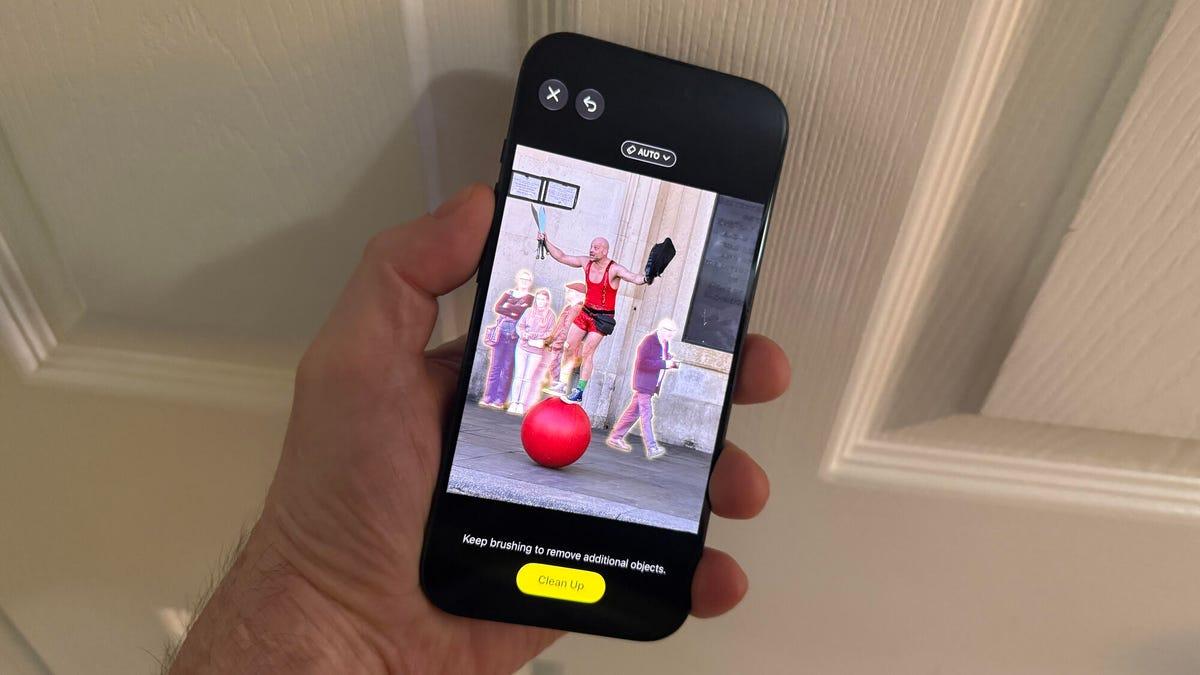
Source: ZDNet
Related Stories
McCormack emphasized that Apple is "not doing AI for the sake of AI" and takes a more measured approach than competitors like Google and Samsung, which allow users to drastically alter photos by moving people around or adding new objects
2
. The fake pixels generated by the Photos app are restricted to backgrounds and won't alter the main subject's face2
. McCormack stated, "A photograph is of something that actually happened," stressing the importance of maintaining "the sanctity of that moment"2
. Apple plans to integrate Google DeepMind's SynthID technology later this year for watermarking, adding an invisible marker indicating images have been altered with generative AI2
.The new features represent a tipping point for what the native Photos app allows users to do with their images
4
. McCormack described the tools as giving "normal people these absolute superpowers" without requiring Photoshop expertise2
. The features are available only on devices supporting Apple Intelligence: iPhone 15 Pro and Pro Max, plus the entire iPhone 16 and 17 lineup5
. While photographers and users debate the authenticity implications of AI-generated pixels, these tools address practical problems like removing photobombers or fixing framing mistakes that occur during real-time capture3
.Summarized by
Navi
[1]
21 Aug 2025•Technology

24 Oct 2024•Technology

30 Oct 2024•Technology

1
Technology

2
Technology

3
Policy and Regulation