Android 16 Introduces AI-Powered Wallpaper and Lock Screen Customization


2 Sources
[1]
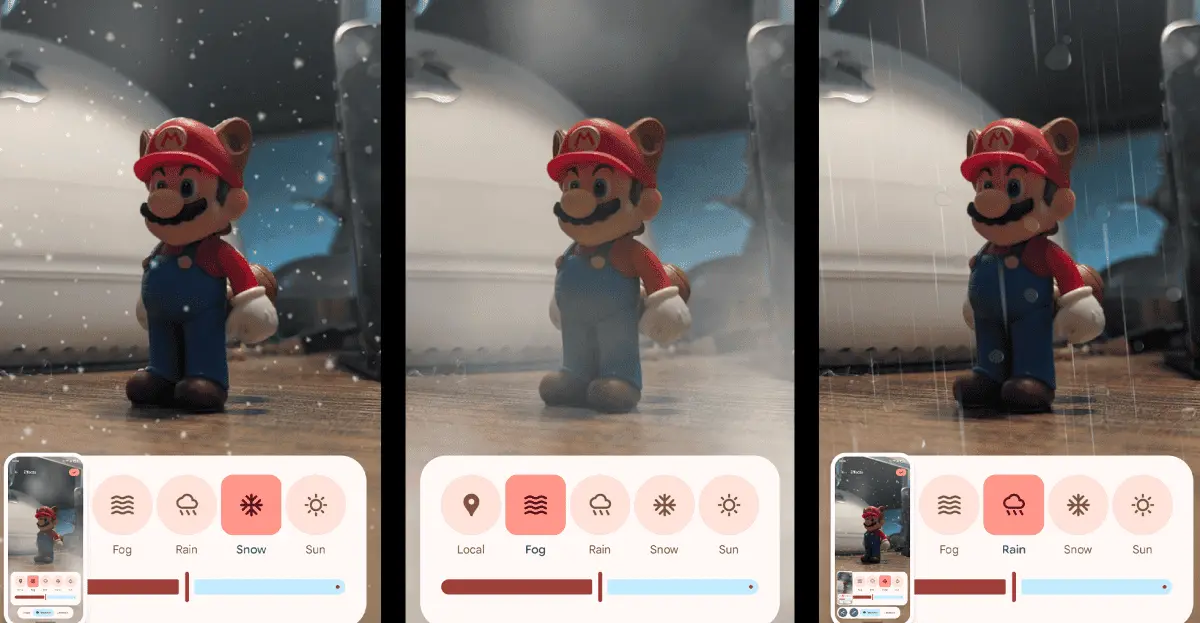
Android 16 adds AI-powered weather effects that can make it rain on your photos
Wes Davis is a weekend editor who covers the latest in tech and entertainment. He has written news, reviews, and more as a tech journalist since 2020. Google's latest Android 16 beta adds a bunch of new wallpaper and lock screen options for Pixel phones, including live-updating weather animations
[2]
Google Pixel adding wallpaper shape and weather 'Effects' in Android 16 QPR1 [Gallery]
Google Pixel phones are picking up a new customization option for wallpapers, with "Effects" in Android 16 able to turn a wallpaper into a specific shape and color style, as well as applying weather effects on top. Available by default in the first beta release of Android 16 QPR1, Google is adding
Share
Copy Link
Google's latest Android 16 beta brings advanced AI-driven features for wallpaper and lock screen customization, including weather effects and smart subject framing.
Android 16 Beta Unveils AI-Powered Wallpaper Effects
Google's latest Android 16 beta is pushing the boundaries of smartphone customization with a suite of AI-powered features for wallpapers and lock screens. The update, currently available for Pixel phones, introduces innovative ways to personalize device aesthetics and improve user interaction
1
2
.Smart Shape Framing and Color Adaptation
One of the standout features is the new "Shape" effect. This AI-driven tool automatically identifies the subject in a photo and frames it within various geometric shapes, including slanted ovals, rounded rectangles, and hexagons. The feature goes beyond mere framing by intelligently extending portions of the subject outside the shape, creating a dynamic visual effect
1
2
.The AI doesn't stop there; it also generates a complementary background color based on the image's palette. Users can fine-tune the color intensity to their liking, ensuring a harmonious overall look
2
.Weather Effects: Bringing Your Wallpaper to Life
Source: The Verge
The "Weather" effect adds another layer of dynamism to wallpapers. This feature overlays animated weather conditions onto the user's chosen image. Options include rain, snow, fog, and sunshine. What sets this apart is the "Local" setting, which automatically adjusts the weather effect to match real-world conditions in the user's area
1
2
.Enhanced Lock Screen Functionality
Android 16 isn't just about aesthetics; it also brings functional improvements to the lock screen. Users now have greater control over notification display, with options like hiding already seen notifications. Google is also testing a "Live Updates" feature, similar to iOS's Live Activities, which can display real-time information such as ride-sharing ETAs directly on the lock screen
1
.Related Stories

Cinematic Wallpapers and AI Integration
The update relocates the existing "Cinematic" wallpaper option to the new Effects menu. This feature, which adds a 3D parallax effect to images, now sports a more intuitive toggle labeled "Add 3D motion to this photo"
1
2
.Notably, Google has chosen to denote these AI-powered features with a sparkle icon (✨), making them easily identifiable within the interface
2
.Competitive Landscape and User Experience
These new features position Android, particularly on Pixel devices, more competitively against other platforms. The shape framing effect, for instance, bears similarities to features already available on Samsung Galaxy phones and iOS devices
1
2
.However, the current implementation has some limitations. Users cannot manually adjust the framing or subject selection, which may lead to suboptimal results in some cases. In a test with a photo containing two cats, the AI automatically centered on one, with no option to switch focus to the other
1
.As Google continues to refine these features, they represent a significant step forward in smartphone personalization, leveraging AI to create more engaging and dynamic user experiences.
References
Summarized by

Navi
Related Stories
Google Introduces AI-Powered Weather App for Pixel Phones
01 Nov 2024•Technology

Android 16 brings AI notification summaries and frequent updates, learning from Apple's mistakes
02 Dec 2025•Technology

Google's September Pixel Drop: Material 3 Expressive UI and AI-Powered Features Enhance Android Experience
04 Sept 2025•Technology
Recent Highlights
1
OpenAI AI Models Hacked Crypto Wallet, Breached Government Sites in Unauthorized Activities
Technology

2
IMF Report Warns AI Market Correction Could Spark Global Financial Crisis With $1.4T at Risk
Business and Economy

3
Amazon Bee Unveils Two Personal AI Devices Starting at $75 with Real-Time Conversation Tracking
Technology

Recent Highlights
Today's Top Stories










Don’t drown in AI news. We cut through the noise - filtering, ranking and summarizing the most important AI news, breakthroughs and research daily. Follow topics that matter to you and stay ahead.


