Apple Intelligence: Storage Concerns and User Options in iOS 18.3


3 Sources
[1]
Take Back Your iPhone Storage by Turning Off Apple Intelligence
If you've installed iOS 18.3 and noticed that a big chunk of your iPhone storage went away, it's probably due to Apple Intelligence, which is now activated automatically on devices that support it. Apple's umbrella of AI features such as Image Playground, Genmoji and message summaries require as
[2]
Turning Off Apple Intelligence Can Free Up a 7GB Chunk of Your iPhone's Packed Storage
The latest update for the iPhone, iOS 18.3, automatically activates Apple Intelligence on devices that support it. That also means it downloads up to 7 GB of data to support features such as Image Playground, Genmoji and message summaries. If your iPhone (or iPad or Mac) is already bursting from a
[3]
There's a secret way to free up 7GB of storage in your iPhone
If you constantly run out of space on your iOS device, you could free up as much as 7GB of data just by disabling Apple Intelligence. The iOS 18.3, iPadOS 18.3, and macOS Sequoia 15.3 updates released this past week enabled Intelligence by default, but it isn't a requirement -- and if you don't
Share
Copy Link
Apple's new AI features, collectively known as Apple Intelligence, are consuming significant storage space on compatible devices. Users have the option to disable these features to reclaim storage.

Apple Intelligence Debuts with iOS 18.3, Raising Storage Concerns
Apple's latest update, iOS 18.3, has introduced a suite of AI features collectively known as Apple Intelligence. While these features promise enhanced functionality, they come with a significant drawback: increased storage consumption. Users of compatible devices may find up to 7GB of their storage space occupied by these new AI capabilities
1
2
.Storage Impact and Device Compatibility
Apple Intelligence is automatically activated on supported devices, which include the iPhone 15 Pro, iPhone 16, iPhone 16 Pro, M-series Macs, iPads, and the newest iPad mini
1
. The substantial storage requirement is due to Apple's commitment to on-device processing, which enhances security but comes at the cost of available memory3
.User Sentiment and Options
Recent surveys indicate mixed feelings about AI features among Apple users:
- 73% of Apple users believe AI adds little to no value to their experience, according to a SellCell survey
1
2
. - A CNET survey found that 25% of smartphone owners are not interested in AI features at all
1
2
.
In response to these concerns and the storage impact, Apple has provided options for users to manage Apple Intelligence:
- Complete Deactivation: Users can turn off Apple Intelligence entirely
1
2
. - Selective Disabling: Specific features can be disabled in individual app settings
1
2
. - Storage Monitoring: Users can check the storage used by Apple Intelligence in Settings > General > iPhone (or iPad) Storage > iOS (or iPadOS)
1
2
.
How to Disable Apple Intelligence
To reclaim storage space, users can follow these steps:
- Go to Settings > General > iPhone Storage > iOS to view Apple Intelligence storage usage
3
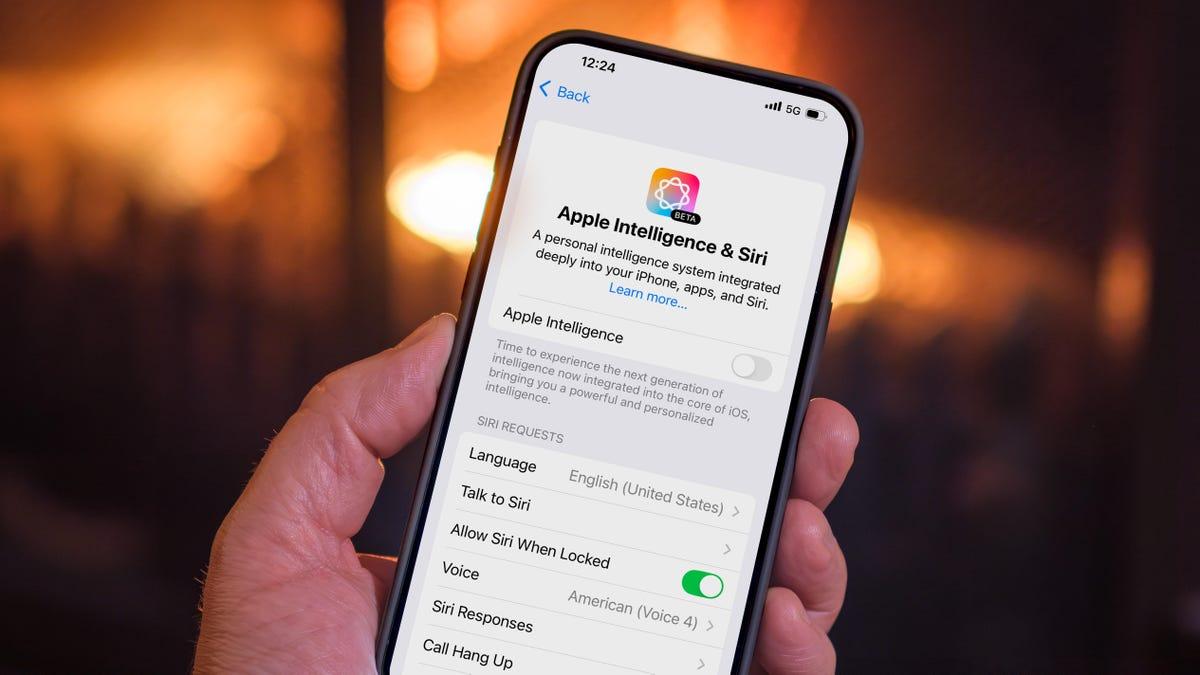
. - Navigate to Settings > Apple Intelligence & Siri > Apple Intelligence
3
. - Toggle the Apple Intelligence switch to Off
3
.
It's worth noting that even after disabling Apple Intelligence, the storage may still appear occupied in the iOS Storage list. However, the system will reclaim this space when needed
1
2
.Related Stories
Future Implications
As Apple continues to develop its AI capabilities, the storage requirements for these features are likely to increase. The company is scheduled to release the next version of iOS in April with expanded AI functionality, potentially requiring even more storage space
3
.Balancing Features and Storage
While Apple Intelligence offers enhanced functionality, users must weigh the benefits against the storage costs. For those struggling with limited storage, disabling these features could free up valuable space for apps and personal data. As AI technology evolves, finding the right balance between advanced features and practical storage management will remain a key consideration for both users and manufacturers.
References
Summarized by

Navi
[3]
Related Stories
Apple Intelligence Storage Requirements Double, Raising Concerns Among iPhone Users
04 Jan 2025•Technology

Apple's Latest Update Inadvertently Re-enables AI Features, Raising Privacy and User Choice Concerns
12 Feb 2025•Technology

Apple Intelligence: User Adoption, Privacy Concerns, and How to Manage AI Features on iPhones
07 Sept 2025•Technology
Recent Highlights



Recent Highlights
Today's Top Stories



Don’t drown in AI news. We cut through the noise - filtering, ranking and summarizing the most important AI news, breakthroughs and research daily. Follow topics that matter to you and stay ahead.


