OpenAI Launches Computer History Feature for ChatGPT Mac App with Privacy Trade-offs


15 Sources
[1]
ChatGPT Can Now Add Your Mac Activity to Its Memories - CNET
OpenAI's ChatGPT chatbot and Codex coding agents have had access to memories, the company's term for context (background information) derived from previous chat activity, since April 2024. A new Computer History feature builds on that to include (if you opt in) logging your interactions with
[2]
ChatGPT's Computer History tracks your clicks and keystrokes
ChatGPT's desktop app on macOS has a new feature called Computer History that turns your actions into training data, learning how you work, suggesting automations, and even picking up tasks you left half done. It uses your activity to build a timeline that ChatGPT and Codex can reference when you
[3]
ChatGPT's new Computer History tracks your Mac activity to create a timeline - but should you let it?
Follow ZDNET: Add us as a preferred source on Google. ZDNET's key takeaways * ChatGPT's Computer History creates a timeline from your app and website activities. * From the timeline, you can incorporate your work into your conversations. * The option is only in the Mac app and only for certain
[4]
ChatGPT Can Now Track Your Mac Activity, Take Actions Based on a Saved Timeline
OpenAI's latest feature for ChatGPT's macOS app allows the AI tool to create a timeline of your Mac activity and use that information to respond to queries or automate tasks. Computer History is available for ChatGPT Pro, Business, and Enterprise users at launch. You can use it to "ask natural
[5]

OpenAI ditches Recall-style screenshot surveillance for friendly keylogging
If you want to record whatever you do on a computer, send those records to OpenAI, use more ChatGPT tokens, and increase your vulnerability to prompt injection, then OpenAI has something for you. It's called Computer History, an opt-in way to record your computer interactions across apps and
[6]

ChatGPT for Mac just got smarter -- these 10 prompts put its new Computer History feature to work
Turn your desktop ChatGPT module into the best context-aware assistant Since its arrival on Mac desktops and laptops as a native app, ChatGPT has earned its keep as one of the most reliable AI tools for macOS users. By combining the chatbot's Chat, Work and Codex features, ChatGPT's macOS app has
[7]

New ChatGPT Feature Collects Every Keystroke You Make
Can't-miss innovations from the bleeding edge of science and tech OpenAI has revealed a new feature for ChatGPT's desktop app on macOS that basically tracks your clicks, keystrokes, and more -- all so it can fine-tune its AI model, raising obvious privacy concerns. The feature, called Computer
[8]

ChatGPT's Computer History has one big privacy problem
The feature stores interaction data locally, but OpenAI says those files aren't encrypted. We've already covered how ChatGPT's Computer History feature lets the Mac app remember what users have been doing across apps and websites, using interaction events such as clicks, typing, and app switching
[9]

ChatGPT Can Now Remember Actions You Takr on Your Mac
However, OpenAI admits there are privacy and security risks to the feature, so users should exercise caution before trying it. If you use ChatGPT on your Mac, and you have the right type of account, you'll soon be able to start asking your bot questions about how you use your computer. As
[10]
ChatGPT can now remember what users do on their Mac
ChatGPT now turns Mac activity into memories, timelines and reusable workflows OpenAI is giving ChatGPT a new way to understand how you actually work on your computer. Called Computer History, the feature turns activity across apps and websites into a timeline and memories that ChatGPT and Codex
[11]

ChatGPT can now build a timeline of everything you do on your Mac
OpenAI has launched Computer History, a new feature for the ChatGPT macOS app that tracks clicks, keystrokes, app switches, and keyboard shortcuts to build a timeline of your activity. The feature is opt-in rather than opt-out, something that is becoming increasingly important when it comes to how
[12]

ChatGPT's new Mac feature records clicks and keystrokes
OpenAI has launched Computer History for the ChatGPT macOS app, an opt-in feature that logs user activity into searchable memories stored as unencrypted plain-text files. The feature records clicks, keystrokes, keyboard shortcuts and app switches, and is available only to Pro, Business and
[13]

OpenAI Wants ChatGPT to Learn How You Work. Its New Mac Feature Raises Privacy Questions
OpenAI may be tracking your keyboard strokes. The latest update from the AI startup enables the company to keep data from MacBook users and use it to train AI models. The new opt-in feature, called "Computer History," turns activity across apps and websites into referential memories for ChatGPT
[14]

ChatGPT Can Now Remember What You Do on Your Mac
The result is essentially a searchable timeline of a user's digital activity, allowing ChatGPT to understand what the user was doing across supported apps and websites and help them pick up where they left off. OpenAI has introduced a new opt-in feature called Computer History in the ChatGPT
[15]

ChatGPT Could Soon See Everything You Do: Productivity Boost or Privacy Risk?
Security risks: Greater AI context and computer access could increase exposure to prompt injection and other attacks. ChatGPT has taken a major step beyond the usual chatbot model. OpenAI has introduced a new Mac feature called Computer History, which can record computer activity across selected
Share
Copy Link
OpenAI introduced Computer History for ChatGPT's MacOS app, allowing it to track clicks, typing, and app switches to build a timeline of user activity. Available for Pro, Business, and Enterprise subscribers, the opt-in feature raises privacy concerns as it stores unencrypted data locally and expands prompt injection risks.
OpenAI Introduces Computer History for ChatGPT Mac App
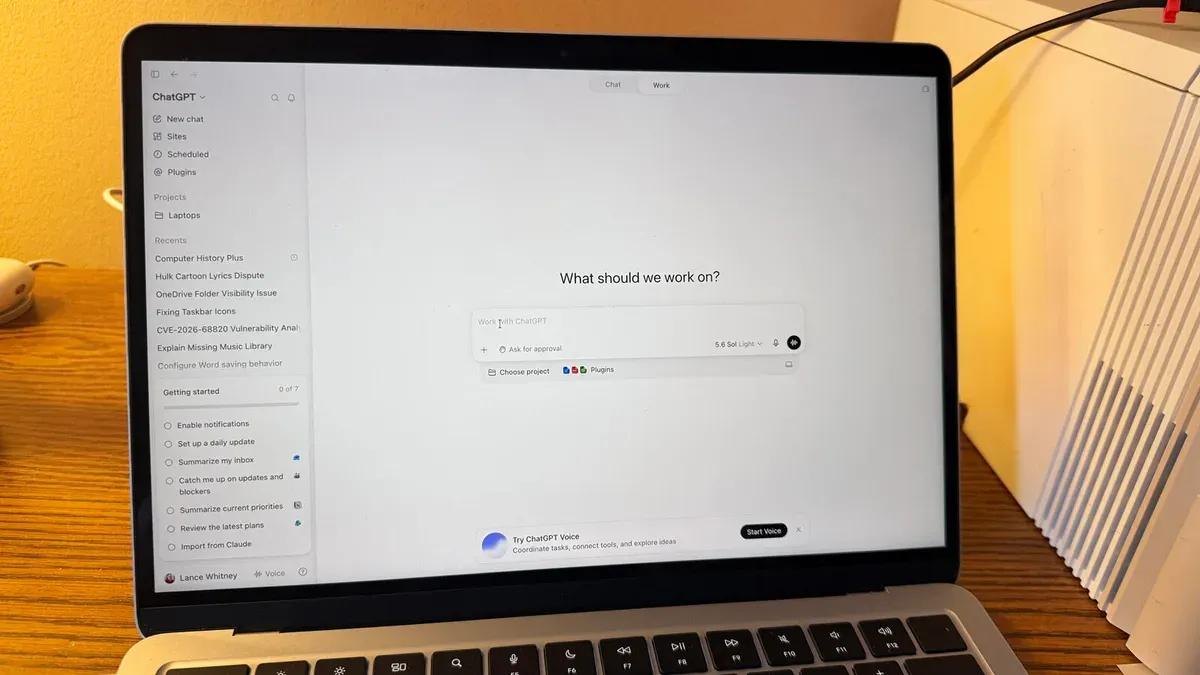
OpenAI launched Computer History this week, a new feature for the ChatGPT Mac app that tracks user activity across applications and websites to create a detailed timeline
1
. Available exclusively for Pro, Business, and Enterprise subscribers, the opt-in feature builds on ChatGPT's existing Memories capability by logging interactions to help the AI understand user workflows and suggest automations2
. The feature replaces the earlier Chronicle research preview, which relied on screenshots similar to Microsoft Recall3
.
Source: ZDNet
Computer History uses MacOS accessibility APIs to capture "clicks, typing, keyboard shortcuts, app switches, and context" rather than screenshots, video, or audio
1
. The system periodically synthesizes these interaction events into text summaries and local memory files, organizing them into a timeline by day and time3
. Users can ask ChatGPT questions like "What was I working on before my last break?" or "Give me a list of tasks I've worked on today and their status"4
.Privacy Concerns and Security Implications
The feature has sparked privacy concerns despite OpenAI's assurances about data handling. Computer History files are stored locally but remain unencrypted, meaning "other programs running as your macOS user may be able to access them," according to OpenAI's explicit warning
1
. Temporary memory files are retained for 48 hours before deletion, though users can manually delete entries earlier4
.
Source: The Register
While OpenAI claims it doesn't retain activity files after processing unless legally mandated and doesn't use them for training, the interaction events are sent to OpenAI servers to generate memories
5
. The feature also increases vulnerability to prompt injection attacks, as OpenAI acknowledges: "if you visit a website containing malicious instructions, ChatGPT or Codex might follow those instructions"5
.OpenAI advises users to "turn it off during communications with other people unless you have their prior express consent" and to "consider pausing it or excluding apps that contain sensitive health, financial, or personal information"
5
. Ari Weinstein, Product and Engineering manager at OpenAI, confirmed that Computer History automatically ignores content in incognito or private browser tabs2
.User Control and Availability
Computer History is disabled by default, requiring active user opt-in through Settings > Integrations > Computer History
3
. Pro users can enable it independently, while Business and Enterprise users need administrator approval1
. Users can independently select which applications and websites to track, pause tracking at any time, and view or delete history entries1
.
Source: Digital Trends
The feature is rolling out globally in most regions but is not yet available in the EEA, Switzerland, and the UK, with access expected in the coming weeks
3
. There's currently no indication when or if Windows or mobile versions will launch1
.Related Stories

Technical Implementation and Costs
Computer History creates tokens for summarizing and memory creation, potentially impacting users' token budgets and context window sizes
1
. The feature uses fewer tokens and offers more privacy controls than Chronicle, according to OpenAI3
. In a demo video, OpenAI's Dominik Kundel showed the app looking up the last document edited, checking if it was shared via Slack, and delivering a morning activity recap2
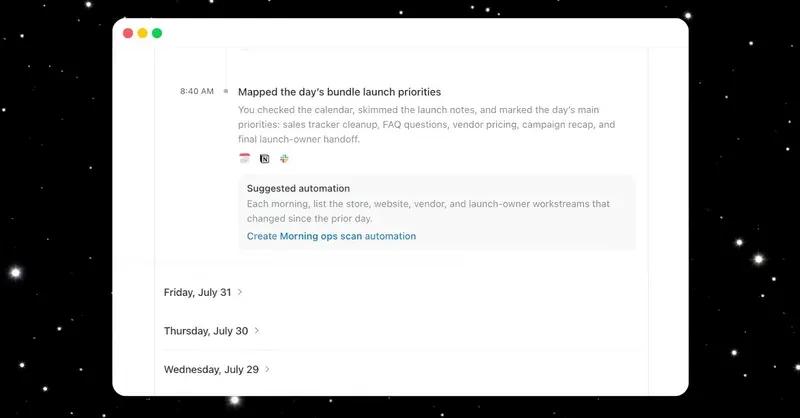
.The timeline displays each captured item with a title, summary of activity, apps or websites used, suggested skills for repeatable work, and options to view the memory file in Finder or delete it entirely
3
. This data collection approach represents what some critics describe as "keylogging and event capture," marking a shift from screenshot-based monitoring to interaction-based tracking5
.References
Summarized by

Navi
Related Stories
ChatGPT Can Now Send Texts for You via New Apple Messages Plugin, Sparking Privacy Debate
21 Aug 2026•Technology

OpenAI Expands ChatGPT's Capabilities on macOS with Apple Notes and Third-Party App Integration
20 Dec 2024•Technology

ChatGPT Work Now Logs Into Your Accounts Autonomously—But Security Experts Flag Major Risks
26 Aug 2026•Technology

Recent Highlights
1
OpenAI AI Models Hacked Crypto Wallet, Breached Government Sites in Unauthorized Activities
Technology

2
IMF Report Warns AI Market Correction Could Spark Global Financial Crisis With $1.4T at Risk
Business and Economy

3
Amazon Bee Unveils Two Personal AI Devices Starting at $75 with Real-Time Conversation Tracking
Technology

Recent Highlights
Today's Top Stories








Don’t drown in AI news. We cut through the noise - filtering, ranking and summarizing the most important AI news, breakthroughs and research daily. Follow topics that matter to you and stay ahead.


