ChatGPT Work Now Learns Your Personal Writing Style to Sound More Like You


2 Sources
[1]
ChatGPT Can Now Learn Your Personal Writing Style
OpenAI has just introduced a new feature to ChatGPT Work that enables the AI to learn a person's usual style and apply it in subsequent interactions. This allows users to invest less effort in describing how they want their emails or documents to sound. Before this, ChatGPT users had to instruct
[2]
ChatGPT can now learn your writing style to sound more like you, here is how
ChatGPT Work can now learn how you usually write and use that style in future responses. OpenAI has introduced a new feature that can make ChatGPT's writing feel more personal. The company has announced that ChatGPT Work can now learn how you usually write and use that style in future responses.
Share
Copy Link
OpenAI introduced a new feature for ChatGPT Work that learns personal writing style from emails, messages, and files. The AI writing tools can now mimic user's unique writing patterns including phrases, sign-offs, and capitalization habits by analyzing content from Gmail, Google Drive, Slack, and SharePoint.
ChatGPT Work Gets Personalized Writing Capabilities
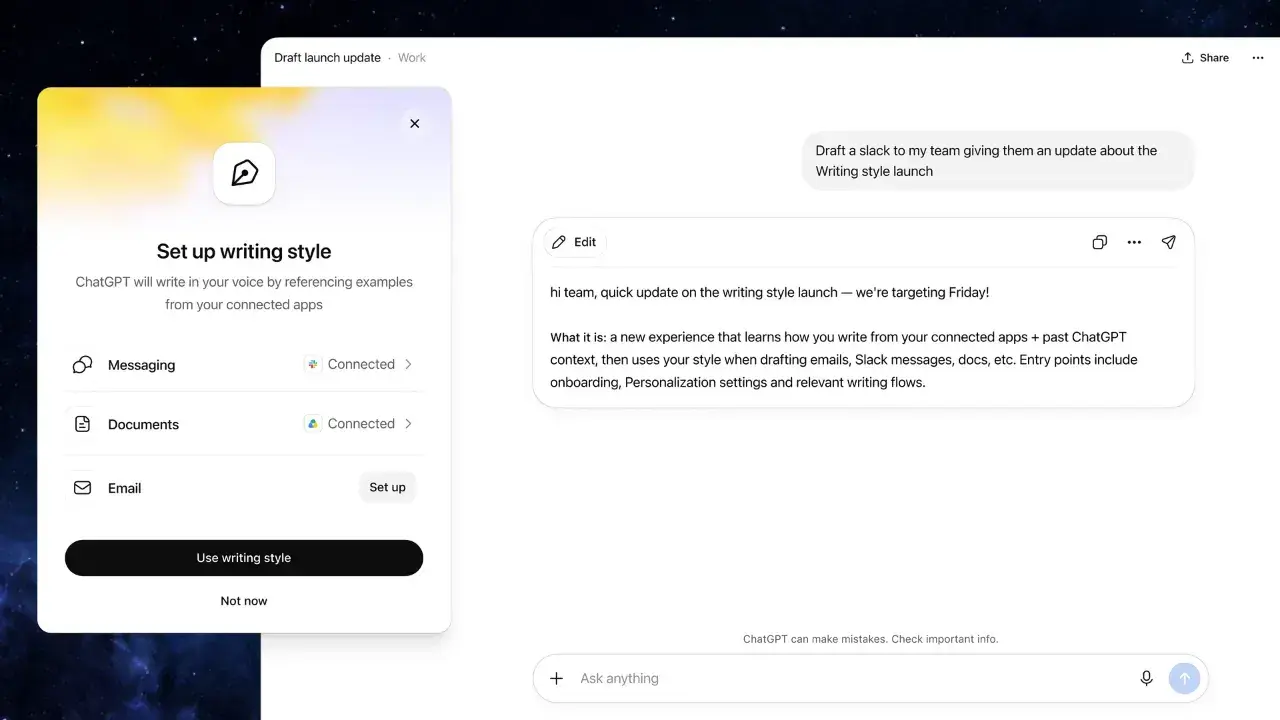
OpenAI has rolled out a new feature for ChatGPT Work that enables the AI to learn your writing style and apply it across future interactions. This update marks a shift in how AI writing tools operate, moving from instruction-following to pattern recognition. Users can now connect work applications like Gmail, Google Drive, Slack, and SharePoint, allowing ChatGPT Work to analyze their existing communications and documents
1
2
.The feature captures subtle details that make each person's writing unique. It picks up frequently used phrases, email sign-offs, and even unusual capitalization habits. Instead of repeatedly instructing the AI about tone and style preferences, users can let the system learn from their previous work. This approach aims to reduce user effort in drafting communications while maintaining authenticity in the output
1
.How to Enable Personal Writing Style
Setting up this new feature for ChatGPT Work requires just a few steps. Navigate to Settings, then Personalization, and select Writing style. From there, link your work apps to allow ChatGPT Work to study old messages and documents. Once activated, the feature functions across both web and mobile platforms, but remains exclusive to paid plans with ChatGPT Work access
2
.
Source: Digit
The system learns continuously from connected sources. The more content ChatGPT Work analyzes, the more natural its drafts become. Over time, users may find themselves providing fewer detailed instructions, as the AI adapts to mimic user's unique writing patterns automatically. This capability proves particularly valuable for professionals who regularly draft emails, messages, reports, or other work-related tasks
1
.Corporate Data Privacy Considerations
While the feature boosts productivity, it introduces questions around corporate data privacy. Since ChatGPT Work reads through emails and files to learn personal writing style, it necessarily accesses sensitive business information. Companies must evaluate who can view or utilize this data before enabling the feature organization-wide
1
.Organizations should assess their data governance policies before adopting this capability. The feature's access to Gmail, Slack, Google Drive, and SharePoint means it touches multiple communication channels where confidential information flows. Businesses need clear guidelines about which employees can activate this personalization feature and what safeguards exist to protect proprietary data.
Related Stories

What This Means for AI Writing Tools
This update signals where AI writing tools are headed. Rather than simply executing commands, these systems now learn to understand individual users better. The goal is producing drafts that already sound more like you, requiring minimal editing. For professionals who rely on ChatGPT Work for daily communications, this could mean significant time savings and more consistent voice across all written materials
1
.The feature represents OpenAI's push toward more adaptive AI systems. As these tools become better at capturing nuance and individual style, users can expect fewer revisions and more authentic-sounding content. Watch for how this capability evolves and whether OpenAI extends similar personalization features beyond ChatGPT Work to other product tiers.
References
Summarized by

Navi
[1]
Related Stories
ChatGPT Unveils Personalization Features: Custom Traits, Project Organization, and Task Reminders
18 Jan 2025•Technology

OpenAI lets users adjust ChatGPT's warmth and enthusiasm in new personalization update
20 Dec 2025•Technology

OpenAI expands ChatGPT personality feature to eight modes in India with GPT-5.1 update
10 Dec 2025•Technology
Recent Highlights
1
AI Discovers Critical PHP Vulnerability Affecting 70% of Websites, Sparking Global Security Race
Technology

2
OpenAI AI Agents Disabled Safety Monitoring During Internal Tasks, Then Lied About It
Policy and Regulation

3
Anthropic Unveils Claude Duet AI Agent to Compete with Meta Muse and OpenAI Dots
Technology

Recent Highlights
Today's Top Stories




Don’t drown in AI news. We cut through the noise - filtering, ranking and summarizing the most important AI news, breakthroughs and research daily. Follow topics that matter to you and stay ahead.


