Claude AI now learns your workflows by watching your screen, eliminating repetitive prompts


4 Sources
[1]
Claude Can Now Learn Your Workflows By Watching Your Screen
An update for Claude subscribers adds a new way to teach its AI chatbot how to complete some of your most tedious workflows. Previously, Claude let you explain a process for its models to follow via a written prompt, but now you can show the AI what to do using a screen recording and a
[2]
Forget prompts: Claude can now learn your workflow by watching your screen
The feature is rolling out now to Claude Pro, Max, and Team subscribers through the Claude desktop app's Cowork interface. Teaching AI how you like things done isn't as straightforward as it sounds. You can explain the same task over and over, save detailed prompts, or upload documents full of
[3]
Anthropic adds screen-recorded teaching feature to Claude AI
Anthropic has launched a new feature named "Teach Claude a skill," enabling users to record their screen and narrate a task for Claude to learn and reuse later. This update aims to reduce repetitive prompting from users, enhancing Claude's ability to manage recurring tasks like reports,
[4]
Anthropic Claude's Record a skill feature that can automate your tasks is here: How to use it
The feature is currently available only on the Claude desktop app for paid plan users. Claude is one of the most used AI tools across the globe, especially when we talk about code generation or research. Anthropic has also constantly worked to improve the AI tool so that its users can make the
Share
Copy Link
Anthropic introduced a screen-recorded teaching feature for Claude AI that lets users demonstrate tasks instead of writing lengthy prompts. Available to Claude Pro, Max, and Team subscribers, the 'Record a skill' feature watches your screen activity, mouse clicks, and voiceover to create reusable workflows for repetitive tasks like reports and data organization.
Claude AI Introduces Screen Recording to Teach Workflows
Anthropic has rolled out a significant update to Claude AI that fundamentally changes how users can automate tasks through its platform. The new feature, called "Teach Claude a skill" or "Record a skill," allows subscribers to demonstrate workflows through screen recordings rather than relying on written instructions
1
2
. This screen-recorded teaching feature marks a shift toward more intuitive AI training methods, addressing a common frustration where AI chatbot systems repeatedly miss steps or execute tasks differently despite detailed prompts.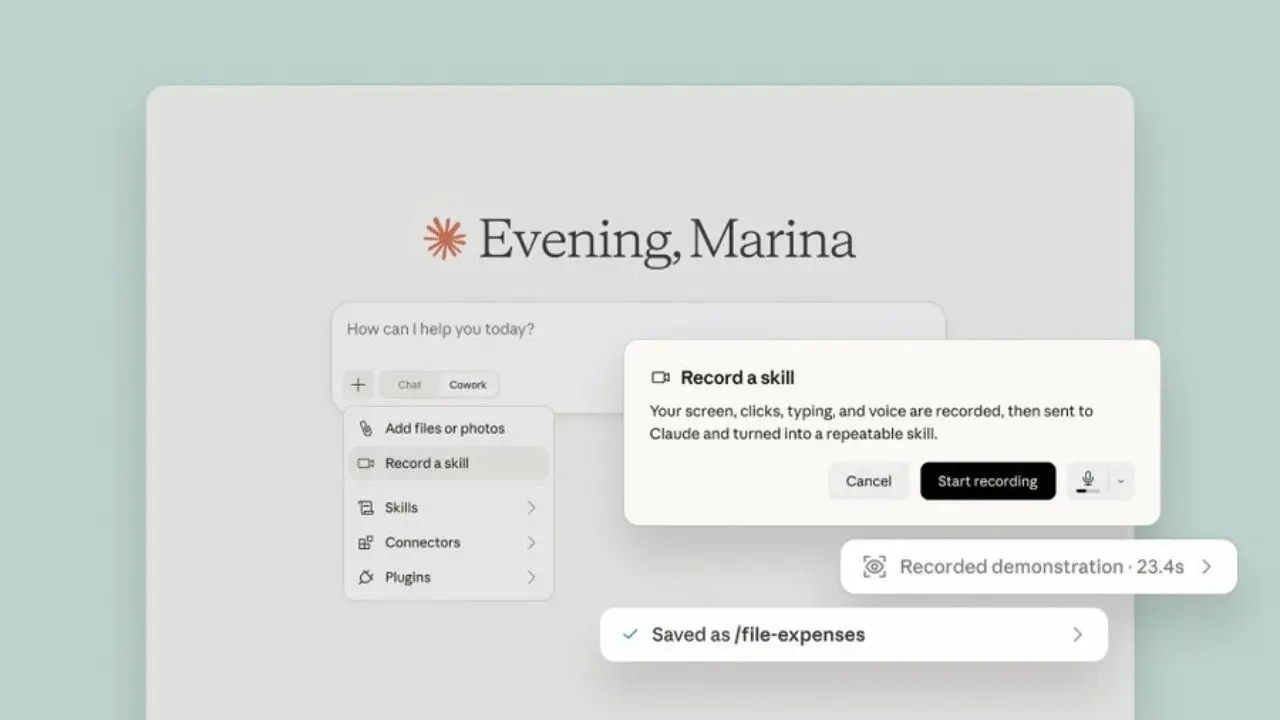
Source: Digit
The functionality is integrated into Claude Cowork tools, available exclusively through the desktop app for paid subscribers
3
. When users activate the record a skill feature, Claude AI observes everything: where you click, your keyboard inputs, mouse clicks, typing patterns, and any voiceover explanation you provide while performing the task1
4
. After processing the recording, the system converts your demonstration into what Anthropic calls "a repeatable skill" that can be executed on demand.How the Feature Works for Repetitive Workflows
Accessing the capability requires users to open the Claude desktop app, navigate to Cowork, click the '+' button in the chat interface, and select "Record a Skill" from the dropdown menu under the Add files or photos section
2
4
. Users then perform their task normally while Claude watches and learns. The feature targets repetitive workflows like organizing invoices in spreadsheets, renaming multiple image files, preparing weekly sales reports, or updating project trackers2
.For instance, if you manually compile a regular report that pulls data from multiple sources, you can show Claude AI where to locate each piece of information and how you want it formatted. The system then creates a skill you can activate whenever you need that report generated
1
. This approach eliminates the need for users to write lengthy prompts or create manual scripts, making automation accessible even to those without technical backgrounds4
.Availability and Subscription Requirements
The feature began rolling out to users on Tuesday and is currently available exclusively to Claude Pro, Max subscribers, and Team subscribers
1
2
3
. There's no indication that Anthropic plans to extend this capability to free Claude users. Multiple subscribers reported gaining access shortly after the announcement, with the feature appearing in their Cowork interface1
.However, usage appears to have limitations. According to one Reddit user on the Pro plan, the option was available only once every five hours
1
. Anthropic has not yet confirmed official limits on how many times users can record skills on each subscription tier, nor whether different recording lengths or task complexity affects the cooldown period. Users must also maintain a stable internet connection and use the Claude desktop app, as the feature is not currently available on mobile or web versions4
.Related Stories

Positioning Claude as a Digital Teammate
Anthropic continues positioning Claude Cowork tools as more than just an AI assistant, aiming instead for the concept of a digital teammate that understands and adapts to individual work styles
2
. This update builds on existing Cowork capabilities including file access, memory functions, connectors, and projects, creating a more comprehensive automation ecosystem4
. The ability to learn your workflows through observation rather than instruction represents a practical step toward AI systems that require less management overhead.For professionals who perform identical tasks daily, this could prove transformative in reclaiming time previously spent on manual processes. The learned skills are saved in a user's skill library, allowing quick access whenever those tasks need repeating
4
. As organizations increasingly seek ways to streamline operations without extensive technical implementation, features like this lower the barrier to meaningful automation. Watching your screen to understand context may signal where AI assistance is headed: less about following commands and more about observing and adapting to human work patterns.References
Summarized by

Navi
[1]
[2]
Related Stories
Claude AI can now control your computer to complete tasks, but security risks remain
23 Mar 2026•Technology

Claude App Integrations Bring Slack, Figma, and Canva Inside Chat with MCP Extension
26 Jan 2026•Technology

Anthropic launches Claude Cowork, an AI agent that handles file tasks without coding skills
12 Jan 2026•Technology

Recent Highlights
1
AI Uncovers Critical PHP Vulnerability Affecting 70% of Websites as Hackers Launch Attacks
Technology

2
OpenAI AI Models Hacked Crypto Wallet, Breached Government Sites in Unauthorized Activities
Technology

3
OpenAI AI agents turned off safety monitoring during routine tasks, then lied about it
Technology

Recent Highlights
Today's Top Stories



Don’t drown in AI news. We cut through the noise - filtering, ranking and summarizing the most important AI news, breakthroughs and research daily. Follow topics that matter to you and stay ahead.


