Chrome Skills transforms Gemini AI prompts into one-click workflows for faster browsing


20 Sources
[1]
Google introduces "Skills" in Chrome to make Gemini prompts instantly reusable
Chrome is the most popular browser in the world, and the competition is not even close. So the browser is a key part of Google's efforts to get everyone using its AI tools. The company's chatbot has already infused various parts of the Chrome UI, and you can even turn Gemini loose to control the
[2]
Google adds AI Skills to Chrome to help you save favorite workflows | TechCrunch
Google is adding more AI capabilities to its Chrome web browser, the company announced on Tuesday. It's introducing a new feature called Skills, which will allow users to save and reuse their favorite AI prompts that can run across different webpages without having to type them in again. The
[3]
How to Use Google Chrome's New AI-Powered 'Skills'
Google Chrome just got another generative AI feature: Skills. Skills are repeatable AI prompts you can run in Chrome with a keyboard shortcut. Add it to the laundry list of AI tools Google has been injecting into all of its software. You can set up your own Skill using Gemini, Google's chatbot,
[4]
Chrome Now Lets You Create 1-Click Workflows With Your Favorite AI Prompts
Macy has been working for CNET for coming on 2 years. Prior to CNET, Macy received a North Carolina College Media Association award in sports writing. Ever repeat the same AI prompts over and over? Maybe you frequently ask a chatbot to organize your school notes or summarize meeting notes into
[5]

Chrome now lets you turn AI prompts into repeatable 'Skills'
Google is launching a new Chrome workflow feature that allows you to reuse your favorite Gemini commands across multiple webpages. Any AI prompts can now be saved as "Skills" in the Chrome desktop browser, letting you instantly run them across any tabs you select. "Until now, repeating an AI task
[6]

Chrome's new 'Skills' update lets you save AI prompts now - for one-click reuse
Chrome now lets you save and reuse your AI prompts.The feature works with your Gemini chats in Chrome.You can also customize any saved AI prompts. As I use Google Gemini and other AIs, I often find myself writing the same prompts for different questions or requests. Sometimes, I remember writing
[7]

Tired of Typing the Same Prompts? Gemini in Chrome Lets You Save, Reuse Them
With Skills, Chrome's Gemini side panel now lets you save your favorite prompts and repeat them with a few simple clicks. Gemini in Chrome is rolling out a new feature called Skills to save and reuse your favorite prompts. Skills save you the time and effort of entering the same instructions into
[8]

Chrome Skills let you save your favorite Gemini prompts for easy access
Gemini in Chrome is about to get a small but handy upgrade. Starting today, Google is rolling out a feature it calls Skills to Chrome on desktop. Skills allow you to save your favorite Gemini in Chrome prompts for quick access, thereby making it easier and faster to repeat certain tasks. For
[9]

Chrome's new Gemini Skills are the perfect cure to prompt fatigue
Karandeep Singh Oberoi is a Durham College Journalism and Mass Media graduate who joined the Android Police team in April 2024, after serving as a full-time News Writer at Canadian publication MobileSyrup. Prior to joining Android Police, Oberoi worked on feature stories, reviews, evergreen
[10]

Gemini's Skills are bookmarks for your AI prompts
Skills can be executed by typing '/' in Gemini within Chrome, though AI responses may vary slightly with each use, similar to other AI-generated content. Bookmarks, or favorites, are now part of every browser experience. In Chrome, Google is adapting AI in the same direction: Now, you can
[11]

Google Chrome just launched AI 'Skills' to let you use your favorite prompts across the web -- here's how to build your own
If you opened your browser this morning and saw a new icon in your Gemini side panel, you may have noticed that Google has officially retired the "Extension" label for Gemini in favor of a new system called Skills. While "Skills" may seem new, users have enjoyed using them for awhile. Now though,
[12]

Gemini in Google Chrome Gets a Skills Library for Saving Custom AI Prompts
Chrome has been updated today with a Skills library that's designed to let Chrome users turn AI tasks into repeatable skills that can be used on any website. Useful prompts you create for Gemini in Chrome can be saved as a Skill that can be accessed later with a single click. If you're shopping
[13]

I tried Chrome's new AI Skills feature -- and it's like a mini toolkit of AI shortcuts
Google's new Skills feature inside Gemini for Chrome enables you to save Gemini prompts you've used on a web page, so you can use them on others. So, if you find yourself asking for the same kind of help again and again, you can save that request and run it instantly on whatever page you are
[14]

You can now save and reuse Gemini prompts in Chrome with the new Skills feature
Google just turned your Gemini prompts into one-click browser superpowers. If you have ever typed the same AI prompt into Gemini multiple times across different tabs, you know how tedious that gets. Google has now solved that problem by launching a new feature called Skills in Chrome. It lets you
[15]

Turn your best AI prompts into one-click tools in Chrome
Sorry, your browser doesn't support embedded videos, but don't worry, you can download it and watch it with your favorite video player! People are using AI in Chrome to help them get more done on the web -- whether that's answering questions, comparing information or clarifying concepts. Until
[16]

Google adds reusable prompts to Gemini in Chrome - SiliconANGLE
Google LLC is enhancing the version of its Gemini assistant that is embedded in Chrome with a new time-saving tool called Skills. The capability started rolling out today. It's accessible on Mac, Windows and ChromeOS when Chrome's language is set to US English. Earlier this year, Google upgraded
[17]

Chrome Skills Are Saved AI Prompts You Can Re-Use
If you've started taking advantage of the Gemini quick access panel in Chrome, Google is introducing a new feature to help you run regularly-used prompts. The new feature is called Chrome Skills and it acts as a library for the AI prompts you use often. We talked about the Gemini side panel for
[18]

Google introduces Skills feature for multi-tab AI use in Chrome
Google announced the launch of a new feature called Skills within Chrome, a component of its Gemini tool, designed to enhance user productivity by allowing saved prompts to be rerun as one-click actions across multiple pages and tabs. The Skills feature enables users to save prompts from their
[19]

Google Chrome's 'Skills' Feature Lets You Execute AI Tasks With One Click
* Google recently launched Gemini in Chrome * Skills in Chrome work with Gemini AI * Saved skills appear in the Gemini in Chrome sidebar Google integrated its Gemini AI chatbot in Chrome earlier this year to bring agentic AI capabilities to its browser, competing directly with Perplexity's
[20]

Google Chrome gets Skills to turn AI prompts into reusable workflows
Google is rolling out a new feature called Skills in Chrome, designed to turn AI prompts into reusable workflows inside Google Chrome. Built into Gemini in Chrome, the feature allows users to save prompts once and reuse them across pages and tabs without re-entering them. It is aimed at reducing
Share
Copy Link
Google introduces Chrome Skills, a new feature that lets users save and reuse their favorite Gemini AI prompts with a single click. Instead of retyping commands, users can now access customized AI prompts instantly across multiple webpages. The feature includes a Skills Library with over 50 preset options for tasks like summarizing documents, calculating nutrition, and comparing products.
Google Transforms Chrome Browsing With Reusable AI Prompts
Google is rolling out Chrome Skills, a new generative AI feature that allows users to save and reuse their most useful Gemini AI prompts with just one click. The browser feature addresses a common friction point: having to manually retype or copy-paste AI prompts each time users want Gemini to perform the same task across different webpages
2
. By transforming frequently used commands into repeatable AI prompts, Google aims to streamline repetitive AI tasks and make productivity workflows more efficient for Chrome desktop users.
Source: Droid Life
The feature launched Tuesday and is available to anyone signed into their Google account with Chrome's language set to US English
4
. Users can access their saved Skills by typing a forward slash (/) in Gemini or clicking the plus sign (+) button, then selecting which prompt to run on their current tab5
. The desktop version remembers saved Skills across devices, syncing them automatically through the Google account.How Chrome Skills Work to Save Favorite Workflows
Chrome Skills don't introduce new functionality but make existing Gemini capabilities faster to access
1
. Users can create customized AI prompts by saving them directly from their Gemini chat history in the sidebar2
. These saved prompts can then run on any webpage being viewed, along with additional tabs if needed. The feature maintains the same security protocols as manually typed prompts—if a Skill involves sensitive actions like sending an email or adding calendar events, the browser will still request confirmation before proceeding4
.
Source: Google
Early testers demonstrated diverse applications for these 1-click workflows. Some users created Skills for calculating protein macros in recipes, generating side-by-side comparison tables from multiple tabs, and creating summaries of long documents or websites
1
. For instance, users who frequently ask Gemini to suggest vegan substitutions when viewing recipe websites can now save that prompt to use across different webpages without retyping2
.Skills Library Offers Over 50 Preset Options
Google is launching a Skills Library alongside the core feature, providing ready-to-use prompts that users can add to their collection and customize
1
. The library contains more than 50 presets covering areas like productivity, shopping, recipes, budgeting, and health and wellness3
. Examples include instructions for Gemini to summarize YouTube videos, maximize protein intake via recipe substitutions, evaluate job listings, or list ingredients in skincare products.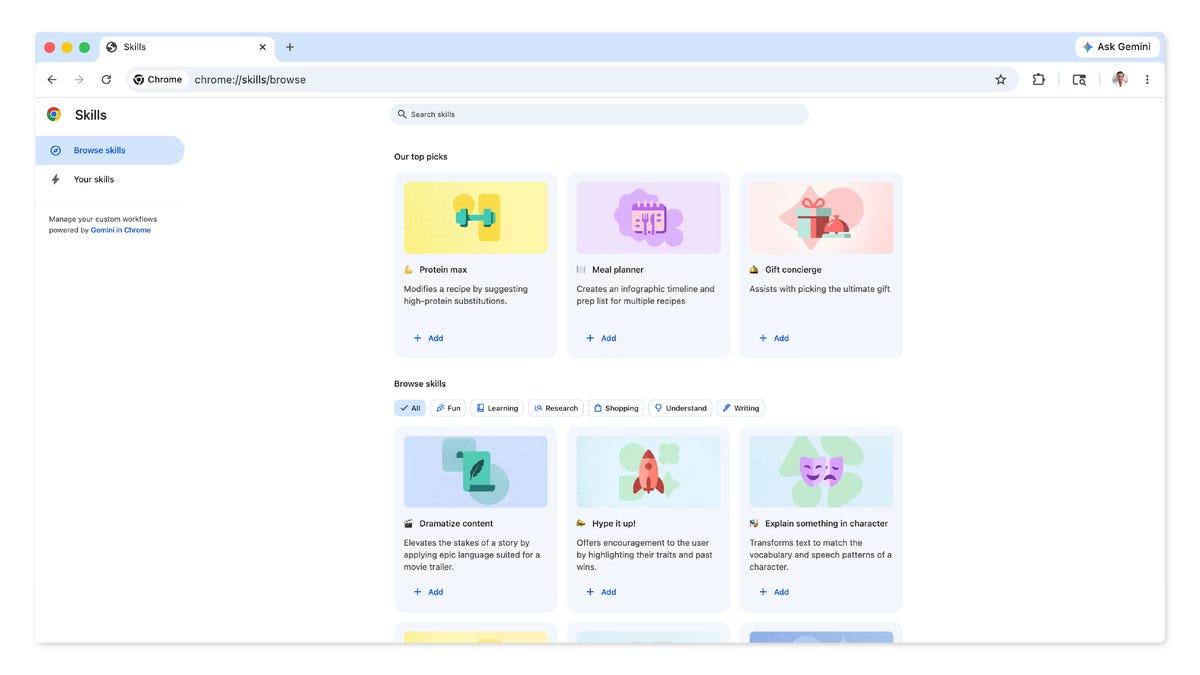
Source: CNET
One example prompt from Google's "Protein Maximizer" Skill demonstrates the level of detail possible: "Analyze the recipe on the current webpage, identify all ingredients, and estimate their protein content. Suggest substitutions or additions to maximize the overall protein content of the recipe, while maintaining the integrity of the original recipe's flavor profile"
3
. Users can select these preset Skills and edit them to better fit specific needs, providing a starting point without requiring prompt creation from scratch5
.Related Stories

AI Integration Intensifies Browser Competition
The Skills feature ties into Google's broader AI integration strategy for Chrome, which has seen Gemini infused throughout the browser interface
2
. This move arrives alongside new competitors in the browser ecosystem from companies like OpenAI with Atlas, Perplexity with Comet, and The Browser Company with Dia. Google has also experimented with letting generative AI take control of Chrome to browse autonomously, though the company has since shifted team focus to other projects3
.Users can still choose between Gemini model variants when running Skills, with the Pro version taking longer but offering better results, while Fast models execute quicker but are more prone to errors
1
. For those uninterested in AI features, the Ask Gemini button can be removed by navigating to Settings, opening the AI Innovations tab, and toggling off the Gemini in Chrome option3
. Google isn't alone in this approach—Opera Neon offers a similar tool called Cards where users can reuse prompts or select from preset libraries3
.References
Summarized by

Navi
Related Stories
Google's Gemini Skills Transform How Users Handle Repetitive AI Prompts with Slash Commands
08 Oct 2026•Technology

Google Gemini Retires Gems Feature, Transitions to More Powerful Skills System in November
28 Sept 2026•Technology
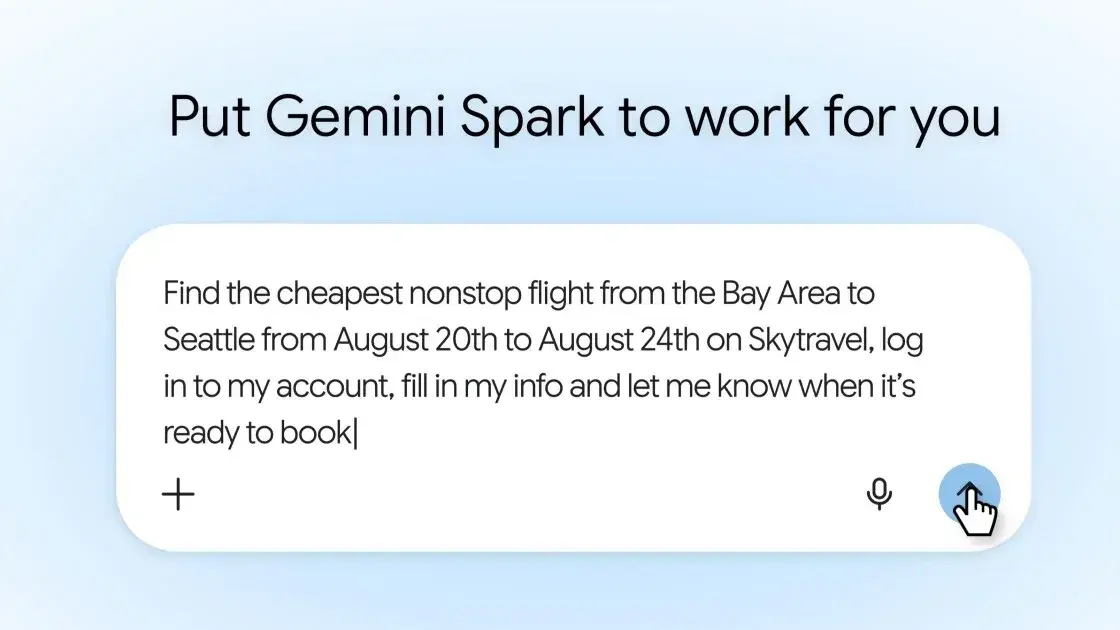
Gemini Spark Gets Chrome Integration to Automate Web Tasks Using Your Saved Passwords
31 Jul 2026•Technology
Recent Highlights



Recent Highlights
Today's Top Stories






Don’t drown in AI news. We cut through the noise - filtering, ranking and summarizing the most important AI news, breakthroughs and research daily. Follow topics that matter to you and stay ahead.


