6 Sources
6 Sources
[1]
I let Gemini Deep Research dig through my Gmail and Drive - here's what it uncovered
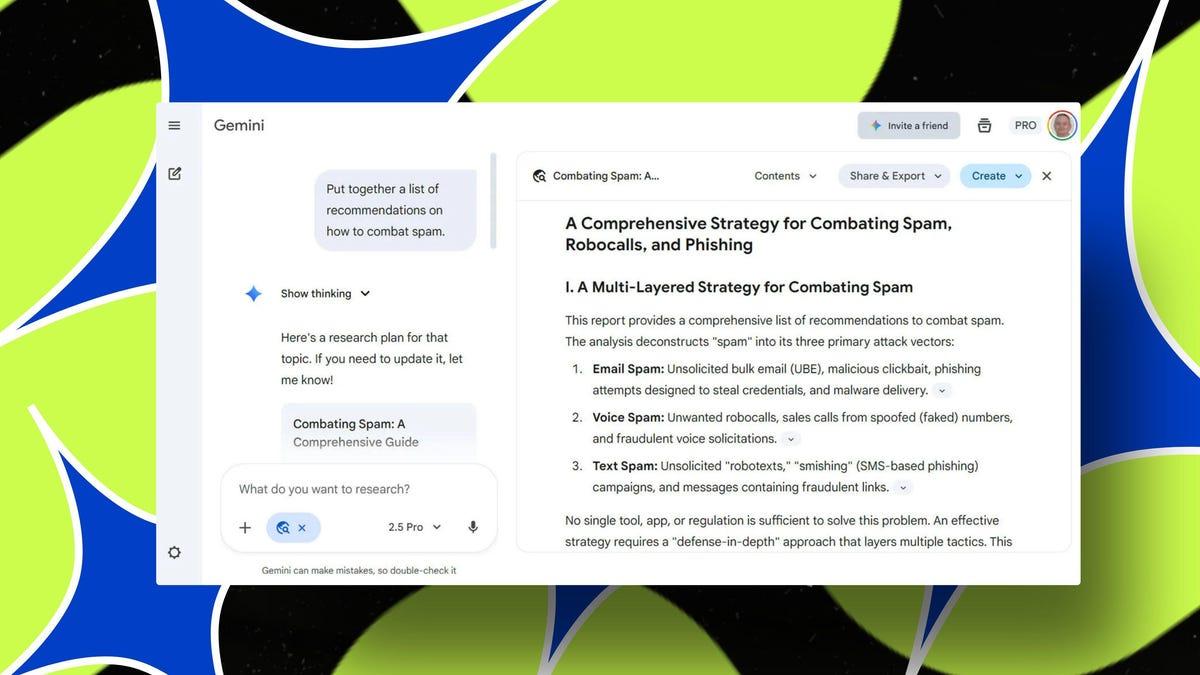
Deep Research will then consult the sources and compile a report. I often use Google Gemini's Deep Research mode to explore general topics and questions that interest me. But sometimes I'd like to include my own articles, emails, and other items in the mix. Now, I can do that thanks to the AI's latest skill. Unveiled on Wednesday, Gemini's Deep Research mode can now pull information from your personal or work Google account. Specifically, the AI can analyze and research your emails from Gmail, your documents from Google Docs, your files from Google Drive, and your conversations from Google Chat. "One of our most-requested features is here: Gemini Deep Research can now draw on content from your Gmail, Drive, and Chat and work it directly into your research," Google said in a Wednesday blog post. "This means you can create even more comprehensive reports by pulling in information directly from your Gmail, Drive (including Docs, Slides, Sheets, and PDFs), and Google Chat, alongside a variety of sources from the web." Also: You can chat with Google Maps now, thanks to this big AI upgrade - how it works The new skill is available to all Gemini users, both free and paid. The option is currently accessible only on the Gemini website, but Google promises it will roll out to mobile users over the next few days. Ironically, Google is a little late to its own game here. Both Microsoft Copilot and ChatGPT already let you pull in files and other content from Gmail and Google Drive, as well as from other services. This capability is often touted as a benefit for businesses and employees who want to include their work emails and company files in their AI research. But it can also be a handy option for individuals who'd like to use their personal emails and files in such research. To get started, open the Gemini website in your favorite browser and make sure you're logged in with your Google account. At the prompt, click the Tools button and select Deep Research, or select the Deep Research button beneath the prompt. A Sources button should appear. Click it, and you'll see sources for Google Search, Gmail, Drive, and Chat. Select any or all of them depending on which info you want Gemini to access. Also: How to turn off Gemini in your Gmail, Photos, Chrome, and more - it's easy to opt out of AI Next, describe the research you'd like Gemini to perform. Keep in mind that Deep Research mode is a more intensive process that will scour the web or your files on your behalf and then provide a detailed report of its findings. That means you'll want to challenge Gemini with a task worthy of its time. And speaking of time, a Deep Research query can take a while to finish, so plan to do something else while the process runs. I challenged Gemini's Deep Research to analyze my files across Gmail, Google Drive, and Google Chat. Here's how it fared. First, I selected Gmail but also kept Search enabled. I asked Gemini to check the invoice emails from my web hosting provider and see if it could find the same type of service at a lower cost. In response, Gemini analyzed the correct Gmail emails and consulted online sources. The results compared and contrasted my current hosting company with others, showing me where and how I could save money. The report provided steps on how to migrate from the current provider to another if I chose to do so. Gemini also listed the sources it consulted, including my Gmail emails and various websites. Also: This new Gemini trick takes your presentation ideas and instantly brings them to life - here's how Next, I selected Drive so that Gemini could access my documents, PDFs, and other files stored on Google Drive. I asked the AI to find any articles I had written about malware and compile a list of tips on how to avoid it. In response, the AI generated a comprehensive report with background information on malware. The tips on how to avoid it were presented in an outline with details on each measure. When I looked at the sources consulted, I saw that the report included only my malware-related stories stored on Google Drive. Finally, I selected Chat. In the past, I'd had a chat with someone about spam calls and messages and had shared some articles I had written along with advice I had compiled. This time, I asked Gemini to put together recommendations on how to combat spam. In response, Gemini provided helpful details on ways to fight email spam, voice spam, and text spam. The report offered specific steps on how to deal with spam on iPhones and Android devices, a topic I had discussed with the other person in the chat. The sources showed that Gemini had used not only the conversation but also the articles I had shared with my chat partner and the websites referenced in those documents. Ultimately, the results looked solid and seemed to accurately analyze my emails and files. But keep in mind that Gemini, like any AI, can make mistakes or misinterpret information. However, when you ask it to use your own files, you can easily double-check to make sure the details are correct.
[2]
Google Gemini's Deep Research can look into your emails, drive, and chats
Gemini can now draw from your emails and documents while performing "deep research" queries. Google's announcement blog called this "one of our most-requested features" for Gemini Deep Research, which is an agentic feature styled specifically for creating research reports rather than just answering questions. The chatbot starts by creating a multi-step research plan, then it performs a series of web searches to create a report that you can ask it to tweak with additional info, or export the whole thing into a Google Doc or AI-generated podcast. Google says of the new connection between Deep Research and Workspace products: Now you can start a market analysis for a new product by having Deep Research analyze your team's initial brainstorming docs, related email threads and project plans. Or you can build a competitor report about a rival product that cross-references public web data with your strategies, comparison spreadsheets and team chats. Once "deep research" is selected on the Gemini's prompt bar, users can pick which of the four options they want Gemini to use: a regular Google Search, Gmail, Drive, and/or Chat. That means that your emails in Gmail, your docs, slides, sheets, and PDFs in Drive, and your chatlogs -- if you use Google Chat -- will provide context for Google's AI model. For now, it's only on desktop, but Google says it'll soon start rolling out to mobile in the coming days.
[3]
Google Gemini can now do deep research on your Gmail and Drive data
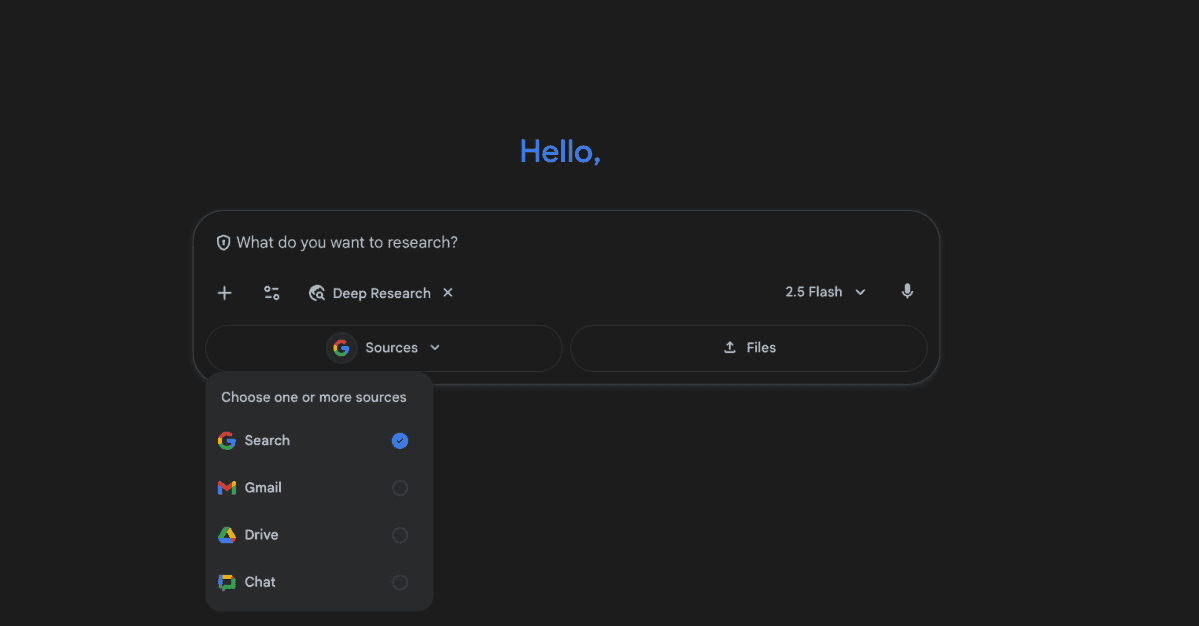
Google released Gemini's Deep Research feature in March, a few months after unveiling the tool, giving you the capability to ask the AI chatbot to create comprehensive reports on complex topics. Deep Research uses sources from the web to write reports for you, but now a new update also allows it to pull information from your Gmail, Docs, Drive and Chat. Google says it's one of the tool's most requested features, and you'll be able to take advantage of it in Gemini, even if you're not paying for a subscription. With Google's latest update, Deep Research is now able to use your emails, all the Slides, Docs, Sheets and PDFs in your Drive, as well your chat history as references. That translates to a more personalized report, since Gemini wouldn't just be using sources from the web. If you ask it to write a marketing analysis for you, for instance, it will take into account your notes, any document your team has written or any back-and-forth between you and your colleagues on email. It can cross-reference information from your account with public data to make, say, comparison spreadsheets for competitor analysis. Take note that you will be able to control which Google service to link to, if you're uneasy about giving Gemini access to all your information. When you click on the Deep Research tool in Gemini, you'll see a drop-down menu where you can tick on Search, Gmail, Drive and Chat individually. At the moment, the feature is only available on desktop, but it will make its way to mobile devices "in the coming days."
[4]
Gemini Deep Research's full Google Workspace integration is here
Google Gemini's Deep Research model is getting a serious upgrade. For those unaware, Deep Research, which first made its way to Gemini all the way back in December 2024, allows users to...well... deeply research whatever the topic at hand. The model takes a while to formulate a report, but the level of detail it highlights and the sheer number of reliable sources it goes through to do so makes the wait worthwhile. And now, with what Google is cooking, the wait has just become even more bearable. The tech giant announced today that Gemini Deep Research will now be able to include personalized internal context from your Gmail, Docs, Drive (Slides, Sheets, and PDFs), and even Chat. Context is king You can create even more comprehensive reports by pulling in information directly from your Gmail, Drive (including Docs, Slides, Sheets and PDFs) and Google Chat, alongside a variety of sources from the web. This can be extremely useful for professionals. For example, using Deep Research, you should now be able to initiate a market analysis for a new product by having Gemini analyze your team's initial brainstorming sessions from Google Docs, emails, and even Chats. Similarly, the AI tool should be able to analyze quarterly reports in the form of Slides and PDFa, and give you a detailed summary of key metrics and performance indicators. The integration is available to all Gemini users. Desktop users can now select Deep Research from the Tools menu and select relevant Workspace sources. Mobile users, on the other hand, will be able to use the same functionality "in the coming days."
[5]
Gemini can finally search Gmail and Drive, following Microsoft
Microsoft announced these same features about a month ago, though they're still in testing. Google has finally begun adding support for its own internal services to Google Gemini, just a month after Microsoft began offering the same capabilities to Windows testers. Google said Wednesday that Gemini Deep Research can now connect to Gmail, Google Drive, and Chat, along with Docs, Slides, Sheets, and PDF files stored within those services. "This powerful new capability is now available for all Gemini users," Google said in a blog post on Wednesday. "To get started, just select 'Deep Research' from the Tools menu in Gemini on desktop and select your sources. This will begin rolling out to mobile users in the coming days." On October 10, Microsoft announced that its own Copilot AI could begin reading Gmail and your Google Calendar via a technology called Connectors, which allows you to manually give access to Copilot so that it can ingest and analyze that data. (At the time, this was limited to members of the Windows Insiders testing program.) A week later, Microsoft more formally announced that those same connectors would allow Copilot to access OneDrive files and Outlook contacts, emails, and calendar events, as well as connect to Google services like Google Drive, Gmail, Google Calendar, and Google Contacts. Microsoft hasn't formally said when these additional capabilities would be released to users, however, giving Google a first-to-market advantage. In an August livestream, OpenAI and ChatGPT also briefly showed off Gmail integration, though ChatGPT's connections don't appear to be as deep or significant right now. However, OpenAI's DevDay 2025 livestream did reveal that ChatGPT can work with apps like Zillow and Canva and query them for more information. For now, the only point in which the two services don't seem to overlap is in Google Chats, though that may be a capability Microsoft specifically neglected to call out. In any event, both Microsoft and Google now appear to offer similar capabilities to allow its AI services to deeply search and understand what you can your colleagues are talking about.
[6]
Gemini Deep Research is able to delve into your Gmail, Docs, Drive and even Chat - but will it really make you more productive?
Google has confirmed it will be bringing Gmail, Google Drive and Chat context into Gemini Deep Research to make the AI tool even more useful. The update, shared in a blog post, comes in response to consumer requests - although Deep Research could previously draw from user-uploaded attachments, its ability to integrate with core Google Workspace functions makes context collection far easier. Deep Research is an agentic feature within Gemini that can conduct detailed research autonomously to create "insightful multi-page reports in minutes," powered by Gemini 2.5. "Now you can start a market analysis for a new product by having Deep Research analyze your team's initial brainstorming docs, related email threads and project plans," the company noted. All Gemini users will get access to context via Gmail, Drive and Chat - not just business users. This comes after the company added PDF attachment support in May. Deep Research was introduced to the Gemini app for powerful on-the-go insights in February 2025 - these additional integrations are coming over the coming days to the app, and they're already available on the web. Google isn't the only company to be offering this type of agentic tool within its AI interface - ChatGPT Deep Research also serves a similar function, and it, too, has been upgraded over time including gaining access to a lightweight o4-mini-based version to expand access to all account types, including free customers. For this particular Gemini update, users can select to include or exclude any of the four following sources: Google Search; Gmail, Drive and Chat. Deep Research is available in 150 countries, and supports over 45 languages.
Share
Share
Copy Link
Google has enhanced its Gemini Deep Research feature to access personal data from Gmail, Google Drive, and Chat, allowing users to create more comprehensive AI-powered research reports. This update puts Google in direct competition with Microsoft Copilot's similar capabilities.
Google has significantly upgraded its Gemini Deep Research feature, enabling the AI tool to access and analyze personal data from Gmail, Google Drive, and Google Chat. This enhancement, announced Wednesday, represents one of the most requested features for the research-focused AI capability
1
2
.The updated Deep Research mode can now pull information from emails in Gmail, documents from Google Docs, files from Google Drive including Slides, Sheets, and PDFs, as well as conversations from Google Chat. This integration allows users to create more personalized and comprehensive research reports by combining their personal or work data with web sources
3
.The new capability opens significant opportunities for business users and professionals. According to Google, users can now "start a market analysis for a new product by having Deep Research analyze your team's initial brainstorming docs, related email threads and project plans"
2
. The feature also enables building competitor reports that cross-reference public web data with internal strategies, comparison spreadsheets, and team communications4
.Real-world testing demonstrates the feature's practical applications. When tasked with analyzing web hosting invoices from Gmail, Gemini successfully identified the correct emails and provided cost-saving recommendations by comparing current services with alternatives found through web research. Similarly, the AI effectively compiled malware prevention tips from stored Google Drive documents and generated comprehensive spam-fighting recommendations based on Google Chat conversations
1
.
Source: ZDNet
Google has implemented granular control options for users concerned about data privacy. When accessing Deep Research, users can individually select which services to include through a dropdown menu featuring Search, Gmail, Drive, and Chat options. This selective approach allows users to maintain control over which personal information the AI can access
3
.
Source: engadget
The feature is available to all Gemini users, including those on free plans, marking a significant democratization of advanced AI research capabilities. Currently accessible only through the desktop Gemini website, Google promises mobile rollout within the coming days
4
.Related Stories
This announcement positions Google in direct competition with Microsoft, which introduced similar capabilities for Copilot approximately one month earlier. Microsoft's Connectors technology allows Copilot to access Gmail, Google Calendar, OneDrive files, and Outlook data, though these features remain in testing phases for Windows Insiders
5
.OpenAI has also demonstrated Gmail integration capabilities for ChatGPT, though their implementation appears less comprehensive than Google's current offering. The competitive timing suggests intensifying rivalry among major AI providers to offer seamless personal data integration
5
.Summarized by
Navi
[4]
21 Feb 2025•Technology

17 Dec 2024•Technology

12 Dec 2024•Technology

1
Business and Economy

2
Business and Economy

3
Business and Economy