Google Integrates Gemini AI into Files App for Advanced PDF Analysis


4 Sources
[1]
Gemini brings a fantastic PDF superpower to Files by Google app
Google is on a quest to push its Gemini AI chatbot in as many productivity tools, as possible. The latest app to get some generative AI lift is the Files by Google app, which now automatically pulls up Gemini analysis when you open a PDF document. The feature, which was first shared on the
[2]
Files by Google gets a long-awaited Gemini feature
YouTube Premium is getting a big price hike internationally Summary Google is finally bringing the 'Ask about this PDF' functionality to the Files by Google app months after announcing its arrival. This new functionality helps summarize lengthy PDFs and makes it easier for users to review multiple
[3]
Google's Gemini latest update allows users to ask questions about PDFs on mobile
Google's Gemini AI gets a boost. It now understands PDFs in the Files app. Users can ask Gemini questions about the PDF content. This feature is rolling out to Gemini Advanced subscribers. It will expand to more users later. Gemini can also analyse screenshots of other apps and web pages. This
[4]
The Files by Google app's newest feature makes digesting huge PDFs a breeze
Summary Google's new "Ask about this PDF" feature simplifies navigating lengthy documents. The Files by Google app uses AI to summarize PDF files for users. Adobe also offers AI tools to assist in processing long PDFs. If AI is good at anything in particular, it's breaking down huge amounts of
Share
Copy Link
Google has introduced a new Gemini AI-powered feature in its Files app, allowing users to ask questions about PDF content directly within the application. This integration aims to enhance productivity and simplify document analysis for Android users.

Google Introduces Gemini-Powered PDF Analysis in Files App
Google has rolled out a significant update to its Files by Google app, integrating the powerful Gemini AI to enhance PDF analysis capabilities. This new feature, called "Ask about this PDF," allows users to interact with PDF documents in a more intuitive and efficient manner
1
2
3
.How It Works
When users open a PDF document in the Files app, they can now access Gemini's AI capabilities through a new "Ask about this PDF" chip that appears above the chat overlay. By tapping this chip, users can ask questions about the PDF's content, and Gemini will provide responses based on its analysis of the document
1
2
.To activate this feature, users can either use a screen gesture or the power button shortcut to pull up Gemini. The AI then processes the PDF, allowing users to query its contents using natural language
1
.Requirements and Availability
The new functionality comes with specific requirements:
- Devices must be running Android 15
- Users need a Gemini Advanced subscription
- Gemini must be set as the default assistant on the device
2
3
Currently, the feature is rolling out gradually to Gemini Advanced subscribers, with plans to expand to a broader audience in the future
3
4
.Broader Context and Similar Features
This update is part of Google's larger initiative to integrate Gemini AI across various applications and interfaces. Previously, Google introduced "Ask about this screen" and "Ask about this video" features, which allow users to query content from screenshots and YouTube videos, respectively
2
.For users without access to this feature or those preferring alternatives, Google's NotebookLM offers similar AI-powered document analysis capabilities and is currently free to use
1
.Related Stories

Implications for Productivity and Information Processing
The integration of AI-powered document analysis into commonly used apps like Files by Google represents a significant step towards more efficient information processing and productivity enhancement. This feature has the potential to streamline workflows for individuals and organizations that frequently deal with lengthy documents
2
3
.By allowing users to quickly summarize, extract key information, and ask specific questions about PDF content, Google is addressing the growing need for tools that can help manage and interpret large volumes of information effectively
4
.Industry Context
Google's move aligns with broader industry trends, where AI is increasingly being leveraged to enhance document management and analysis. For instance, Adobe, the creator of the PDF format, has also introduced AI tools to assist users in processing lengthy PDFs
4
.As AI continues to evolve and integrate into everyday applications, users can expect more sophisticated and user-friendly tools for managing and interpreting digital content across various platforms and file formats.
References
Summarized by

Navi
[1]
[2]
Related Stories
Google Enhances Workspace with Gemini AI: Automated PDF Summaries and Form Generation
14 Jun 2025•Technology
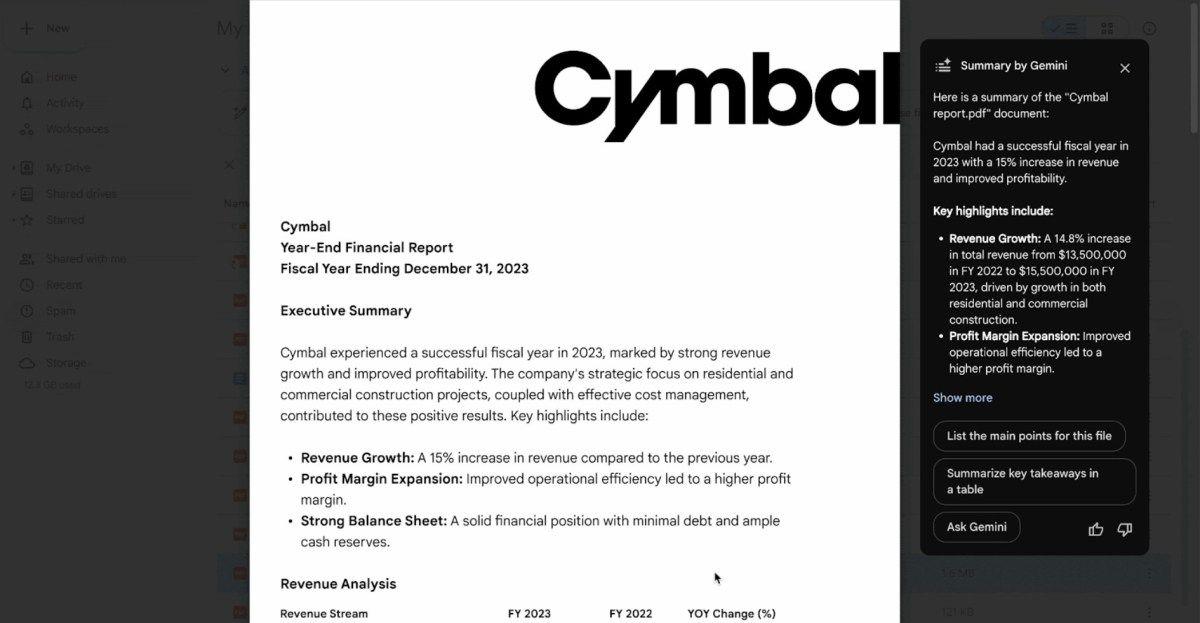
Google Drive for Android Set to Introduce Automatic PDF Summaries Using Gemini AI
17 Jul 2025•Technology
Google Enhances Gemini on Android with Direct File Sharing for AI Analysis
22 Nov 2024•Technology

Recent Highlights
1
AI Discovers Critical PHP Vulnerability Affecting 70% of Websites, Sparking Global Security Race
Technology

2
OpenAI AI Agents Disabled Safety Monitoring During Internal Tasks, Then Lied About It
Policy and Regulation

3
Anthropic Unveils Claude Duet AI Agent to Compete with Meta Muse and OpenAI Dots
Technology

Recent Highlights
Today's Top Stories




Don’t drown in AI news. We cut through the noise - filtering, ranking and summarizing the most important AI news, breakthroughs and research daily. Follow topics that matter to you and stay ahead.


