2 Sources
2 Sources
[1]
I just tested Napster's holographic AI sidekick -- here's what worked (and what flopped)
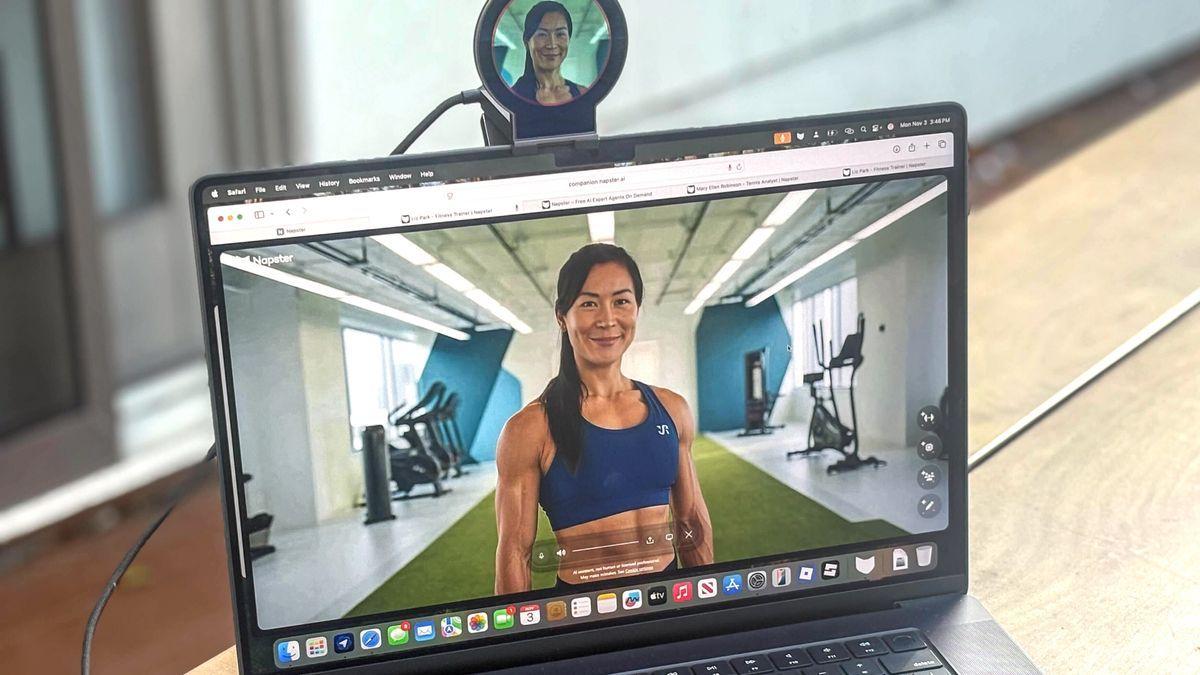
If you grew up downloading songs off Napster in the early 2000s, you might do a double take at what the brand has become. The company, acquired by Infinite Reality, has reinvented itself as a spatial-AI platform, complete with holographic hardware and a suite of "embodied" assistants you can actually video-chat with. Think of it as FaceTiming an AI coworker who lives on your desk That's the idea behind Napster Companion (the software) and Napster View (the hardware). AI agents are something we are seeing a lot more of lately. We've seen them from OpenAI and Microsoft but what makes Napster's AI agents different is that they feel much more life-like. Agents such as fitness experts, financial consultants, creative directors, or even custom personalities you design, all have faces. While you can use the software in your browser, the features and accompanying Napster View are only available on macOS at this time. After giving Napster View a test run, here are my thoughts, likes and dislikes after spending time with the hologram Companions for a weekend. Setting up Napster Companion was fairly simple. After installing the desktop app and plugging in the View device via USB-C, the 2-inch display immediately came to life, projecting a small 3D avatar that felt like a mix between a hologram and a mini-Zoom window. The setup for the device was essentially plug and play. I started by going to napster.ai and selected a persona. There are so many to choose from that the site itself reminded me of MasterClass. For example, users can choose from AI personas such as "Wellness Coach Maya" and "Financial Analyst Leo." Once you're logged in (even on a PC), you can start talking. There's no prompt bar, just voice conversation. You'll know it's working when the Companion says your name. Speech recognition was unbelievably fast, which is something I noticed immediately. However, it's not flawless. Occasionally, the Napster View and the companion weren't completely aligned, which was a little bit like watching a dubbed movie. And sometimes my agent misunderstood casual phrases or background noise. But the face tracking and lip sync were far smoother than early versions of Meta's avatars or Pi's video mode. You can upload files, share screens or ask your agent to generate proposals, summaries and plans in real time. It's like ChatGPT, but having a face adds a unique layer, that I really like. I can tell that Napster Companion is aimed at professionals who already use AI in their workflow. The novelty actually feels useful. I've seen a ton of AI novelty gadgets, and not all are impressive. But what I really like about Napster View is that it's undeniably cool and useful. It's like Napster shapeshifted and grew up. It was not as weird as you may think to have an AI "presence" off-screen and almost hovering to help me stay focused. It's like giving your digital assistant its own space instead of bouncing between browser tabs. Human-like engagement. I've used ChatGPT Voice and Gemini Live and this feels like a step up from both. The video chat format creates a surprising sense of accountability. Asking a human-looking face to summarize meeting notes or proofread copy feels more natural than typing into a chat box or chatting to a faceless AI. Memory and context. Regardless of what Companion I chose, each one remembered what I'd asked earlier in the day and followed up later. For example, one of them said to me "Did you ever finish that outline?" That persistence felt closer to how a real assistant behaves. As someone with lots of irons in the fire throughout the day, this is the type of nudge I need. Cross-domain agents. You can swap between experts. For example, I'm dealing with a herniated disk (the worst!) and it was nice to chat with a "fitness expert" about my running injury in between conversations with a "creative strategist" without re-training prompts. Each Companion has their own distinct tone and vocabulary, which gives the illusion of team collaboration. Limited platform support. Right now, Napster Companion and View are optimized for macOS. Windows support is listed as "coming soon." As a Windows gal, I'm looking forward to the company expanding the experience. However, anyone can use the software without the accompanying hardware in their browser by logging in. Those on Windows or lacking the hardware won't get the full, integrated experience. Occasional glitchy moments. Companions are extremely sensitive to anything audible. If you're in a meeting or get a phone call, forget it! They will start talking and ask you what's going on, if you're ready to continue or if you need more time. I really just need them to hush. Additionally, eye contact sometimes lingered a beat too long, and the facial animation occasionally got out of sync from the speech. Steep price tag. Napster View is $99 and the software starts around $19/month, or $219 annually. While the first month felt premium, I'm not sure the average user will want to pay that indefinitely for what's essentially a better interface for ChatGPT-style responses. But at the same time, it's ChatGPT with a face, which I really like. For comparison, ChatGPT Plus is about $19/month. Privacy questions. Napster claims all conversations are private and exportable, but any service with memory-enabled AI deserves scrutiny. There's little transparency yet on where the data lives or how it's used to "personalize" your agent. As a huge Napster fan in my twenties, I have to say, I'm happy to see what the company has become. Napster View feels like the futuristic direction that AI needs to go, especially when it comes to chatbots. I appreciate having a face to match a voice so I'm not just chatting into the void. The hologram aspect adds a surprising charm to an already useful interaction. The setup blends novelty and functionality -- an AI assistant you can see rather than just hear -- and that alone makes it one of the most intriguing experiments in human-AI interaction I've tried lately. Still, at $99 for the device and $19/month for the software, this is an investment for early adopters more than everyday users. It's a bit like owning the first iPad (fun, futuristic and a little ahead of its time), but might be worth waiting for the next-gen features. If Napster can iron out the quirks, expand platform support, and give users more control over privacy and memory, this holographic sidekick could genuinely change how we work with AI.
[2]
I put Napster View AI on my MacBook Pro, and I'm now convinced no one needs this much face time
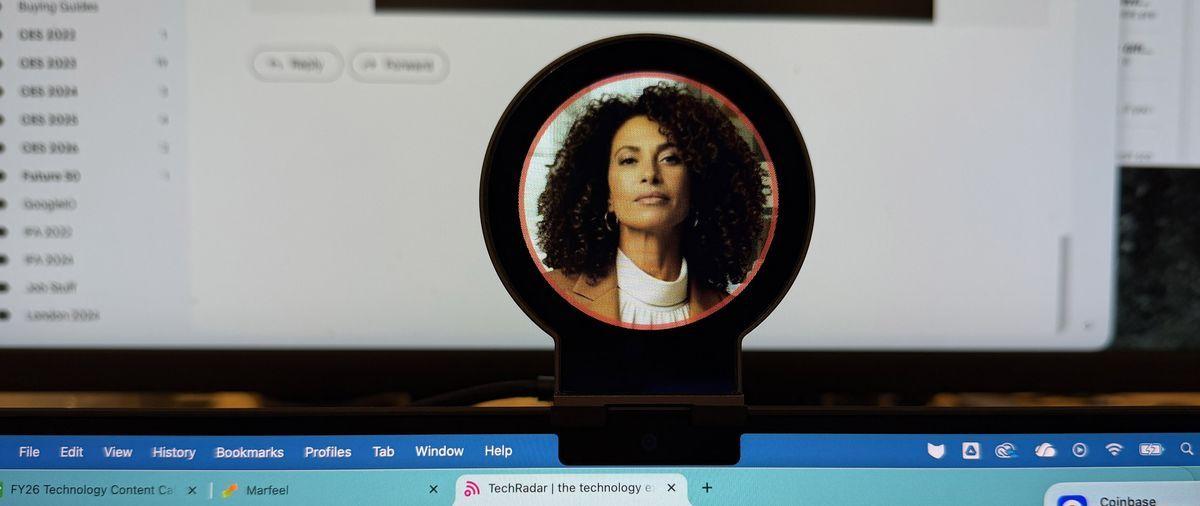
Why you can trust TechRadar We spend hours testing every product or service we review, so you can be sure you're buying the best. Find out more about how we test. No one likes to be watched, even if the watcher has no real face, eyes, hands, or body. If there's an image of a floating face that seems to be watching your every move, it's gonna get old fast - and Napster View (forget about music) and its new AI platform straddle the line between real utility and overwhelming creepiness, helping me finally answer the question of just how much AI is actually too much. The Napster View and AI idea is novel and potentially useful: a team of virtual assistants, each with their own area of expertise, at your beck and call to solve real-time problems. They will, if you let them, look at what your desktop screen, or even, via your computer's webcam, your real world. The secret sauce for the platform is the $99 Napster View hardware (it's currently only available in the US), which puts any one of a half-dozen experts (and their avatars) in a circular 'holographic' screen right above your desktop. The hardware is lovely if a bit over-built. A roughly two-inch in diameter but quite thin screen is connected to a pair of folding metal blocks that balance the display on top of your MacBook display by sort of cantilevering it against the back (rubber keeps the metal from scratching your laptop). There's a USB port on the back of the top block, which receives the included USB cable. You then plug that into one of your MacBook's available USB ports. It works with any of the best MacBooks running an M1 chip or newer, and it's your Apple silicon-based MacBook that drives the graphics; however, you can also just run the interface on your desktop. The whole reason for the $99 hardware is to get that floating interface out of the way. Setup is fairly straightforward. You have access to your 'team', which includes your Chief of Staff Kai Mercer, a financial advisor, Kevin Jones, and the wellness guide, Elena Garcia. While these are just a collection of slightly topic-tailored LLMs, each one also features an attractive avatar who stares out at you, waiting for your first request. Eleven Labs made them so they move just enough to seem lifelike. But when they talk, it's mostly just their mouths that move in sync to voices that, ultimately, do not always seem to fit the face. When I first installed the screen, I couldn't get the floating window off my desktop and onto the custom hardware. Turns out I had to give the Napster for Mac app some permissions, and then the avatar, in this case Kai's, appeared on the circular screen. The 3D effect is pretty decent, and appears to use some lenticular technology to separate the avatar from the background. Kai, like my other avatar team members, blinks and watches me. But none of the avatars listen until I hit the mic button. After that, the interface adds options for turning on my webcam so the AI can analyze what I show it, a screen-share option, and a message center. It took a couple of tries to get the Napster View avatar to see my screen, but eventually I figured out I had to choose the option to share the entire screen. I switched to the financial advisor, 'Richard Warnok', and asked it to analyze some fake small-business financials I had Gemini cook up. 'Warnok' did a good job of assessing that I was overspending and needed to make some changes, but when I said I wanted to lay off staff, he couldn't help me write the email. In fact, none of the avatars would help in that regard. I then added a one-time $250K expense for a pet tiger. Warnok spotted it, and we eventually agreed it was a bad choice. It could not help me cook up ideas to monetize it. In my conversations with the AIs, which use a variety of models (including some from OpenAI and Google Gemini) depending on the task, it became apparent that they had no sense that I was engaging with them through a visual avatar. All told me they had no hair, no face, no arms. Even the one who had pink hair, my coding guide, insisted she had none. I did enter a lengthy coding session with her in which she spit out what looked like usable JavaScript code, but she was not much use in helping me test it. I didn't like that even when using the hardware screen, the software interface took up some screen real estate and blocked part of my MacBook screen. What I liked even less was the avatars staring at me. Also, if I left the mic on, they listened to everything. That could be maddening. Perhaps the most fascinating part of Napster AI is the platform's ability to build a digital twin. That's right, an AI version of you that can interact with colleagues, friends, maybe fans, when you're not available. There's quite a process here that starts with uploading a decent photo of yourself. The system will use it to build a rendered avatar, which is a nicer-looking version of you. You can even dress it up. I chose a nice blazer. Napter AI asks for your LinkedIn profile, which is used to build a baseline career history. The most fascinating party, though, is the AI interview. One of Eleven Labs avatars (backed by Napster AI) interviews you for about three minutes about your career, highlights, your thoughts and feelings on your chosen industry, and how you want to interact with people. It's kind of a fun process, and even though it was just an AI, I felt sort of seen. With that done, the last step is for you to read a paragraph of permission text that helps gather your voice print and ensure that you gave Napster AI permission to create your digital twin. I was pleased to see that Napster AI retains no right to my likeness or voice. Unfortunately, my first attempt failed for unknown reasons, and I had to do the entire process again. My second attempt succeeded, though I think the AI questions were somewhat less insightful. It's almost like they rushed through the interview. In any case, my Digital Twin is live and is living somewhat creepily in the Napster View. We engaged in a conversation that was, well, weird. My voice sounds almost but not quite like me. The animation of the mouth and face is not fantastic, but it sort of works. As with the other avatars, mine appears to be floating on the screen, and like one of those images of Jesus some people hang on their walls, the eyes appear to be following me. You can publish your digital twin and share the link on LinkedIn and other social platforms. Those who want to chat with it, though, do need to sign into Napster AI and agree to certain conditions. Napster View is a fascinating, if not necessarily useful, combination of hardware and AI software. Your affinity for it will largely depend on how comfortable you are with engaging with digital life forms who have ones and zeroes coursing through their virtual veins. The hardware is well designed, and the holographic screen is effective. But I'm not comfortable with a face (even my own) staring at me all day. Plus, there's the need to verbally converse. Yes, you can wear earbuds, but you'll still be talking out loud to your computer. Your officemates or home office companions may not appreciate all the chatter. The digital twin is impressive, and while it's not something I think I'll actively use, I am aware that this is the start of a trend. More and more people, especially those in business, will be employing digital twins to handle low-level tasks and, especially, communications. Businesspeople using this is also a function of the price. It'll cost you as much as $49 a month to use Napster AI's digital team services (and run that digital twin). Consumers won't likely sign up for that, but small companies that want to think big and maybe be even more productive with the help of AI might be interested.
Share
Share
Copy Link
Napster has reinvented itself as a spatial-AI platform offering holographic AI assistants through its View hardware and Companion software. While the technology shows promise with fast speech recognition and lifelike avatars, reviewers found the constant presence intrusive and the $99 hardware plus subscription pricing steep.
Napster, the brand synonymous with early 2000s music downloading, has undergone a dramatic reinvention under new ownership by Infinite Reality. The company now positions itself as a spatial-AI platform, offering what it calls "embodied" AI assistants through its Napster Companion software and Napster View hardware
1
. This represents a complete departure from its music roots, targeting professionals who want AI assistance with a more human-like interface.The Napster View is a $99 hardware device featuring a roughly two-inch circular display that sits above your MacBook screen, creating what the company describes as a holographic experience
2
. The device connects via USB-C and uses a cantilever design with metal blocks that balance against the back of your laptop, with rubber padding to prevent scratching2
.
Source: TechRadar
Setup proves relatively straightforward - users simply plug in the device and install the desktop application. The 3D effect utilizes what appears to be lenticular technology to separate avatars from their backgrounds, creating a convincing floating display
2
.The platform offers multiple specialized AI personas, including Wellness Coach Maya, Financial Analyst Leo, and Chief of Staff Kai Mercer
1
. Each assistant features distinct personalities, vocabularies, and areas of expertise, powered by various AI models including those from OpenAI and Google Gemini2
.
Source: Tom's Guide
Users interact through voice conversation rather than text prompts, with the system offering exceptionally fast speech recognition
1
. The assistants can analyze uploaded files, share screens, and generate real-time proposals and summaries, positioning themselves as comprehensive workflow tools.Reviewers praised several aspects of the Napster system. The speech recognition speed impressed users immediately, while the face tracking and lip synchronization proved smoother than early Meta avatars or Pi's video mode
1
. The video chat format creates what one reviewer described as "a surprising sense of accountability," making interactions feel more natural than traditional text-based AI interfaces1
.The system demonstrates impressive memory and context retention, with assistants remembering previous conversations and following up on incomplete tasks throughout the day
1
. Users can seamlessly switch between different expert personas without retraining prompts, creating an illusion of team collaboration.Related Stories
Despite its technological achievements, the system faces substantial criticism. The constant presence of staring avatars creates what one reviewer called an "overwhelming creepiness"
2
. The assistants prove extremely sensitive to ambient noise, interrupting conversations and meetings when they detect background audio1
.Technical issues include occasional synchronization problems between audio and visual elements, resembling "a dubbed movie," and eye contact that sometimes lingers uncomfortably long
1
. The software interface also occupies screen real estate even when using the dedicated hardware2
.The Napster ecosystem requires significant investment, with the View hardware priced at $99 and software subscriptions starting at $19 monthly or $219 annually
1
. Currently, the full experience only supports macOS with M1 chips or newer, though Windows support is promised as "coming soon"1
. Users can access the software through web browsers without hardware, but miss the integrated holographic experience.Summarized by
Navi
[1]
20 Oct 2025•Technology

02 Jul 2025•Technology

06 May 2025•Technology

1
Business and Economy

2
Business and Economy

3
Business and Economy