6 Sources
[1]
Adobe Photoshop Adds a Whole New AI Editing Mode - CNET
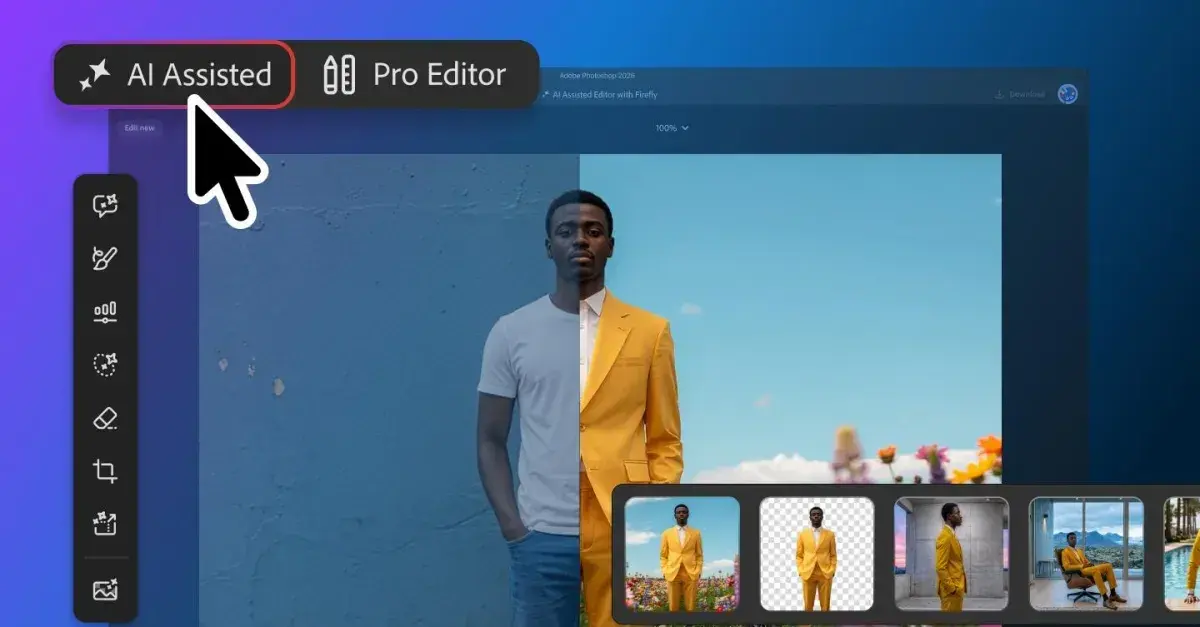
Ever since being admittedly fascinated by the Cambridge coffee webcam from the 1990s, I've written about VPNs, the NFL, smartphones, living wages, over/unders and everything in between. Read full bio Adobe is giving Photoshop users more AI tools for their work belt. A new feature called AI Assisted Editor lets you do a variety of things with your images using merely natural language prompts. It's not replacing the traditional Pro Editor; it's just another option. Adobe also announced several other new features on Thursday -- a light adjustment layer for more lighting controls, Instruct Edit with Masks for prompt-based editing, and Markup to let you visually communicate edits by drawing on an image. Adobe has been busy with new AI wrinkles in the past several months. AI Assistant arrived in March to enable editing with conversational commands, and in June, the company added AI assistants to Photoshop, Premiere Pro, InDesign, Illustrator and Frame.io. Earlier this month, OpenAI and Adobe teamed up to integrate dozens of photo- and video-editing capabilities into ChatGPT. AI Assisted Editor is currently being tested in the beta version of Photoshop, which costs $23 per month. AI Assisted Editor keeps it simple When you open Photoshop, you will see two editing interface options: AI Assisted and Pro Editor. AI Assisted is the new feature announced Thursday, and Pro Editor is Photoshop's classic workspace offering manual control over layers, adjustments and editing tools. Photoshop masters are likely comfortable with Pro Editor, but less-experienced users might gravitate toward AI Assisted for simpler editing. If you go with AI Assisted, you can use a natural language prompt bar to request edits and changes. A vertical tool bar includes seven functions, including prompt to edit (using natural language prompts), remove background, generative expand (extend image dimensions), generative remove (eliminate unwanted objects), generative fill (add, replace, or remove content), generative upscale (increase image resolution) and AI markup (annotate images). The Prompt to Edit function could be the biggest game changer. You can change out the image entirely with a natural language prompt. Maybe you've got an image of someone sitting on a beach, but want them in the mountains. A prompt of "Put this person on a hiking trail in the mountains" could do the trick. More new Photoshop features Adobe also announced three other new options for what the company called "more precise, sharper editing." The light adjustment layer lets you toggle through several lighting controls -- exposure, contrast, highlights, shadows, whites and blacks. With the Instruct Edit with Masks function, you can simply describe the edits you want in the masked areas -- have the person smile, put the bird in flight, open the blue door -- instead of having to mark every area on the image that you want to edit. With the markup tool, you can draw on an image to tell the AI your changes. You might circle a building and tell the AI to make it brown, or maybe draw an arrow to where you want a certain object. Adobe says markup is a way of being more precise with the AI to avoid any ambiguity that might occur if you instead used text prompts.
[2]
Adobe is adding more AI to Photoshop
Adobe is rolling out an AI-heavy update for Photoshop that includes a new "optional" interface dedicated to its AI tools. Launching in beta, the "AI Assisted Editor" view will show all of Photoshop's AI features in a single toolbar, including its prompt-based image editor, background remover, an AI image extender, and more. There are also new ways to refine edits with AI, including a "markup" feature to draw directly on an image to show Photoshop's AI assistant what you'd like to change. That means you can "select areas to recolor, sketch arrows to indicate position, or brush in rough shapes to suggest new elements" without using a text prompt, according to Adobe. Additionally, Adobe is launching an update to its "Instruct Edit with Masks" feature, which lets you edit a mask using natural language prompts. Adobe says its Firefly Image 5 model now understands the entire context of an image, which means you'll no longer have to manually mark every area to edit. Instead, you can describe what you'd like to change, like opening closed eyes or placing a hat on someone's head.
[3]
Adobe Photoshop adds optional 'AI Assisted Editor' mode
Adobe today announced a beta for AI Assisted Editor, a new optional editing mode within Photoshop with a simplified, prompt-based interface for image editing. Here are the details. Photoshop gets optional AI Assisted Editor Adobe announced AI Assisted Editor, a new beta experience that replaces Photoshop's detailed, intricate image-editing tools with a prompt-based interface and a simplified menu. AI Assisted Editor can be accessed from a new toggle on Photoshop's menu bar, which users can also choose to hide at any time from Settings. Once the user enters AI Assisted Mode, they see a simplified interface with tools including: Al Assisted Editor includes: * Prompt to Edit: Transform images using natural language prompts without complex manual editing. * Remove Background: Erase backgrounds, refine edges, and customize images in just a few clicks. * Generative Expand: Extend image dimensions and generate content that blends naturally with your composition. * Remove Tool: Eliminate unwanted objects and distractions while maintaining realistic image quality. * Generative Fill: Add, replace, or remove content using simple text prompts. * Generative Upscale: Increase image resolution while preserving sharpness and visual fidelity. * Al Markup: Annotate images to communicate edits visually and generate more precise results. The Markup tool is particularly interesting for users who are new to image editing or for experienced users working on a rough concept or needing to quickly sketch out a tweak. With it, users can just roughly draw, or click on any region of the image, and add a natural-language instructions such as "Add more clouds," "change this shoe," or "Add a banner with the text ON SALE NOW." Adobe Firefly will then make the adjustments, and users can further tweak the results either in AI Assisted Edit mode or by continuing to the traditional Pro Editor. Other tidbits included in today's announcement In addition to the new, optional AI Assisted Editor beta, Photoshop added support for prompt-based masked edits, which let users roughly select just the portion of the image they want Firefly Image 5 to edit. Adobe says this addresses much of the criticism of the current prompt-based editor, which can occasionally reduce image quality or generate results that aren't always globally aligned with the lighting or angle of the subject being edited. Another new feature making its way to Photoshop today is a new non-destructive layer tool for light adjustments. That includes adjustments for Exposure, Contrast, Highlights, Shadows, Whites, and Blacks, "so you get Camera Raw-level results without ever leaving your Photoshop layers workflow," says Adobe. One new tool that is the complete opposite of mask-based editing tools is "Prompt to Edit," which allows the user to write a prompt to change the entire image, rather than just a segment. For instance, a user might want to turn a day shot into a night shot, or a rainy shot into a sunny shot, and this tool lets them do exactly that. This new tool supports FLUX 2 pro, FLUX Context Pro, Gemini 3.1 (with Nano Banana 2), Gemini 3 (with Nano Banana Pro), Gemini 2.5 (with Nano Banana), GPT Image 2, and Adobe's own model, and it creates a new layer with two variations of the edited image. Finally, Adobe announced two other features designed to offer users "more control, fewer interruptions:" * Dynamic Text, Shapes and Paths extends Photoshop's Dynamic Text to any custom shape or path, allowing text to adapt automatically along curves and freeform layouts so you keep your formatting without manual rework. * Stock Panel Integration puts more than 900 million Adobe Stock assets right inside Photoshop in a dockable panel, so you can easily discover, preview, and use assets without leaving your workflow. AI Assisted Editor is available in beta today, while the other tools will be generally available starting today. Worth checking out on Amazon
[4]
Adobe adds direct image markup to Photoshop
Adobe has released a Photoshop update that adds a new Markup feature for drawing directly on images and a Light Adjustment Layer with Lightroom-style lighting controls. The Light Adjustment Layer adds non-destructive controls for exposure, contrast, highlights, shadows, whites and blacks inside Photoshop. Adobe said the feature is designed to deliver camera raw-level results without leaving the app's layer-based workflow. The update also adds a new AI feature called Instruct Edit with Masks, powered by Firefly Image 5. Adobe said users can mask part of an image and then describe specific changes through prompts, including edits such as opening closed eyes or placing a hat on a person's head. Adobe said unmasked areas remain untouched when using Instruct Edit with Masks, so protected parts of an image are not altered during the edit. The new Markup tool combines hand-drawn annotations with text prompts to guide image edits. Adobe said users can select areas to recolor, sketch arrows to indicate placement, or draw rough shapes to suggest new elements. In one example shown by Adobe, a roughly drawn cat and wall tiles were converted into photorealistic generated elements. Adobe is also introducing an AI Assisted Editor in beta that groups several Photoshop AI tools into a dedicated interface with a natural-language prompt bar. The tools include Prompt to Edit, Remove Background, Generative Expand, Remove Tool, Generative Fill, Generative Upscale and AI Markup. Users can still access those AI tools through Photoshop's standard professional interface. The update also includes Dynamic Text for custom shapes and paths. Adobe said the feature extends Photoshop's Dynamic Text capabilities to any custom shape or path. Adobe also added a Stock Panel Integration that provides access to more than 900 million Adobe Stock assets through a dockable panel inside Photoshop. All of the new features are available in the latest Photoshop update through Creative Cloud.
[5]
Adobe just added a brand new AI-assisted editor to Photoshop
Adobe today announced a bunch of new AI-powered features for its flagship design software. Photoshop now offers new light adjustment tools, more precise AI editing with masks, and, perhaps most significantly, a brand new editing space. Centred around prompt-based editing, the new AI-assisted editor, now available in beta, offers a dedicated interface for users to edit using a natural language prompt bar alongside other generative tools, powered by various AI models. The new editor represents perhaps Adobe's most decisive move yet in its embracing of 'conversational editing'. The company has already added new AI assistants to the likes of Photoshop and Adobe Express. But now it's offering an entirely new editing interface for its most established software. As well as prompt to edit, the new AI-assisted editor features some of Photoshop's other AI tools, including Remove Background, Generative Expand, Generative Fill and Generative Upscale. While the advent of a brand new AI-assisted editor is unlikely to appease those lamenting the insertion of AI into every area of digital creativity, Adobe is keen to stress that like all of its AI offering, the AI-assisted editor is designed to fit into existing workflows. Or, if a user prefers, they can disable it altogether. And the prompt to edit feature isn't limited to the new AI editor. "Prefer to keep working in the Pro Editor? Prompt to Edit offers the same natural language editing directly in the Pro Editor's Contextual Task Bar, so you can transform an entire image using simple prompts, with no selection required, right from the context bar you're already using," Adobe announced in a blog post. "Whether you prefer prompts, precision tools, or a combination of both, Photoshop offers the flexibility to support the way you create."
[6]
Adobe Adds AI Editor to Photoshop: Editing Gets Simpler
Adobe has introduced an optional AI-Assisted Editor beta for Photoshop, simplifying AI image editing for creators. The update arrived on August 27, 2026, through Photoshop itself, giving beginners and professionals a faster editing option. Adobe designed the mode to reduce complex tool searches while keeping the traditional Pro Editor available. The new interface brings popular Photoshop AI features together through prompts and visual instructions. The works as an optional workspace inside Photoshop, where creators can access AI tools from one interface. Users can describe changes through natural language or draw directly over images using AI Markup. Adobe said the update provides "more choice in how you create" while supporting greater creative control. The simplified workspace includes Prompt to Edit, Generative Fill, Generative Expand, Remove Background, Remove Tool and Generative Upscale. These tools target common editing tasks without requiring users to navigate Photoshop's complete toolbar. AI Markup adds another approach by letting creators sketch instructions directly onto an image. A rough arrow can indicate placement, while painted areas can guide recoloring or added elements. This feature could make AI editing easier when text prompts cannot explain an exact visual idea. Adobe has also upgraded Instruct Edit with Masks using . The model understands the wider image context, allowing targeted changes without manually masking every area. The beta remains optional, so professional users can continue with Pro Editor mode. Adobe's approach gives creators a simpler AI workspace without removing Photoshop's traditional editing controls.
Share
Copy Link
Adobe launched AI Assisted Editor in beta for Photoshop, offering a simplified interface with natural language prompts and a markup tool for drawing edits directly on images. The update includes light adjustment layer controls and enhanced Instruct Edit with Masks powered by Adobe Firefly Image 5, while keeping the traditional Pro Editor intact.
Adobe Photoshop has unveiled AI Assisted Editor, a new beta interface that transforms how users interact with the software through natural language prompts and visual markup tools
1
2
. The update represents Adobe's most decisive step toward conversational editing while maintaining flexibility for traditional workflows5
.The AI Assisted Editor appears as a toggle option on Photoshop's menu bar, offering users a choice between the new simplified interface and the traditional Pro Editor
3
. This optional mode consolidates seven AI features into a single vertical toolbar: Prompt to Edit, Remove Background, generative expand, Remove Tool, generative fill, Generative Upscale, and AI Markup1
. Users can hide the toggle entirely from Settings if they prefer working exclusively in the classic workspace3
.
Source: The Verge
The beta version is available now through Creative Cloud at $23 per month
1
. Adobe emphasized that all AI features remain accessible through both interfaces, ensuring users can work in their preferred environment without losing functionality5
.The markup tool introduces a fundamentally different approach to image editing by letting users draw directly on images to communicate changes
2
. Users can circle areas to recolor, sketch arrows to indicate object placement, or brush rough shapes to suggest new elements without writing text prompts4
. Adobe demonstrated this capability by converting roughly drawn cats and wall tiles into photorealistic generated elements4
.This visual annotation system addresses ambiguity that sometimes occurs with text-only prompt-based editing
1
. The feature proves particularly valuable for users new to image editing or experienced professionals sketching quick concepts3
.Adobe upgraded Instruct Edit with Masks using its Adobe Firefly Image 5 model, which now understands complete image context
2
. Users no longer need to manually mark every area requiring edits—they can mask a portion of the image and describe specific changes like opening closed eyes or placing hats on heads4
.Unmasked areas remain untouched during edits, protecting parts of images from unintended alterations
4
. This addresses criticism of current prompt-based editors that occasionally reduce image quality or generate results misaligned with the lighting or angle of subjects being edited3
.Adobe introduced a non-destructive light adjustment layer with controls for exposure, contrast, highlights, shadows, whites, and blacks
1
4
. The feature delivers camera raw-level results without leaving Photoshop's layer-based workflow3
, streamlining the editing process for photographers who previously needed to switch between applications.Related Stories

The Prompt to Edit function enables wholesale image transformations through natural language prompts
1
. Users can change someone sitting on a beach to hiking in mountains with a simple prompt like "Put this person on a hiking trail in the mountains"1
. The tool supports multiple AI models including FLUX 2 Pro, FLUX Context Pro, Gemini 3.1, Gemini 3, Gemini 2.5, GPT Image 2, and Adobe's own model, creating a new layer with two variations of edited images3
.Adobe expanded Dynamic Text capabilities to work with any custom shape or path, allowing text to adapt automatically along curves and freeform layouts
3
. The update also includes Adobe Stock integration through a dockable panel, providing access to more than 900 million Adobe Stock assets directly inside Photoshop4
3
.All new AI features are available in the latest Photoshop update through Creative Cloud
4
, with AI Assisted Editor remaining in beta while other tools have reached general availability3
. Adobe continues building on its March launch of AI Assistant for conversational commands and June additions of AI assistants across Photoshop, Premiere Pro, InDesign, Illustrator, and Frame.io1
.Summarized by
Navi
[2]
[4]
[5]
1
Technology

2
Policy and Regulation

3
Technology