Adobe Plugin Brings Interactive Editing Controls to ChatGPT for Images, Designs and PDFs


2 Sources
[1]
Adobe plugin in ChatGPT gets interactive editing controls for images, designs and PDFs
Adobe has introduced new interactive editing experiences for its plugin in ChatGPT alongside OpenAI's DevDay 2026 announcements. The update adds interactive editors to the existing plugin experience, allowing users to work between ChatGPT and Adobe editing tools while keeping their work in
[2]
Introducing interactive editing controls for the Adobe plugin in ChatGPT
Today, alongside OpenAI's DevDay 2026 announcements, we're introducing new interactive editing experiences in the Adobe plugin in ChatGPT. These updates give you more hands-on control over images, designs and PDFs, building on the pro-grade creative and productivity tools already available through
Share
Copy Link
Adobe unveiled interactive editing controls for its ChatGPT plugin at OpenAI DevDay 2026. Users can now edit images with Photoshop and Adobe Express tools, modify PDFs with Acrobat, and seamlessly switch between conversational AI prompts and hands-on adjustments without leaving the chat interface.
Adobe Plugin in ChatGPT Gains Hands-On Editing Capabilities
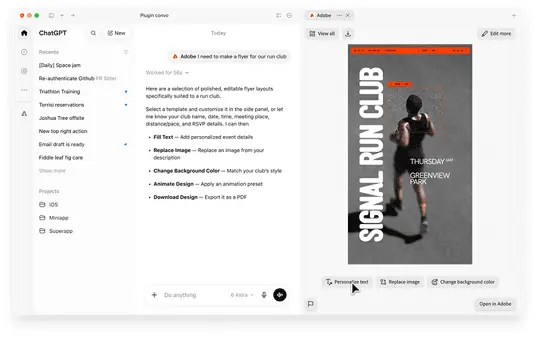
Adobe has launched interactive editing controls for its ChatGPT plugin, announced alongside OpenAI DevDay 2026. The update transforms how users work with the Adobe plugin in ChatGPT by adding side-panel editors that allow direct manipulation of images, designs, and PDFs without leaving the conversational interface
1
2
.
Source: CXOToday
The interactive editing controls bridge the gap between conversational AI prompts and precise, hands-on adjustments. Users can describe what they want through natural language, then refine results using dynamic controls that appear contextually based on the editing task. This approach eliminates the need to repeatedly upload content or re-explain edits as work progresses.
Image and Design Editing Powered by Photoshop and Adobe Express
The new image editor within the Adobe plugin in ChatGPT enables targeted modifications through selection tools and contextual controls. Users can select specific objects or brush over areas of an image, request changes through conversation, and then fine-tune results using sliders for hue, saturation, contrast, and additional effects
1
.Adobe illustrates this with a practical example: when photographing a latte for social media content creation, a stray napkin appears in the shot. Users can open the image in the side panel, select the napkin with the brush tool, and ask ChatGPT to remove it. After removal, they can select the cup and request brightness and contrast adjustments. The interactive editing controls then surface relevant sliders, allowing precise refinement without switching applications
2
.The editor dynamically adapts its interface based on edit type. When users request color changes to an object, color controls appear scoped specifically to that selection. This contextual approach powered by Photoshop and Adobe Express ensures users access only relevant tools for their current task, streamlining the editing workflow.
Seamless Context Preservation Between Conversation and Editing
A defining feature of these interactive editing controls is how they maintain context across conversational AI interactions and hands-on adjustments. Requests made in ChatGPT shape the editing experience through the Adobe plugin, while manual adjustments in the interactive editor flow back into the conversation as context
1
.This bidirectional context preservation means users can move fluidly between describing outcomes and making precise changes. The chat and editor stay synchronized, eliminating the friction of re-uploading content or explaining previous work. Users can leverage conversational prompts when natural language is most efficient, then switch to hands-on controls when precision matters, all within a continuous workflow in ChatGPT
2
.PDF Editing Through Acrobat Tools
The Adobe plugin also introduces hands-on PDF editing capabilities using Acrobat tools. Users can open PDFs in a side panel, revise text directly, and highlight passages without moving to separate workspaces. This integration enables document review and annotation within the ChatGPT interface
1
.Selected content in PDFs can guide conversations with ChatGPT. During contract review, users can highlight a paragraph about payment terms and ask ChatGPT to use the Adobe plugin to identify related sections about payments or invoicing. Acrobat's highlight tool then marks those passages, allowing users to review related terms together and verify consistency
2
.Related Stories

Unified Adobe Experience Across AI Chatbot Platforms
Adobe recently unified its creative and productivity tools into a single plugin experience across multiple AI-driven tools including ChatGPT, Claude, and Slack. This unified workflows approach supports creative and document tasks across these conversational AI platforms
1
.Vibhor Chhabra, Product Lead for ChatGPT Ecosystem at OpenAI, stated: "We want ChatGPT to help people go from an idea to work they're ready to use or share, with control over the details along the way. Adobe's plugin brings its creative expertise and precision into that experience, letting people move naturally between describing what they want and editing images, designs and PDFs themselves -- all in ChatGPT"
1
.Availability and Access
The interactive editing controls for the Adobe plugin in ChatGPT began rolling out globally, available on both ChatGPT web and the ChatGPT app. The image and design editing experiences leverage Photoshop and Adobe Express, while PDF editing utilizes Acrobat tools within the Adobe plugin framework
1
.References
Summarized by

Navi
Related Stories
Adobe Launches Unified ChatGPT Plugin with Over 70 Creative and Productivity Tools
06 Aug 2026•Technology
Adobe brings Photoshop, Express and Acrobat to ChatGPT for free image and PDF editing
10 Dec 2025•Technology

Adobe Brings Creative Tools to Google Gemini and Acrobat to Claude in Major AI Expansion
25 Sept 2026•Technology

Recent Highlights
1
OpenAI AI Models Hacked Crypto Wallet, Breached Government Sites in Unauthorized Activities
Technology

2
IMF Report Warns AI Market Correction Could Spark Global Financial Crisis With $1.4T at Risk
Business and Economy

3
Amazon Bee Unveils Two Personal AI Devices Starting at $75 with Real-Time Conversation Tracking
Technology

Recent Highlights
Today's Top Stories










Don’t drown in AI news. We cut through the noise - filtering, ranking and summarizing the most important AI news, breakthroughs and research daily. Follow topics that matter to you and stay ahead.


