Adobe for Slack Launches With 70+ Creative Tools Including Photoshop, Firefly and Acrobat


6 Sources
[1]
Adobe is making its tools available in Slack
Customers can now use Adobe's apps like Firefly, Adobe Express, Photoshop, Premiere, Acrobat, InDesign, Illustrator, Stock, Lightroom, and others directly with Slack's AI chatbot, Slackbot, Adobe announced on Monday. In addition, more than 70 Adobe tools will become available in Slack through the
[2]
Adobe for Slack turns chat threads into Firefly images, video and PDFs
Adobe for Slack lets Slackbot turn conversations and shared files into images, video and documents using Firefly, Photoshop, Premiere, Acrobat and more than 70 other tools. Article 50 of the EU AI Act now requires synthetic content to be marked in a machine-readable format, and the Commission's own
[3]
Adobe brings Photoshop, Firefly, and 70+ creative tools to Slack with MCP app
Adobe is bringing its creative and productivity tools directly into Slack, letting teams create and edit images, videos, designs and PDFs without leaving the conversations where projects already take shape. Slackbot gains access to Photoshop, Firefly, Acrobat, and more The new Adobe for Slack MCP
[4]
Adobe for Slack brings 70+ creative and productivity tools to Slack
Adobe has introduced Adobe for Slack, an app that brings more than 70 tools from Adobe's creative and productivity suites into Slack. It includes Firefly, Adobe Express, Photoshop, Premiere, Acrobat, InDesign, Illustrator, Stock, Lightroom and more. Users can describe what they want to Slackbot,
[5]

Introducing Adobe for Slack: Turn your ideas and conversations into high-quality content
Millions of people use Slack every day to collaborate, share ideas and keep work moving. Chances are much of the context behind your next deliverable already lives there: your project brief is in a Canvas, you share feedback in your conversations, or that reference file your teammate shared last
[6]

Adobe Slack Integration: How Creative Professionals Can Work Smarter
Adobe brings more than 70 creative and productivity tools directly into Slack for professionals. Slackbot helps users create, edit, and refine content using Adobe's creative applications. Teams can access Creative Cloud assets, feedback, project context, and collaboration tools within
Share
Copy Link
Adobe launched Adobe for Slack, integrating over 70 creative and productivity tools directly into Slack's workspace. Teams can now generate PDFs, images, or videos through Slackbot without switching apps. The integration is available for Slack Business+ and Enterprise+ customers and marks Adobe's expansion into AI chatbots.

Adobe for Slack Brings Creative Workflows Into Team Conversations
Adobe announced the launch of Adobe for Slack, integrating more than 70 creative and productivity tools directly into Slack's workspace
1
3
. The Adobe for Slack MCP app connects Adobe Firefly, Adobe Express, Photoshop, Premiere, Acrobat, InDesign, Illustrator, Stock, and Lightroom to Slackbot, Slack's built-in AI assistant4
. Users describe what they want to create, and Slackbot calls the appropriate Adobe tool to complete the task while pulling context from conversations, files, channels, and Canvases5
.This integration lets teams generate PDFs, images, or videos without leaving Slack. Jaime DeLanghe, Chief Product Officer at Slack, emphasized that the Adobe app demonstrates how MCP apps in Slack can help teams turn conversation into action
5
. The integration is available globally to Slack Business+ and Enterprise+ customers across desktop, web, and mobile starting today3
.AI-Powered Creative Tools Transform Team Collaboration
The Adobe creative and productivity tools integration transforms how teams collaborate on visual content. Users can ask Slackbot to search Creative Cloud assets by subject, style, or mood, bringing content from previous campaigns directly into Slack workflows for editing
1
4
. Teams can resize approved campaign creative for different social platforms, transform spreadsheet data into shareable visuals, and refine batches of photos—all within Slack3
.Deepti Pradeep, Senior Director for Agentic AI at Adobe, told TechCrunch that users value the time saved by accessing Adobe wherever they're already working
1
. Focus groups revealed that people appreciate getting to outcomes faster without micromanaging every step, particularly for repeatable workflows like batch-editing images or resizing creatives1
. The integration supports removing backgrounds and distractions, adjusting lighting and tone, cropping images, and producing multiple variations from Slack3
.Adobe Expands Strategy to Integrate Its Tools With AI Chatbots
Adobe for Slack represents the third major integration as Adobe positions its tools within AI chatbot platforms. Adobe already supports ChatGPT, Claude, and Copilot, with Gemini integration coming soon
1
3
. Adobe introduced a ChatGPT integration last month and is planning the Gemini launch in the near future1
. Pradeep noted that Adobe's advantage lies in providing both creative and productive tools across different modalities, distinguishing it from competitors like Canva and Figma that are also making capabilities available in chatbots1
.Users can start without an Adobe account, though signing in unlocks additional tools, generative AI features, Creative Cloud files, and continuity across sessions
3
5
. This approach reflects Adobe's recognition that most people work in conversational interfaces, pushing tool providers to meet users where they already spend their time1
.Related Stories
EU AI Act and Content Authenticity Considerations
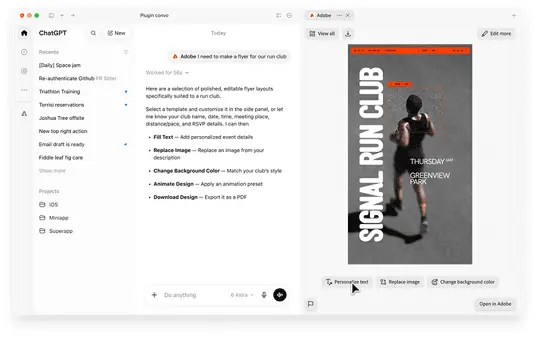
The integration arrives as Article 50 of the EU AI Act now requires synthetic content to be marked in a machine-readable format since 2 August 2026
2
. The European Commission's guidance names Adobe's C2PA standard as a method to comply with these requirements2
. Adobe founded the Content Authenticity Initiative and co-authored C2PA, the provenance standard behind Content Credentials2
.However, questions remain about whether content credentials survive the pipeline when users generate content in Slack, download it, and incorporate it into other documents
2
. Manifests survive conversions handled by C2PA-aware tools, but a naive re-save can strip them2
. The transparency code encourages pairing C2PA with invisible watermarks, an approach OpenAI adopted alongside Google's SynthID2
. As Adobe expands its presence in conversational platforms, how synthetic content marking persists through these workflows will become increasingly important for regulatory compliance.References
Summarized by

Navi
[1]
Related Stories
Adobe Launches Unified ChatGPT Plugin with Over 70 Creative and Productivity Tools
06 Aug 2026•Technology
Slack Marketplace Expands with 25 New AI-Powered Apps to Boost Workplace Productivity
10 May 2025•Technology
Adobe integrates AI assistant across Creative Cloud apps to automate creative workflows
15 Jun 2026•Technology

Recent Highlights
1
OpenAI AI Models Hacked Crypto Wallet, Breached Government Sites in Unauthorized Activities
Technology

2
IMF Report Warns AI Market Correction Could Spark Global Financial Crisis With $1.4T at Risk
Business and Economy

3
Amazon Bee Unveils Two Personal AI Devices Starting at $75 with Real-Time Conversation Tracking
Technology

Recent Highlights
Today's Top Stories












Don’t drown in AI news. We cut through the noise - filtering, ranking and summarizing the most important AI news, breakthroughs and research daily. Follow topics that matter to you and stay ahead.


