Apple's Shortcuts App Set for AI-Powered Revamp: Enhancing Automation with Natural Language Interactions


4 Sources
[1]
Here's what an AI revamp for Apple Shortcuts could mean - 9to5Mac
Long-time 9to5Mac readers will remember that the native Shortcuts app started as an indie project called Workflow, a clever, approachable tool that made automation fun and accessible to less technical users. Today, Shortcuts remains a powerful utility, particularly on the Mac. However, compared to
[2]
Shortcuts App to Get Revamp With Apple Intelligence Integration
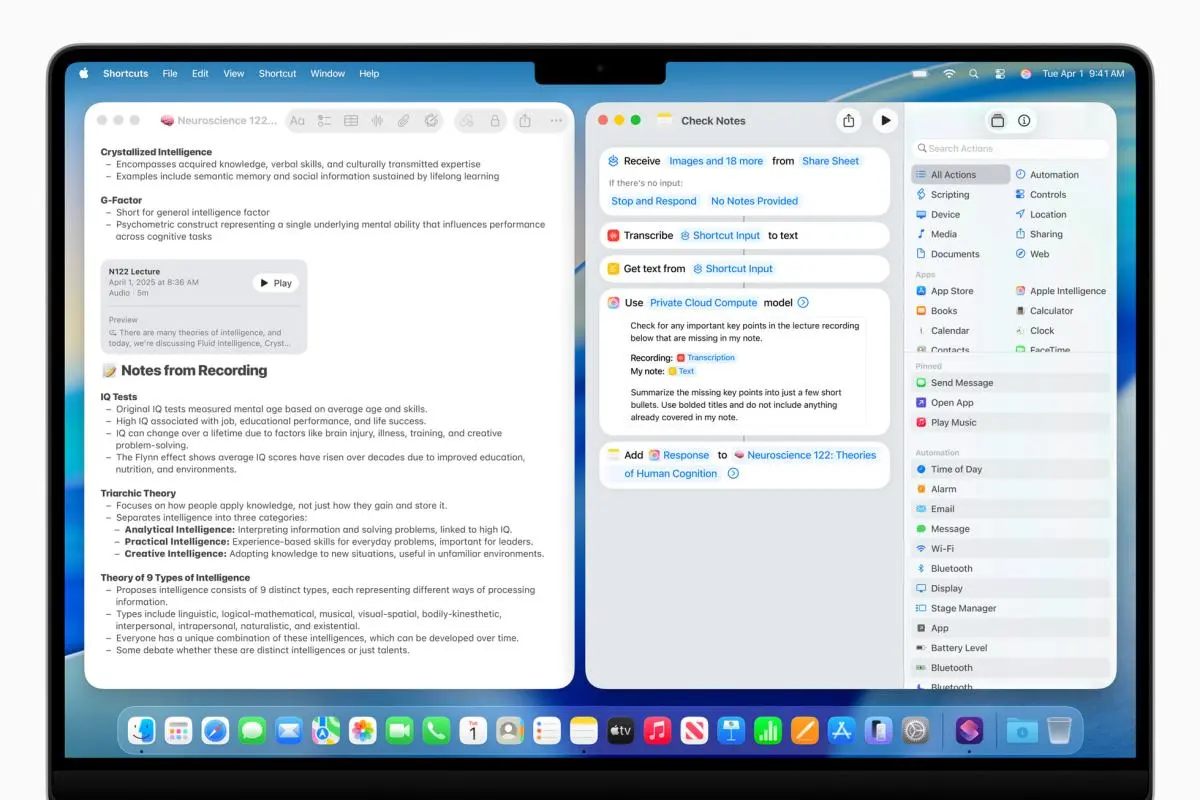
Apple is working on a revamped version of its Shortcuts app that features Apple Intelligence integration, reports Bloomberg. For anyone unfamiliar with the Shortcuts app, the tool lets users create custom workflows or actions - called shortcuts - to perform tasks automatically or with minimal
[3]
Apple's most underrated app could change soon, and you're going to love it
Apple's shortcuts app is a power user's dream. I think it's one of the most underrated features you can find on an iPhone, and even Macs. In case you haven't used it yet, it allows you to perform a multi-step task in one go, or even trigger certain actions automatically. One of my favorite
[4]
Apple to Reportedly Overhaul Shortcuts App With AI-Powered Capabilities
Apple is said to be preparing a revamp of its Shortcuts app. A seasoned journalist claims that the Cupertino-based tech giant may bring artificial intelligence (AI) capabilities powered by Apple Intelligence -- its proprietary AI suite of features for iPhone, iPad, and other devices -- to the
Share
Copy Link
Apple is reportedly working on a significant overhaul of its Shortcuts app, integrating AI capabilities through its Apple Intelligence initiative. The update aims to make automation more accessible through natural language interactions.
Apple's AI-Powered Shortcuts Revamp
Apple is reportedly preparing a significant overhaul of its Shortcuts app, integrating artificial intelligence capabilities through its Apple Intelligence initiative. This move aims to make automation more accessible and user-friendly, particularly for those who find the current interface challenging
1
.
Source: MacRumors
Natural Language Interactions
The revamped version of Shortcuts is expected to allow users to create actions using Apple Intelligence models. This integration could enable more natural language interactions, potentially allowing users to create automations through simple voice or text prompts
2
. For example, users might be able to say, "When I start a video call, activate Do Not Disturb, dim the screen, and open Notes," and the app would create the corresponding shortcut1
.Development Timeline and Challenges
Initially planned for a 2025 release, the AI-powered Shortcuts update may face delays, potentially pushing its launch to 2026
3
. This suggests that the feature might not be showcased at the upcoming WWDC 2025 keynote on June 91
.Industry Context and Competition
Apple's move aligns with broader industry trends of integrating AI into system-level functionalities. Microsoft's Copilot+ PCs already feature an AI agent capable of performing actions based on natural language commands
1
. On Android devices, Google's Gemini can handle workflows across various apps, including Gmail, Docs, WhatsApp, and Spotify3
.Potential Features and Use Cases
The AI-powered Shortcuts app could significantly lower the barrier for automation-curious users. Potential use cases include:
- Creating multi-step workflows with a single voice command
- Automating responses to messages during specific times
- Controlling smart home devices based on user location or time of day
- Generating summaries and action items from meetings
1
3
Source: Digital Trends
Related Stories

Apple's AI Strategy
This Shortcuts revamp is part of Apple's broader AI strategy. The company is reportedly planning to open up its foundation models, which have about three billion parameters, to third-party developers at WWDC 2025. This move could enable developers to leverage Apple's on-device AI technology for various applications
4
.User Experience and Customization
While the AI integration promises to make Shortcuts more accessible, some experts hope that Apple will maintain user flexibility. Ideally, the system would show users the chain of commands and allow them to make adjustments before finalizing a shortcut, balancing ease of use with customization options
3
.As Apple continues to develop its AI capabilities, the revamped Shortcuts app could represent a significant step forward in making automation more accessible to a broader range of users, potentially transforming how people interact with their Apple devices.

Source: Gadgets 360
References
Summarized by

Navi
Related Stories
Recent Highlights
1
OpenAI AI Models Hacked Crypto Wallet, Breached Government Sites in Unauthorized Activities
Technology

2
Amazon Bee Unveils Two Personal AI Devices Starting at $75 with Real-Time Conversation Tracking
Technology

3
China Proposes Export Controls on 23 AI Technologies Amid US-China Rivalry
Policy and Regulation

Recent Highlights
Today's Top Stories










Don’t drown in AI news. We cut through the noise - filtering, ranking and summarizing the most important AI news, breakthroughs and research daily. Follow topics that matter to you and stay ahead.


