Astropad Workbench reimagines remote desktop for AI agents running on Mac Mini and Apple devices


3 Sources
[1]
Astropad's Workbench reimagines remote desktop for AI agents, not IT support | TechCrunch
Demand for Apple's Mac Mini has skyrocketed, particularly in China, as the small computer has become an ideal platform for experimenting with autonomous AI agents like OpenClaw and others. Now, a company called Astropad is building out a remote desktop solution specifically for this use case. On
[2]
Astropad unveils Workbench for Mac: 'Remote desktop made for the AI era' - 9to5Mac
Astropad, makers of the excellent Rock Paper Pencil iPad screen protectors, has unveiled a new Mac utility called Workbench. The macOS app enables "remote desktop made for the AI era." Workbench includes native apps on the Mac, iPhone, and iPad. Astropad touts "fast, high-fidelity streaming" with
[3]
Astropad Workbench Lets You Remotely Control Your Mac and AI Agents From iPhone and iPad
Astropad, the company behind the popular Astropad Studio software for turning the iPad into a drawing tablet, today launched a new app called Astropad Workbench. Astropad Workbench is a remote desktop app designed for the Mac, and more specifically, built for use with AI. With Astropad Workbench,
Share
Copy Link
Astropad has launched Workbench, a remote desktop for the AI era that lets users control AI agents from iPhone and iPad. The app offers high-fidelity streaming, voice-activated commands, and specialized tools to monitor and manage AI tasks running on Mac Mini servers. Available for $10/month or $50/year, it targets the growing demand for autonomous AI agent platforms.
Astropad Workbench Brings Remote Desktop Built for AI Agents
Astropad has introduced Workbench, a remote desktop solution designed specifically to monitor and manage AI tasks running on Apple devices. Announced on Tuesday by Astropad CEO Matt Ronge, the app addresses a growing need as demand for Apple's Mac Mini has surged, particularly in China, where the compact computer has become a preferred platform for experimenting with autonomous AI agents like OpenClaw
1
. While AI agents running on a Mac Mini may not require a screen, human operators need to check logs, monitor outputs, or restart stuck tasks, making a specialized remote desktop for the AI era essential.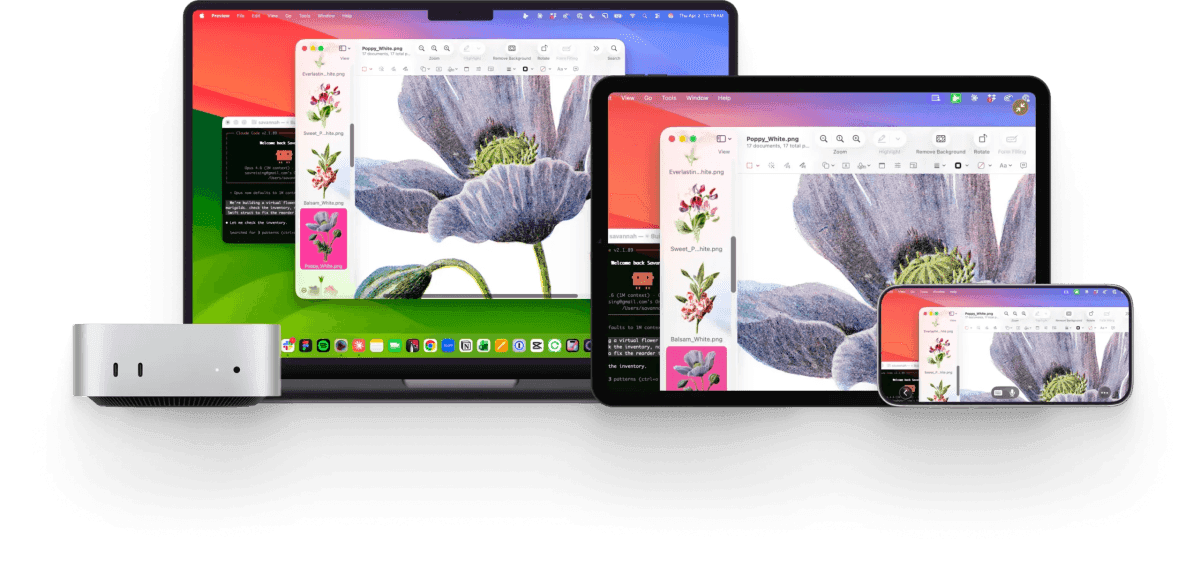
Source: TechCrunch
The new app offers native clients for Mac, iPhone, and iPad, allowing users to control AI agents from iPhone while on the go
3
. This mobility factor sets Astropad Workbench apart from traditional enterprise remote desktop tools that weren't built with AI workflows in mind. Ronge explains that existing solutions like Jump Desktop, RustDesk, AnyDesk, and VNC-based platforms lack features tailored to the specific needs of managing AI agents remotely1
.High-Fidelity Streaming and Voice-Activated Commands Transform AI Management
Astropad Workbench leverages the company's proprietary Liquid engine, the same low-latency display protocol that powers Luna Display and Astropad Studio. The technology delivers high-fidelity streaming with Retina support and perceptually lossless visuals, ensuring lines don't blur or data doesn't pixelate even at high resolutions
2
. While monitoring an AI agent may not always demand such quality, the fidelity becomes valuable when approving designs or mock-ups created by AI agents1
.A standout feature is voice-activated commands using Apple's voice model, allowing users to dictate prompts and commands by pressing a microphone button on their iPhone or iPad. "It's a very natural way to work with agents," Ronge notes, highlighting a capability that traditional remote desktop platforms simply don't offer
1
. The app also supports keyboard input, Apple Pencil, touch gestures, and mouse controls, providing multiple ways to remotely control your Mac3
.Pricing and Features Target AI Enthusiasts and Businesses
Astropad Workbench runs on macOS 15 and up, plus iOS 26, with support for both Intel and Apple silicon Macs, though Apple silicon is recommended
2
. The app is available as a free download offering 20 minutes of access per day, while unlimited access costs $10 per month or $50 per year1
3
. Security is addressed through end-to-end AES-256 encryption, with no display recordings captured or saved2
.For users managing multiple Mac systems, Workbench includes a device chooser that enables quick switching between different machines. The app combines multiple Mac displays into a single screen matching your remote device's resolution, with a mini-map view for navigating large desktops
2
. Setup requires no complex network configurations, making it accessible for users who want to check logs and output to verify agent work or restart failed tasks without technical hurdles3
.Related Stories

Business Adoption and Future Development on the Horizon
Astropad, a bootstrapped and profitable company with over 100,000 customers across its iPad hardware accessories and software products, sees significant potential for Workbench in both consumer and enterprise markets. "I totally think businesses are gonna buy it," Ronge states, pointing to the productivity gains he's personally experienced. "It's just too powerful"
1
. The team's decade of experience building iOS and iPad apps positions them well to refine the platform as remote support for AI agents becomes more common.The company plans to expand beyond macOS and iOS, with Windows and Linux support in development alongside refinements to the iPhone app
1
. As businesses increasingly adopt AI agents for automation and productivity, the ability to monitor long-running tasks, approve dialogs, and visually verify what's happening on remote machines from a pocket-sized device could become standard practice. The low latency and specialized features make Astropad Workbench particularly suited for scenarios where traditional terminal access or chat-based monitoring proves too limited for complex AI workflows.References
Summarized by

Navi
[1]
Related Stories
Meta's Manus launches desktop app with AI agent to automate tasks on Mac and Windows
18 Mar 2026•Technology
Apple Mac becomes AI powerhouse with local processing, challenging Nvidia and cloud services
22 Sept 2026•Technology

Apple Silicon Exec Reveals Mac Mini's Surge as Preferred Platform for Running AI Agents
06 Jul 2026•Technology

Recent Highlights



Recent Highlights
Today's Top Stories








Don’t drown in AI news. We cut through the noise - filtering, ranking and summarizing the most important AI news, breakthroughs and research daily. Follow topics that matter to you and stay ahead.


