Canva Code 2.0 opens AI website building to all 265 million users with vibe coding platform


5 Sources
[1]
Canva Code 2.0 adds visual editing, HTML imports, real-time collaboration
Canva today unveiled Canva Code 2.0, an AI-powered vibe coding platform that lets users build and visually edit websites, apps, and interactive experiences. Here are the details. 'Vibe code websites, apps and interactive experiences, then edit like a Canva design' A few months ago, Canva
[2]
Canva wants you to have full control over the design - Code 2.0 just does the heavy lifting for you
* Canva Code 2.0 is now free for everyone following a successful public preview * It can generate editable designs from simple prompts and existing creations * Users can create websites, apps and games - not just flyers and ads Initially teased at Canva's annual Create conference earlier this
[3]
Canva launches Code 2.0, offering AI website building to every user -- including free accounts
Canva on Tuesday launched Canva Code 2.0, a major upgrade to its AI-powered coding tool that lets users build interactive websites, apps, and experiences using plain-language prompts -- and then edit the results as easily as tweaking a Canva presentation. The feature is now available to all of the
[4]
Canva Code 2.0 just made vibe coding way less intimidating for everyone
Coding used to be reserved for developers who spent years learning complex languages. That has slowly changed with vibe coding, which lets you build apps and websites using simple, plain-language prompts. The problem is that most of these tools still feel intimidating for regular folks, as they
[5]

You Can Now Use Vibe Coding to Build Your Website Using Canva Code 2.0
* Canva has introduced more than 50 Canva Code templates * Canva Code can be created inside other design projects * Canva Code 2.0 combines AI-powered code generation Canva on Tuesday took the wraps off Code 2.0, its latest AI-powered tool that allows users to build and edit websites, apps, and
Share
Copy Link
Canva has launched Code 2.0, an AI-powered tool that brings vibe coding to its entire user base, including free accounts. The platform lets users build and visually edit websites, apps, and interactive experiences using plain-language prompts, then customize them like any Canva design. With HTML import, real-time collaboration, and 75% faster generation times, Canva is competing with Lovable and Replit in the rapidly growing AI website building market.
Canva Code 2.0 Launches as AI-Powered Tool for All Users
Canva unveiled Canva Code 2.0 on Tuesday, making its AI-powered tool available to all 265 million monthly users across every pricing tier, including free accounts
3
. The platform enables users to build and visually edit websites, apps, and interactive experiences through vibe coding—a method that uses plain-language prompts instead of traditional programming1
. This marks Canva's most aggressive push into the fast-growing vibe coding market, which reached an estimated $4.7 billion in 2026 and is projected to hit $12.3 billion by 2027 at roughly 38 percent compound annual growth .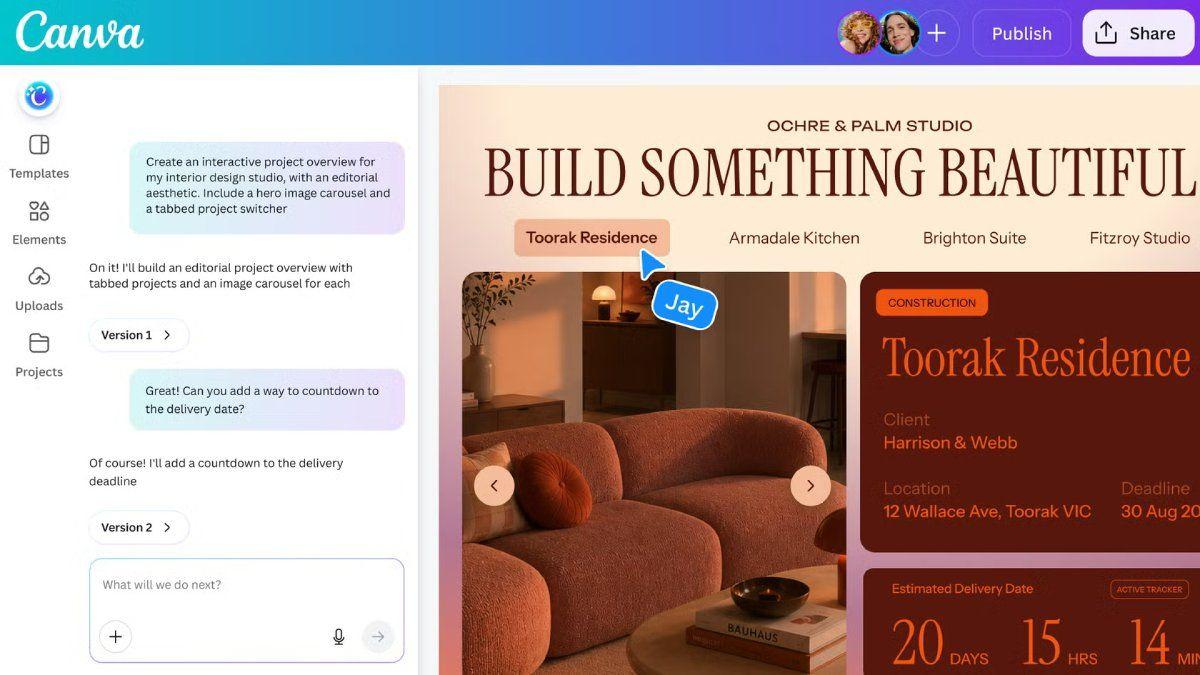
Source: Gadgets 360
Targeting Non-Technical Users with Design and Editability
Canva Code 2.0 deliberately targets non-technical users, distinguishing itself from competitors like Lovable, Replit, and Bolt.new by prioritizing design and editability over pure code generation
3
. Danny Wu, Canva's Head of AI Products, explained that the tool aims to "bring the power of AI coding—and really lightweight coding—into the Canva platform" while addressing user requests for more interactivity and customization3
. The platform solves a critical problem: while most vibe coding tools generate functional prototypes, they often produce generic-looking outputs that require complex editing surfaces or endless prompting to customize3
. By integrating directly into Canva's editor where brand kits already exist, the tool helps users create interactive websites that maintain brand consistency1
.
Source: VentureBeat
HTML Import and Real-Time Collaboration Features
The platform introduces several capabilities designed to democratize design for workers who lack creative vision or technical skills
2
. Users can start with a prompt, choose from more than 50 new interactive templates, or use HTML import to bring projects created with other AI assistants directly into Canva as editable designs5
. The HTML import feature automatically detects elements and layers through a specific layered object intelligence feature, allowing users to continue working on existing projects without recreating them from scratch2
. Teams can leverage real-time collaboration to build, review, and comment on interactive designs together5
. Users can swap images by dragging directly from Canva's built-in library of over 120 million templates and assets, update colors and fonts through the toolbar, or click into any section to retype text directly3
.Related Stories
Performance Improvements and Market Competition
Canva has reduced average code generation time by 75 percent and cut the median time from initial prompt to a published site by 30 percent
3
. Since Canva Code was first introduced, the company claims to have supported building more than six million coded sites, and by integrating Code at the heart of the UI rather than as a separate tool, active Code users have risen by 25 percent2
. The platform automatically adapts outputs to different screen sizes with built-in mobile preview capabilities3
. Users can publish to a free Canva domain, connect a custom domain, or share within their organization4
. AI-generated code now comprises approximately 41 percent of all code written globally, with Lovable reportedly reaching approximately $400 million in annual recurring revenue by early 20263
. For creators who prioritize both functionality and brand-aligned aesthetics, Canva's approach offers a compelling alternative in the competitive AI website building landscape, though the platform currently doesn't support moving elements around—users still need to re-prompt for repositioning3
.References
Summarized by

Navi
[2]
[3]
[4]
Related Stories
Canva Unveils Major AI-Powered Update: Visual Suite 2.0 Challenges Tech Giants
11 Apr 2025•Technology

Canva Unveils AI-Powered Creative Operating System and Makes Affinity Apps Free
30 Oct 2025•Technology
Canva AI 2.0 transforms design platform with memory, automation, and third-party integrations
16 Apr 2026•Technology

Recent Highlights
1
OpenAI releases 700+ AI-generated math solutions, but mathematicians cry foul over methods and transparency
Science and Research
2
Meta Unveils Muse Wonder Frontier AI Models, Claims Performance Matching OpenAI and Anthropic
Technology

3
Microsoft and Nvidia Launch Surface Laptop Ultra: A $2,599 AI-Ready PC With RTX Spark Chip
Technology

Recent Highlights
Today's Top Stories











Don’t drown in AI news. We cut through the noise - filtering, ranking and summarizing the most important AI news, breakthroughs and research daily. Follow topics that matter to you and stay ahead.


