4 Sources
[1]
ChatGPT for iPhone now grabs your recent photos with a long press
OpenAI has added a shortcut that surfaces your four most recent photos when you long press the plus button in ChatGPT on iPhone. It lands while Apple's own camera and visual assistant features stay unavailable on iPhone in the EU. OpenAI has taken two taps out of the most common thing people do with ChatGPT on a phone. Long pressing the plus button beside the prompt box now surfaces your four most recent photos, ready to attach. The old path was not hard, just longer. Open the plus menu, choose Photos, then find the image in a library that may hold tens of thousands. OpenAI's consumer product lead Adam Fry called it "a fun, power user feature," shipping it in the company's 21 August weekly drop alongside better handling of the current time and faster loading for long conversations on the web. Taken alone this is a gadget-blog item. What makes it worth a look is the gap it is quietly filling. Apple demonstrated this exact job at WWDC26. A Siri mode in the Camera app and an expanded Visual Intelligence were meant to let you point a phone at something and ask about it, without attaching anything. European iPhone owners are not getting those. Apple said in June that there is no timeline for Siri AI on iPhone or iPad in the EU, while keeping the features on Mac and Vision Pro. The company was blunt about it. "We're deeply disappointed that our EU users won't have Siri AI on iPhone or iPad when we share our new software releases later this year," said software chief Craig Federighi. The dispute is over the Digital Markets Act. Apple argues the Commission's reading of the interoperability rules would force it to give rival assistants the same deep system access Siri has, and regulators rejected both its Trusted System Agent proposal and an 18-month phased rollout. The practical result is a continent of iPhones without a native visual assistant. TNW has put the population affected at around 450 million people across the EU. OpenAI is building for exactly that opening. It is pushing further into the same market on the commercial side too, taking ads into 31 European countries. So a long press is a trivial feature almost everywhere. In Europe it is the closest thing an iPhone owner has to a camera that answers questions.
[2]
ChatGPT for iPhone now lets users grab recent photos with a long press
Attaching photos to a ChatGPT conversation on an iPhone has always been easy enough, but the latest update removes a few more taps from the process. A new shortcut now lets users jump straight to their most recent images, making it quicker to add a photo when asking ChatGPT to identify, explain, analyze, or simply react to something in front of them. According to an X post by OpenAI's Consumer Product Lead, Adam Fry, OpenAI has added the feature to the iPhone version of ChatGPT. The shortcut is part of a broader set of improvements arriving in the app, although the photo gesture is arguably the most immediately useful for anyone who regularly uses images as part of a prompt. A long press replaces a few extra taps Previously, adding an image required opening the + menu, selecting Photos, and then choosing an image from the photo library. The process was hardly difficult, but it involved navigating through multiple steps for something users may do several times a day. Recommended Videos According to the post, users can now press and hold the + button beside the ChatGPT prompt box to bring up their four most recent photos. From there, one of those images can be selected and attached directly to the conversation. The feature was also highlighted by OpenAI's Adam Fry in a post on X as part of the company's August 21 feature updates. The shortcut may sound minor, but it reflects how image-based interactions are becoming a more routine part of using AI assistants. Asking ChatGPT about an object, screenshot, product, document, or problem often starts with attaching a picture, and reducing the friction could make that behavior feel more natural. OpenAI has also been improving photo and camera uploads on iOS more broadly, with recent ChatGPT updates aimed at making image uploads faster and smoother. Small changes matter when they remove friction The new gesture is particularly useful for users who frequently turn to ChatGPT for quick visual questions. A screenshot can be attached for troubleshooting, a photo of an unfamiliar object can become the basis of a question, or an image can simply provide context that would otherwise take several sentences to explain. Recent photos are the obvious target because they are usually the images users have just taken specifically to ask about. Digging through the full photo library to find something captured moments earlier is not exactly difficult, but it is one more interruption between having a question and getting an answer. The update also arrived alongside other ChatGPT improvements, including better awareness of the current time and performance changes for longer conversations on the web, according to 9to5Mac. No major redesign is involved here, and there is no dramatic new AI capability hiding behind the feature. Still, the best interface changes are often the ones that disappear into muscle memory. After a few uses, long-pressing the + button to grab a recent photo may simply become the faster way to start a conversation.
[3]
ChatGPT for iPhone adds quick photo access with new long press feature
OpenAI has launched a new feature in the ChatGPT app for iPhone that allows users to access their four most recent photos quickly by long-pressing the plus button. This update, released on August 21, 2026, aims to streamline the process of attaching images during conversations, enhancing user experience significantly. The shortcut reduces the number of taps needed to add a photo. Previously, users had to navigate through the plus menu, select Photos, and then choose an image from their library. Now, they can simply hold the plus button next to the input box to see and select one of their latest images directly. Adam Fry, OpenAI's Consumer Product Lead, described the new feature as "a fun, power user feature." The addition reflects a growing trend of integrating image-based interactions into AI assistant functionalities, making it easier for users to ask questions about visual content. Alongside the new photo shortcut, OpenAI has also improved the app's handling of current time awareness and performance for longer conversations on the web. These updates aim to enhance the overall functionality of ChatGPT, particularly for users who frequently engage with images in their queries. In a broader context, OpenAI is expanding its services within the European Union, where approximately 450 million people currently lack access to Apple's camera and visual assistant features due to regulatory issues. Despite these challenges, OpenAI continues to adapt and enhance its offerings in the region, including plans to introduce advertising across 31 European countries. The recent updates, though not a major redesign, indicate OpenAI's commitment to refining user interactions with its AI tools. The convenience of quickly attaching photos is expected to become a natural part of the ChatGPT experience for many users, as they engage in various visual inquiries.
[4]
ChatGPT's hidden trick for adding photos faster to any conversation
If the ChatGPT app is the most direct and convenient way to access OpenAI's AI, getting to know that app thoroughly is the best idea. And that includes knowing its secret features, like the gesture that lets you attach recent Photos much faster to any conversation. How to add a recent photo with a simple long press Adding a photo to a conversation used to require tapping the "+" button, selecting Photos, opening the Photos picker, choosing an image, and confirming. Now, the whole thing comes down to long-pressing a single button. As reported by 9to5Mac, the feature has just arrived in ChatGPT for iOS. The process is really simple and quite fast: * Open ChatGPT on your iPhone. * Long-press the "+" button next to the text field. * You'll see your four most recent photos appear. * Tap the one you want to attach to the conversation. A small difference, perhaps? A welcome one, in any case. It's common to want to identify objects or use the photo we've just taken, and in this case, having a few fewer steps is always appreciated. On compatible iPhones, Visual Intelligence offers an integration that may be even smarter, but if instead of just one question you want to add context to a conversation with ChatGPT, this feature is your best option. One of those features you'll probably use more than you'd think.
Share
Copy Link
OpenAI introduced a long press feature in ChatGPT for iPhone that surfaces the four most recent photos instantly. Released on August 21, the update streamlines adding images to prompts while positioning OpenAI to fill the visual assistant gap left by Apple's delayed Siri AI rollout in the European Union.
OpenAI introduced a long press feature for ChatGPT for iPhone on August 21, removing multiple taps from the process of adding images to prompts
1
2
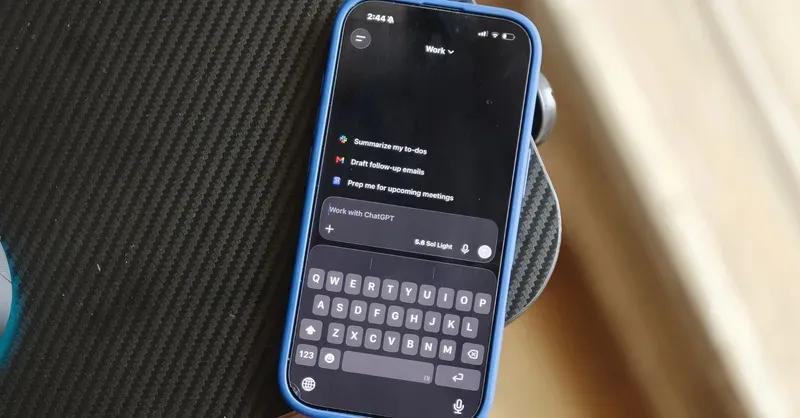
. Users can now press and hold the plus button beside the prompt box to surface their four most recent photos, ready to attach recent photos directly to conversations3
. Previously, adding images to prompts required opening the plus menu, selecting Photos, then navigating through a library that could contain tens of thousands of images4
. Adam Fry, OpenAI's Consumer Product Lead, described it as "a fun, power user feature" arriving alongside improvements to time handling and faster loading for long conversations on the web1
.
Source: Digital Trends
The update reflects how adding images to prompts has become routine behavior when using AI assistants
2
. Users frequently ask ChatGPT for iPhone to identify objects, analyze screenshots, troubleshoot problems, or provide visual context that would otherwise require multiple sentences to explain2
. Recent photos represent the obvious target because users typically capture them specifically to ask visual questions2
. The long press feature eliminates friction between having a question and getting an answer, making adding visual context to AI interactions feel more natural3
. While no major redesign accompanies this change, the best interface improvements often disappear into muscle memory, becoming the faster way to start user interaction with AI tools2
.
Source: The Next Web
The photo feature gains significance against Apple's decision to withhold Siri AI from iPhone and iPad in the European Union
1
. Apple demonstrated similar functionality at WWDC, including a Siri mode in the Camera app and expanded Visual Intelligence that would let users point their phone at objects and ask questions without attaching anything1
. However, approximately 450 million people across the European Union will not receive these features due to disputes over the Digital Markets Act1
. Apple's software chief Craig Federighi stated the company was "deeply disappointed" that EU users would not have Siri AI on iPhone or iPad, though the features remain available on Mac and Vision Pro1
. The dispute centers on interoperability rules that Apple claims would force it to give rival AI assistants the same deep system access Siri has, after regulators rejected both its Trusted System Agent proposal and an 18-month phased rollout1
.Related Stories
OpenAI is building for exactly this opening left by Apple's absence, pushing further into AI-driven visual assistance on both consumer and commercial fronts
1
. The company is taking ads into 31 European countries, expanding its services within the European Union where users currently lack access to Apple's camera and visual assistant features3
. What registers as a trivial update in most markets becomes the closest thing iPhone owners in Europe have to a camera that answers questions1
. The practical result positions ChatGPT for iPhone as the primary visual assistant option across a continent of iPhones1
. OpenAI continues adapting and enhancing its offerings despite regulatory challenges, demonstrating commitment to refining user experience through incremental improvements that reduce friction in image-based interactions into AI assistants3
. The convenience of quickly attaching photos is expected to become a natural part of object identification and visual queries for many users3
.Summarized by
Navi
[2]
1
Technology

2
Policy and Regulation

3
Technology