Claude Now Works Inside Google Docs, Sheets, and Slides With Direct Editing Capabilities


11 Sources
[1]
Claude can now access your Google Docs, Sheets, and Slides with minimal effort
* Claude for Google Workspace adds a sidebar to Docs/Sheets/Slides for live LLM help. * Edit directly or review Claude's proposed-change cards to approve or deny big edits. * It's available now for paid members via Google Workspace Marketplace. If you want to get a lot done within Google's
[2]
Claude just made one of its biggest moves against Gemini yet
New Google Workspace connectors also let you create or edit Google files from Claude itself, putting it in more direct competition with Gemini. Using Claude alongside Google Docs has always meant too much jumping back and forth. You ask Claude to rewrite a paragraph, copy the result into your
[3]
Claude launches Google Docs, Sheets, and Slides integration with sidebar and more
If Gemini isn't quite your cup of tea, Anthropic's Claude now supports sidebar integration with Google Docs, Sheets, and Slides. You can already use Gemini natively in Google Workspace apps, but those invested in Claude can now use their AI of choice inside of Google's ecosystem through the Claude
[4]
Claude just landed in Google Docs, Sheets and Slides -- here are 7 things you should try with it right now
Try out Claude's new Google Workspace integration for yourself Google's own Gemini has already been integrated into Google Workspace's Docs, Sheets and Slides to help users with their projects. But now Anthropic's Claude AI tool has also made its way into those three Google Workspace apps via
[5]

You can now open Claude directly in Google Docs, Sheets and Slides (and vice versa, open and edit the files in Claude)
Anthropic is putting Claude directly inside some of Google's most popular enterprise productivity apps: Docs, Sheets and Slides. Users can also open these types of files and edit them directly in the Claude web interface. This makes Anthropic's lineup of AI models potentially formidable
[6]

Claude Can Now Edit Google Docs, Sheets and Slides Directly
Users can review Claude's suggested edits before applying them Anthropic has introduced Claude to Google Workspace. Google Docs, Sheets, and Slides users can now work with the AI assistant directly alongside their files. Claude can read the content they have open, work on selected text, cells or
[7]

Claude AI: Anthropic brings Claude to Google Docs, Sheets and Slides; here's how it works
The feature, called Claude for Google Workspace, is now available in public beta for users on all paid Claude plans, Anthropic said in a blog post. Anthropic on Tuesday announced that its artificial intelligence (AI) assistant Claude can now work directly with Google Docs, Sheets and Slides,
[8]

Anthropic Expands Claude Into Google Workspace
Anthropic is pushing Claude further into workplace software, bringing its AI assistant directly into Google Docs, Sheets and Slides as the company expands its efforts to make Claude a more deeply embedded tool for businesses and developers. The company said Tuesday that a new public beta add-on
[9]

Claude Comes to Google Workspace: What it Can do in Docs, Sheets and Slides
Access controls, approval prompts and current feature limits give users control over how Claude works in Workspace. Claude is now available inside Google Docs, Sheets and Slides through a single Workspace add-on. The beta can draft, edit, analyze data, build models and improve presentations while
[10]

Anthropic adds Claude integration to Google Workspace apps By Investing.com
Investing.com -- Anthropic announced Tuesday that its Claude artificial intelligence assistant now works with Google Docs, Sheets, and Slides through a new add-on and connectors available in public beta. The Claude for Google Workspace add-on is available on all paid Claude plans. The integration
[11]

Claude can now edit Google Docs, create Sheets formulas and build Slides: Here is how to set up
Users can rewrite content, create formulas, charts and slides with Claude. Anthropic has recently rolled out Claude for Google Workspace, bringing its LLM capabilities directly into Google Docs, Sheets and Slides. With the new functionality, Claude can fix sentences and rewrite content in Docs,
Share
Copy Link
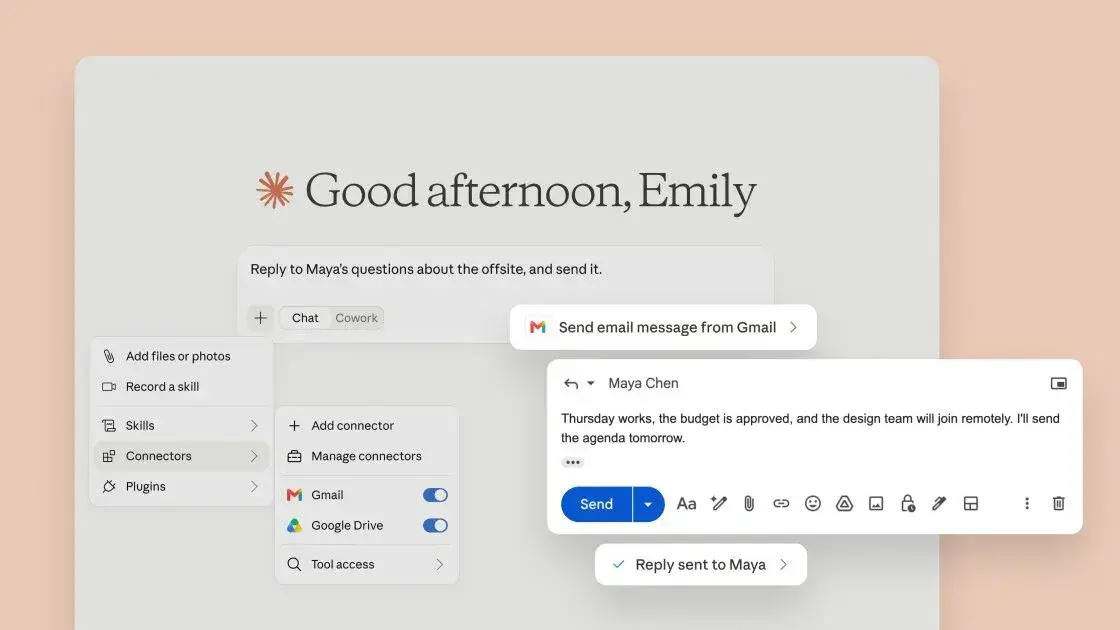
Anthropic launched Claude for Google Workspace, bringing its AI assistant directly into Google Docs, Sheets, and Slides through a sidebar integration. Available in public beta for paid Claude users, the extension enables live document editing, spreadsheet formula writing, and presentation building—putting Claude in direct competition with Google's own Gemini on its home turf.

Anthropic Brings Claude Directly Into Google Workspace Apps
Anthropic has launched Claude for Google Workspace, introducing a sidebar assistant that works directly inside Google Docs, Sheets, and Slides
1
. The integration marks a significant expansion for Claude into productivity tools, enabling users to access AI-powered assistance without leaving their workflow. Available now in public beta through the Google Workspace Marketplace, the extension supports all paid Claude plans including Claude Pro, Max, Team, and Enterprise3
.The launch represents Anthropic's first-party integration bringing Claude directly into these Google productivity apps. While third-party Google Workspace add-ons previously offered access to Claude models, this marks the first time Anthropic has embedded its AI assistant as a native sidebar experience
5
. The bidirectional integration also introduces new Google Workspace connectors that allow users to create and edit Google files directly from the Claude web interface by simply pasting a file link into their conversation2
.Live Document Editing With Preserved Formatting
In Google Docs, Claude can perform edits ranging from fixing spelling errors to rewriting entire sections while maintaining existing formatting
3
. Users can highlight specific paragraphs and ask Claude to shorten them, adjust tone, or clean up wording—with changes appearing directly in the document rather than requiring copy-paste workflows2
. This eliminates the friction of jumping between Claude and Google Docs that previously slowed productivity.For larger revisions, Claude generates proposed-change cards in the sidebar that users can approve or deny before implementation
1
. The AI assistant can restructure documents with clearly defined sections and proper headings, copy-edit for clarity and concision, or transform lists into formatted tables within the original document4
. Users retain full control through an "Ask before edits" mode that shows approval cards, or they can enable "Accept all edits" to let Claude work through tasks without stopping for confirmation2
.Advanced Spreadsheet Capabilities and Data Manipulation
The Sheets integration delivers particularly robust functionality. Claude can write spreadsheet formulas, build pivot tables, create native Google Sheets charts, add new tabs, and clean messy data
2
. For complex tasks like joining datasets or cleaning data, Claude can pull spreadsheet ranges into Python, perform the work, and write results back into the Sheet5
. This transforms Claude from a chat assistant into something closer to an AI agent operating spreadsheets directly.Users can ask Claude to fix broken formulas, reorganize data, or turn datasets into charts—all while receiving detailed explanations of the changes made
4
. The LLM capabilities extend to uploading additional documents or spreadsheets to build something new in Sheets using context from multiple sources3
. This addresses a common pain point where messy spreadsheets dropped into inboxes previously required extensive manual formula writing and menu navigation.Related Stories
Presentation Building With Existing Themes and Layouts
In Slides, Claude can generate new slides using the layouts and themes already present in a deck rather than producing independent presentations that require restyling
5
. The AI assistant can build competitive analyses, summarize decks, or review presentations for consistency4
. Claude also inspects its own output for overlapping objects, elements extending beyond slide boundaries, and hard-to-read text—catching issues that might otherwise slip through5
.Users can ask Claude to create presentations from collections of notes or add slides that align with existing topics, with the slide deck assembly happening alongside the Claude conversation on supported setups
2
. The integration maintains access to the same Claude models, connectors, and Skills users employ elsewhere, enabling tasks like assembling quarterly business review presentations using customer history and data from multiple sources5
.Direct Competition With Gemini on Google's Home Turf
The launch puts Claude in direct competition with Gemini, which Google already embeds throughout Workspace
2
. Gemini can rewrite content, alter formatting, and incorporate information from Drive, Gmail, Chat, and the web within Docs, while also building new spreadsheets and performing end-to-end work in Sheets5
. Microsoft Copilot offers similar multi-step actions in Word, Excel, and PowerPoint, with Microsoft stating that some Copilot capabilities use Anthropic models—creating a situation where Anthropic simultaneously competes with Microsoft while supplying models to parts of Copilot5
.For users who prefer Claude but work primarily in Google Workspace, this integration removes a significant barrier. The AI-driven productivity tools no longer require switching between applications or managing fragmented workflows
2
. Anthropic already offers Claude directly inside Word, Excel, and PowerPoint, making the Google release part of a broader strategy to position Claude as an AI work layer spanning both dominant enterprise productivity ecosystems5
. Access follows users' existing Google sharing permissions, maintaining security protocols already in place5
.This development signals intensifying competition in the AI productivity space, with major players racing to embed their models directly into the applications where knowledge work happens. Watch for further expansions of Claude's enterprise integrations and potential responses from Google regarding Gemini's capabilities as this space continues evolving rapidly.
References
Summarized by

Navi
[2]
[4]
Related Stories
Anthropic's Claude AI Expands Capabilities with Google Workspace Integration and New Research Tool
16 Apr 2025•Technology

Anthropic brings Claude AI assistant into Microsoft Word as Copilot alternative
12 Apr 2026•Technology

Claude AI Now Integrates with Google Docs for Enhanced Document Analysis
23 Nov 2024•Technology

Recent Highlights



Recent Highlights
Today's Top Stories



Don’t drown in AI news. We cut through the noise - filtering, ranking and summarizing the most important AI news, breakthroughs and research daily. Follow topics that matter to you and stay ahead.


