Anthropic Brings Claude Cowork to Chrome Sidebar, Enabling Cross-Device AI Work Sessions


3 Sources
[1]
Claude Cowork can now run in a Chrome sidebar - Engadget
Take your conversations with the chatbot into the Anthropic browser extension. Anthropic's Claude Cowork is now available as part of the company's Claude for Chrome browser extension. The change means conversations had in the Chrome side panel will become a part of the user's history, and their
[2]
Claude Cowork is coming to your Chrome browser, and I might finally use it now
Get extra input on your work tasks with Claude Cowork in Chrome * Claude Cowork is coming to Google Chrome side panels * Claude can now connect across multiple systems and tools * Users will start seeing the upgrade now Anthropic has revealed it is upgrading the Claude in Chrome browser
[3]
Claude can now pull data from your browser tabs and keep working on your desktop
Claude in Chrome just merged with Cowork for uninterrupted cross device sessions. Anthropic just made its Claude browser extension a lot smarter, and it can remember your conversations on desktop, web, or mobile. The Claude in Chrome side panel now runs as a full Claude Cowork session, meaning
Share
Copy Link
Anthropic upgraded its Chrome browser extension to run full Claude Cowork sessions in the sidebar. The AI-powered work assistant now syncs conversation history, skills and connectors across desktop, web and mobile. Users can automate tasks across vendor portals and legacy systems while maintaining context between devices.
Claude Cowork Transforms Chrome Extension Into Full AI Work Assistant
Anthropic has upgraded its Claude for Chrome browser extension to support full Claude Cowork sessions directly in the Chrome sidebar
1
. This integration means conversations held in the side panel now become part of the user's conversation history, and their skills and connectors automatically work within the browser2
. The AI chatbot can start tasks in a Claude app and continue them seamlessly in a Chrome browser or vice versa, addressing a longstanding workflow interruption where browser sessions stayed completely separate from other devices3
.
Source: Engadget
Seamless Cross-Device AI Sessions Change How Users Work
The AI-powered work assistant now enables users to maintain context as they move between desktop, web, and mobile platforms. Sessions live with the user's account rather than a single device, allowing work started in a browser to be picked up later on desktop or mobile apps
2
. This proves particularly valuable for multi-step projects like creating budget spreadsheets that require pulling invoices from multiple vendor portals. Claude Cowork can gather amounts and dates from various sources before building the spreadsheet, then users can continue the session in the desktop app to add files from their computer or compare against previous budgets2
.Browser Automation Extends Reach to Unconnected Tools
While Anthropic has secured integrations with numerous professional and lifestyle services, many tools like internal dashboards, legacy systems, and vendor portals lack official support
1
. The Chrome browser extension solves this by allowing Claude to interact with web pages directly, including clicking links, typing text, filling out forms, and navigating between pages using existing logins3
. This capability to run in a Chrome sidebar and execute tasks in tools without official integration provides a workaround for accessing systems that would otherwise remain isolated from AI assistance.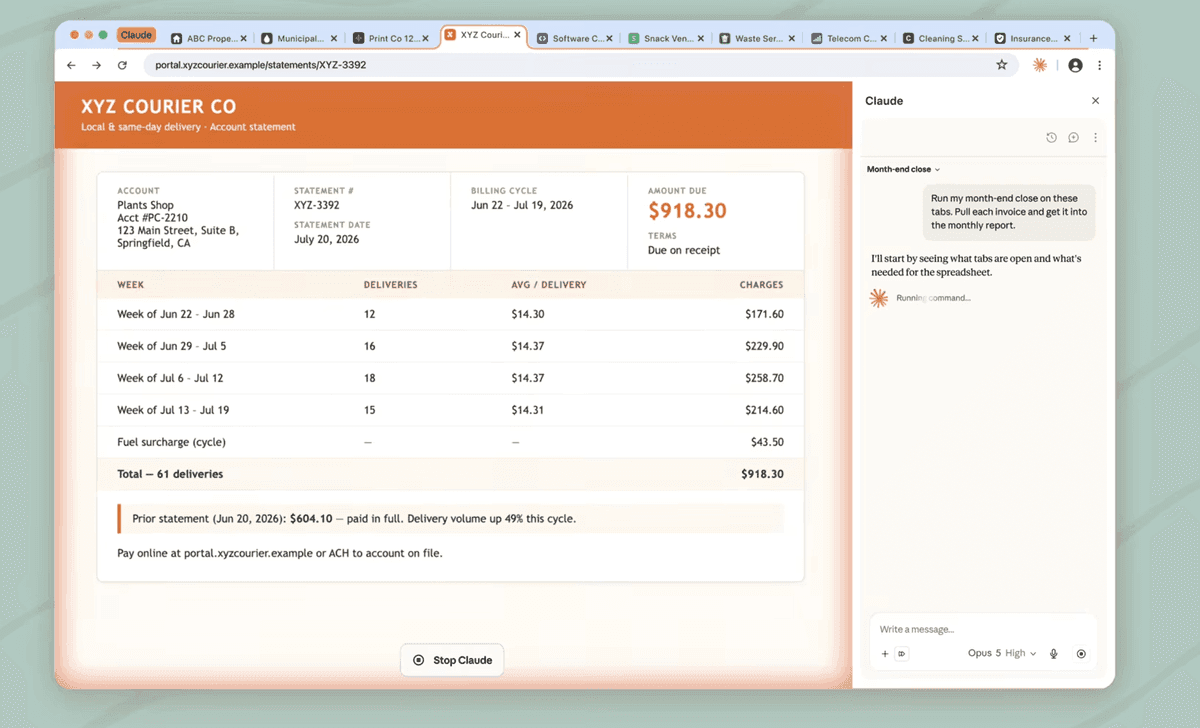
Source: TechRadar
Related Stories
Security Measures Address Prompt Injection Risks
Anthropic implemented safeguards against prompt injection attacks, where hidden instructions buried in webpages or documents could redirect the AI without user knowledge
3
. The company added user confirmation steps that review any consequential action against the original request before execution. Claude will ask permission before performing major actions such as submitting forms, sending messages, downloading files, making purchases, or sharing personal information2
3
. This addresses growing concerns around browser automation security as AI agents gain more capabilities to act independently within user environments.Rollout Timeline and Availability Across Plans
Max and Team subscribers can access Claude Cowork in the Chrome sidebar immediately or install the extension from the Chrome Web Store now
2
. Pro plans will receive access in the coming weeks1
. Enterprise admins can enable the feature selectively by domain, providing granular control over deployment3
. Claude Code, the professional-grade option for coding and programming with Anthropic's AI models, was already available in the Chrome plugin before this update1
. Claude Cowork launched as a more streamlined option intended for layperson users, and the company recently added smartphone control capability1
. The broader Claude for Chrome extension rolled out to all Anthropic users in late 20251
. This integration positions Google Chrome as a central hub for AI-assisted workflows, particularly for knowledge workers juggling tasks across disconnected systems and platforms.References
Summarized by

Navi
Related Stories
Anthropic Opens Claude Chrome Extension to All Paid Users With Powerful Automation Features
20 Dec 2025•Technology

Anthropic Launches Claude for Chrome: AI Integration Raises Both Excitement and Security Concerns
27 Aug 2025•Technology

Anthropic Unifies Claude AI With New Docs and Slides Tools in Single Interface Overhaul
17 Sept 2026•Technology
Recent Highlights



Recent Highlights
Today's Top Stories



Don’t drown in AI news. We cut through the noise - filtering, ranking and summarizing the most important AI news, breakthroughs and research daily. Follow topics that matter to you and stay ahead.


