Google brings Gemini in Chrome to Android with auto browse and AI-powered productivity tools


5 Sources
[1]
Gemini in Chrome arrives on Android devices in June - Engadget
Google is bringing Gemini in Chrome to Android devices. During the Android Show: I/O Edition livestream on Tuesday, the company announced that it would release the chatbot integration in June. Once it arrives, Android users will see a new Gemini icon at the top right of the toolbar. Tapping it will
[2]
Chrome on Android can now do your online errands for you
You can also set us as a preferred source in Google Search by clicking the button below. Among the avalanche of Google announcements today, the tech giant also revealed that Chrome auto browse is coming to Android for the first time. If you're unfamiliar with the feature, it's an agentic
[3]
Chrome for Android adding full Gemini integration and auto browse
In January, desktop Chrome gained an auto browse capability powered by Gemini. This is now coming to Chrome for Android with deeper Gemini integration. At the moment, Android's Gemini overlay has some integration with mobile Chrome, like "Summarize page." The full Gemini instance is now being
[4]
Google's next Chrome update is a big deal for Android users
Gemini is clearly becoming the centerpiece of Google's AI strategy, and that focus is now extending deep into Chrome on Android. Starting in June, Chrome is getting a fresh wave of AI-powered features built around Gemini, and the goal is pretty simple: turn your browser into something that actually
[5]

Bringing the best of Gemini in Chrome to Android
Next month, we're introducing new AI features in Chrome for Android to help you get the most out of your mobile experience. Built on Gemini 3.1, our most intelligent model, these new features will bring the power of Gemini in Chrome, with auto browse for smarter assistance and agentic browsing,
Share
Copy Link
Google announced it will release Gemini in Chrome for Android devices starting late June, bringing AI-powered features like auto browse, page summarization, and deep integration with Google apps. The update requires Android 12 or newer with at least 4GB of RAM, while auto browse remains exclusive to AI Pro and Ultra subscribers.
Google Gemini arrives on mobile browsers with full feature set
Google announced during its Android Show: I/O Edition livestream that Gemini in Chrome is coming to Android devices starting in late June
1
.
Source: Google
The Chrome update for Android brings a comprehensive AI browsing assistant built on Gemini 3.1, Google's most intelligent model, designed to transform how users interact with web content on mobile devices
5
. Chrome for Android users will see a new Gemini icon at the top right of the toolbar that opens a chat interface from the bottom of the screen, maintaining easy access to web pages while interacting with the AI1
.AI features in Chrome for Android match desktop capabilities
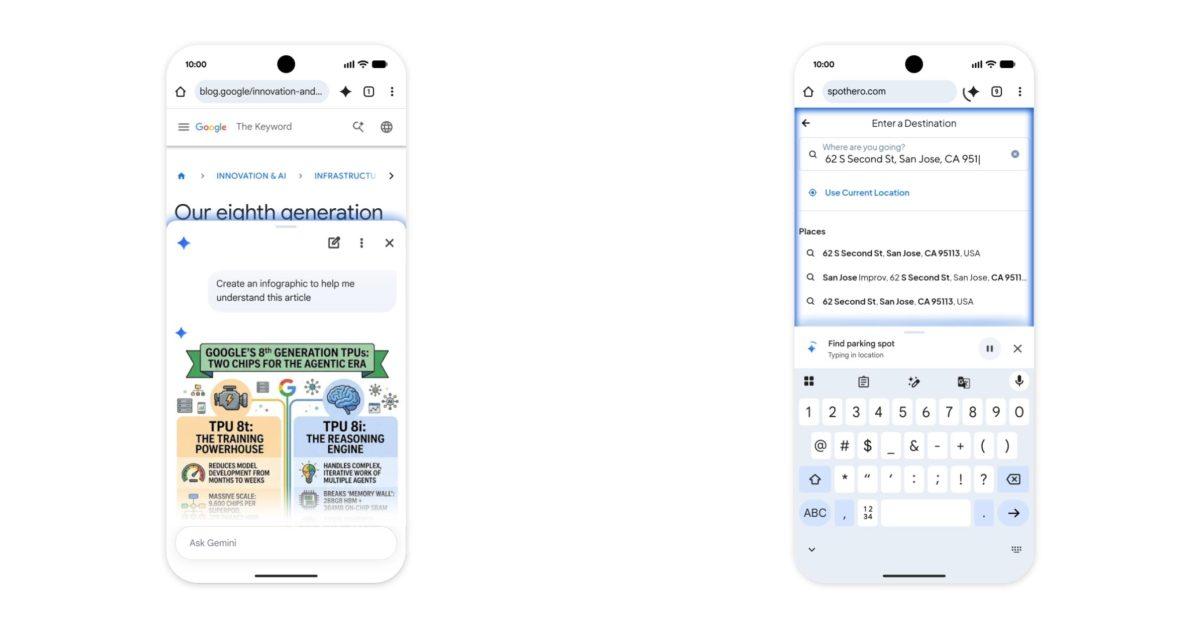
Despite the shift to a smaller form factor, the majority of features Google offers on desktop Chrome have made their way to mobile. The Gemini integration enables users to ask questions about webpages they're viewing, summarize long articles, and get detailed explanations for complex topics without switching between apps
5
.
Source: 9to5Google
Nano Banana image generation is included, allowing users to create and personalize visuals based on online content and turn dense text into visual summaries
4
. Integration with Google Calendar and Google Keep lets users add events or save recipe ingredients directly from their web browsing1
. Personal Intelligence, which allows Google Gemini to pull context from other Google services, provides responses tailored to users' interests, hobbies, and even family and pets for those who opt in5
.Gemini-powered Chrome auto browse handles tasks autonomously
The standout addition is the auto browse feature, an agentic tool that can scroll, tap, and enter text to accomplish tasks users assign it
3
. First introduced to desktop Chrome in January, auto browse can now handle tedious errands on Android devices3
. Google suggests the feature proves helpful when users are in a rush, citing an example where someone who forgot to reserve parking tickets for a comedy show can instruct Gemini to secure one through SpotHero using information from their ticket confirmation1
.
Source: Engadget
When Gemini is active, users will see a circular indicator around the spark icon and a blue glow around the webpage, with the ability to check status on the sheet or minimize it for a docked progress bar
3
.Related Stories

Security protections and user controls prioritized
Google emphasized that all capabilities are built with the same security protections offered on desktop, defending against emerging threats like prompt injection attacks
1
. The auto browse feature is designed to ask for confirmation before completing sensitive tasks like making purchases or posting on social media, ensuring users maintain control over critical actions . Users also need to manually confirm before the AI can access saved credentials in Google Password Manager2
. This context-aware assistance approach keeps users in control while offering a personalized experience that respects privacy5
.Rollout details and device requirements
The rollout begins in the United States starting at the end of June for select Android devices running Android 12 or higher with at least 4GB of RAM
3
. However, the auto browse feature will be limited to Google AI Pro and AI Ultra subscribers on supported devices at launch3
. The move signals Google's strategy to position Gemini as the centerpiece of its AI offerings, transforming Chrome from a simple web browsing tool into an active participant in how users complete tasks online4
. The page summarization and productivity features represent a shift toward completing small tasks in context rather than just searching, which could fundamentally change mobile web browsing workflows for millions of users.References
Summarized by

Navi
[2]
[4]
Related Stories
Recent Highlights
1
Microsoft and Nvidia Launch Surface Laptop Ultra: A $2,599 AI-Ready PC With RTX Spark Chip
Technology

2
Google Unveils Gemini 4 Argon AI Model, Restricts Access to Trusted Cyber Defenders
Technology

3
Trump Consulted Grok AI Before Ordering Venezuela Invasion and Capture of Nicolás Maduro
Policy and Regulation

Recent Highlights
Today's Top Stories






Don’t drown in AI news. We cut through the noise - filtering, ranking and summarizing the most important AI news, breakthroughs and research daily. Follow topics that matter to you and stay ahead.


