3 Sources
[1]
Google's wild Gemini tool that creates a talking, moving AI clone of you is now rolling out widely
Every generated video includes an invisible SynthID watermark and requires users to be at least 18 years old. There's a moment during Gemini's new Avatar setup process when things suddenly stop feeling like a fun AI demo and become extremely uncanny. You sit there staring into your phone's camera while Gemini asks you to slowly move your head from side to side and read out random numbers. A few seconds later, Google spits out a digital version of you, complete with your face and your voice. Then you watch it speak in videos you never actually recorded. Google is now rolling out Gemini's new Avatar feature more widely for paid Gemini subscribers, months after we first spotted the feature during an APK teardown back in March. You can find and create your Gemini Avatar from the Gemini app under Settings > Avatar. The feature uses Google's new Omni model to recreate your actual appearance and voice so you can generate content starring yourself. Once setup is complete, you can summon your avatar directly in Gemini chats by typing commands like @me or @your user name. The setup process isn't really elaborate or anything. You just have to record your face and voice while following a guided enrollment process. You're asked to look into the camera, move your head, and read specific numbers aloud so the system can accurately map your facial structure and voice. My avatar's resemblance is honestly unsettling because it's so believable. The facial movements and tone of voice are extremely realistic and could easily fool someone who doesn't know me very well. Of course, I can tell it's AI, but I expect most of my acquaintances won't know the difference because the avatar doesn't look like a cartoon version of me; it looks like a very polished digital clone. Of course, Google knows a feature like this has the potential to be misused massively. Keeping that in mind, the company is baking in several security and privacy safeguards. Users must be at least 18 years old to access Avatar creation, and the account owner has to be physically present during the setup process. Additionally, every video generated using the Omni-powered avatar system includes Google's invisible SynthID watermark permanently embedded into the file. That means people can verify whether a clip was AI-generated by checking it in Chrome or through Google Search tools.
[2]
I made a Gemini avatar of myself. It's so real, it creeps me out
Despite Google's safety measures including SynthID watermarks and usage restrictions, the realistic results raise concerns about potential misuse of deepfake technology. I swear that's not a video of me at Disneyland. Or is it? "I've finally made it to Disneyland," I say in the video, looking around at the magical scene with a chuckle. "This place is pure magic." Well no, it isn't me. It's my avatar, which I created this morning using the Gemini app. The process took about five minutes and it was as easy as enrolling my face in Face ID on my iPhone. You just go to Settings → Avatar in the Gemini app and follow the prompts, which involve aiming your phone's camera at your face as you turn this way and that, then speaking a series of number (like "48" and "72") out loud. Once I created my avatar -- a paid Google AI account is required to make your own -- I simply started a new Gemini chat, tapped the "+" button, added my avatar from the menu, and submitted a prompt: "Make a video of me at Disneyland." And here's the result: That looks and sounds an awful lot like me, although my daughter assured me that it looked like AI. I'm glad she can tell the difference. Next I tried another prompt: "Make a video of me in a podcast studio talking about RTX Spark." A few minutes later, there I was, spouting off about Nvidia's brand-new system-on-a-chip from Computex: I must say, avatar me is way better at podcasting than real me. For my last video, I took things into more problematic territory: "Make a video of me admitting to a crime." Gemini happily obliged: OK, so what is this? Google bills its new avatar tool -- first unveiled at Google I/O last month -- as a way to "streamline your content creation process." The tool, which is now entering general availability, works with Gemini Omni, Google's new multimodal model that can accept images and videos as inputs and has a far greater understanding of physics and the real world than did Veo, Google's previous standalone video model. You must be at least 18 years old to create an avatar, Google says. The selfie and voice data used to craft your avatar will be used for creating AI-generated videos as well as to "protect Google, our users, and the public." Generated video using your avatar are also embedded with a Google SynthID watermark, identifying the content as AI-created. You can delete your avatar at any time, according to Google, and if you do delete your avatar, Google promises to wipe the selfie and voice data that was used to initially create it. Google has strict guidelines and restrictions against generating deepfake content, and Gemini's new "personal avatar" tool is meant strictly for creating your own avatar, not one of somebody else. There are also limits on how many Gemini Omni videos you can create per day. As a Google AI Pro user, I was cut off after just three videos. (Maybe that's a blessing, given Omni's potential as an AI slop machine.) In any event, my Gemini avatar has thoroughly creeped me out, and I can't see any use for it except (at best) as a goofy "look at what AI can do!" kind of thing. From a wider perspective? Well... ugh.
[3]
Gemini Made This Hyperrealistic Deepfake Video of Me in Just a Few Minutes
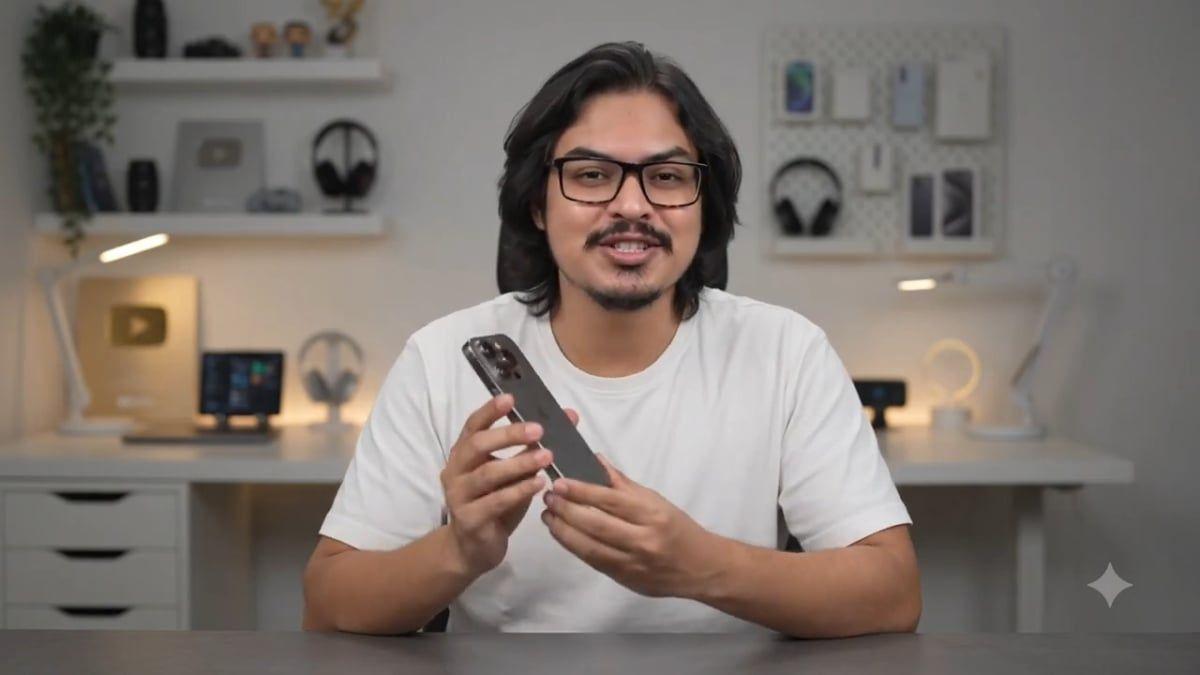
While all Omni videos are watermarked with SynthID, concerns about deepfake video abuse remain unadressed. During its big I/O 2026 keynote, Google announced Gemini Omni, an AI model that can generate videos from, well, just about anything. In the weeks since the announcement, paid subscribers have been able to use a mix of text, images, documents, and video clips to generate new AI videos. Now, Google is rolling out a new Omni feature, that lets you generate hyperrealistic avatars of yourself. It's limited to videos right now (no AI profile pictures yet), but it does a surprisingly good job of creating a talking-head video with only a couple of reference selfies -- surpassing what the short-lived Sora app accomplished. With Omni, Google has unleashed a tool that lets you create deepfake videos of yourself (and only yourself) in mere minutes. Are we ready for it? You can create your own deepfake with Gemini Omni today Thankfully, you can't take a selfie and turn it into a deepfake video. You need to go through a verification process from Google that requires scanning your face. Once you have access to this Omni feature, go to the Gemini sidebar and tap on Videos. You'll see a pop-up here to create your own avatar. If you don't see it, click the Plus button from the Gemini prompt box, then tap Avatar. Gemini will direct you to a Google site to scan your face. Here, you take a couple of selfies and move your face from side to side. Then, you say a couple of numbers out loud, and you're done. You don't even have to speak any words or sentences. Once the process is done, the avatar is ready, and you can go back to Gemini. Now, back in the "Videos" section, type "@[your name]" to use your own avatar in your videos. Generating a video takes a couple of minutes, and you'll get a notification when it's ready. You can play the video in the app, save it to your gallery, or share it via a link or with the video file itself. There are some further limitations here: Gemini's new avatar feature is only available AI Pro or AI Ultra subscribers using personal accounts. In addition, the feature is limited to users 18 or older, and it's not available in the European Economic Area, Switzerland, or the United Kingdom. Right now, it can only generate audio in English. Each generation carries an obvious Gemini watermark, but is also coded with SynthID, Google's new industry standard for subtly watermarking AI videos and images using metadata that can be tracked even if the video is cropped. Would you deepfake yourself? After playing around with this feature all day and generating a series of videos, it's clear that this tool is shockingly good. We are not prepared for an era in which deepfake technologies are this prevalent and easy to access. You can see that in the example below: I asked Gemini to generate a video of me reviewing the iPhone 17 Pro, and requested that it include me saying a specific sentence. It did that. Of course, there are limitations, and I can find plenty of faults as well. I asked for a review of the iPhone 17 Pro, but the video used an iPhone 16 Pro. At one point, something spontaneously appears above one of the many headphones in the background. And while the audio sounds like my real voice, there's no cadence to it. There's no personality, just a monotone delivery. And that extends to the videos themselves. It's me, a human, saying things, but the video feels quite lifeless. It's too clean, and too sharp, and my hair doesn't always look that good. If you know what to look out for, it's not necessarily difficult to tell that this is ultimately an AI deepfake (if the Gemini watermark and the AI label on YouTube didn't give it away). But the question is, how long will that be true for? And who will look deeply enough? Videos are limited to 10 seconds right now, and you can't edit them, or make any changes, so the potential for abuse here is still quite small. That said, according to Google's announcements, they are currently gathering feedback. The company says, "in terms of editing videos to change audio and speech, we are still working to test this and better understand how we can bring this capability to users responsibly," so there's a possibility of an interactive editing interface down the line. Soon enough, users might place themselves in videos they can adjust to their exact specifications before sending them out into the wider internet. We might not be ready for that.
Share
Copy Link
Google is widely rolling out its Gemini Avatar feature that lets paid subscribers create AI-powered avatars of themselves. Using facial scans and voice recordings, the tool generates hyperrealistic deepfake videos in minutes. While the feature includes SynthID watermarks and age restrictions, early users report the results are unsettlingly convincing, raising questions about deepfake technology's rapid advancement.
Google is expanding access to its Gemini Avatar feature, a tool that enables paid subscribers to create an AI clone of themselves capable of appearing in AI-generated content
1
. First unveiled at Google I/O and spotted during an APK teardown in March, the feature is now entering general availability for Google AI Pro and AI Ultra subscribers3
. The personalized AI avatar functionality works through the Gemini app, where users can access it under Settings > Avatar and begin the verification process1
.
Source: Android Authority
The setup takes approximately five minutes and resembles enrolling a face in biometric authentication systems
2
. Users must aim their phone's camera at their face while moving their head from side to side, then speak a series of random numbers aloud so the system can map their facial structure and voice1
. Once complete, the AI-powered avatar can be summoned directly in Gemini chats by typing commands like @me or @your username1
.The avatar feature leverages Gemini Omni, Google's new multimodal model that accepts images and videos as inputs and demonstrates enhanced understanding of physics and the real world compared to Veo, Google's previous video model
2
. Early testers report that the resemblance is unsettlingly believable, with facial movements and tone of voice appearing extremely realistic1
. One user noted that while they could identify the deepfake video as AI-generated, most acquaintances likely wouldn't notice the difference because the avatar doesn't resemble a cartoon but rather a polished digital clone1
.Users can generate videos by starting a new Gemini chat, tapping the plus button, adding their avatar from the menu, and submitting prompts such as "Make a video of me at Disneyland" or "Make a video of me in a podcast studio"
2
. Video generation takes a couple of minutes, with users receiving notifications when content is ready3
. Currently, videos are limited to 10 seconds and cannot be edited after generation3
. There are also daily limits on how many videos users can create—AI Pro users reported being cut off after just three videos2
.Source: PCWorld
Related Stories
Recognizing the potential for misuse, Google has implemented several safety measures
1
. Users must be at least 18 years old to access avatar creation, and the account owner must be physically present during the verification process1
. Every video generated using the system includes Google's invisible SynthID watermark permanently embedded into the file, allowing verification of whether a clip was AI-generated by checking it in Chrome or through Google Search tools1
.The feature is limited to users with personal accounts and is not available in the European Economic Area, Switzerland, or the United Kingdom
3
. Currently, it can only generate audio in English3
. Users can delete their avatar at any time, and Google promises to wipe the selfie and voice data used to create it2
. Google's guidelines include strict restrictions against generating deepfake content of other people—the tool is meant strictly for creating your own avatar2
.
Source: Lifehacker
Despite these safeguards, early users have expressed concerns about the technology's implications. One tester successfully generated a video of themselves "admitting to a crime," demonstrating how easily the tool could be misused
2
. Another noted that while current videos feel lifeless with monotone delivery and lack personality, the question remains how long these telltale signs will persist and who will look deeply enough to identify them3
. According to Google's announcements, the company is gathering feedback and testing how to bring video editing capabilities—including changing audio and speech—to users responsibly [3](https://lifehacker.com/tech/gemini-made-this-hyperrealistic-deepfake-video-of-me], suggesting an interactive editing interface may arrive in the future.)Summarized by
Navi
[1]
19 May 2026•Technology

14 Apr 2026•Technology

12 May 2026•Technology

1
Technology

2
Policy and Regulation

3
Policy and Regulation