2 Sources
[1]
I test AI coding tools all day -- here are 9 hidden Claude Code features you're probably missing
These essential features are a must for anyone just starting with Claude Code The more I explore what Claude Code can do, the more it becomes clear that Anthropic has built one of the best AI development tools on the market. It doesn't just generate code snippets; it can build full apps from scratch, debug complex errors, explain unfamiliar repositories, and completely automate your repetitive workflows. But even after spending dozens of hours testing it, I realized I'd barely scratched the surface of what it can do. Many of Claude Code's most useful features aren't immediately obvious. They're tucked away in technical documentation or designed for software engineers who live in the terminal. Whether you're building your very first coding project, experimenting with AI-assisted workflows, or just looking to reclaim hours of your work week, here are the hidden Claude Code features you should start using right now. 1. Inject permanent project memory with a CLAUDE.md file One of the single biggest time-savers in Claude Code is creating a CLAUDE.md file in your project's root folder. Think of it as a permanent onboarding manual. Instead of reminding Claude during every single chat session to use TypeScript, write unit tests, or follow a specific naming convention, you can bake those rules right into your project. Claude automatically scans this file the moment you launch a session. This is Ideal CLAUDE.md Architecture: Project Overview: Tells Claude exactly what the app does. Example: "A Next.js dashboard for tracking personal finance." Tech Stack: Locks down languages and frameworks. Example: TypeScript, TailwindCSS, PostgreSQL Commands: Fast-tracks how Claude builds and tests. Example: npm run dev, npm run test Code Style: Sets strict architectural rules. Example: "Always write dry code and include concise inline comments." Pro-Tip: Don't turn this file into a textbook. Claude reads it at the start of every session, which uses up your token window. Keep it under 200-300 lines of highly concentrated project constraints. 2. Time-travel through your mistakes with Checkpoints We've all had that heart-stopping moment where a single line of bad code completely breaks an application. Claude Code removes that anxiety entirely with its built-in checkpoint system. As Claude works, it takes snapshots of your codebase. If an experimental feature goes sideways or a bug spirals out of control, you can instantly roll your project back to a pristine, earlier state. How to use it: Type /rewind in the terminal (or hit Esc twice to bring up the history menu) and visually select the exact moment in time you want to jump back to. 3. Supercharge your workflow with Custom 'Skills' While Claude Code features standard built-in slash commands for quick tasks, its true superpower is letting you build custom workflows called Skills. If you find yourself repeatedly typing long, complex prompts to format data, generate marketing copies, or set up boilerplate folders, you can teach Claude a permanent Skill. For example, you could teach it a /newsletter skill that automatically pulls your latest project updates, drafts a summary, structures an email template and suggests SEO improvements in one click. Once saved, it's a permanent shortcut. 4. Break down complex jobs using Subagents When you give an AI a massive, multi-step task, it can get overwhelmed and hallucinate. Claude Code solves this by dynamically spinning up specialized AI "subagents." If you ask Claude to overhaul a major feature, it might quietly assign one subagent to review the existing code, order a second to write the new logic, and task a third with generating unit tests. They work in parallel, pool their results, and present you with a finished product without forcing you to manage three separate chat windows. 5. Unlock external data with the Model Context Protocol (MCP) By default, most AI chatbots are trapped inside their own window, entirely blind to your external tools. Claude Code breaks down these walls using Anthropic's Model Context Protocol (MCP). MCP allows you to securely connect Claude directly to outside infrastructure -- like your GitHub repositories, enterprise databases, Slack channels or web search APIs. Instead of constantly copying and pasting data back and forth between applications, Claude can pull the exact context it needs right into your workspace. 6. Let Claude run on autopilot with Headless Mode Most people use Claude interactively, trading prompts back and forth. But "headless mode" allows Claude Code to run completely in the background without you actively sitting at your keyboard. Advanced users and developers can embed Claude into automated terminal scripts. You can trigger it to run automatically at midnight to audit your code for bugs, generate fresh documentation, or draft release notes for your team while you sleep. It transitions Claude from a standard chatbot into an automated digital teammate. 7. Save your thumbs with built-in Slash Commands Stop typing out lengthy paragraphs like "Please look over this specific file, check it for syntax errors, and give me feedback." Claude Code comes out of the box with built-in shortcuts designed to save your thumbs and keep you in the flow. Essential Commands to Know: /bugfix: Instructs Claude to scan your active file specifically for errors and fix them. /review: Triggers a comprehensive code review and suggests optimization strategies. /test: Automatically writes and executes tests for the code you just completed. 8. Put guardrails on your code using Hooks If you want to ensure you never accidentally push broken code, you need to use hooks. Think of hooks as automated security guards that execute a check right before or right after a major action. You can configure Claude to automatically run your project's test suite before committing changes to git or force it to run a formatter the second it finishes writing a file. It's a foolproof way to catch minor typos and formatting issues before they turn into major headaches. 9. Pick up exactly where you left off There is nothing worse than closing an AI coding session at night, only to spend 20 minutes the next morning re-explaining the entire project architecture to the chatbot. Claude Code maintains deep conversation history across sessions. When you boot up the CLI the next day, you can instantly resume a previous thread with all the context, variables, and past logic perfectly preserved. Final thoughts It's easy to look at Claude Code and assume it's just another chat window that happens to sit in your terminal. But treating it like a standard chatbot sells it incredibly short. Features like permanent project files (CLAUDE.md), automated subagents, instant rewind buttons and tool integration turn it into a true autonomous development partner. You don't need to master all 9 of these features on day one -- but unlocking just two or three of them will radically change how fast you can build. Give them a try and let me know what you think in the comments. Follow Tom's Guide on Google News and add us as a preferred source to get our up-to-date news, analysis, and reviews in your feeds. Subscribe to Tom's Guide on YouTube and follow us on TikTok. Finally, you can visit our dedicated Tom's Guide Savings Squad hub for expert help on getting the best products for less.
[2]
12 Claude Tricks That Will Save You Hours Every Week
Claude is an AI platform designed to handle a variety of tasks, extending well beyond basic chat functions. As Skill Leap AI explains, Claude includes features such as task automation and code generation, all within a single application. For instance, its spreadsheet integration can clean up datasets, correct formulas and generate summaries, making it especially useful for organizing complex information. These capabilities allow users to tackle tasks like document analysis, presentation creation and application development more efficiently. Explore how to use Claude Cowork to automate multi-step workflows and reduce repetitive tasks. Learn how Claude Skills can be customized to align with your specific needs, making sure outputs match your style or requirements. Additionally, gain insight into features like the Browser Agent and Dispatch, which support productivity whether you're working at your desk or remotely. This explainer provides actionable strategies to help you fully use Claude in your daily routines. Features That Enhance Your Workflow Claude's extensive capabilities make it a valuable tool for a wide range of applications. Its features are designed to help you work smarter and achieve better results with less effort. Here's how Claude can transform your workflow: * Task Automation: Simplify repetitive processes and manage projects with greater ease and precision. * Code Generation: Develop software and applications without requiring prior programming expertise. * Interactive Tools: Build and share dynamic applications directly within the platform. * Design Assistance: Create professional-grade visuals that align with your brand's identity. * Data Organization: Clean, organize and analyze spreadsheets efficiently. * Presentation Creation: Convert outlines into polished, impactful slideshows. * Custom Preferences: Tailor outputs to match your unique style and specific requirements. Claude Cowork: Simplifying Complex Workflows Claude Cowork is designed to streamline multi-step workflows by automating routine tasks. It processes local files to generate summaries, reports, and presentations, significantly reducing the time spent on repetitive activities. Additionally, it incorporates approval workflows, making sure that task management remains both organized and collaborative. This feature is particularly useful for teams that need to maintain a clear structure while working on shared projects. Deep dive into the latest in Claude AI by exploring our other resources and articles. Claude Code: Making Software Development Accessible Claude Code enables users to generate code for websites, applications and tools, even if they lack prior programming experience. By responding to specific prompts, this feature customizes outputs to meet your exact requirements, making software development more accessible to individuals and teams alike. Whether you are a beginner or an experienced developer, Claude Code reduces the barriers to entry for technical projects, allowing faster and more efficient results. Artifacts: Designing and Sharing Interactive Tools Artifacts allow you to create interactive tools and applications directly within Claude's chat interface. These tools can be published and shared via links, allowing seamless collaboration across teams or with external stakeholders. This feature is particularly valuable for developing dynamic solutions tailored to specific needs, such as interactive dashboards, calculators, or prototypes. Claude Design: Streamlining Professional Design Claude Design simplifies the creation of landing pages, presentations, animations and prototypes while adhering to your brand guidelines. By making sure that your outputs are visually appealing and consistent with your organization's branding, this feature saves both time and effort in the design process. It is an ideal solution for professionals who need to produce high-quality visuals without extensive design expertise. Spreadsheet Integration: Managing Data with Ease Claude's spreadsheet integration feature is a powerful tool for managing and analyzing large datasets. It can clean and organize Excel sheets, fix formulas and generate summaries, making it easier to work with complex data. Seamlessly compatible with Microsoft Office applications, this feature is invaluable for professionals who need to handle data-intensive tasks efficiently. Presentation Creation: Turning Ideas into Polished Slides With Claude's presentation creation feature, transforming ideas into professional slideshows becomes effortless. By converting outlines into polished presentations, this tool saves time and ensures high-quality results. Using "Claude Skills," you can further customize these slides to align with your brand's visual and stylistic guidelines, making sure a cohesive and professional appearance. Claude Skills: Personalizing Your Outputs Claude Skills allow you to teach the platform your specific preferences, such as writing style, tone, or branding requirements. This ensures consistent outputs across tasks, enhancing the quality and coherence of your work. By reducing the need for repetitive adjustments, this feature helps you save time while maintaining a high standard of communication and presentation. Projects and Connectors: Centralizing Your Work Claude organizes files, instructions and context within dedicated project spaces, making it easier to manage complex workflows. By integrating with tools like Google Drive, Gmail and Slack, it enhances collaboration and efficiency. This centralized approach allows you to manage projects seamlessly from a single platform, reducing the need to switch between multiple applications. Document Analysis: Making sure Accuracy and Consistency Claude's document analysis feature is designed to identify contradictions, errors and inconsistencies in lengthy documents. It provides detailed dashboards for review, helping you maintain accuracy and reliability in your work. This feature is particularly useful for professionals handling complex reports, legal documents, or technical manuals, where precision is critical. Browser Agent: Automating Online Activities The Browser Agent, available as a Chrome extension, automates repetitive web-based tasks such as form filling, data retrieval and online research. By saving time on routine online activities, this feature allows you to focus on more strategic responsibilities, enhancing overall productivity. Dispatch: Managing Tasks Remotely The Dispatch feature enables you to manage and execute tasks remotely via mobile devices. It coordinates desktop activities, such as email and calendar checks, making sure that you remain productive even when you are away from your workstation. This feature is particularly beneficial for professionals who need to stay connected and efficient while on the go. Custom Writing Style: Consistent and Professional Communication Claude learns and replicates your specific writing tone, making sure consistent communication across various tasks. This feature is especially valuable for maintaining a unified voice in professional correspondence, marketing materials, or personal projects. By enhancing clarity and professionalism, it helps you communicate more effectively with your audience. Maximizing Productivity with Claude Claude's extensive suite of features makes it a powerful tool for improving productivity, automating workflows and creating tailored solutions across various domains. By using tools like Claude Cowork, Claude Code and Claude Design, you can streamline your processes, save time and focus on higher-value tasks. Whether you are managing projects, designing presentations, or analyzing documents, Claude adapts to your needs, making it an indispensable resource for modern workflows. Media Credit: Skill Leap AI Disclosure: Some of our articles include affiliate links. If you buy something through one of these links, Geeky Gadgets may earn an affiliate commission. Learn about our Disclosure Policy.
Share
Copy Link
Anthropic's Claude has evolved far beyond a simple chatbot, offering sophisticated AI tools for developers and professionals. From Claude Code's hidden capabilities like permanent project memory and time-travel debugging to Claude Cowork's multi-step workflow automation, these features can reclaim hours of work each week. Custom Skills, Subagents, and the Model Context Protocol transform how users approach coding, data management, and repetitive tasks.
Anthropic has built Claude into one of the most capable AI tools available, but many users barely scratch the surface of its potential. Claude Code doesn't just generate snippets—it builds full applications, debugs complex errors, and automates repetitive software development workflows
1
. Yet its most powerful features remain tucked away in technical documentation, invisible to users who could benefit most.
Source: Tom's Guide
The AI-powered coding assistant includes capabilities that fundamentally change how developers and non-technical users approach projects. Creating a CLAUDE.md file in your project's root folder serves as permanent project memory, eliminating the need to repeatedly explain coding standards, tech stack preferences, or naming conventions
1
. Claude automatically scans this file at session launch, baking project rules directly into every interaction. Experts recommend keeping this file under 200-300 lines to avoid consuming excessive token windows.Claude Code's built-in Checkpoints feature functions as time-travel for your codebase. When experimental features break or bugs spiral out of control, developers can instantly roll back to earlier pristine states by typing /rewind in the terminal
1
. This removes the anxiety of catastrophic code failures that plague traditional development.For complex multi-step tasks, Claude deploys Subagents—specialized AI workers that operate in parallel. When overhauling major features, Claude might assign one subagent to review existing code, order a second to write new logic, and task a third with generating unit tests
1
. This prevents the AI from becoming overwhelmed and hallucinating, delivering finished products without forcing users to manage multiple chat windows.The Model Context Protocol (MCP) represents a significant leap in how AI-driven tools access external information. Unlike typical chatbots trapped inside their own windows, MCP allows Claude to connect securely to GitHub repositories, enterprise databases, Slack channels, and web search APIs
1
. Users no longer need to constantly copy and paste data between applications—Claude pulls exact context directly into the workspace.Headless Mode takes automation further by allowing Claude Code to run completely in the background without active user presence. Advanced developers can embed Claude into automated terminal scripts that trigger at scheduled times to audit code for bugs, generate documentation, or draft release notes while they sleep
1
. This transitions Claude from a standard chatbot into an automated digital teammate.Related Stories
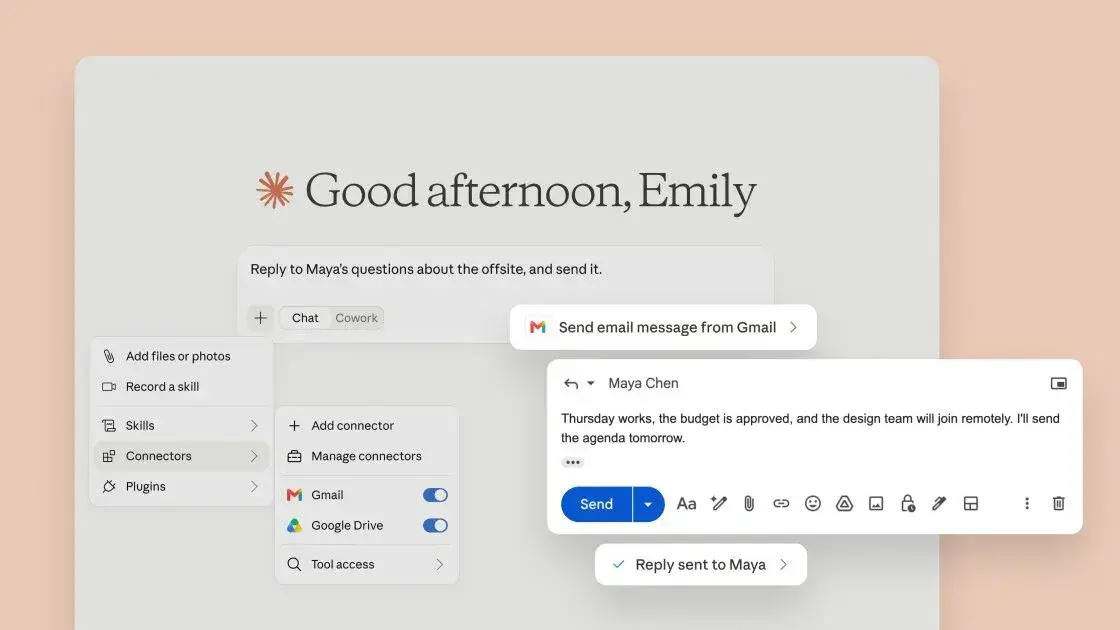
Beyond coding, Claude offers features that streamline workflows across diverse professional contexts. Claude Cowork automates multi-step processes by processing local files to generate summaries, reports, and presentations
2
. It incorporates approval workflows to maintain organized, collaborative task management—particularly valuable for teams working on shared projects.
Source: Geeky Gadgets
Custom Skills represent Claude's true superpower for workflow automation. Instead of repeatedly typing long, complex prompts, users can teach Claude permanent shortcuts. A custom /newsletter skill could automatically pull project updates, draft summaries, structure email templates, and suggest SEO improvements in one click
1
. Once saved, these become permanent workflow accelerators.Claude Design simplifies creating landing pages, presentations, animations, and prototypes while adhering to brand guidelines
2
. The Artifacts feature enables users to build interactive tools and applications directly within Claude's chat interface, which can be published and shared via links for seamless collaboration2
.For data management, Claude's spreadsheet integration cleans and organizes Excel sheets, fixes formulas, and generates summaries—seamlessly compatible with Microsoft Office applications
2
. The code generation capability allows users to develop websites, applications, and tools without prior programming experience, responding to specific prompts to customize outputs2
. This accessibility removes traditional barriers to technical projects, delivering faster results for both beginners and experienced developers looking to maximize productivity in their software development workflows.Summarized by
Navi
[1]
[2]
06 Jun 2025•Technology

21 May 2026•Technology

10 Apr 2026•Technology

1
Technology

2
Science and Research

3
Policy and Regulation