Instagram Edits Desktop App Brings AI Video Editing and Multi-Track Timeline to macOS


2 Sources
[1]
You can edit your videos with AI on Instagram's new desktop Edits app
Instagram's standalone video editing app is now available on macOS, where you can plug in your AI agent of choice to assemble your videos. Instagram's Matthew Simari, head of product management for Edits, said in an interview with The Verge, "One of the things we're releasing with Edits Desktop is
[2]
Instagram Edits
Instagram's video editing app for macOS, featuring multi-track editing, AI-assisted workflows, color grading, and 4K video exports. Instagram Edits is a video editing application developed by Meta for content creators. Originally launched on mobile devices, Edits is now available for macOS,
Share
Copy Link
Meta launched Instagram Edits for macOS, introducing AI-assisted editing through Model Context Protocol integration. The standalone video editing app features a multi-track timeline, 4K exports, color grading tools, and direct publishing to Instagram, though cross-platform project syncing remains in development.
Instagram Expands Video Editing Capabilities with Desktop Launch
Meta has released Instagram Edits for macOS, transforming its mobile-first standalone video editing app into a desktop powerhouse for content creators. The desktop app introduces AI-assisted editing capabilities through Model Context Protocol (MCP) integration, allowing users to connect AI agents like Meta's Muse to handle editing tasks.
1
Matthew Simari, Instagram's head of product management for Edits, confirmed that creators heavily requested the desktop version, but AI-driven editing capabilities also factored into the macOS expansion decision.
Source: TechSpot
AI Video Editing Through MCP Integration
The Instagram Edits desktop app leverages the Model Context Protocol to enable seamless AI-assisted editing workflows. Content creators can now use any MCP-compatible AI agent to interact with the application's editing tools, though Meta encourages users to try its Muse agent.
1
Simari explained how the agentic workflow operates: creators can ask an AI agent to generate a rough cut from video files in their downloads folder, and the agent accesses the MCP to execute tool calls and assemble the initial edit. Users then switch to manual editing within Instagram's new desktop Edits app to refine their projects.1
This AI-driven editing capability builds on the creative assistant feature Instagram added to the mobile version in September, which provides video suggestions and feedback using data from users' Instagram accounts, including views and retention metrics.
1
Professional-Grade Features for Content Creators
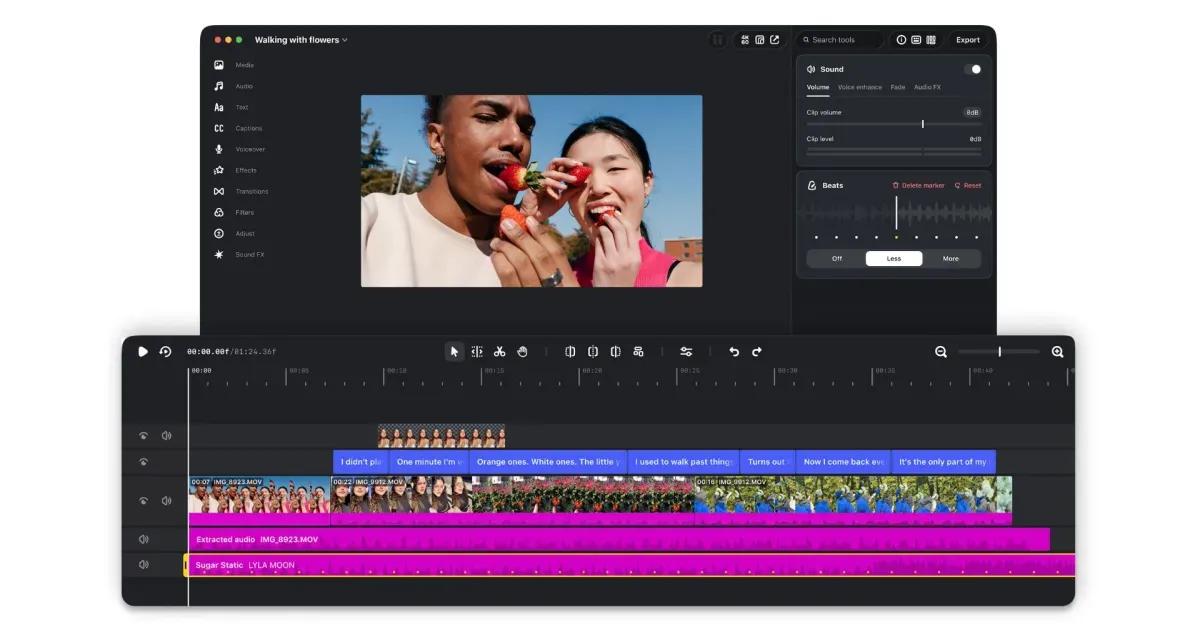
Instagram Edits for macOS delivers advanced editing features designed for desktop workflows. The application includes a full multi-track timeline for arranging video and audio clips, detailed audio waveforms for precise sound editing, and color grading tools for visual refinement.
1
2
Content creators can export videos in up to 4K resolution without watermarks, addressing a common frustration with mobile editing applications.1
Source: The Verge
The desktop app supports customizable keyboard shortcuts that can be carried over from other editing software, reducing the learning curve for experienced editors.
1
2
Meta is expanding Edits to support multiple aspect ratios, aligning with Instagram's push into longform, widescreen videos that benefit from larger screen editing.1
Related Stories

Integration with Instagram's Ecosystem
The standalone video editing app maintains tight integration with Instagram's platform. Users can access Instagram's audio library directly within the desktop app and publish videos straight to Instagram without switching applications.
1
2
Audio and text styles saved in the mobile app automatically become accessible in the desktop version, providing continuity across devices.1
2
Direct publishing capability streamlines the content creation workflow, eliminating the need to export and manually upload finished videos.Platform Limitations and Future Development
Instagram Edits desktop app currently remains exclusive to macOS, with no Windows or Linux versions announced.
1
2
Cross-platform project syncing between mobile and desktop versions is not yet available, meaning creators cannot start a project on mobile and continue editing on desktop.1
2
However, Meta confirmed it is actively developing cross-platform editing capabilities and plans to update the desktop app weekly.1
The application requires an Instagram account to sign in and use, and remains free with no subscription fees.
2
This positions Instagram Edits as a competitive option for content creators seeking professional editing tools without financial barriers, particularly those already embedded in Instagram's creator ecosystem.References
Summarized by

Navi
[2]
Related Stories
Instagram Launches 'Edits' App: A Comprehensive Video Editing Tool for Creators
23 Apr 2025•Technology

Instagram Unveils 'Edits': A New Video Editing App to Rival TikTok's CapCut
20 Jan 2025•Technology

Instagram Launches AI Assistant to Help Creators Decode Performance Metrics and Boost Engagement
30 Sept 2026•Technology

Recent Highlights



Recent Highlights
Today's Top Stories








Don’t drown in AI news. We cut through the noise - filtering, ranking and summarizing the most important AI news, breakthroughs and research daily. Follow topics that matter to you and stay ahead.


