Malicious Chrome Extension Impersonated Perplexity AI to Intercept User Searches


2 Sources
[1]
Malicious Perplexity Chrome Extension Intercepted Searches and Address Bar Input
Microsoft has found a malicious Chrome extension that posed as the AI search engine Perplexity and quietly logged what people searched for. It routed every query and every character typed into the address bar through an attacker-controlled server before redirecting users to real results. Microsoft
[2]
Fake Perplexity extension on Chrome Web Store tracked searches
A malicious extension in the Chrome Web Store is masquerading as the Perplexity AI answer engine, intercepting search traffic and collecting browsing information. Called "Search for perplexity ai," the extension routed search queries and real-time suggestions through its infrastructure before
Share
Copy Link
Microsoft discovered a malicious Chrome extension posing as Perplexity AI that intercepted searches and logged every character typed into the address bar. The fake extension, called "Search for perplexity ai," routed queries through an attacker-controlled server before redirecting to legitimate results, enabling extensive data collection.
Fake Perplexity Extension Routed Searches Through Attacker Infrastructure
Microsoft Defender researchers uncovered a malicious Chrome extension that impersonated AI search engine Perplexity AI and quietly logged user activity
1
. The fake Perplexity extension, titled "Search for perplexity ai" with ID flkebkiofojicogddingbdmcmkpbplcd, used a look-alike domain perplexity-ai[.]online to masquerade as the legitimate service at perplexity.ai2
. Google removed the extension from the Chrome Web Store following responsible disclosure by Microsoft Threat Intelligence1
.
Source: Hacker News
Once installed, the extension replaced the browser's default search provider and routed every query through the attacker-controlled server before redirecting users to real search results from Perplexity AI, Google, or Bing
2
. This search interception happened seamlessly, making the theft invisible to users who received normal-looking results. The attacker's server logged each query along with browser headers, IP addresses, and user agent data1
.Address Bar Input Captured Character by Character
The security risk extended beyond completed searches. The extension also hijacked Chrome's live search suggestions feature by pointing the suggest_url to the same attacker domain
1
. This meant that every character typed into the address bar was transmitted to the attacker-controlled server before users even pressed Enter. The data collection occurred in real-time as users typed, capturing not just finished searches but partial queries and browsing intent.
Source: BleepingComputer
Microsoft Threat Intelligence researchers found server-side logging code that proved the data collection was intentional, not merely a side effect of redirection
1
. The extension requested excessive permissions from Chrome's declarativeNetRequest family, which enabled traffic redirection, URL rewriting, and selective request filtering—capabilities far beyond what a legitimate search tool requires2
.Hidden Capabilities Suggest Broader Threat Potential
While Microsoft found no evidence of password theft or credential harvesting, the extension's permissions would easily allow such activity if operators chose to expand their scope
2
. Researchers discovered disabled redirect rules for Google and Bing searches, indicating the same infrastructure could be activated for those search engines1
. The extension even included provisions to run WebAssembly code later, a feature that has no legitimate purpose in a simple search tool1
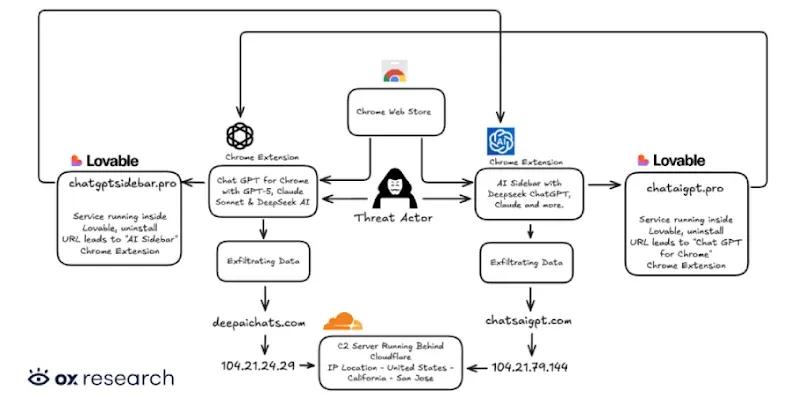
.This incident fits a concerning pattern of malicious extensions hiding behind AI branding. Microsoft's research has linked similar chat-skimming campaigns to roughly 900,000 installs across more than 20,000 company networks . While previous threats targeted AI chat conversations from ChatGPT and DeepSeek, this attack focused specifically on intercepted user searches and address bar input collected through Chrome's own extension machinery
1
.Related Stories
What Users and Organizations Should Watch
Anyone who installed "Search for perplexity ai" should remove it immediately and verify their default search engine settings have not been altered
1
. As an abundance of caution, users should rotate critical account passwords2
. For enterprise environments, Microsoft suggests allowing only approved extensions through browser or company policy, monitoring for changed search settings and strange extension permissions, and watching for traffic to unfamiliar domains1
.The collected data enables extensive user profiling and creates potential avenues for future exploitation, even if credentials weren't directly targeted
2
. Microsoft recommends treating AI-branded tools with extra scrutiny and verifying the publisher and domain before installation1
. No operator has been identified, and Microsoft did not disclose how many users installed the extension before takedown1
.References
Summarized by

Navi
[2]
Related Stories
Two Chrome Extensions Caught Stealing AI Chats from 900,000 ChatGPT and DeepSeek Users
07 Jan 2026•Technology
Malicious Chrome extensions disguised as AI assistants steal data from 300,000+ users
12 Feb 2026•Technology

Browser extensions with 8 million users caught secretly harvesting AI conversations
17 Dec 2025•Technology

Recent Highlights



Recent Highlights
Today's Top Stories







Don’t drown in AI news. We cut through the noise - filtering, ranking and summarizing the most important AI news, breakthroughs and research daily. Follow topics that matter to you and stay ahead.


