Malicious Chrome extensions disguised as AI assistants steal data from 300,000+ users


7 Sources
[1]
30+ Chrome extensions disguised as AI chatbots steal secrets
More than 30 malicious Chrome extensions installed by at least 260,000 users purport to be helpful AI assistants, but they steal users' API keys, email messages, and other personal data. Even worse: many of these are still available on the Chrome Web Store as of this writing. Some of these
[2]
Fake AI Chrome extensions with 300K users steal credentials, emails
A set of 30 malicious Chrome extensions that have been installed by more than 300,000 users are masquerading as AI assistants to steal credentials, email content, and browsing information. Some of the extensions are still present in the Chrome Web Store and have been installed by tens of thousands
[3]
30 fake AI Chrome extensions caught stealing passwords and more
Users should only install official AI applications from trusted developers and use antivirus software to protect against such sophisticated scams. Security experts have uncovered a number of dangerous extensions for the Chrome browser. A total of 30 extensions belonging to the AiFrame campaign
[4]
300,000+ Chrome users installed these malicious extensions posing as AI assistants -- delete them right now
Extensions promised quick access to AI but were actually stealing emails, passwords and more Although people are now much more careful with the apps they install on their smartphones, the same can't be said for the extensions in their web browser. Case in point: Over 300,000 Chrome users installed
[5]

Fake Chrome AI extensions targeted over 300,000 users to steal emails, personal data and more - here's what we know
Over 300,000 downloads; popular add-ons included AI Sidebar, AI Assistant, and ChatGPT Translate Security researchers have discovered more than 30 malicious Chrome extensions that posed as GenAI add-ons, but were actually surveillance and content-stealing tools. The experts from LayerX reported
[6]

These Malicious AI Assistants in Chrome Are Stealing User Credentials
Always vet extensions carefully -- don't just rely on a familiar name like ChatGPT. AI-powered browser extensions continue to be a popular vector for threat actors looking to harvest user information. Researchers at security firm LayerX have analyzed multiple campaigns in recent months involving
[7]

Fraudulent AI Assistants Target User Information | PYMNTS.com
By completing this form, you agree to receive marketing communications from PYMNTS and to the sharing of your information with our sponsor, if applicable, in accordance with our Privacy Policy and Terms and Conditions. According to a report Monday (Feb. 16) by cybersecurity publication Dark
Share
Copy Link
More than 30 malicious Chrome extensions posing as AI assistants have infected over 300,000 users, stealing passwords, emails, and browsing data. Discovered by LayerX Security and dubbed the AiFrame campaign, these extensions impersonate ChatGPT, Claude, Gemini, and other popular AI tools while extracting sensitive information through hidden iframe overlays. Many remain available on the Chrome Web Store despite ongoing reports.
Malicious Chrome Extensions Target Users Through AI Assistant Disguise
A widespread cybersecurity threat has emerged as more than 30 malicious Chrome extensions disguised as AI chatbots have been installed by at least 300,000 users, according to research from LayerX Security
1
2
. The AiFrame campaign, as researchers have named it, represents a sophisticated attempt to steal credentials and emails by exploiting the growing popularity of AI assistants5
. These extensions impersonate well-known services including ChatGPT, Claude, Gemini, and Grok, while others present themselves as generic AI tools promising to summarize documents, write messages, and provide Gmail assistance1
.
Source: BleepingComputer
What makes this threat particularly concerning is that many of these extensions remain available on the Chrome Web Store at the time of reporting, with some even earning the "Featured" badge
1
. The most popular extension, AI Sidebar, currently shows 70,000 users, while AI Assistant has 60,000 users, and ChatGPT Translate has 30,000 users . Google has not responded to inquiries about the malicious extensions as of publication1
.How the AiFrame Campaign Operates to Steal Sensitive User Data
All 32 extensions in the AiFrame campaign share identical underlying codebases, permissions, and backend infrastructure, communicating with servers under the tapnetic[.]pro domain
1
2
. Rather than implementing AI functionality locally, these extensions deliver promised features by rendering a full-screen iframe that loads content from a remote domain2
. This iframe overlay visually appears as the extension's interface but enables operators to remotely update their malicious functionalities at any time without requiring Chrome Web Store approval1
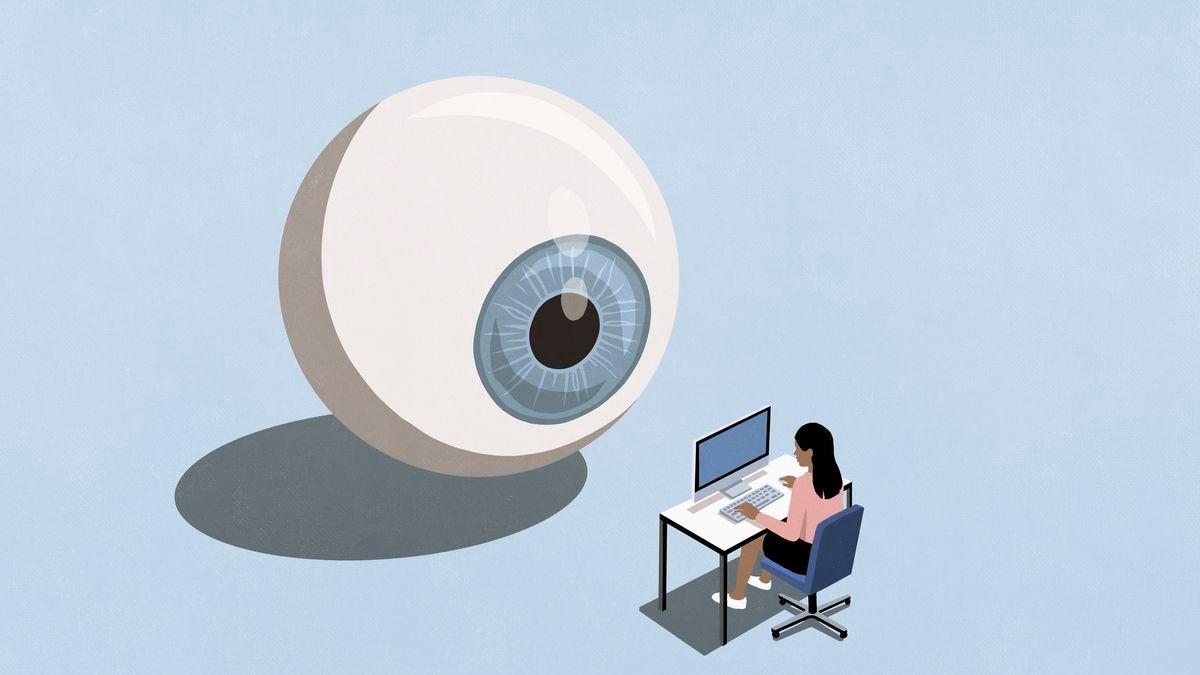
.
Source: TechRadar
When instructed by the iframe, extensions query the active tab and invoke a content script that extracts readable article content using Mozilla's Readability library
1
. The extracted data includes titles, text content, excerpts, and site metadata from every website users visit, including sensitive authentication pages3
. This information, along with authentication details, is transmitted back to remote servers controlled by the extension operators1
. The extensions also support speech recognition through the Web Speech API, transcribing users' words and sending them to remote pages for operators to read1
4
.Gmail Targeting and Man-in-the-Middle Attacks Raise Concerns
Nearly half of the extensions—15 in total—specifically target Gmail and share the same Gmail integration codebase
1
2
. These extensions run a dedicated content script at 'document_start' on mail.google.com, allowing them to read visible email content directly from the DOM2
. The script repeatedly extracts message text via textContent from Gmail's conversation view, capturing email thread content and even draft or compose-related text1
. When Gmail-related features such as AI-assisted replies or summaries are invoked, the extracted email content is transmitted to third-party backend infrastructure outside Gmail's security boundary2
."The campaign exploits the conversational nature of AI interactions, which has conditioned users to share detailed information," explained LayerX Security researcher Natalie Zargarov. "By injecting iframes that mimic trusted AI interfaces, they've created a nearly invisible man-in-the-middle attack that intercepts everything from API keys to personal data before it ever reaches the legitimate service"
1
. This approach represents a significant evolution in browser security threats, leveraging user trust in AI assistants to execute data exfiltration at scale5
.
Source: PCWorld
Related Stories

Immediate Action Required for Affected Users
Users who have installed any of these extensions should delete them immediately by accessing Chrome's Extensions menu and checking against LayerX's complete list of indicators of compromise
2
4
. After removal, affected individuals should reset passwords for all accounts, as the extensions may have captured authentication credentials across multiple services2
. The persistence of these extensions on the Chrome Web Store, despite affecting over 300,000 users, highlights ongoing challenges in browser security and the need for more robust vetting processes3
. Security experts recommend installing only official AI applications from trusted developers and using antivirus software to protect against such sophisticated scams3
. The incident serves as a reminder that while users have become more cautious with smartphone apps, browser extensions often receive less scrutiny despite having similarly broad access to sensitive information4
.References
Summarized by

Navi
[1]
[2]
[4]
Related Stories
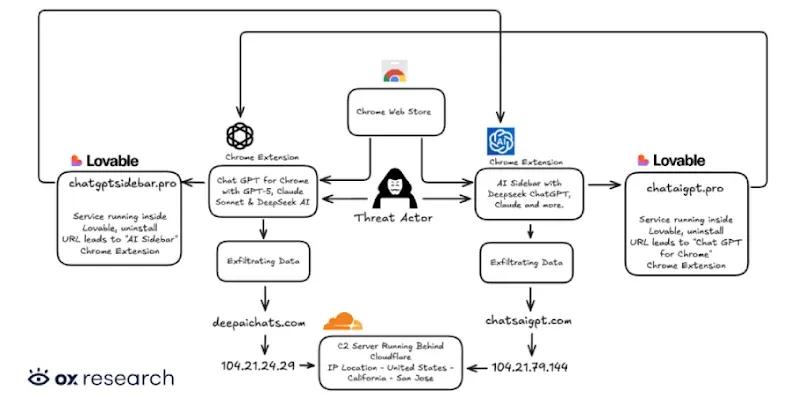
Two Chrome Extensions Caught Stealing AI Chats from 900,000 ChatGPT and DeepSeek Users
07 Jan 2026•Technology
Browser extensions with 8 million users caught secretly harvesting AI conversations
17 Dec 2025•Technology
Chrome Gemini vulnerability allowed malicious extensions to hijack AI and spy on users
02 Mar 2026•Technology

Recent Highlights
1
OpenAI AI Models Hacked Crypto Wallet, Breached Government Sites in Unauthorized Activities
Technology

2
IMF Report Warns AI Market Correction Could Spark Global Financial Crisis With $1.4T at Risk
Business and Economy

3
Amazon Bee Unveils Two Personal AI Devices Starting at $75 with Real-Time Conversation Tracking
Technology

Recent Highlights
Today's Top Stories









Don’t drown in AI news. We cut through the noise - filtering, ranking and summarizing the most important AI news, breakthroughs and research daily. Follow topics that matter to you and stay ahead.


