ChatGPT now creates and edits PowerPoint slides with simple text prompts


3 Sources
[1]
You can now add ChatGPT to PowerPoint - Engadget
OpenAI is now letting you give your presentations the AI treatment. The company announced that ChatGPT is available in Microsoft PowerPoint. The chatbot can create new presentation slides, as well as editing and updating existing ones. As with many of ChatGPT's capabilities, it takes action based
[2]
ChatGPT Lands in Microsoft PowerPoint | PYMNTS.com
By completing this form, you agree to receive marketing communications from PYMNTS and to the sharing of your information with our sponsor, if applicable, in accordance with our Privacy Policy and Terms and Conditions. This new feature, currently in beta, allows users to generate full
[3]
ChatGPT can now make your presentation using text prompts: Here is how
OpenAI has introduced a new feature that lets users create and edit PowerPoint presentations using ChatGPT. The feature, called ChatGPT for PowerPoint, is currently available in beta and allows users to build presentation slides with simple text prompts. With this integration, users no longer need
Share
Copy Link
OpenAI has integrated ChatGPT into Microsoft PowerPoint, allowing users to generate full presentations from scratch using conversational prompts. The beta feature works with notes, spreadsheets, and images, while also editing existing slides and identifying narrative gaps. Available across free and paid tiers, the move closes a competitive gap with Anthropic's Claude and Google Gemini.
ChatGPT Arrives in Microsoft PowerPoint
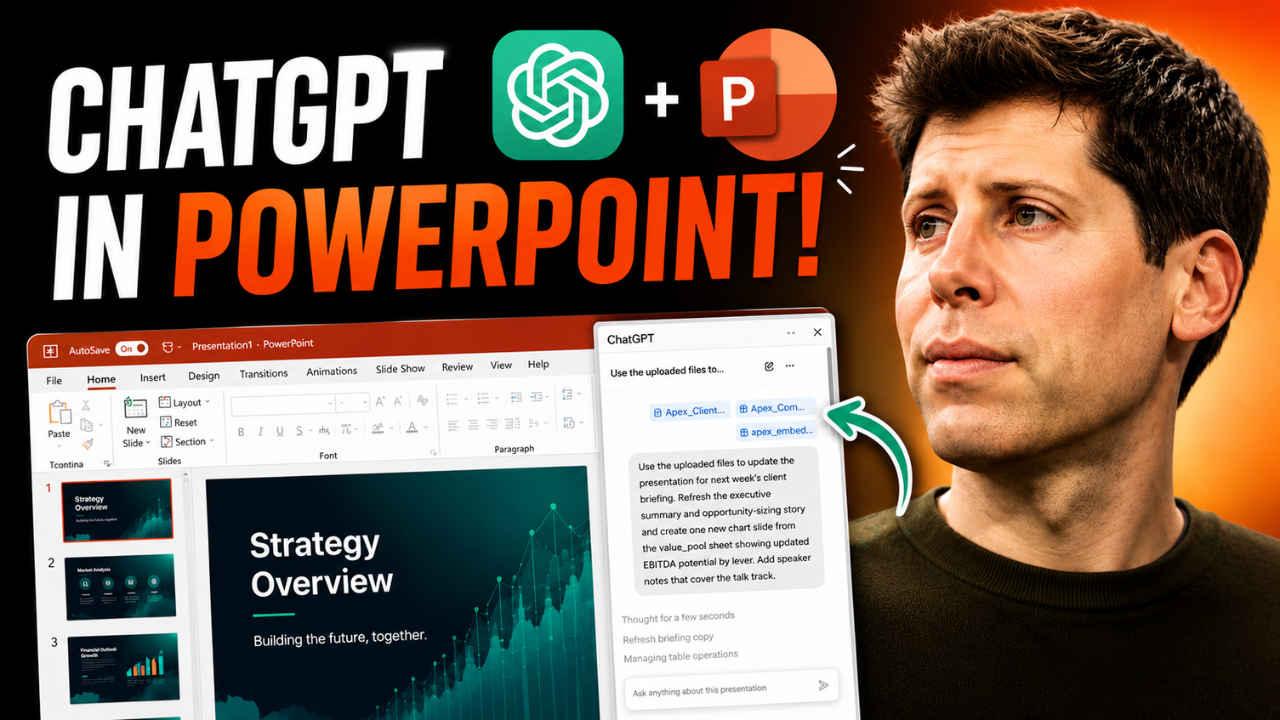
OpenAI announced that ChatGPT is now available in Microsoft PowerPoint, enabling users to create and edit presentations through natural language prompts
1
. The feature, called ChatGPT for PowerPoint, is currently in beta and allows users to generate full presentations from scratch by providing conversational prompts or raw materials such as notes, spreadsheets, and images2
. Users no longer need to manually create every slide, as the AI can transform various document types into professional presentation decks while keeping them fully editable inside PowerPoint3
.
Source: Digit
Advanced Editing and Analysis Capabilities
Beyond initial creation, the tool functions as an advanced editor capable of modifying or inserting slides without requiring a total restart
2
. ChatGPT works directly inside the presentation software and understands the structure of slides, enabling it to rewrite content, shorten long paragraphs, and improve overall slide structure3
. The AI can also analyze a finished deck to identify narrative weak points and predict objections that clients or audience members might raise during presentations2
.Seamless Integration with Business Tools
To streamline presentation creation, ChatGPT integrates with services like Gmail, Outlook, and SharePoint, allowing it to pull information directly from a user's connected accounts rather than requiring manual data transfers
2
. The feature is available globally for ChatGPT Business, Enterprise, Edu, Teachers, and K-12 users, with OpenAI also rolling it out for free tier, Go, Plus, and Pro subscribers3
. This notably inclusive rollout reaches the broad majority of OpenAI users, from those on free accounts to organizations on the corporate ChatGPT Business plan2
.
Source: Engadget
Related Stories
Closing the Competitive Gap
This move allows OpenAI to close a competitive gap with rivals offering comparable slide-building functionality. Anthropic's Claude has offered similar capabilities since September, while Google Gemini integrates naturally with the company's Slides platform
1
. PowerPoint was a notable outlier, since ChatGPT was already integrated into other enterprise tools such as Microsoft Excel and Google Sheets1
. The integration arrives amid a shifting relationship between the tech giants, with a restructured partnership meaning Microsoft no longer holds exclusive rights to OpenAI's AI models, though it retains a non-exclusive license through 20322
.Strategic Timing and Business Focus
The push into PowerPoint comes as OpenAI prepares for a potential IPO, aiming for a public debut this September
2
. While the company generated nearly $6 billion in revenue during the first quarter—driven largely by its Codex coding agent and business sales—it continues to operate deeply in the red with a projected $14 billion annual loss2
. Financial disclosures reveal that OpenAI lost $1.22 for every dollar of revenue in the first quarter, resulting in an adjusted operating income margin of negative 122%2
. Consequently, the company is pivoting to focus more heavily on coding and business users to maintain its lead over rivals as the market moves toward intense scrutiny of AI business models2
. Users can access the feature by installing the ChatGPT add-in inside Microsoft PowerPoint, though OpenAI notes some limitations exist with complex formatting like template or font handling3
.References
Summarized by

Navi
[1]
Related Stories
ChatGPT Slides Lets Users Create Editable PowerPoint Decks with AI Assistance
Yesterday•Technology
OpenAI Developing Excel and PowerPoint-like Tools for ChatGPT, Potentially Rivaling Microsoft Office
17 Jul 2025•Technology

ChatGPT Expands Enterprise Features with Cloud Integration and Meeting Transcription
05 Jun 2025•Technology

Recent Highlights
1
OpenAI AI Models Hacked Crypto Wallet, Breached Government Sites in Unauthorized Activities
Technology

2
IMF Report Warns AI Market Correction Could Spark Global Financial Crisis With $1.4T at Risk
Business and Economy

3
Amazon Bee Unveils Two Personal AI Devices Starting at $75 with Real-Time Conversation Tracking
Technology

Recent Highlights
Today's Top Stories












Don’t drown in AI news. We cut through the noise - filtering, ranking and summarizing the most important AI news, breakthroughs and research daily. Follow topics that matter to you and stay ahead.


