ChatGPT Integrates Voice Mode into Main Chat Interface, Eliminating Separate Screen


10 Sources
[1]
ChatGPT's voice mode is no longer a separate interface | TechCrunch
ChatGPT's voice mode is getting more usable. OpenAI announced on Tuesday it is updating the user interface to its popular AI chatbot so users can access ChatGPT Voice right inside their chat, instead of having to switch to a separate mode. That means you'll be able to converse with the chatbot and
[2]
This ChatGPT upgrade just fixed my biggest annoyance with voice mode - for free
The text of the live conversation will also appear on the screen. I always enjoy chatting by voice with ChatGPT. The cool British accent used by my favorite voice always sounds so friendly no matter what topic we're discussing. The only hiccup in the past was that a voice chat would always take
[3]
ChatGPT Brings Voice Mode Into Conversations, No Separate Interface
With over a decade of experience reporting on consumer technology, James covers mobile phones, apps, operating systems, wearables, AI, and more. Like having conversations with your AI chatbot? ChatGPT's latest change makes it easier than ever to talk back and forth with its assistant, allowing you
[4]
ChatGPT's Voice Mode moves into chats for faster, more natural conversations
With the update, Voice Mode will now display a live transcript as you converse with it and show more information, such as weather and maps, within the same chat. ChaGPT's mobile app and web version are getting a handy update that integrates its Voice Mode directly inside the chat. That means you
[5]

ChatGPT now lets you enable Voice mode directly inside your chat without switching -- here's how
OpenAI has announced it has just rolled out a major update to ChatGPT's Voice mode, which will make conversations smoother and more flexible. Instead of having to switch between separate screens for voice and text, ChatGPT now lets users move effortlessly between speaking and typing, all within a
[6]

ChatGPT's new voice integration feels like the missing piece in AI chat - I've tried it, and it's almost perfect
OpenAI has just low-key released one of the best updates to ChatGPT it's made in months - voice chat's integration into regular chat. There was no grand Sam Altman tweet or big announcement. Instead, the OpenAI account simply tweeted, "You can now use ChatGPT Voice right inside chat -- no separate
[7]
ChatGPT's voice mode just got a major upgrade - here are 5 things you need to know
ChatGPT's voice mode has long been a powerful way to augment your conversations with the artificial intelligence (AI) chatbot, but it's had a few weaknesses that have held it back. Now, though, OpenAI has updated ChatGPT to fix some of the major complaints people have had with voice mode, which
[8]

OpenAI moves ChatGPT Voice into main chat thread
OpenAI has updated how its Voice mode operates within ChatGPT, moving voice interactions directly into the ongoing chat thread rather than isolating them in a separate interface. The change, applicable to both the web and mobile apps, allows users to see a real-time transcript of their spoken
[9]

ChatGPT's Voice Mode Will Now Open Directly Within the Chat Interface
The ChatGPT feature is available to all users on mobile and web OpenAI, on Tuesday, rolled out a new quality-of-life feature to ChatGPT, the company's artificial intelligence (AI) chatbot app. So far, using the advanced Voice Mode opened a new full-screen interface where users could have a two-way
[10]

ChatGPT Voice now works right inside chats with live transcripts: Check details
The new experience is now the default for all users and is rolling out across mobile and web versions. OpenAI is making it easier to talk to ChatGPT by bringing the voice feature straight into the main chat screen. The company has updated the interface so you don't have to switch to a dedicated
Share
Copy Link
OpenAI has updated ChatGPT to integrate voice mode directly into the main chat interface, allowing users to seamlessly switch between voice and text without switching screens. The update includes live transcripts and real-time visual content display.
OpenAI Streamlines ChatGPT Voice Experience
OpenAI has announced a significant update to ChatGPT's voice functionality, integrating voice mode directly into the main chat interface and eliminating the need for users to switch to a separate screen. The update, which began rolling out on Tuesday, represents a major improvement in user experience for one of the chatbot's most popular features
1
.
Source: Digit
Previously, accessing ChatGPT's voice mode required users to navigate to a separate interface featuring an animated blue circle, which included basic controls like mute, record, and exit options. This separation often disrupted conversation flow and prevented users from viewing responses in text format during voice interactions
1
.Enhanced Conversational Flow
The new integrated approach allows users to converse with ChatGPT while simultaneously viewing responses on screen, creating a more natural interaction experience. Users can now seamlessly transition between speaking and typing within the same conversation, though they still need to tap "end" to conclude voice interactions before switching back to text-only mode
2
.One of the most significant improvements is the addition of live transcripts during voice conversations. As users speak with ChatGPT, the text of the conversation appears on screen in real-time, allowing them to follow along without missing responses or needing to exit voice mode to review previous exchanges
3
.Real-Time Visual Content Integration
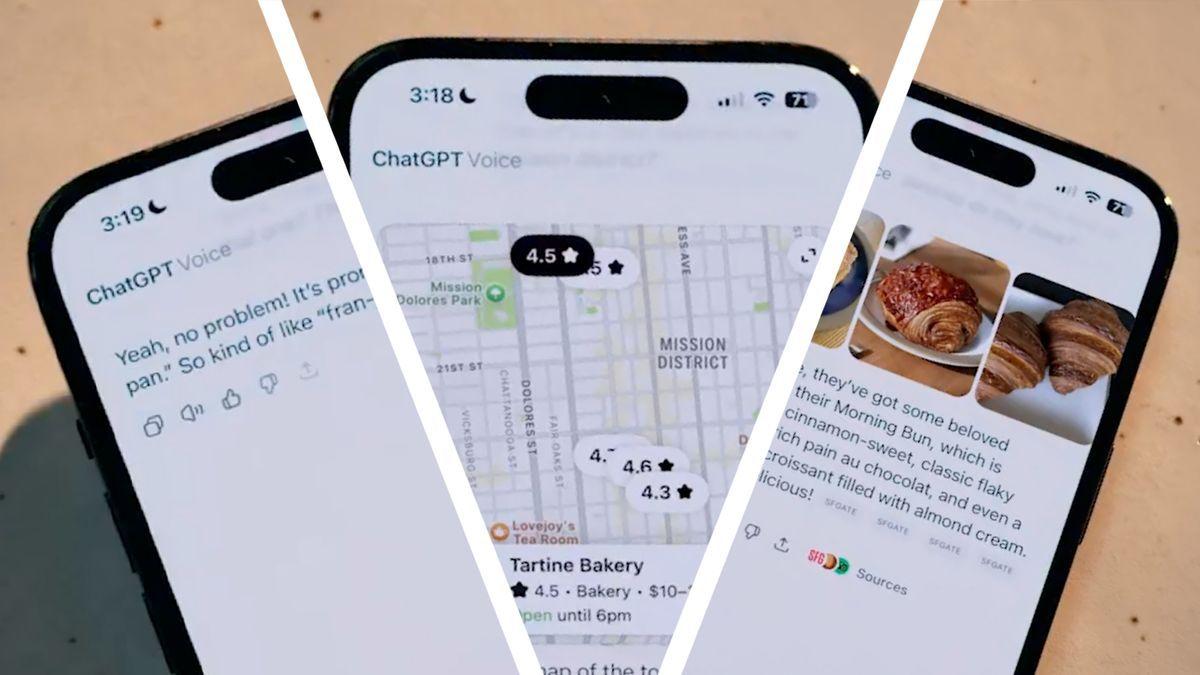
The updated voice mode now supports real-time display of multimedia content, including images, maps, charts, diagrams, and code snippets. Users can request visual information during voice conversations and see the results immediately without interrupting the flow of dialogue. This functionality extends to various content types, from geographical maps to programming code examples
2
.
Source: TechRadar
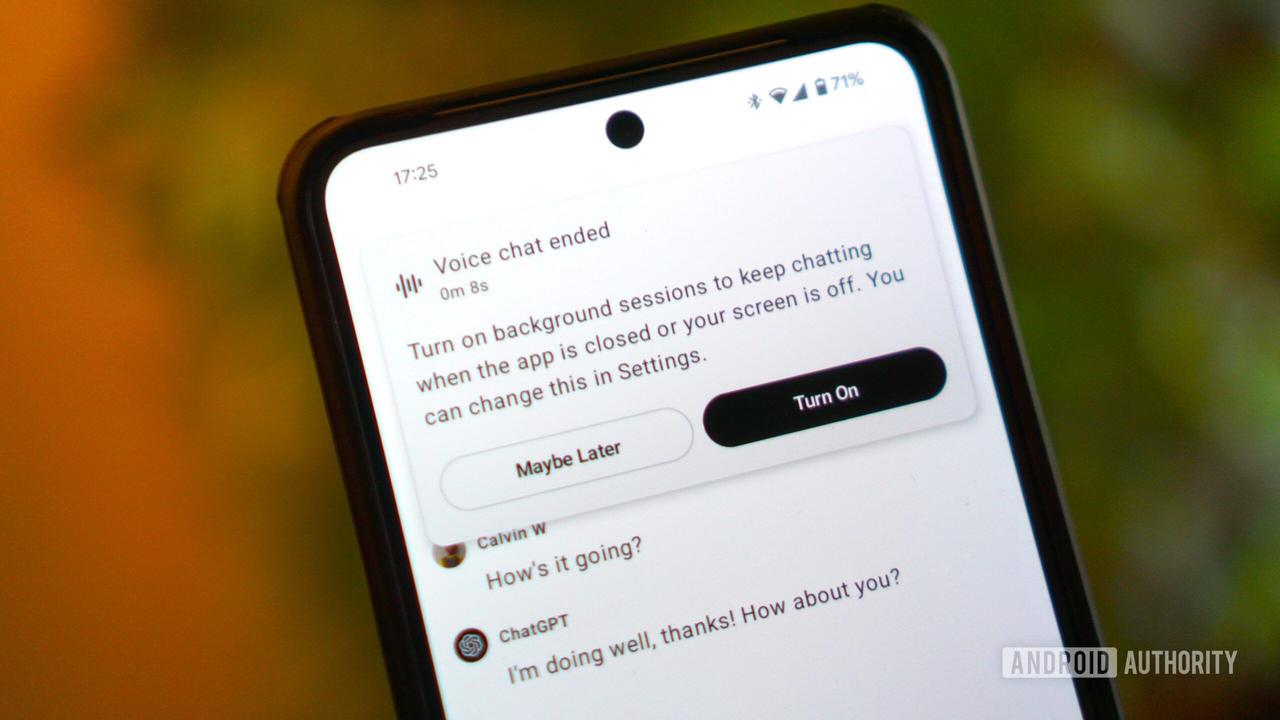
Additionally, the new system supports multitasking capabilities, allowing users to continue voice conversations with ChatGPT while using other applications. The AI maintains listening and responding functionality in the background, enabling assistance during other tasks
2
.Related Stories



Platform Availability and User Options
The revamped voice mode is now the default experience across all ChatGPT platforms, including web browsers and mobile applications for both iOS and Android devices. Users can access the integrated voice feature by tapping the waveform icon located on the right side of the text prompt box
4
.Recognizing that some users may prefer the original interface, OpenAI has maintained the option to revert to the separate voice mode screen. Users can access this setting through the "Voice Mode" section in ChatGPT's settings menu, where they can enable "Separate mode" to restore the previous experience
5
.The update applies to both the standard voice mode available to all users and the Advanced Voice Mode reserved for paid subscribers, ensuring that the improved experience reaches ChatGPT's entire user base
4
.References
Summarized by

Navi
[4]
Related Stories
Recent Highlights
1
OpenAI's AI Models Disprove 27-Year Exponential Time Hypothesis, Rendering Decades of Research Obsolete
Science and Research

2
Google DeepMind unveils Genie 4 world model with audio and 2-minute interactive simulations
Technology

3
OpenAI Cuts Internet Access for AI Model Training After Security Breaches
Technology

Recent Highlights
Today's Top Stories




Don’t drown in AI news. We cut through the noise - filtering, ranking and summarizing the most important AI news, breakthroughs and research daily. Follow topics that matter to you and stay ahead.


