7 Sources
[1]
YouTube's AI Is Ready to Customize Your Scrolling
Dashia is the consumer insights editor for CNET. She specializes in data-driven analysis and news at the intersection of tech, personal finance and consumer sentiment. Dashia investigates economic shifts and everyday challenges to help readers make well-informed decisions, and she covers a range of topics, including technology, security, energy and money. Dashia graduated from the University of South Carolina with a bachelor's degree in journalism. She loves baking, teaching spinning and spending time with her family. AI is coming for your YouTube feed algorithm, if you want it. The platform announced a new feature this week that can create a personalized feed based on a prompt describing your interests. In its announcement, YouTube suggests prompts like unwinding after work with 10-minute guided meditations or something different from your usual interests. And you can save your prompt as a pin at the top of your Home page to revisit it. YouTube unveiled the new feature on Wednesday, along with a few new AI updates, including automatic AI detection and clear labels for AI-generated content. The AI customized feed feature is available now and rolling out to US viewers signed in on the YouTube mobile or desktop app. It's unclear if or when the feature will be available internationally or on TV apps. A representative for YouTube did not immediately respond to a request for comment. How YouTube's new AI feature works Here's how it works: You'll tap the "Your custom feed" chip on the Home page and enter a prompt that describes the video you're looking for. You can also choose from YouTube's suggested prompts for a custom feed. YouTube says you can edit the prompt at any time. To enable the feature, you'll need to turn your search and watch history on in your account settings. Google recommends using the Help Center if you have trouble using the feature. YouTube hasn't shared what data will be used to generate the feed or if it will be saved. YouTube is rolling out other AI features that could shape your experience. Google's 'Ask YouTube' is a search feature that will find the exact part of a video that answers your question. The trouble with content creation and AI The big question is what YouTube's new AI feature will mean for content creators. We're unsure how the tool will interpret prompts -- whether it's based on your watch history or keywords. Will it focus on videos that are already popular? And will it focus on newer creators or those with high view counts? AI features are appearing more and more in search engine results, and publishers and creators of content are often seeing their traffic drop as a result. Will a similar outcome happen on YouTube? We'll have to wait and see.
[2]
YouTube will let you ask AI to make a custom video feed
YouTube is launching a new AI feature that creates a personalized video feed based on descriptions of what you want to watch. In its announcement, YouTube says custom content feeds can be built around your specific interests, moods, or favorite topics, which you can then pin to the top of your YouTube homepage -- making it easy to jump back into the feed. This feature is currently rolling out with English language support to YouTube users in the US who are signed-in on the YouTube mobile app or desktop. To access it, click on the "Your custom feed" tab at the top of the YouTube homepage and enter a prompt description into the AI text box. For example, you can ask the YouTube AI to "help me unwind with guided meditations under 10 minutes," or for "deep-dive tech podcasts about AI," and then receive a curated feed based on your request. It's similar to other AI-powered feed customization features we've seen from other platforms, including Spotify's prompted playlists. Instagram also gave users more control over their Reels feed algorithm in December, though that uses topic lists rather than descriptive prompts. YouTube says that prompts can be edited at any time to "generate a brand new space" by selecting the text box at the top of your custom feed. To see the "Your custom feed" tab, YouTube says you need to ensure your search and watch history are enabled in your account settings. If the AI messes up your feed request, you can also report the issue to YouTube by clicking the 3-dot menu on the feature tab and selecting "Something wrong?" to leave feedback.
[3]
Don't Like Your YouTube Feed? You Can Now Design One Using an AI Prompt
The AI-powered feature delivers a custom feed tailored to your interests, which you can pin to the top of your homepage for 30 days, and switch between the custom and regular feeds. YouTube is adding a button at the top of the homepage that lets you enter a prompt and create a custom feed that matches your preferences. The custom feed option has been spotted in tests since late last year, and it is now rolling out to users in the US who are logged in to their accounts and have enabled watch and search history. At launch, the feature only supports English. Google describes the rollout as "a new way to shape your discovery experience." Once you click the new button, you'll see a prompt box, and some suggested prompts below it. You can choose one of those options or describe your interests, moods, or favorite topics in the prompt box. Sample prompts include "give me something different beyond my usual feed" and "help me unwind after work with guided meditations under 10 minutes." Once your prompt yields a custom feed, you can "pin it as a saved chip right to the top of your Home page," Google says. Unlike on some social media apps, YouTube doesn't let you create multiple custom feeds. "You can maintain one custom feed at a time," Google says on a support page, but adds that you can change the vibe of your feed by updating your prompt at any time. You can switch between the custom feed and the regular feed whenever you like. When in the custom feed, click on YouTube's Home button from the side panel to return. A custom feed will be valid for 30 days. After that, the prompt and the feed will expire. You'll need to re-create the feed once again to enjoy watching the same kind of videos. In case you don't like the feed YouTube's AI generates, you can share feedback by clicking the three-dot menu next to the prompt box and selecting "Something wrong?" Google seems determined to weave AI into YouTube's search and recommendation experiences. Last week at Google I/O, the company also teased an Ask YouTube button that opens up a chatbot-like interface and shows the most relevant videos for your search alongside text summaries. That feature will roll out to US users this summer.
[4]
YouTube now lets you offload your playlist curation to AI - Engadget
'Your custom feed' lets build personalized playlists simply by entering a prompt. After releasing a feature to detect and label AI-generated videos, YouTube has released a new feature that will let you arrange videos using... AI. With the new "Your custom feed" feature, you can build personalized playlists based on your interests, hobbies and daily routines simply by entering a prompt. That can then be pinned to the top of your homepage so you can jump back in quickly. To use the feature, tap on the "Your custom feed" chip at the top of your home page. Then, enter a prompt to describe what you want the playlist to be about. Google gives a few examples like "15-minute HIIT workouts that don't need any equipment and zero jumping" and "deep-dive tech podcasts to learn more about using AI for work." You can edit your prompt anytime from the text box at the top of your custom feed to generate a new space. YouTube isn't the first with an AI prompt feature, as Spotify released its Prompted Playlist tool for music and podcasts earlier this year. YouTube's custom feed feature is now rolling out to signed-in viewers in the US on mobile or desktop in English -- just make sure your YouTube search and watch history are turned on in your account settings.
[5]
YouTube now lets you create a 'custom feed' about anything you want
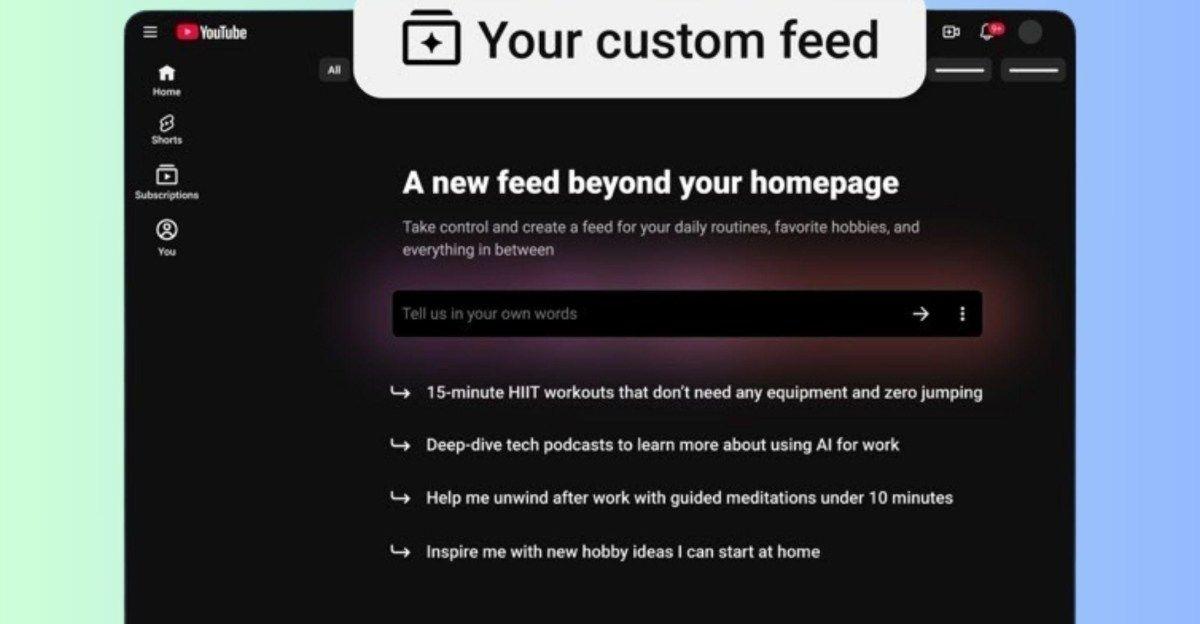
The option is rolling out now to US users on desktop and mobile. YouTube's introduced a new feature that lets you create a custom video feed -- or at least have AI create a custom video feed for you. A new custom feed page is rolling out now, where you can enter a prompt to have YouTube create a feed of videos based on your criteria. A blog post explaining the new custom feed makes it seem like your prompt can be as broad or specific as you want, from asking for a feed that's "something different beyond my usual feed" to one that features specific types of guided meditation content. This new feed will be accessible on desktop and mobile, through a chip at the top of the home tab labeled Your custom feed. When you tap the chip, you'll see a text box labeled "Tell us in your own words." There, you can describe whatever feed you want, or choose from one of a handful of suggestions. Once you've created your initial custom feed, you can edit your prompt at any time to start a new one. YouTube announced the new custom feed initiative as a new feature, not a limited experiment. I'm not seeing it the new home page chip to activate the feature yet, but YouTube says it's rolling out starting today on both desktop and mobile, for users in the US who are signed into YouTube and have search and watch history enabled.
[6]
Your Custom Feed is YouTube's answer to a problem that doesn't really exist
I've been covering Android and other mobile technology for close to ten years now, with a specific interest in phone accessories, e-readers, and what makes each individual phone different from another. I delight in looking at the phone market from as many angles as possible, and while my opinions may be odd, at times, they're always from the heart as much as the head. I have a background in the mobile accessories world, which explains my odd enthusiasm for cases and things that clip onto smartphones. I worked for Digital Trends from 2017 to 2025. YouTube is rolling out a new feature that lets you use AI to custom build a new feed. Unlock Personalized Content & Exclusive Features For Free * Engage in discussions in Threads * Follow and Like top authors, topics, and trends * Browse with fewer ads across the site * Personalize your profile to showcase your activity * Get a content feed tailored to your interests By creating an account, you agree to our Terms of Use and Privacy Policy. You also agree to receive our newsletters; you can unsubscribe any time. Keep Reading Log In Forgot your password? Create an account Please provide your email address to finish creating your account. Create An Account *Required: 8 chars, 1 capital letter, 1 number Create An Account Continue withGoogle Continue withOpenPass or Continue withEmail Continue By creating an account, you agree to our Terms of Use and Privacy Policy. You also agree to receive our newsletters; you can unsubscribe any time. Build a new feed for a specific purpose Your Custom Feed is currently rolling out to YouTube users in the US who have both watch and search history enabled, and are using YouTube in English. Once you have the update, you'll see a Your Custom Feed chip on your homepage that, when tapped, will open a prompt box with some suggestions below it. The example suggestions show how YouTube expects this to be used. There are options to learn new skills, get some exercise videos, or meditation or hobby ideas. Or, you can create your own with your own prompt. Once created, your custom feed lasts for 30 days, and can be pinned beside your usual feed for fast swapping. However, you can only make one at a time, though you can edit the prompt whenever you like. Why does this exist? Maybe I'm just old, but I'm struggling to see the point of this particular feature. Right now, without this feature, I can already conjure a new list of videos if I don't like what my feed is offering. I can tap a text box, type in what I want, and get a new list of videos to match what I want. I can even bring up an older query if I want to. This handy feature is called "the search bar". I'm feeling generous, so I'll say it does look like it'll be quicker to switch to compared to searching. But I'm still struggling to see how this really offers much more than the search bar already does. Sure, you can specify how long you want the videos to be, but you can also do that with YouTube's existing search filters. Subscribe to the newsletter for YouTube AI feed insights Want clearer takes on AI-driven platform changes? Subscribe to our newsletter for concise analysis, practical how-tos, and implications of features like YouTube's Custom Feed -- helping you decide how and when to apply new AI tools. Get Updates By subscribing, you agree to receive newsletter and marketing emails, and accept our Terms of Use and Privacy Policy. You can unsubscribe anytime. It's likely that YouTube is priming people to replace the regular search with an AI-powered version, much like AI Mode in regular Google Search -- but if that's the case, then just power-up the existing search. There's no need to pretend that this AI-powered search is anything else.
[7]
YouTube now lets you ask AI to build a video feed for you
YouTube will now let you use AI to build custom feeds of videos, in a move similar to competitors like Reddit, Bluesky, and X. Announced on Wednesday, Google described the personalised feed as "a new way to shape your discovery experience," in its blog post. Essentially, YouTube users can now prompt and generate their own unique array of videos across topics, using Google's Gemini. YouTube has been testing the AI-powered custom feed tool since Nov. 2025. According to the company, the feature will be rolling out to the U.S. for users on mobile or desktop. To create one, users can tap the "Your custom feed" button on the home page. Then, give YouTube a prompt like you would an AI-powered chatbot, using moods, topics, or interests -- YouTube gave the examples of "help me unwind after work with guided meditations under 10 minutes" and "give me something different beyond my usual feed," and said there will also be prompt suggestions. Once you've hit enter, Gemini will then generate a content feed that you can pin to your YouTube homepage, and it will continually refresh with new videos. All prompts are editable to tweak the feed, if you're not liking the vibe of what you're seeing. Notably, Wednesday's announcement came the same day YouTube said it's upgrading its AI labeling system to make it more prominently displayed up top. However, YouTube Kids won't get the same labels straight away. As Mashable's Chase DiBenedetto reported, YouTube told Mashable in April that it was working on it. "The company also explained that its current labeling approach doesn't apply to YouTube Kids because of other safety policies, including a lack of descriptions on Kids content," she wrote. "For now, the new labels only apply to the main YouTube website, not content found on YouTube Kids."
Share
Copy Link
YouTube launched an AI-powered feature that generates personalized video feeds based on text descriptions. US users can now prompt the platform to curate content around specific interests, moods, or topics, with feeds pinnable to their homepage for 30 days. The feature joins similar tools from Spotify and Instagram as platforms compete to offer tailored content experiences.
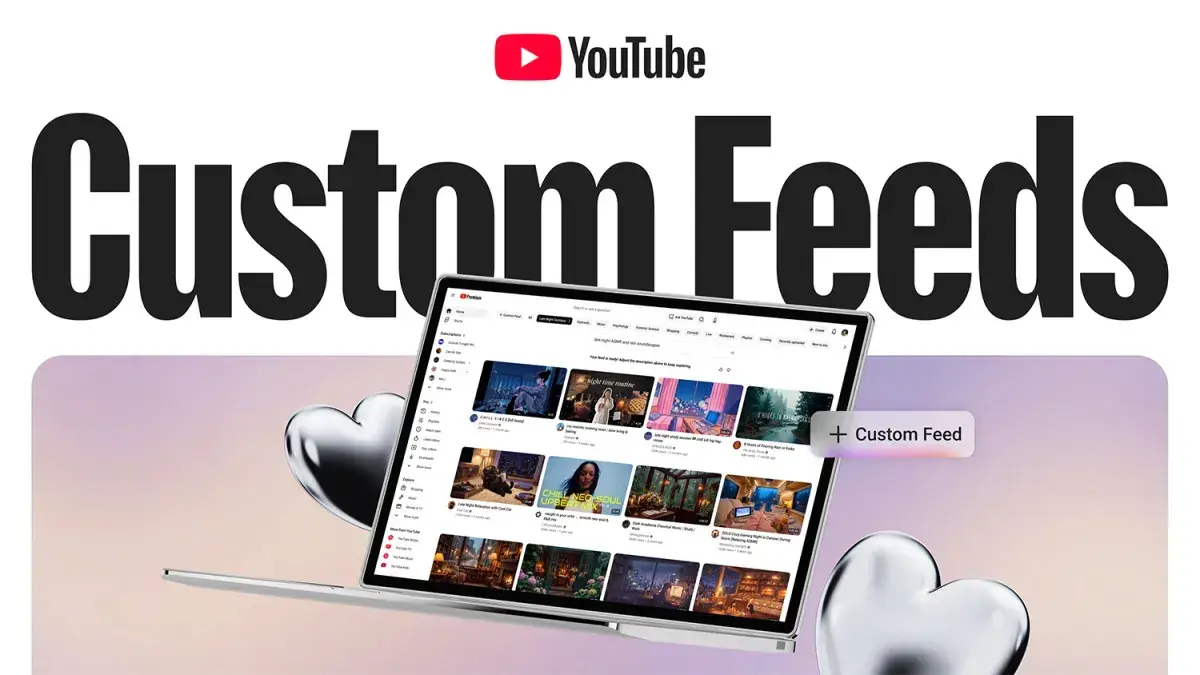
YouTube has launched an AI-powered feature that allows users to create a custom video feed by simply describing what they want to watch
1
. The platform announced the feature this week, enabling viewers to build personalized video feeds around specific interests, moods, or favorite topics through natural language prompts2
. Users can ask YouTube AI for content ranging from "help me unwind with guided meditations under 10 minutes" to "deep-dive tech podcasts about AI," and the system generates a curated feed based on those requests2
.
Source: The Verge
The feature is accessible through a "Your custom feed" chip at the top of the YouTube homepage, where users can enter an AI prompt or select from suggested options
5
. Google describes the rollout as "a new way to shape your discovery experience," allowing viewers to pin their interest-tailored feed to the homepage for quick access3
. This positions YouTube alongside competitors like Spotify, which released its Prompted Playlist tool earlier this year, and Instagram, which introduced topic-based Reels feed controls in December2
.To access the feature, US users must be signed into their accounts on either the mobile app or desktop, with watch and search history enabled in account settings
1
. At launch, the feature only supports English language prompts3
. Unlike some social media platforms, YouTube limits users to maintaining one custom feed at a time, though prompts can be edited at any point to generate a brand new space3
.
Source: Android Police
Each custom feed remains valid for 30 days before expiring, requiring users to re-create the feed if they want to continue enjoying the same type of content
3
. Users can switch between their custom feed and the regular feed whenever they choose by clicking YouTube's Home button from the side panel3
. If the AI-generated results don't meet expectations, viewers can report issues by clicking the three-dot menu next to the prompt box and selecting "Something wrong?" to leave feedback2
.Related Stories
This launch represents part of Google's broader strategy to weave AI into YouTube's search and recommendation functions
3
. Last week at Google I/O, the company teased an Ask YouTube button that opens a chatbot-like interface, showing relevant videos alongside text summaries, set to roll out to US users this summer3
. YouTube also unveiled automatic AI detection and clear labels for AI-generated content alongside the custom feed announcement1
.
Source: CNET
However, the feature raises questions for content creators about how the system interprets prompts and prioritizes videos
1
. It remains unclear whether playlist curation to AI will favor already popular videos or provide opportunities for newer creators with lower view counts1
. As AI features increasingly appear in search engine results, publishers and content creators have seen traffic drops—raising concerns about whether similar outcomes could affect YouTube creators1
. YouTube has not disclosed what data will be used to generate feeds or whether prompt information will be saved1
. The platform's international rollout timeline and TV app availability remain unconfirmed1
.Summarized by
Navi
[5]
1
Policy and Regulation

2
Policy and Regulation

3
Technology