Zoom AI Companion 3.0 launches with browser access and free tier for meeting summaries


4 Sources
[1]
Zoom brings its AI assistant to the web with access to free users | TechCrunch
Zoom released its AI assistant to the web today as part of its AI Companion 3.0 release. The company is also allowing free users to access the assistant's features, such as summarizing the meetings, listing action items, or getting insights from meetings with limits. The company said that basic
[2]
Zoom opens up a taste of its AI Companion features to free users
Key productivity features include automated follow-up task generation, email drafting, and daily meeting reports, significantly expanding AI accessibility beyond paid subscribers. Yesterday, Zoom launched its AI Companion 3.0 initiative (reports TechCrunch), which now makes the company's AI
[3]
Zoom is also getting an AI assistant, if that's what you need for video calls
Zoom is rolling out its AI Companion 3.0 with a new web interface and expanded features that turn meetings, chats, and documents into actionable insights. Zoom has launched its next-generation AI Companion 3.0, which brings its AI assistant out of the app and into a dedicated web interface. It
[4]
Zoom rolls out AI Companion 3.0 with browser access and agentic automation - SiliconANGLE
Zoom rolls out AI Companion 3.0 with browser access and agentic automation Zoom Communications Inc. today launched AI Companion 3.0, the latest iteration of its workplace assistant that pushes the platform beyond meeting summaries into agentic workflows, low-code automation and federated AI
Share
Copy Link
Zoom unveiled AI Companion 3.0, bringing its AI assistant to the web and opening access to free users for the first time. Basic plan users can now use the assistant for three meetings monthly, including meeting summaries, AI note-taking, and 20 questions. The update introduces agentic automation, document creation tools, and integration with third-party services like Google Drive and Microsoft OneDrive.
Zoom AI Companion Expands to Browser and Free Users
Zoom released AI Companion 3.0, marking a shift from a desktop-only tool to a web-accessible AI assistant available at ai.zoom.us
1
4
. For the first time, the company is extending AI features for free users, allowing Basic plan subscribers to access the Zoom AI Companion within three meetings every month1
. Each session includes meeting summaries, in-meeting questions, and AI note-taking capabilities, plus 20 questions through the side panel and web interface2
. Users seeking more can purchase a $10 add-on plan to unlock full AI assistant functionality1
3
.Browser access removes barriers for users who work across multiple platforms. Xuedong Huang, Zoom's chief technology officer, explained that bringing the system into the browser allows the AI Companion to meet users where they work, fitting into existing user workflows rather than forcing adaptation
4
. The web surface includes conversation starter prompts to help users understand what the assistant can do1
.
Source: SiliconANGLE
Agentic Automation and Productivity Tools Transform Daily Work
AI Companion 3.0 pushes beyond simple transcription into agentic automation that handles end-to-end workflows
4
. The assistant generates daily reflection reports that summarize meetings, tasks, and updates for the day, helping users stay organized without manual effort1
2
. Automated task creation enables the assistant to generate follow-up tasks and draft email messages based on meeting content1
3
.Document creation and editing capabilities allow users to draft and refine documents based on meeting details directly within the companion surface
1
. Users can start drafting in the companion interface and shift projects to Zoom Docs for team collaboration, with export options to Markdown, PDF, Microsoft Word, and Zoom Docs formats1
4
. A "Help Me Write" mode transforms the copilot into a document generator capable of reading meeting transcripts and other assets to craft polished reports4
.Currently in beta, a low-code automation designer with a drag-and-drop interface lets users build personal workflows with triggers, actions, and outcomes executed by AI agents
4
. Huang described this as "agentic coding, but for everyone," enabling non-technical users to create sophisticated automation.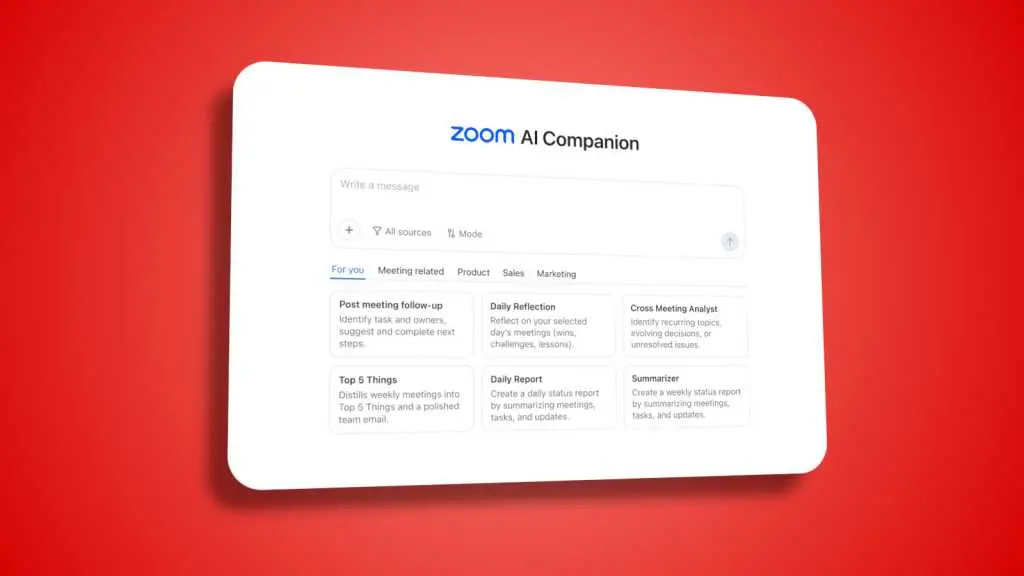
Source: PCWorld
Integration with Third-Party Services Expands Data Access
Integration with third-party services significantly enhances the assistant's utility. AI Companion 3.0 can retrieve and analyze information from Google Drive and Microsoft OneDrive, along with all data stored within Zoom
1
2
. Using agentic retrieval capabilities, the assistant locates information across past meetings, notes in Zoom Workplace, and connected apps4
. Zoom plans to add Gmail and Microsoft Outlook as connectors soon, further refining personal workflows1
3
.This broader data access matters because it positions Zoom to compete directly with productivity tools from Google, Microsoft, ClickUp, and Notion, all racing to capture more context about user data
1
. Lijuan Qin, head of AI product at Zoom, stated that having contextual meeting data gives the company an advantage as an independent operator in the productivity space1
.Related Stories

Federated AI Approach Blends Multiple Language Models
Zoom employs a federated AI approach that orchestrates multiple AI models rather than relying on a single system
3
4
. The company uses a mix of its own language models alongside models from OpenAI and Anthropic1
3
. Zoom starts with small language models to understand user personalization and intent, then escalates to larger models like GPT-4 when necessary for complex tasks4
.This strategy learns quickly to lower costs while improving quality. Zoom's federated AI approach achieved a 48.1% score on Humanity's Last Exam, a 2.3-point improvement over tool-integrated frontier models such as Google's Gemini 3 Pro
4
. "We are really standing on the shoulders of giants," Huang said, noting that frontier models from OpenAI, Google and others enable Zoom to provide an orchestrated solution4
.The update signals Zoom's evolution from a video-conferencing platform synonymous with pandemic-era remote work into an AI-driven workspace that handles meetings, chats, documents, and connected apps
3
. Meeting summaries remain the dominant use case, followed by customer support automation via Zoom Virtual Agent and sales tooling through Zoom Revenue Accelerator, all powered by the same AI Companion platform4
. AI Companion 3.0 is included with paid Zoom Workplace licenses and available as a standalone product for $10 per user per month4
.References
Summarized by

Navi
Related Stories
Zoom Unveils AI-Powered Features: Photorealistic Avatars, Cross-Platform Integration, and Intelligent Meeting Management
17 Sept 2025•Technology

Zoom Unveils AI Companion 2.0: Transforming Meetings with Agentic AI Capabilities
18 Mar 2025•Technology

Zoom Enhances AI Companion with Agentic Capabilities and Third-Party App Integration
09 Jul 2025•Technology

Recent Highlights



Recent Highlights
Today's Top Stories










Don’t drown in AI news. We cut through the noise - filtering, ranking and summarizing the most important AI news, breakthroughs and research daily. Follow topics that matter to you and stay ahead.


