Adobe integrates AI assistant across Creative Cloud apps to automate creative workflows


18 Sources
[1]
Adobe adds its AI assistant to Premiere, Illustrator and InDesign
Adobe is updating its Firefly AI assistant with new chops, and adding it to Premiere, Illustrator, InDesign and Frame.io. The company has given the assistant new abilities to make brand kits, product videos, and storyboards . Plus, the Firefly app now lets users save whatever they've created as an
[2]
Adobe Says Its Expanded AI Agents Are There to 'Guide You Down the Happy Path'
Adobe is bringing its creative AI assistants into public beta and springing them across the Creative Cloud ecosystem. Starting on Thursday, you can use the AI assistant in the beta versions of Photoshop, Premiere Pro, InDesign, Illustrator and Frame.io. These creative, agentic AI tools were first
[3]
Adobe's redesigned AI studio remembers what your creations look like
Adobe is introducing some new capabilities for its Firefly AI assistant, alongside a "reimagined" AI studio that lets you edit and generate new designs from a single interface. The new Firefly experience launching today in private beta is designed to give you "persistent context, reusable assets,
[4]
Photoshop and Premiere now have AI assistants
Adobe's plan to stick AI assistants into all of its Creative Cloud suite is now fully underway, with new chatbots now rolling out to its biggest editing and design apps. As part of a public beta launching today, Photoshop, Premiere, Illustrator, InDesign, and Frame.io now each have a bespoke AI
[5]
Adobe brings its Firefly AI Assistant inside of Premiere, Photoshop and Illustrator - Engadget
The company is also previewing an upgraded creative AI studio experience. Earlier this year, Adobe debuted Firefly AI Assistant, an AI agent that could work across its family of Creative Cloud apps to complete multi-step workflows on behalf of users. Today, the company is previewing an updated
[6]

Adobe's big AI week: Firefly, Disney, Semrush, LinkedIn
Adobe has spent two years bolting AI onto its software. This week it tried to become the AI layer underneath everything creative and marketing, in five announcements stretched across three days. The headline is an agent inside the apps. The rest of the week shows what Adobe is really building: a
[7]

Adobe expands Firefly capabilities, extends agentic tools to Creative Cloud apps
Adobe is out with a massive update to its suite of creative agents today, including new Firefly capabilities and agentic features across several Creative Cloud apps. Here are the details. Adobe Firefly expands Create Skills library Adobe recently introduced pre-built Creative Skills for its
[8]

Adobe embeds agentic AI workflows across Creative Cloud, shifting from media generation to production orchestration
Adobe has announced a major expansion of its "creative agent" across its flagship Creative Cloud suite and upgraded Firefly AI studio. Available in public beta starting today across Premiere Pro, Photoshop, Illustrator, InDesign, and Frame.io, the agent is designed to serve everyone from
[9]

Adobe Adds More User Control to AI Features Inside Lightroom and Photoshop
"Have you ever spent hours manually reviewing thousands of photos from an event or portrait shoot to find the selects your clients will love?" Adobe asks. It's a safe bet that for many photographers, the answer is, and Adobe believes its latest Creative Cloud updates will help solve this issue and
[10]
Adobe rolls out major Creative Cloud updates for Lightroom, Premiere, more
Adobe is rolling out a broad set of Creative Cloud updates this week, introducing new AI-powered tools and workflow improvements across Photoshop, Lightroom, Premiere Pro, After Effects, and Illustrator. Here are the details. What's new in Adobe Lightroom With today's update, Lightroom and
[11]

Adobe is rolling out agents for its Creative Cloud apps. It will be a lifesaver for creatives
I found myself in awe as I watched someone using an agent to set up a Premiere project. It did everything starting from a pile of randomly named video, audio, and graphic files to creating a project structure. I watched as it renamed and tagged footage using computer vision to entirely setting up a
[12]

Adobe Unveils New Creative Cloud Features for Photoshop, Premiere and More
Adobe Creative Cloud products, including Photoshop, Premiere, After Effects, and Lightroom, are getting major upgrades, the tech firm has announced. Along with the new updates, the California-based company has announced that its Assisted Culling tool in Adobe Lightroom is now generally available.
[13]

Adobe expands AI Assistant across Firefly and Creative Cloud apps
Adobe has expanded its AI creative agent across Adobe Firefly and Creative Cloud, introducing new agentic capabilities, creative tools, and a unified experience that connects every stage of creative work from ideation to production. The announcement also expands AI Assistant across Adobe's
[14]

Adobe Unveils Major Expansion of Creative Agent Across Firefly and Creative Cloud Apps Including Photoshop and Premiere
Adobe announced a major expansion of its creative agent across Firefly and Creative Cloud. Adobe Firefly, the all-in-one creative AI studio, now delivers expanded agentic capabilities with new creative skills and tools, and previewed a unified experience that brings every stage of creative work
[15]

Adobe solves one of AI's most maddening problems amongst a ton of other announcements
The software giant is upgrading AI, from character consistency to app-specific AI assistants. If you've ever tried to use AI image generation in a real creative workflow, you'll know this particular misery. You spend time tweaking your prompts, refining a character's look, and finally get what you
[16]
New Adobe Creative Cloud updates will genuinely save you time
Adobe has just announced a sweeping set of updates across Creative Cloud, and if you're a photographer, video editor, or designer, you'll want to know about them. Rolling out this week, these innovations are squarely focused on cutting out the friction of editing, giving you more time to
[17]

Adobe Unveils Major Expansion Of Creative Agent Across Firefly And Creative Cloud Apps Including Photoshop And Premiere
Adobe announced a major expansion of its creative agent across Firefly and Creative Cloud. Adobe Firefly, the all-in-one creative AI studio, now delivers expanded agentic capabilities with new creative skills and tools, and previewed a unified experience that brings every stage of creative work
[18]
Adobe Expands Creative AI Agent Across Firefly, Photoshop and Premiere
Adobe unveiled a major expansion of its creative AI agent across Firefly and Creative Cloud apps. The agent works like an assistant inside tools such as Photoshop, Premiere, Illustrator and InDesign. Users describe the outcome they want and the assistant handles the steps to get there. The maker
Share
Copy Link
Adobe has launched its Firefly AI assistant in public beta across Photoshop, Premiere Pro, Illustrator, InDesign, and Frame.io. The conversational creative agents can automate repetitive tasks like sorting video clips, organizing layers, and checking brand compliance. A redesigned Firefly studio introduces Elements and Projects features to maintain consistency and organize workflows, while new capabilities include brand kit generation and storyboard creation.
Adobe Brings AI Assistants to Major Creative Cloud Apps
Adobe is rolling out its Firefly AI assistant across its flagship Creative Cloud applications, marking a significant expansion of AI-driven creative tools into the workflows of millions of designers and video editors. Starting in public beta, the AI assistant is now available in Photoshop, Premiere Pro, Illustrator, InDesign, and Frame.io, each equipped with app-specific capabilities designed to streamline creative workflows
1
4
.
Source: CNET
These conversational creative agents operate independently within each application, functioning "as a specialist" tailored to the unique demands of different creative tasks
4
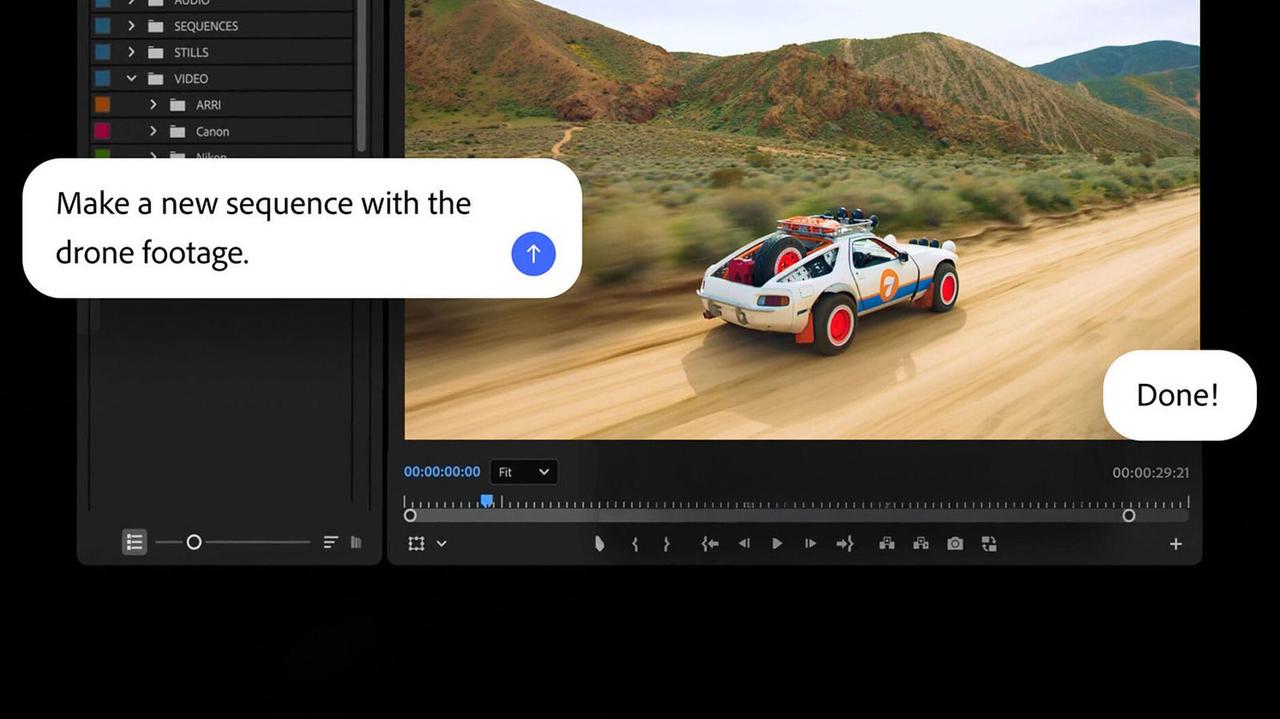
. The AI assistants for Photoshop and Premiere can handle complex, multi-step production jobs that previously required significant manual effort. In Premiere Pro, users can direct the AI assistant to sort assets into bins, batch-rename clips based on content, identify interview questions in recorded speech, and add markers to project timelines1
2
. For Photoshop, the assistant manages layers, removes backgrounds in batches, and resizes assets for different platforms through natural language prompts4
.
Source: Engadget
Automating Repetitive Tasks Without Sacrificing Creative Control
The focus on automating repetitive tasks reflects Adobe's strategy to position AI agents in Creative Cloud as collaborative partners rather than replacements for human creativity. "Creative agents are about giving you control, letting you direct, letting you jump in at every point in time, if you so choose to edit further by hand," explained Deepa Subramaniam, Adobe's vice president of product marketing for creative professionals
2
.In Illustrator, the AI assistant can reorganize layers across documents, flag color mode errors, check for missing fonts, and generate multiple design file versions from spreadsheets
1
4
. InDesign users can apply print-readiness checks and update copy and styling across page layouts when uploading new PDFs or opening templates4
. Frame.io's assistant surfaces revision feedback, organizes shoot assets, and generates B-roll footage4
.Redesigned Firefly Studio Introduces Elements and Projects Features
Alongside the Creative Cloud integration, Adobe unveiled a reimagined Firefly AI studio experience currently in private beta. The updated interface introduces two features aimed at improving human-AI collaboration and design consistency. The Elements feature allows users to save AI-generated characters, objects, and locations for reuse across projects
1
3
. Users can upload reference images and assign names, enabling them to prompt Firefly to generate scenes in specific settings without repeatedly describing details—a solution to one of the major challenges professional creators face when using AI for consistent outputs2
.The Projects feature houses assets, generations, and creative context together, making it easier to organize work and resume where you left off
3
. This capability proves particularly valuable for teams working on video series or brand campaigns that require maintaining visual consistency across multiple deliverables1
.Related Stories

New Creative Skills: Brand Kit Generation and Storyboard Creation
Firefly AI now offers expanded creative skills, including brand kit generation that produces logos, brand identity, and color palettes based on descriptions or uploaded collateral
1
3
. The assistant can also generate product videos from photos and create storyboards to visualize video projects1
. A Quick Cut feature assembles video clips into polished first drafts that users can refine manually, and the assistant can transform image-based storyboards into video content3
.
Source: TechCrunch
Firefly is already compatible with ChatGPT, Claude, and Copilot, with Adobe planning to add support for Google Gemini and Slack soon
1
2
. This integration strategy positions Adobe to meet users across different platforms and workflows.What This Means for Creative Professionals
Forest Key, Adobe's vice president of agentic AI for creativity and productivity, emphasized that the company aims to make Firefly "more of a co-working partner" rather than a tool that replaces human work entirely
3
. The approach acknowledges that creative paths vary significantly among users—some may prefer conversational prompts for entire workflows, while others will use AI assistance selectively while maintaining hands-on control.The expansion raises questions about how AI will reshape creative industries. While Adobe positions these tools as time-savers for tedious tasks, the technology's ability to handle increasingly complex creative decisions could shift what skills remain essential for designers and editors. As the public beta progresses, watching how professionals integrate these AI agents in Creative Cloud into their actual production workflows will reveal whether Adobe's vision of human-AI collaboration matches the reality of creative work.
References
Summarized by

Navi
[4]
Related Stories
Adobe Firefly AI Assistant orchestrates tasks across Photoshop, Premiere, and Creative Cloud apps
15 Apr 2026•Technology
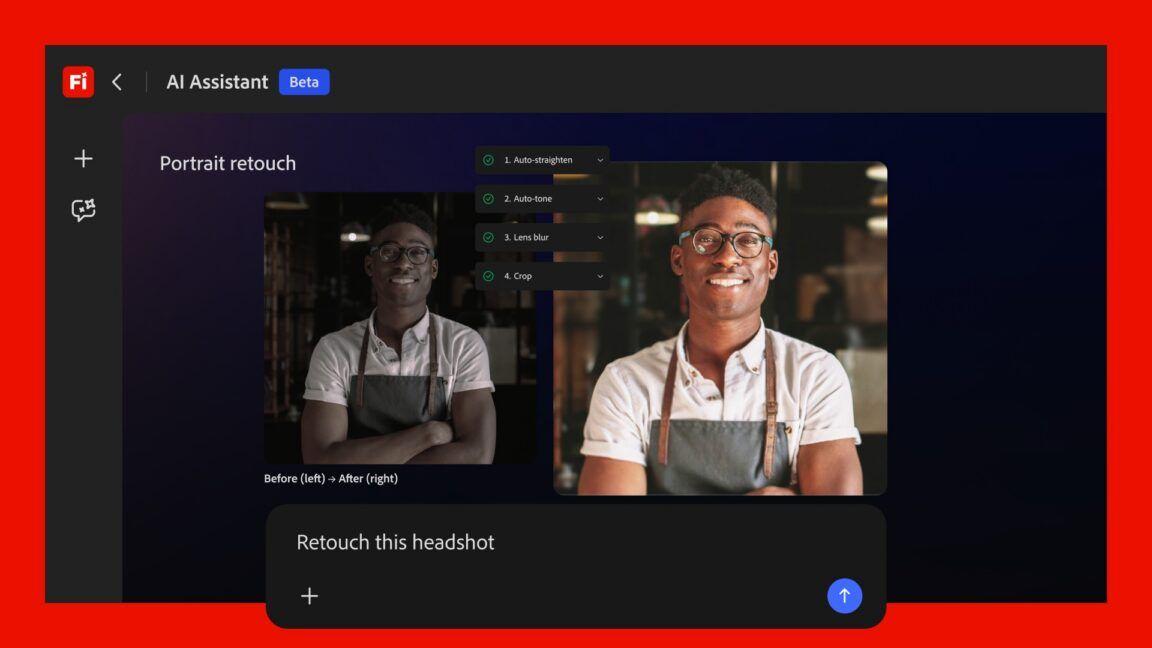
Adobe Firefly AI Assistant enters public beta with cross-app workflow automation
27 Apr 2026•Technology

Adobe Unveils AI Assistants for Photoshop and Express, Introducing Conversational Editing and Third-Party Model Integration
28 Oct 2025•Technology

Recent Highlights
1
Microsoft and Nvidia Launch Surface Laptop Ultra: A $2,599 AI-Ready PC With RTX Spark Chip
Technology

2
Google Unveils Gemini 4 Argon AI Model, Restricts Access to Trusted Cyber Defenders
Technology
3
Trump Consulted Grok AI Before Ordering Venezuela Invasion and Capture of Nicolás Maduro
Policy and Regulation

Recent Highlights
Today's Top Stories






Don’t drown in AI news. We cut through the noise - filtering, ranking and summarizing the most important AI news, breakthroughs and research daily. Follow topics that matter to you and stay ahead.


